App Store Apps

Apple to announce Siri support for larger variety of apps at WWDC

Apple is expected to announce plans next week to make Siri work with a larger variety of apps, reports Reuters. Currently the digital assistant integrates with apps from just six categories: ride sharing, messaging, photo search, payments, fitness and auto infotainment.

The move will make Siri more competitive against other assistants, such as Amazon's Alexa, which is capable of handling some 12,000 different tasks. Apple has taken criticism for lagging behind other tech giants in the AI space, and next week it looks to close the gap.

In addition to announcing improved app support for Siri, Apple is also expected to unveil an Echo-like speaker featuring the assistant. Reports have said that it is cylinder in shape, like the latest Mac Pro, and it features a high-end sound system and a dedicated touch panel.

Apple's WWDC keynote begins on Monday, June 5 at 10am PDT. Be sure to join us as we cover the event, and all subsequent announcements, live. Also make sure you check out our inaugural WWDC Fantasy Draft.

Source: Reuters

Halide, Clarity, Adobe Scan, and other apps to check out this weekend

This week's edition of our Apps of the Week roundup includes a new camera app with a beautiful UI and powerful features, a wallpaper editor and a text scanner. And as usual, we have two great new games for you to check out this weekend.

Halide

The App Store probably didn't need another camera app, but Halide was just too beautiful to pass up. The developers describe Halide as a "groundbreaking camera app for deliberate and thoughtful photography." Its bag of high-end tools includes gesture-based exposure and manual focus controls, focus peaking, histogram, adaptive level grid and RAW support. Built by former Apple designers, this app is well-worth checking out. Halide is available for $2.99 (limited time).

Clarity

Clarity is a minimal, handy wallpaper editor. Simply load your favorite photo into the app and adjust things like Hue, Saturation and Opacity to ensure that any image makes a great wallpaper. Other features include 200+ gradients to choose from, as well as various blur and mask effects. The point is to make your photo light enough so that you can still clearly see the date/time on your Lock screen and icons on your Home screen. Clarity is available for free.

Adobe Scan

That's right, Adobe released a scanner app this week called Adobe Scan. Like similar apps, it turns your mobile device into a portable scanner that recognizes text automatically using OCR. Turn anything—receipts, notes, pictures, documents, business cards, whiteboards—into an Adobe PDF with content you can highlight, search and annotate. There are a few caveats here, such as you need an Adobe account to use the app, but this still looks like a solid option for folks in the market for a scanner app. Adobe Scan is available for free (with some IAPs).

Bouncy Hoops

Bouncy Hoops is a minimal basketball game for all the, in the developers' words, "street ballers and shot callers" out there. The gameplay is dead simple, with one-touch controls, and there is quite a bit of content to unlock—20 different basketballs and 5 unique locations to hoop in. It has a retro arcade style look and sound, and it's getting very favorable early reviews. The game is made by the same team behind Flappy Golf and Super Stickman Golf. Bouncy Hoops is available for free (with some IAPs).

SUP Multiplayer Racing

Gear up and make your engines roar for the craziest multiplayer mobile racing experience ever! Leave your rivals in the dust: drift, jump, blast off with boosters, and reach the finish line in one piece. Compete with up to 3 opponents from around the world on stunning tracks, smash others off the track and push your car to the limit! There is tons of customizable content and events to keep you entertained. If you're looking for a new racing game, this one is worth checking out. SUP Multiplayer Racing is available for free (with some IAPs).

More apps to check out Apple’s free app of the week: The Robot Factory Expand iPad’s Picture-in-Picture feature with PiPifier Skype is getting a major redesign with Snapchat-like features Plex app gets live TV support and DVR enhancements Twitter’s inbox now separates out messages from people you don’t follow

Expand iPad’s Picture-in-Picture feature with PiPifier

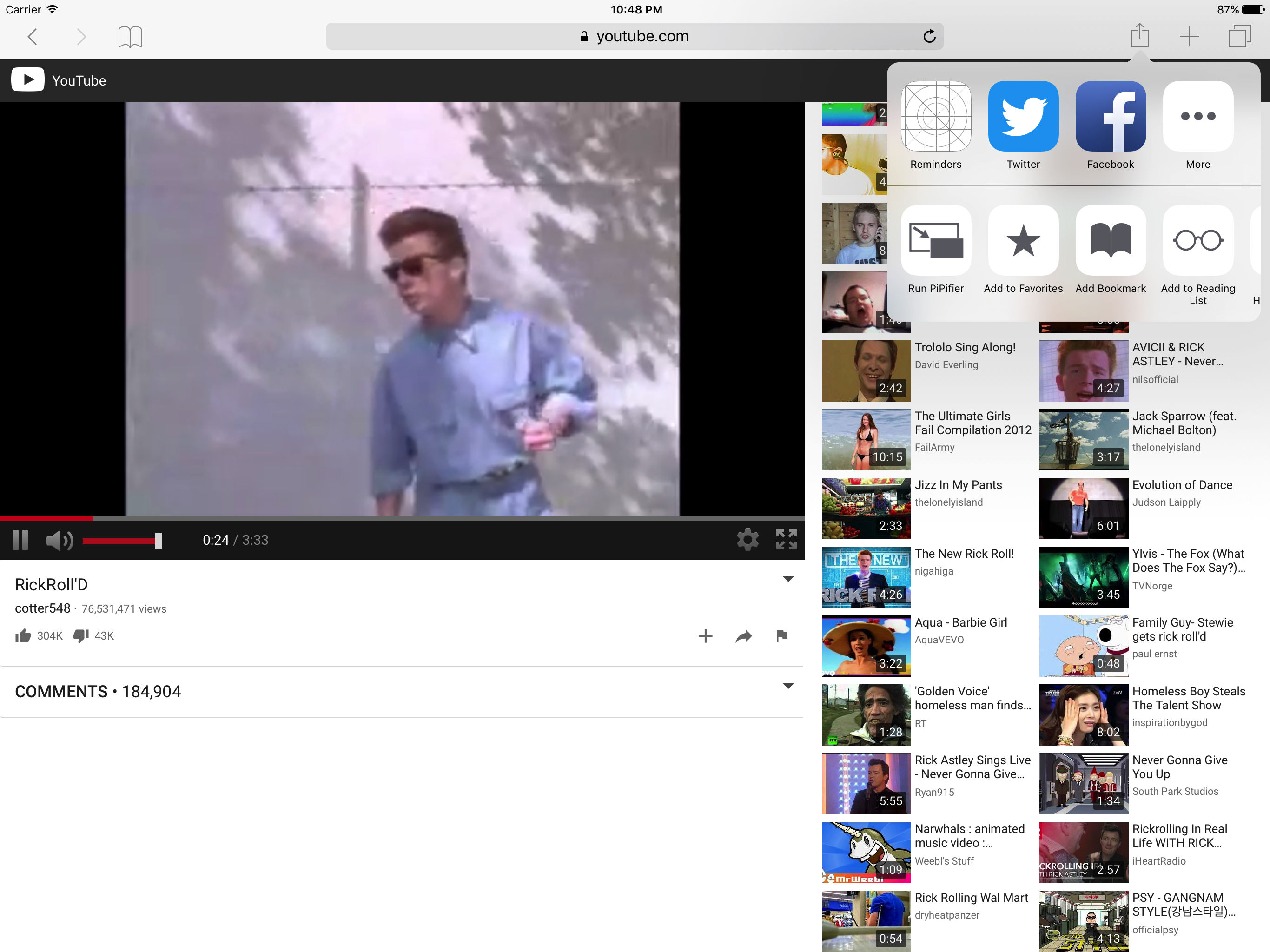
The iPad's Picture-in-Picture feature can really come in handy—when it works. Unfortunately, some pages such as YouTube use custom video players that don't have a dedicated PiP button, rendering the feature useless. That's where the app PiPifier comes into play.

PiPifier lets you view every HTML5 (which is basically every web video on iOS) in Picture-in-Picture mode. It uses a Safari Action extension, so all you have to do is open Safari to your preferred web video, tap on the Share Menu, and select the Run PiPifier option.

As you can see in the screenshots, doing this puts your video into native PiP mode. This allows you to watch your clip in a resizable window that you can place virtually anywhere on your iPad's screen, all while performing other tasks, such as replying to emails and texts.

PiPifier is available for free.

Apple updating Swift Playgrounds with support for robots, drones, and instruments

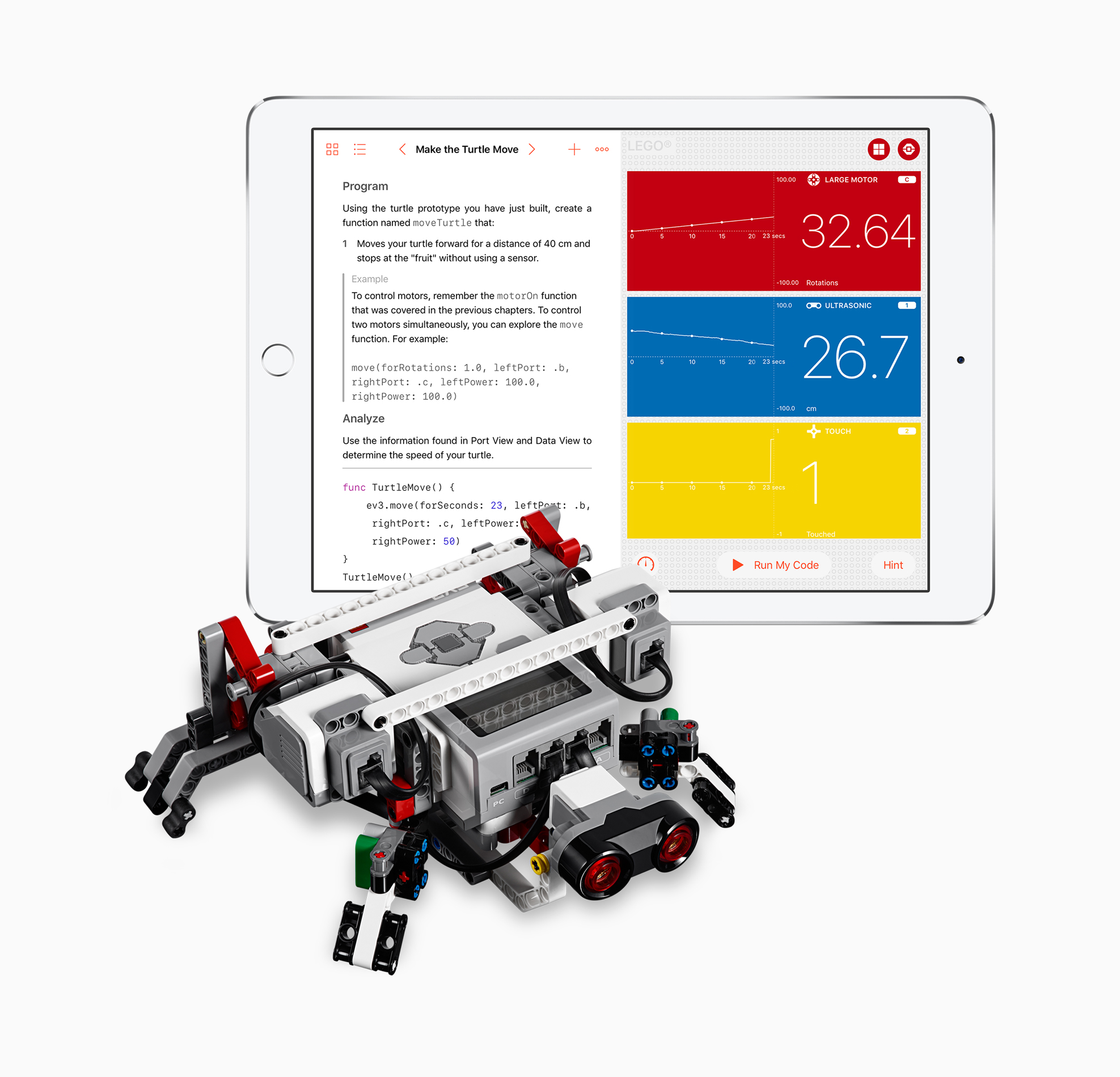
Apple today announced a significant update for its iPad app Swift Playgrounds. The app, which is geared towards teaching beginners to code in a fun and interactive environment, will soon work with robots, drones and musical instruments.

Scheduled to be released next week, Swift Playgrounds version 1.5 will support programming a slew of new devices including the Sphero SPRK+ ball, UBTECH Jumu Robot MeeBot Kit, Wonder Workshop's Dash, Parrot drones and LEGO Mindstorms.

“More than 1 million kids and adults from around the world are already using Swift Playgrounds to learn the fundamentals of coding with Swift in a fun and interactive way,” said Craig Federighi, Apple’s senior vice president of Software Engineering. “Now they can instantly see the code they create and directly control their favorite robots, drones and instruments through Swift Playgrounds. It’s an incredibly exciting and powerful way to learn.”

“Today we’re combining efforts with Apple to provide even more students around the world with the opportunity to learn how to code,” said Esben Stærk Jørgensen, president, LEGO Education. “We’re pairing the familiar LEGO bricks and our hands-on approach to playful learning found in LEGO MINDSTORMS Education EV3 with Swift Playgrounds' powerful learning platform so now anyone can program their LEGO MINDSTORMS creation with real Swift code.”

Swift Playgrounds 1.5 will be a free update for the app and will be released June 5.

Source: Apple

Skype is getting a major redesign with Snapchat-like features

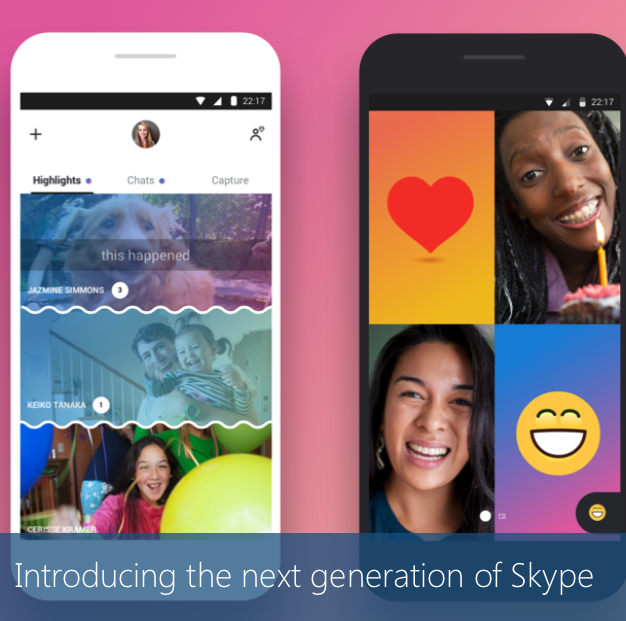
Microsoft on Thursday unveiled a major redesign for its Skype video conferencing app. Rebuilt from the ground up, the company says the new app vastly improves the ways you can connect with your favorite people, putting chat front and center.

Early reactions to the new design have pointed out that the interface has kind of a Snapchat vibe. Group chats are more lively, expressive and personalized, and there's a new Stories-like Highlights section that allows you to share a photo or video.

Highlights can be decorated with emojis and text, and they remain available for a full week instead of the usual 24 hours. They can be viewed by anyone who follows you on Skype, or you can choose to send your Highlights to a specific group or user.

https://www.youtube.com/watch?v=RU9w41tPXyc

Other new features include Facebook-like reactions to Highlights and chats, in-video chat overlays for emojis, text, stickers and photos, and the addition of smart assistant Cortana. Skype is also adding bots from Bing, Expedia, YouTube and others.

The Skype update hits Android first, later today, iOS within the next few weeks, and Mac and Windows devices within the next few months.

Source: Skype

Plex app gets live TV support and DVR enhancements

Plex on Thursday announced that they're rolling out support for live TV to their various Plex apps. They're starting with Android TV and iOS, and say updates for other platforms like tvOS will follow suit.

The live TV feature is built right into the Media Server, so you'll be able to stream everything from game shows to sporting events in real time, from pretty much anywhere in the world.

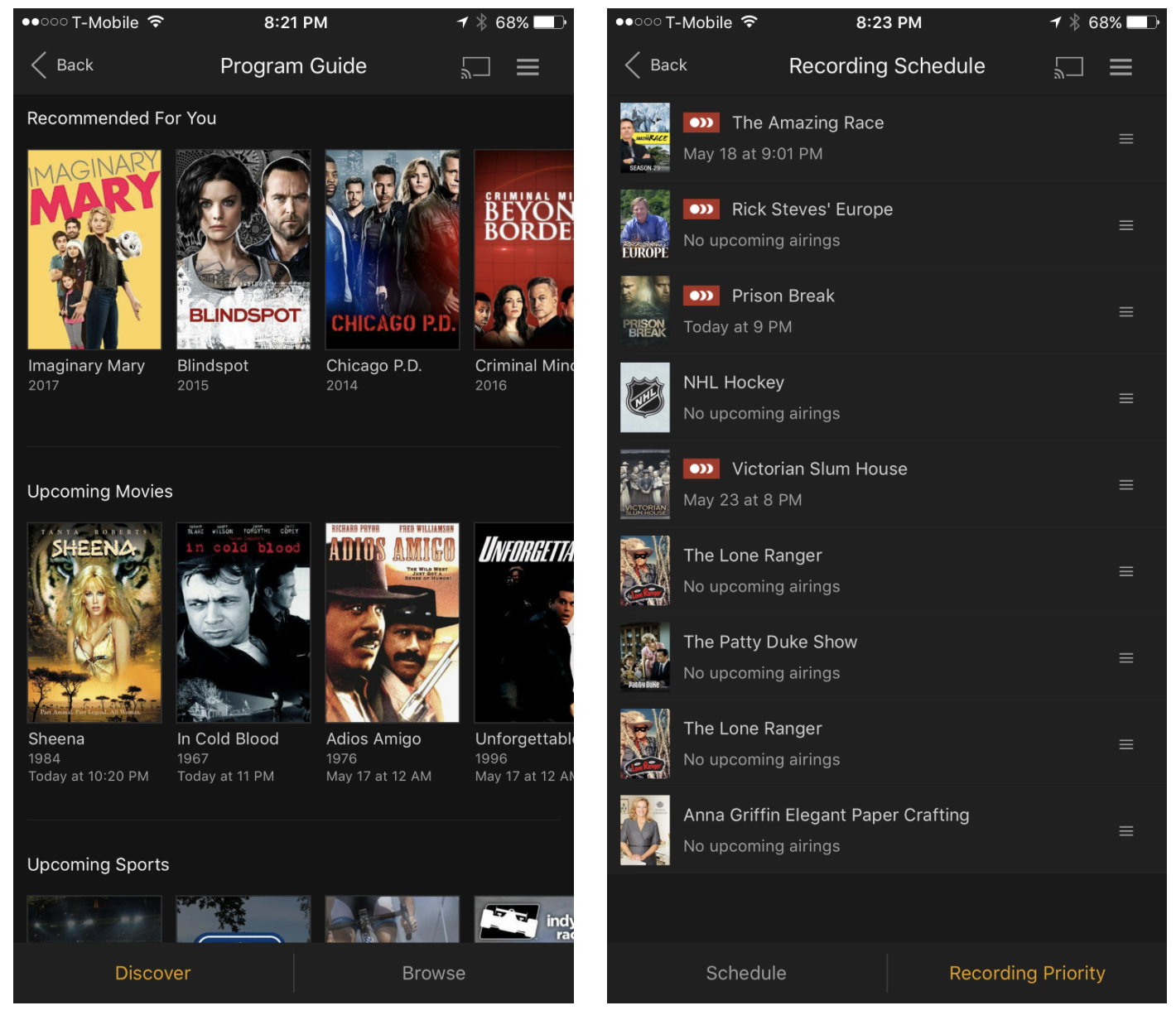
The app is also getting other improvements: in-app DVR management, meaning you can now browse the program guide and manage recordings directly from within the app, and expanded tuner support. Last September Plex announced support for the HDHomeRun tuner line, and now it's opening up to tuners from Hauppauge, AVerMedia and many more.

Plex Live TV and DVR are available immediately for Plex Pass users only. The service costs $5 per month, $40 per year, or $120 for life (20% off for a limited time). It's a bit pricey, but it's definitely worth looking into if you're thinking about cutting the cord.

Source: Plex

Apple: App Store developers earned over $70 billion in revenue since debut

Apple announced Thursday morning that developers all over the world for its platform have generated over $70 billion in total revenue, a new record since the launch of the App Store almost nine years ago in 2008.

The number 70 appears to be Apple’s lucky number this year, as app downloads have also soared 70% in the last 12 months, illustrating interest in numerous new app titles that took the App Store by storm.

Easily manage all your YouTube notifications via all-new Activity tab

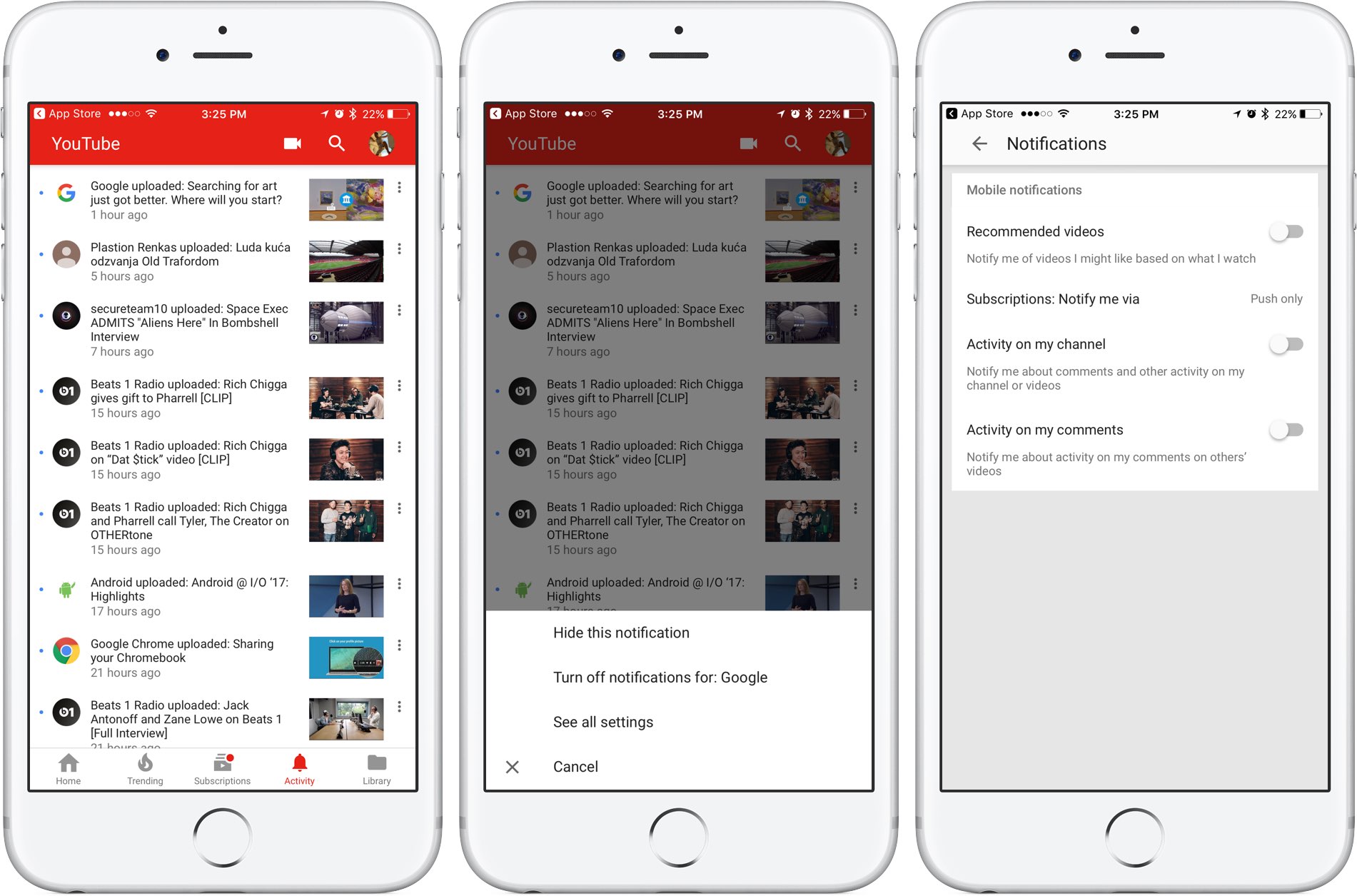
Google is rolling out a small update to its mobile YouTube app for iPhone and iPad, bringing out an all-new Activity tab where you can easily find and control all of your notifications.

Now you can see your notifications, opt-out of receiving alerts from specific accounts and more—all in one central place just a tap away no matter where you happen to be in the app.

The new tab joins the app's existing tabs: Home, Trending, Subscriptions and Library.

Before today, accessing notifications was a multi-tap affair: you were required to tap your profile picture in the app's top-right corner, then hit Notifications (see the screenshot below).

Functionally, nothing has changed drastically—the new Activity section still shows notifications from your favorite accounts in the order they were received.

The old way of managing your YouTube notifications was a multi-tap affair.

Tapping the three dots next to a notification allows you to hide that particular notification, just like before, as well as elect to turn off all future notifications for that account and more.

Tapping the option See All Settings takes you to settings where you can turn notifications on or off for any recommended videos, choose whether you'd like to be notified about activity on your comments or others' videos, select how you'd like to be notified and more.

The new Activity tab requires YouTube for iOS version 12.20 or later.

Grab YouTube for iOS for free form App Store.

How to generate app-specific passwords

Apps designed to use iCloud Drive for syncing data between devices “just work”. On the other hand, those that don’t natively support Apple's secure Two-Factor Authentication system may ask for your Apple ID password to access data stored in your iCloud account.

For instance, Fantastical for Mac may require your Apple ID user name and password to import your iCloud calendars. And what if you'd like to use your iCloud email account in apps like Spark or Airmail, but don't want to expose your Apple ID credentials to the app?

Given that asking for the user's iCloud password poses a dangerous attack vector, Apple now mandates that all native apps use app-specific passwords to access user data stored in iCloud.

The change goes into effect on June 15, 2017.

To ensure worry-free experience, you can use an app-specific password to sign in to an app or service not provided by Apple, without ever typing your Apple ID password.

In this step-by-step tutorial, you will learn how to create an app-specific password for any native app that wants to access your personal data stored in iCloud, revoke all of your generated passwords one by one or all at once, and more.

About app-specific passwords

Security is paramount.

Protecting your Apple ID account against hackers and nefarious users by turning on Apple's older Two-Step Verification system or the modern, more secure Two-Step Verification also entails using app-specific passwords for any web apps, online services and apps that don’t natively support entering verification codes.

TUTORIAL: How to protect your Apple ID with Two-Factor Authentication

App-specific passwords maintain “a high level of security and ensure that your primary Apple ID password won’t be collected or stored by any third-party apps you might use,” notes Apple.

You can have up to 25 active app-specific passwords at any given time. If you need to, you can revoke passwords individually or all at once.

How to generate app-specific passwords

1) Sign in to your Apple ID account page at appleid.apple.com/account/home.

2) In the Security section, click Generate Password below App-Specific Passwords.

3) Type a password label into the text field, then click Create to generate a random password. The password label helps distinguish one app-specific password from another.

I'll create an app-specific password for Fantastical and name it “Fantastical for Mac”.

4) Click Done to finish creating the password.

5) Now paste the password into the password field of the app as you would normally.

Again, I'm a Fantastical believer so I'm going to type the generated password into Fantastical.

Using an app-specific password ensures that Fantastical is able to access my iCloud calendar and gives me a piece of mind knowing I don't have to worry about the security of my Apple ID.

As a reminder, you can have up to 25 active app-specific passwords at any given time. Keep in mind that each app-specific password is case-sensitive and only works in one app.

How to revoke app-specific passwords

You can revoke app-specific passwords individually or all at once. Revoking an app-specific password stops the app from accessing data in your iCloud account.

1) Sign in to your Apple ID account page at appleid.apple.com/account/home.

2) In the Security section, click Edit.

3) In the App Specific Passwords section, click View History.

4) You can now revoke an individual password or all passwords at once:

Revoke individual passwords—To revoke an individual password, click the “x” next to a password you'd like to delete, then click Revoke. Revoke all passwords at once—To revoke all the app-specific passwords you've generated thus far, click Revoke All.

“After you revoke a password, the app using that password will be signed out of your account until you generate a new password and sign in again,” notes Apple.

Be sure to generate new app-specific passwords for any apps that don't support entering verification codes because, for the sake of your own security, all of your app-specific passwords are auto-revoked any time you update or reset your primary Apple ID password.

Need help? Ask iDB!

If you like this how-to, pass it along to your support folks and leave a comment below.

Got stuck? Not sure how to do certain things on your Apple device? Let us know at help@iDownloadBlog.com and a future tutorial might provide a solution.

Submit your how-to suggestions via tips@iDownloadBlog.com.
WWDC app updated with curated video playlists, interactive venue and street maps & more

Apple today updated its WWDC app for iPhone, iPad and Apple Watch with curated video playlist, interactive venue and street maps and other content ahead of the June 5 keynote.

“We’ve made several app updates to improve your experience in 2017, whether you’re attending or following along remotely,” reads the changelog accompanying the download.

Bumped to version 6.0, the app lets you watch curated video playlists focused on featured themes, as well as view interactive venue and street maps of San Jose McEnery Convention Center and access other important venue information through the new Venue tab.

Unlike before, you can now use all app features without signing in.

Lastly, Apple has given the app an Apple Music-like facelift with bold headings, larger images and simplified navigation, as evidenced by the screenshots.

The WWDC app supports all form-factor iOS devices natively and includes a sticker pack for iMessage and an Apple Watch component.

You can download it free on App Store.

The keynote will be live-streamed through the Apple Developer website and on the WWDC app.

The Cupertino giant could unveil its own Siri speaker at WWDC and potentially unveil hardware updates to the iPad Pro lineup and a next-generation Apple TV with 4K video support.

Check out our WWDC 2017-themed wallpapers for your Apple hardware.

Even if you plan on watching the keynote, be sure to join us here at iDownloadBlog that Monday as we’ll be covering all things WWDC throughout the entire week.

SpotAngels, Ditty, Gaia GPS, and other apps to check out this weekend

This week's edition of our Apps of the Week roundup includes an app for preventing parking tickets, a musical meme-maker, and an off-road GPS app. And as usual, we have two great new games for you to check out this weekend.

SpotAngels

This isn't a new app, but it's worth checking out for those who aren't familiar with it. SpotAngels detects when you park and sends you alerts if and when you have to move your car. It does this by using your phone's motion sensors and Bluetooth (as it disconnects from your car) to know that you've parked, and then it checks your location against its data base of trouble spots. These include meters, to away zones, street cleaning, permit parking and other rules in dozens of major cities like New York, Dallas and Portland. The app also helps you find free parking around you, and since it's crowd-sourced, anyone can submit an update. SpotAngels is available for free.

Ditty

Here's another not-so-new app that you might find fun to play with this weekend. It's called Ditty, and it allows you to make goofy songs and music videos using a mix of GIFs, photos, videos and more. The app will actually sing anything you type, and there are tons of famous songs to choose from, with new content added weekly. Add your friends to follow their feeds, or post a Ditty yourself for a chance to be featured in the app. Ditty is available for free (with some IAPs).

Gaia GPS

Established GPS apps like Apple Maps and Waze do a nice job of getting you around the streets. But what about getting you around off road? That's where Gaia GPS comes in. This app features a beautiful and well-thought out interface that makes navigating the backcountry simple. Features include worldwide topo, road and satellite maps, syncing of photos, tracks and waypoints, a database with hiking trails, parks and other natural sights, and several customization options. This is a freemium app, and unfortunately most of the features are tucked behind an in-app purchase. But, Gaia has a great track record in this space and the app is getting rave reviews. If you need something like this, check it out. Gaia is available for free (with some IAPs).

Zombie Gunship Survival

The long-awaited sequel to Zombie Gunship is here! Zombie Gunship Survival has you as one of the few survivors in a devastating zombie apocalypse. To stay alive, you must take the gunner seat aboard a heavily-armed AC-130 ground attack aircraft and blow up the undead in this intense, high-definition shooter experience. You'll build up your remote airfield as a base for operations, defend that base, deploy your troops to annihilate the undead, and try to survive one of the most hostile environments ever. This is another freemium title, so there are a lot of in-app purchases, but the game itself has nearly a 5-star App Store rating on 1,200 reviews. Zombie Gunship Survival is available for free.

Goat Simulator PAYDAY

The goat is back! Goat Simulator: Payday is the most criminally realistic goat simulation ever! There are 3 new thugs, including a flying flamingo that can control people's brains, a wheelchairing dolphin that can climb almost any surface, a spitting camel, and of course the goat. You can meet up with your Pranknet crew, buy masks to disguise your identity, carry out "jobs" to collect cash to buy things, and you can even steal and drive cars. There's no real elaborate story line here, just a GTA-style open world adventure game that encourages you to inflict the maximum amount of destruction. Goat Simulator PAYDAY is available for $4.99.

More apps to check out Apple’s free app of the week: klocki You can now drag and drop files on iPad between Readdle’s productivity apps 1Password’s Travel Mode protects your private data from unwarranted searches Not to be outdone by Instagram, Snapchat unveils custom Stories of its own Duet Display brings even more desktop power to your iPad drawing experience YouTube TV app gains AirPlay support New Pokémon game is based on Magikarp, the weakest Pokémon ever At long last, Konami’s Pro Evolution Soccer 2017 hits App Store