App Store Apps

ClippyCam, Groovebox, Taskful, and other apps to check out this weekend

This week's edition of our Apps of the Week roundup features a new picture-in-picture sharing app, an easy-to-use beat-maker, and a task manager app with a unique twist. And as always, we've selected two new games for you to check out.

ClippyCam

ClippyCam is a new app that aims to make sharing photos and videos with your friends more fun. No, not with text or stickers or emojis—but with videos. Basically you record a video of yourself and it gets embedded in your photo or video in a picture-in-picture style. Think of it as a way to explain the photo or video you're sharing, or even as a way to brag about what you are doing. "Just hanging out in Hawaii, wish you were here!" The app itself is free, but you'll have to fork over $3 to remove the annoying watermark. ClippyCam is available for free.

Groovebox

Groovebox is a free, beautifully designed music studio app packed with inspiring synths and drum machines. In minutes you’ll be making beats, melodies, and playing with world-class instruments. Play with touchable instruments to quickly create your own beats and melodies, or draw in notes. Need inspiration? Groovebox has hundreds of patterns and sounds to get you started. I know there are a ton of these types of apps on the App Store already, but this one looks sharp and appears to have the features to make it worth checking out. Groovebox is available for free (with some IAPs).

Taskful

Taskful is a smart to-do list and task manager app that helps you stay on track and meet your deadlines. It breaks down all of your tasks and only shows you what you need to do today, so you can stay focused and motivated. Whether you are trying to track your steps, drink more water, or read that book you haven't picked up in a while, Taskful is designed to help you get stuff done. This is another app that is competing in a super crowded space, but again I think the design and feature set here make it worth a look. Taskful is available for $2.

Flipping Legend

Unleash the power of your fists, spells and weapons in this pattern-based adventure game. Hone your reflexes and be one with the environment as speed and rhythm become second-nature. Play with powerful heroes and unlock all their abilities and secrets to help better dispense your foes. Reach new and faraway lands not yet discovered by fellow travelers. Be a Flipping Legend! The game does have some annoying IAPs, but it has a 5-star rating on nearly 300 early reviews. Flipping Legend is available for free.

forma.8 GO

For those who aren't familiar with it, forma.8 is a unique take on the proven Metroidvania action-adventure formula, with a striking visual style and a huge world to explore. As the small exploration probe forma.8 you're stranded alone on the surface of an alien planet. Separated from your companions by accident you have a life or death mission to accomplish: find and recover a lost, powerful energy source before it's too late. Ancient civilisations, great perils and dystopian visions await you. And not everything is what it seems... Forma.8 GO is available for $4 (sale price).

More apps to check out This 5-star Mac productivity tool is on sale for just $4.99 Apple’s free app of the week: Beat Stomper Twitter revamped with dynamically updated Reply/Like/Retweet counts, Safari Reader support & more Box introduces macOS client for its cloud syncing service

Facebook for iOS now lets everyone use animated GIFs in comments

Facebook today announced that users of its mainland mobile app can now use animated GIFs in comments. This sought-after feature has been enabled for all people on Facebook globally.

“We know people love communicating with GIFs on Messenger and we’re also making it easier to use GIFs on Facebook,” said the social network. When making a comment in Facebook for iPhone, iPad or iPod touch, tap the new GIF button to spice up your message with animations.

Additionally, Facebook rolled out some new and exclusive GIFs they’ve created featuring some of the Internet’s biggest stars, including DNCE, Logan Paul, Amanda Cerny, DREEZY, Patrick Starr, Violet Benson, Wuz Good, Brandi Marie and Landon Moss.

To use them, search #GIFparty when sharing a GIF on Facebook or Messenger or visit GIPHY.com/Facebook.

Since rolling out support for animated GIFs on Messenger back in 2015, users have sent nearly thirteen billion GIFs in the last year alone via the messaging app, or nearly 25,000 GIFs every minute. GIF sends on Messenger have tripled in the past year and New Year’s Day 2017 was the most popular day ever for GIF sends on Messenger, with more than 400 million GIF sends.

Facebook for iOS is available at no charge in App Store.

iWork apps gain editing improvements, 500 shapes & more in latest update

Apple's iWork productivity suite was updated today on Mac App Store and App Store with several new editing features and other improvements available across iPhone, iPad, iPod touch and Mac devices.

For starters, Pages, Numbers and Keynote for Mac, along with their iOS counterparts, now come with a brand new library of over 500 professionally drawn shapes that you can readily use in your documents, spreadsheets and presentations.

Across all the iWork apps, users can now reply to comments and join threaded conversations, making collaborative editing even easier than before, while new auto-correction and text replacement options save time while typing.

In Numbers, the new Insert Stock Quote feature and the Stock and Currency functions let you get data from the previous market day’s close. Keynote now lets you scroll like a pro on your Mac's trackpad with new pan and zoom options and your presenter notes can be edited while displaying slides in Light Table view.

Here's the full list of new features, fixes and enhancements in Pages 6.2, Numbers 4.2 and Keynote 7.2 for Mac, iPhone and iPad listed in release notes accompanying these downloads:

What's new in Pages 6.2 for Mac Enhance your documents using a library of over 500 professionally drawn shapes Reply to comments and join threaded conversations Add linked text boxes so text easily flows from one place to another New auto-correction and text replacement options save time while typing Export documents as fixed layout ePub books Change margins, headers, footers and paper size while collaborating Improved support for Hebrew and Arabic languages

Learn more about the new Pages for Mac features on Apple's website.

What's new in Numbers 4.2 for Mac Enhance your spreadsheets using a library of over 500 professionally drawn shapes Reply to comments and join threaded conversations Support for print preview in collaborative spreadsheets New auto-correction and text replacement options save time while typing The Insert Stock Quote feature and the Stock and Currency functions now return data from the previous market day’s close

Learn more about the new Numbers for Mac features on Apple's website.

What's new in Keynote 7.2 for Mac Enhance your presentations using a library of over 500 professionally drawn shapes Reply to comments and join threaded conversations New auto-correction and text replacement options save time while typing Scroll anywhere with new pan and zoom options Edit presenter notes while displaying slides in Light Table view Improved support for Hebrew and Arabic languages The Stock and Currency functions now return data from the previous market day’s close

Learn more about the new Keynote for Mac features on Apple's website.

What's new in Pages 3.2 for iOS Enhance your documents using a library of over 500 professionally drawn shapes Reply to comments and join threaded conversations Add linked text boxes so text easily flows from one place to another New auto-correction and text replacement options save time while typing New page thumbnail view allows you to easily navigate your document Export documents as fixed layout ePub books Change margins, headers, footers and paper size while collaborating

Learn more about the new Pages for iOS features on Apple's website.

What's new in Numbers 3.2 for iOS Enhance your spreadsheets using a library of over 500 professionally drawn shapes Reply to comments and join threaded conversations Support for print preview in collaborative spreadsheets New auto-correction and text replacement options save time while typing The Insert Stock Quote feature and the Stock and Currency functions now return data from the previous market day’s close

Learn more about the new Numbers for iOS features on Apple's website.

What's new in Keynote 3.2 for iOS Enhance your presentations using a library of over 500 professionally drawn shapes Easily rearrange your slides with the new Light Table view Edit presenter notes while viewing slides Reply to comments and join threaded conversations New auto-correction and text replacement options save time while typing Improved support for Hebrew and Arabic languages

Learn more about the new Keynote for iOS features on Apple's website.

These apps used to be paid downloads, but Apple recently made them free for all users.

Grab Pages, Numbers and Keynote for free from Mac App Store.

Pages, Numbers and Keynote for iPhone and iPad are available free on App Store.

Sherpa, Trybeo, Beacon, and other apps to check out this weekend

This week's edition of our Apps of the Week roundup features a new Instagram-based travel guide, an app for posting and accepting wild challenges, and a new social network for linking up with friends. And as usual, we've selected two great new games for you to check out.

Sherpa

Sherpa is a community-generated travel guide powered by photos shared on Instagram. It's actually a very clever idea: an app that scrapes Instagram for photos tagged in specific locations, organized into a travel guide. Sherpa allows you to discover over 15,000 cities, regions and countries through the authentic lens of world travelers, adventurers and locals. Save the places you want to visit, and put together the ultimate itinerary. There is one small caveat here: at the time of writing, the app requires an invite code. But it's pretty simple to download the app and request an invite, so this shouldn't be much of a problem. Sherpa is available for free.

Trybeo

Do you find your life bored or lacking direction? Would you like to step outside your comfort zone and discover exciting new people and adventures? Check out Trybeo. It's a social network based around challenges—you can either accept posted challenges or propose your own. These consist of anything from flipping water bottles to doing cartwheels down an isle at the grocery store, or trying to knock a cone off your friend's head with a football. Take on challenges to become the best player, or up-vote worthy opponents. Trybeo is available for free.

Beacon

Use Beacon to signal your availability to your friends and family. Going to be in town for work or just general visiting? Send out a Beacon. Have an extra ticket to an upcoming Concert or want to go see a movie Thursday? Beacon. Post your impromptu event in Beacon and your friends will be notified immediately. When your friends join the event, you're notified immediately. Everyone can comment in the thread, and you can tell people where to go and what to expect. Bored? You're only two taps away from hanging out with a friend. Beacon is available for free.

Cobi Darts

The Cobi games, for me, are always a good time. The gameplay is accurate, fast-paced and easy to learn. Even if you don't like throwing darts in real life, I imagine you can find some fun in the challenge of Cobi darts. Features include 9 awesome game modes, including classic 501 and 301 games, custom darts and characters and even iMessage support. Cobi Darts is available for free (with some IAPs).

Art of Conquest

Looking for something a little different this weekend? Check out Art of Conquest. This new strategy game gives you full control in a world full of dwarves, magic and monsters in a perfect marriage of MMO and strategy. Besiege enemy strongholds to expand your kingdom, slay nefarious dragons with a band of legendary heroes, and challenge players around the world in epic real-time battles. Command, summon, build and explore. Art of Conquest is available for free (with some IAPs).

More apps to check out Apple’s free app of the week: Framed Monument Valley 2 hits App Store Apple announces completely redesigned App Store

Apple now allowing developers to implement digital tip jars via In-App Purchase mechanism

Apple recently asked WeChat and other popular social networking apps in China to disable the popular tipping feature, and now we know why—the Cupertino giant has introduced an officially-sanctioned way for iPhone and iPad users to tip content creators in apps via the standard In-App Purchase mechanism.

Like with other In-App Purchases, tipping content providers is subjected to Apple's 70:30 revenue sharing scheme, meaning the company will keep 30 percent of any proceeds to itself.

According to TechCrunch, the updated App Store Review Guidelines now include a clause that deals with tips, here's a relevant excerpt:

Apps may use in-app purchase currencies to enable customers to “tip” digital content providers in the app. Apps may not include buttons, external links, or other calls to action that direct customers to purchasing mechanisms other than In-App Purchases.

According to the report, developers have the freedom to decide how much of the tips are passed to the content creators themselves (after Apple's 30 percent cut, of course).

At any rate, Apple was smart to implement this cool new feature.

Tipping content creators like musicians, comedians, e-sports athletes and others is tremendously popular in China. The company has lacked a tipping system for iOS apps, meaning it couldn't get in on the action to process such transactions through its own iTunes billing system.

With tips now being officially supported via the familiar In-App Purchase mechanism, many customers who were previously reluctant to use PayPal or their credit card for tipping their favorite content creators will now be able to do so, directly in the app.

And by taking tipping out of the grey area, as TechCrunch observes, more developers might implement digital tip jars— without fearing repercussions from Apple—as an alternative way to get creators paid without having to offer ad revenue sharing.

In turn, the feature may create a whole new revenue stream for Apple at a time when the company is monetizing its huge user base in an attempt to boost its ever-growing Services revenue.

Apple honors select app developers in its 2017 Design Awards

Unlike the name might imply, Apple’s Design Awards are not exclusively dedicated to chasing the pinnacle of visual design, but more comprehensively appraise other app elements such as user interface innovation, sound design and also gameplay for apps offering unique gaming experiences. The latter, games, have easily stolen the show this year with 5 out of the 12 winners coming from said category.

In a slightly embellished press release, Apple announced the names and links of all twelve winning applications, each coming with a punchy story to explain and celebrate the selection in addition to screenshots and pictures of each developer team.

iOS can automatically uninstall apps that haven’t been used in a while

iOS 11 included many new features and enhancements, big and small alike.

For example, a revamped storage-management section became available in Settings. Speaking of which, users can appreciate another new feature that allows them to optionally have their device automatically uninstall apps that haven't been used in a while.

If you venture to Settings  → iTunes & App Store, you'll notice a new toggle at the bottom of the screen, labeled Offload Unused Apps. Setting that switch to the ON position shall prompt iOS to delete rarely used apps from your device in order to make more room for your photos, videos, documents and so forth.

iOS uses Siri intelligence to determine your usage of apps.

The feature's description notes that documents and data belonging to uninstalled apps will be kept on your device in case the app is reinstalled. “Reinstalling the app will place back your data, if the app is still available in the App Store,” notes Apple.

This feature is disabled by default.

Rightfully so, if I may add. Had Apple enabled it by default, novice users would've been stunned discovering iOS had deleted their apps for seemingly no apparent reason.

iOS 11 drops support for 32-bit apps

During Monday's keynote talk at the Worldwide Developers Conference, Apple introduced iOS 11, the next major software update for iPhone, iPad and iPod touch. As previously suspected, the mobile operating system has dropped support for legacy 32-bit apps.

Attempting to launch a 32-bit app on iOS 11 now yields a message, saying “The developer of this app needs to update it to work with iOS 11”. You can tap OK to dismiss the prompt or tap Learn More to open the full list of 32-bit-only apps that are currently installed on the device.

Apple's Clips app, for example, requires a 64-bit iOS device and the new Files app is optimized for 64-bit computing. Starting with iOS 10.3, Apple began naming and shaming legacy apps via a new App Compatibility section in Settings → General → About → Applications.

TUTORIAL: How to identify legacy 32-bit apps on your iOS device

Any previously installed 32-bit apps are no longer available for re-download through the App Store's Purchased tab. Moreover, 32-bit app no longer appear in App Store search.

The time is right to drop support for non-64-bit apps because running legacy 32-bit apps alongside 64-bit ones slows down the system as iOS has to load both 32-bit and 64-bit versions of the kernel and system frameworks in the RAM.

Devices with the Apple-designed A7 or newer chips are 64-bit, including the sixth-gen iPod touch and every iPhone and iPad from their respective iPhone 5s and iPad Air models onward.

In fact, iOS 11 itself won't run on a non-64-bit iPhone, iPad or iPod touch, meaning iPhone 5s, iPad Air and the sixth-generation iPod touch are now the entry-level devices for iOS 11.

Apple announces completely redesigned App Store

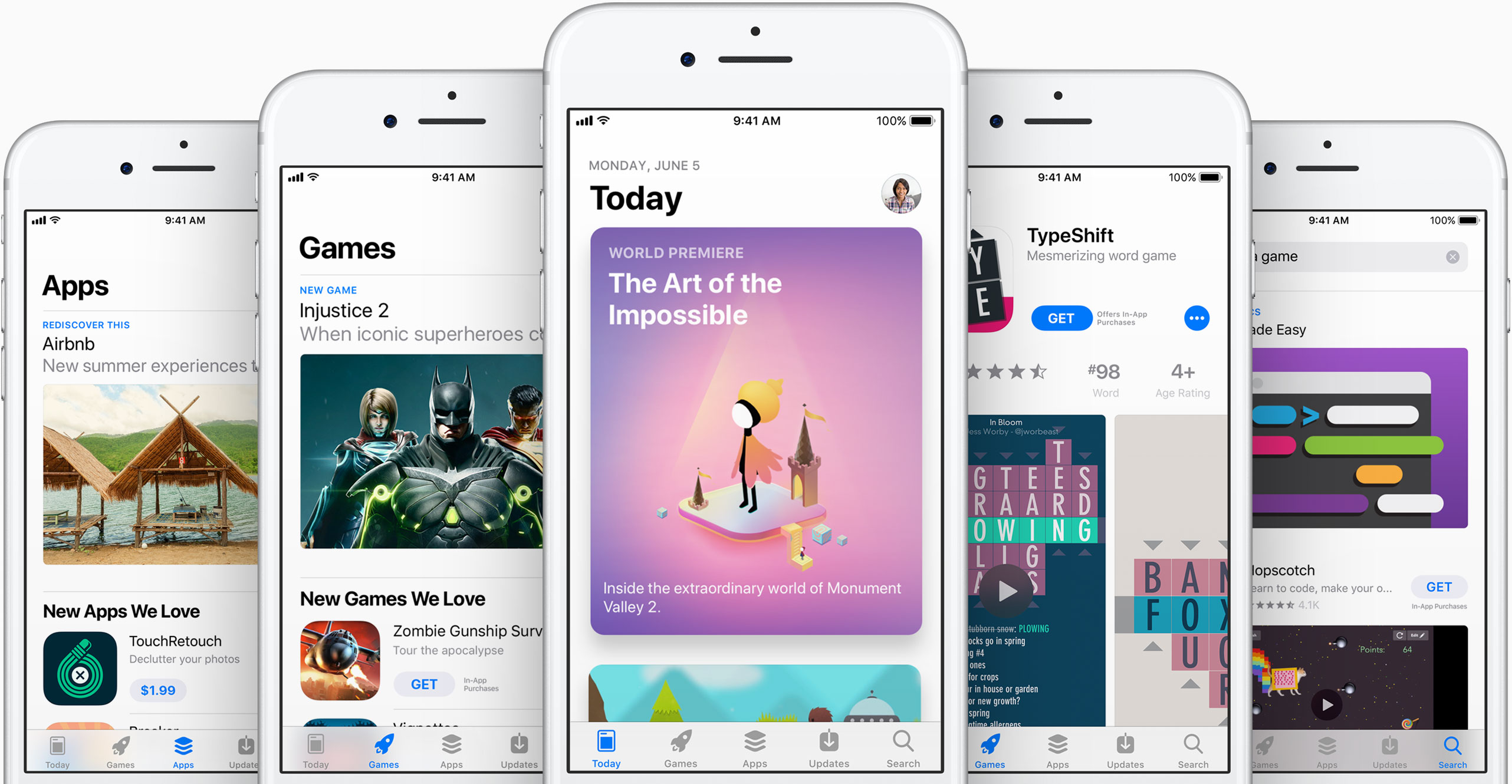
Phil Schiller just made perhaps the most surprising and impactful announcement at Apple's WWDC keynote: the App Store is getting a complete redesign. This is the first time this has happened since the App Store was introduced back in 2008.

“Together with our incredible developer community, we’ve made the App Store the best app platform in the world, and more than 500 million unique customers visit it every week,” said Philip Schiller, Apple’s senior vice president of Worldwide Marketing. “Now, we are taking everything we’ve learned from the App Store over the past nine years and putting it into a stunning new design. Every element of the new App Store is richer, more beautiful and more engaging.”

As you can see in the above images, the new App Store looks a lot like Apple Music and Apple News. Images are larger with rounded corners, and header text is large and bold. There's a new Today tab, with big, color cards you scroll through that shows app previews and updates, news, tips and guides, and more. There will also be an app of the day, game of the day, and a daily list of suggestions.

"It all starts with the Today tab, a daily destination all about games, apps and app culture. Through in-depth features and interviews filled with beautiful artwork and videos, the App Store’s global team of editors will share the stories behind the apps and games that change the way we live and the developers whose ideas push and shape the world as we know it. Today will feature exclusive premieres, new releases and a fresh look at all-time favorites, as well as recommended tips and how-to guides to help customers use apps in innovative ways."

Games also now have their own tab, separate from apps, which should make non-game developers pretty happy. This is going to be one of those things where we are going to have to go hands on with to cover the extent of the changes.

"Games is the most popular category on the App Store, and with the new design there will now be a dedicated home just for games. It will feature recommendations of new releases and updates, compelling videos, top charts just for games and hand-picked collections. It's now easier than ever to navigate the over half a million games available, and find the perfect game for everyone from the casual player to the hardcore enthusiast."

What do you think of the new App Store design?

Apple’s Activity app could be removable in iOS 11

Aside from spotting interesting references to a drag-and-drop feature for iPad and an all-new dedicated Files app, developer Troughton-Smith also noticed a placeholder listing for Apple's stock Activity app on App Store.

This is the first time the app has appeared as a downloadable item on App Store, suggesting Activity could be removable in iOS 11. The listing has since been removed from App Store.

No additional screenshots, descriptions or other information were provided.

Introduced as part of the iOS 9 update two years ago, the Activity app is one of the few stock apps that cannot be hidden from a user's Home screen. Check out Apple's support document for the full list of built-in iPhone and iPad apps that can be removed from the Home screen.

The Activity app only appears on the Home screen if a paired Apple Watch is present. Apple could be making Activity a downloadable item so that non-watch users could optionally download it and fill their Activity rings with other fitness tracking devices.

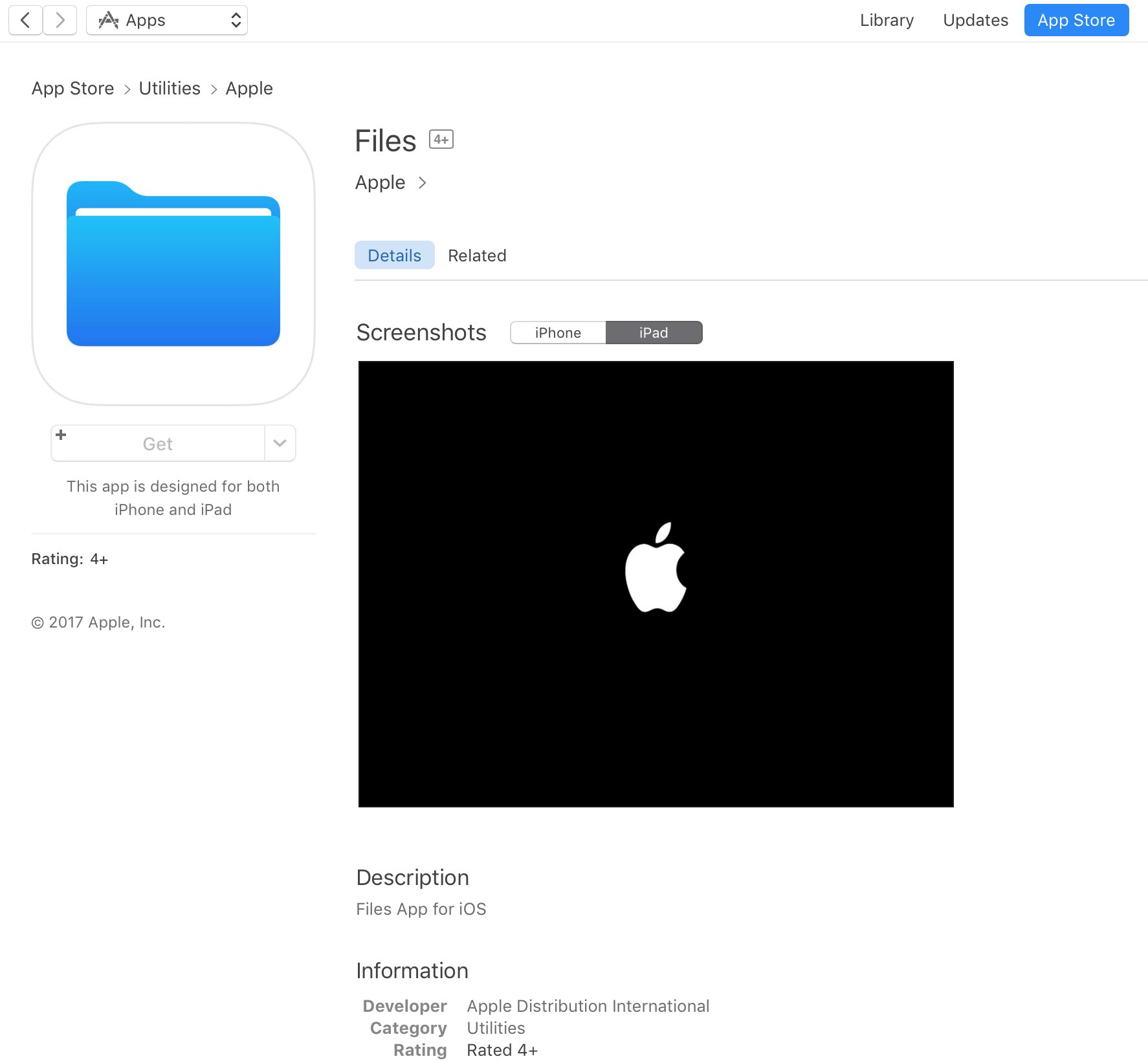
App Store placeholder listing for Apple Files app appears briefly ahead of WWDC keynote

A placeholder listing for a new Apple Files app has briefly appeared on App Store ahead of today's live-streamed WWDC keynote, as spotted by iOS developer Steven Troughton-Smith late Sunday. It's surfaced in the Utilities section of App Store and has since been removed.

No screenshots or the official description were provided.

The app requires iOS 11 and 64-bit support and is designed for both iPhone and iPad. It sports a blue file folder icon resembling the design for folder icons in macOS. It's entirely possible that the new Files app is really just a rebranded version of the existing iCloud Drive app.

It's unclear if the forthcoming app will be a new stock item in iOS 11 or an optional download. If I had to guess, I'd say it will likely come pre-installed with iOS 11. Since iOS 10, Apple has allowed users to hide most of the stock apps from their Home screen.

To help users easily re-install any removed stock apps, Apple has provided all of its first-party iOS apps that are removable as downloadable App Store items. iOS 11 will be previewed at WWDC later today along with tvOS 11, watchOS 4 and macOS 10.13.

How to track your sleep using AutoSleep

You don’t have to be a scientist to know that a good night’s sleep is conducive to your overall wellbeing and health. On that note, a while ago we have screened the App Store for the best sleep trackers available on iPhone and Apple Watch so as to make it easy for you to pick and choose your new sleep companion.

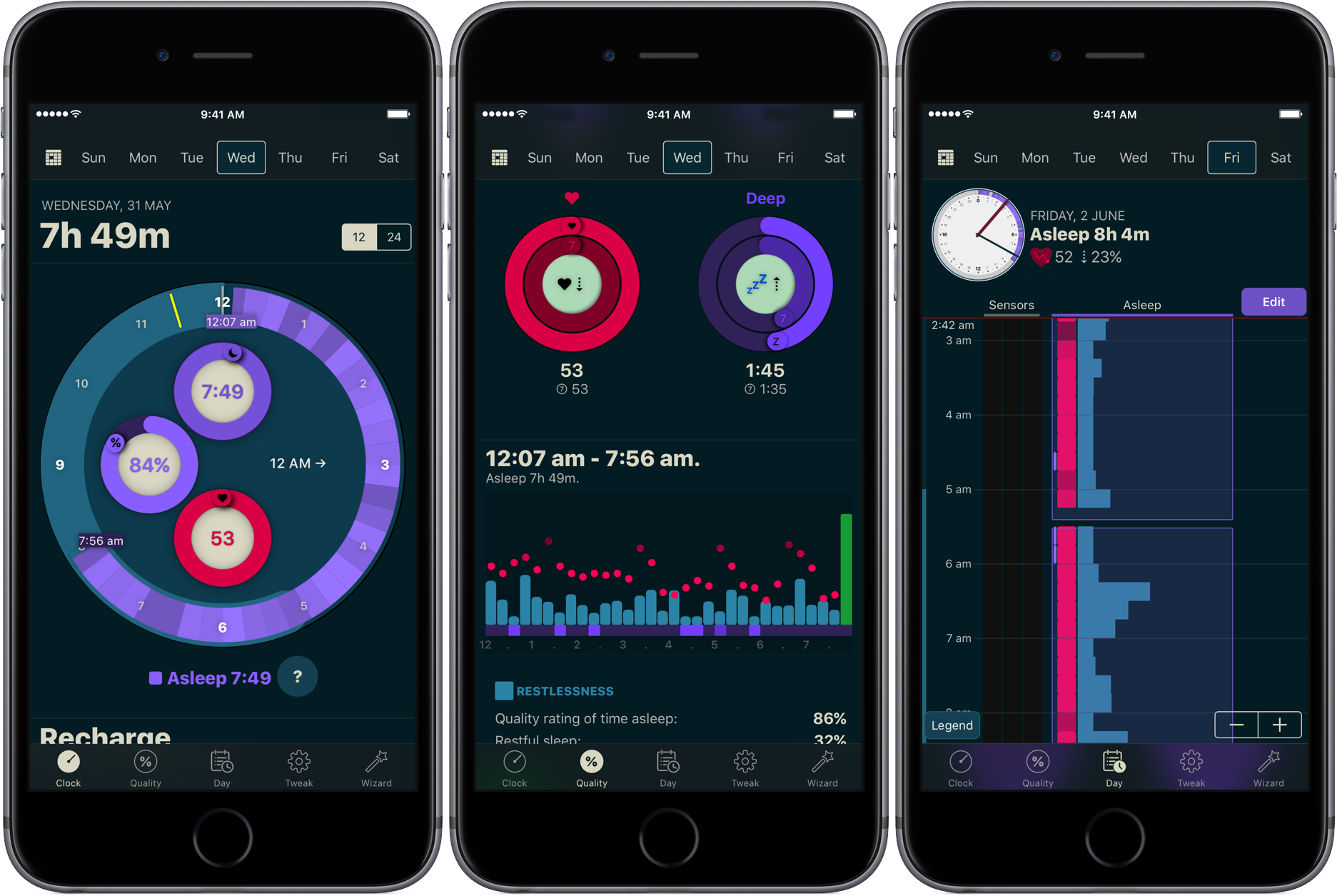
While varying in looks and features, all of the apps listed serve the same purpose: record how you slept and explain possible discrepancies in perceived quality of sleep and your actual rest. With the hands-off roundup in mind, we decided to select the most requested and popular app featured - AutoSleep - and throw a complementary hands-on tutorial on sleep tracking into the mix. Want to learn more about how to track your sleep using your iPhone, Apple Watch, and the AutoSleep app? Then join us for the tour!