App Store Apps

How to post images and videos to Instagram on the web

Marketing image with a tagline "Everyone has a story" in white font printed on top of a colorful Instagram gradient background

Instagram for iOS is pretty decent, but there are times when you just wanna quickly post an image without having the app unnecessarily eat into that precious cellular data by refreshing feeds and other content. While you can send photos from other iPhone apps via Instagram's Share sheet extension, it's now possible to upload images through Safari as well.

This tutorial provides step-by-step instructions explaining how to upload your photographs to Instagram using the mobile web interface, no apps needed whatsoever.

Before we get to it, know that you cannot take or upload photos from Instagram's web interface on a desktop computer. Only Instagram's web UI on mobile lets you do that.

You can now order photo books and archive images on Google Photos

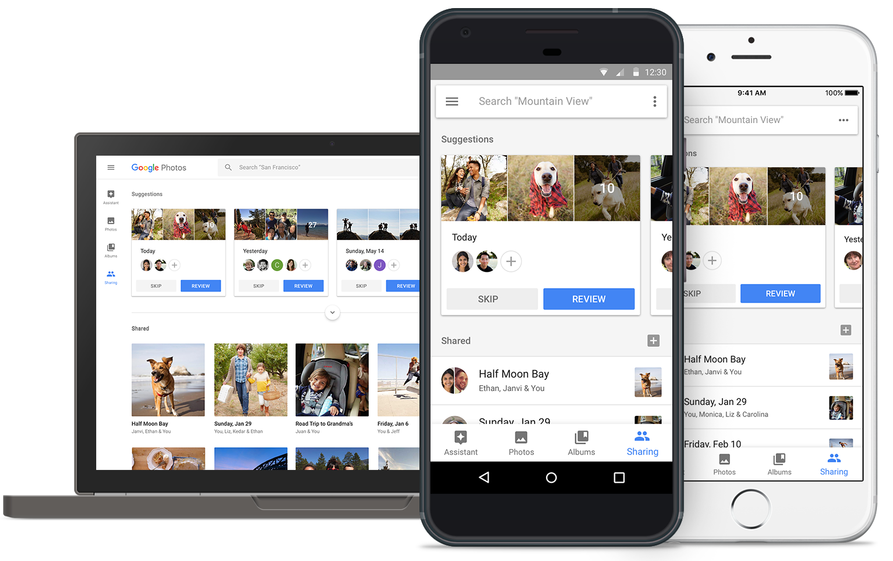
At its annual developers conference earlier in the month, Google announced three new features for its Photos app: automatically curated albums, photo books and sharing suggestions.

Today, the company pushed an update to its Photos app for iOS, Android and the web, bringing support for ordering printed photo books comprised of your best photographs. You can make a photo book in minutes with automatic photo curation and easy customization.

Photo books

To order a printed photo book, select the images you’d like to fill your album with. Google’s machine learning picks the best shots for your, removing duplicates and poor quality images.

In fact, the app will even offer personalized suggestions for photo books, like your trip to the Grand Canyon, time with family during the holidays, your puppy and so forth.

You can order a seven-inch square softcover book for $10 a piece or its nine-inch hardcover version for twice as much. Each has twenty pages though you can buy additional pages if you'd like:

Softcover—$0.35 per additional page Hardcover—$0.65 per additional page

Photo books are currently available to users in the US only.

However, the search company has made promises to bring them to more countries soon.

Google photo books key highlights:

Quickly find your best shots— Start from an album or search for a person, place or thing. Then, Google Photos can automatically pick out your best photos—helping you save time. Perfect your book in minutes—Easily move around your photos, add a book title and tweak your cover design. Beautifully crafted for you—Just choose a size and get started on your phone or computer. Photo books are made in the USA from premium, responsibly sourced materials.

Apple's Photos app supports photo books, too. As a matter of fact, ordering photo books has been part of the now phased-out iPhoto app for almost a decade.

Archive photos

Aside from photo books, today's update includes the Archive feature.

Chances are your photo library includes not only your selfies, food shots and cherished memories, but the more mundane pictures as well, like recipes, receipts, scanned documents and so forth.

Now you can move images to the app's new Archive section to tidy up your photo grid.

To get started, simply select a few photos you'd like to archive, tap the Menu icon and choose Archive from the popup menu. This simply moves the selected photos to your archive rather than delete them. Any archived images and videos remain visible in search and albums.

Aside from the image archival feature and photo books, this update includes performance improvements and reduces the amount of on-device storage space used by the app.

Instagram Direct now lets you send links and images in landscape and portrait orientations

Instagram yesterday announced a pair of minor updates for Direct, a direct-messaging feature built into its mainland mobile app for iOS and Android. For starters, Instagram Direct now supports sending images and videos in portrait and landscape orientations.

Plus, Instagram is just now offering support for sending links in direct messages.

The ability to send a permanent photo or video in landscape and portrait orientations through Direct means you no longer have to worry about weirdly cropping it as it will now show up properly in its intended orientation.

“We’ve added support for links in Direct,” noted the company. “You can share website links with friends and preview them directly from your thread.” As a bonus, the team also has implemented automatic links to phone numbers and addresses send through Direct.

Landscape and portrait uploads in Direct are available today on iOS, with Android coming soon. Links in Direct messages are available today on both iOS and Android.

Today's features are part of Instagram's version 10.22 update.

Grab Instagram for free via App Store.

You can now drag and drop files on iPad between Readdle’s productivity apps

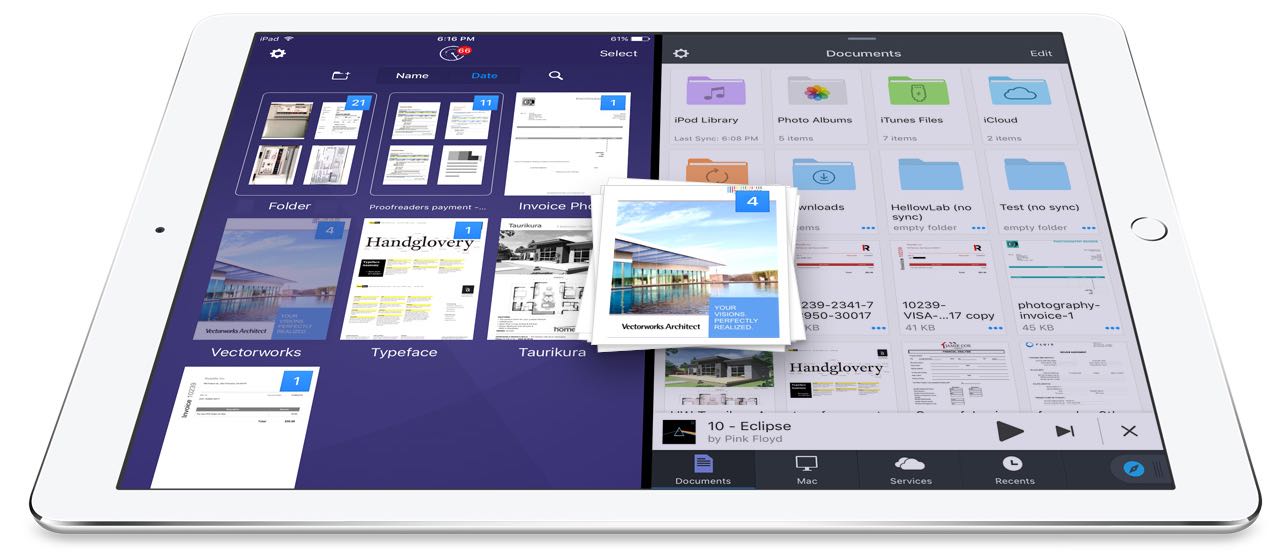
Readdle, Ukrainian makers of fine productivity software for iPhone, iPad and Mac, today announced that, for the first time ever, they're making it possible to drag and drop items in the split screen mode on iPad between its most popular productivity apps: Documents, PDF Expert, Scanner Pro and Spark.

In addition to cross-app drag and drop in Split View multitasking mode, Readdle's excellent Documents app has received a major update that turns it into a Finder on iOS of sorts.

Cross-app drag and drop

Drag and drop between Readdle apps works like a charm, really.

For instance, you can drag a file from Documents and drop it on Spark to instantly create a new email message with an attachment. Or, you can drag and drop scans from Scanner Pro to PDF Expert for further editing.

How about moving that attached contract from Spark to PDF Expert to sign it before sending the signed document back to Spark as a reply? You can do all that—and much, much more—across the aforesaid Readdle apps on your iPad.

The promo video below showcases drag-and-dropping files between Readdle apps.

https://www.youtube.com/watch?v=epzh9-rd-AI

True, some third-party iOS apps do support direct manipulation of content within the app.

That being said, however, the ability to drag and drop files and other content between multiple apps has not been utilized on iOS at all. While Apple could enhance iOS's Split View multitasking mode in the future with useful interactions like drag and drop, Readdle has already found a way to make cross-app drag and drop work.

Denys Zhadanov, Readdle's Vice President of Marketing, said via email:

We see it as a major improvement of iOS and this is how all iPad apps should work between each other. It’s so freaking awesome—glues all our apps into a phenomenal productivity ecosystem.

“The Readdle Team hopes that Apple will introduce their own implementation of inter app drag and drop one day,” developers noted. “That will support other apps and make iPad a much better productivity device than it is now.”

New features in Documents 6

As mentioned earlier, Readdle's capable (and free) file manager, called Documents, is getting a major update today turning it into the iOS Finder you’ve always wanted. The update brings out various enhancements, including an overhauled design with Spark-like quick actions, an easier way to import files, improved file management, an all-new media player, on-the-fly editing of cloud files, music and video streaming and more.

https://www.youtube.com/watch?v=i-314ezmBgE

According to Readdle:

iOS has always been a 'no-file-manager' system. Everything is taken care of by the apps. That’s a blessing and a curse at the same time.However, some of us are very comfortable with controlling things on our devices, especially when it comes to getting real work done.

This is why we created Documents, an extremely powerful, versatile hub for all of your files on iPhone or iPad. It’s your Swiss knife that removes iOS file management woes.

Documents has always been a powerful iOS file manager and now it's gotten even better.

The completely rethought user interface is very functional.

As the screenshots attest, you can now easily edit, zip, tag, move or sync your files with fewer taps than before. Bigger file preview thumbnails give you a better idea of the content of that Excel spreadsheet or PPT presentation before you even open it.

A prominently featured “+” button lets you quickly import files, including documents from your computer, Dropbox, Google Drive, Box, WebDAV or any other cloud-based storage source. Files are now organized into folders exactly the way you are comfortable with.

Just select one or a few of them and easily drag them to the right location. And with cross-app drag and drop support, you can move a single or multiple files between Documents and Spark, Scanner Pro or PDF Expert.

“The best part is that you can access any of the locally stored files in any app with the ‘Open in’ option,” notes Readdle. “This is a unique experience on iOS, and it’s what finally gives you that Finder feel on your iPhone or iPad.” Now you can work directly with your cloud files in Documents and even stream photos, videos and music from any cloud storage without needing to download the files to your device.

The new media player helps you organize your music into playlists, with the ability to shuffle and loop your favorite tracks. And if you have PDF Expert installed on your device, Documents will let you annotate and edit PDFs, fill out forms, sign applications and more.

If you haven't played with Documents before, you should really give it a try.

Acting a central hub for all of your files, it lets you view almost any file format natively, store your files directly on the device or connect to the popular cloud storage service to keep everything together in perfect sync.

Availability

Spark and Documents are available at no charge from App Store.

PDF Expert is $9.99 on App Store.

Scanner Pro is $3.99 on App Store.

You should really download the latest version of Spark, Documents, Scanner Pro and PDF Expert and see for yourself what kind of a productivity device your iPad can be with proper drag and drop support.
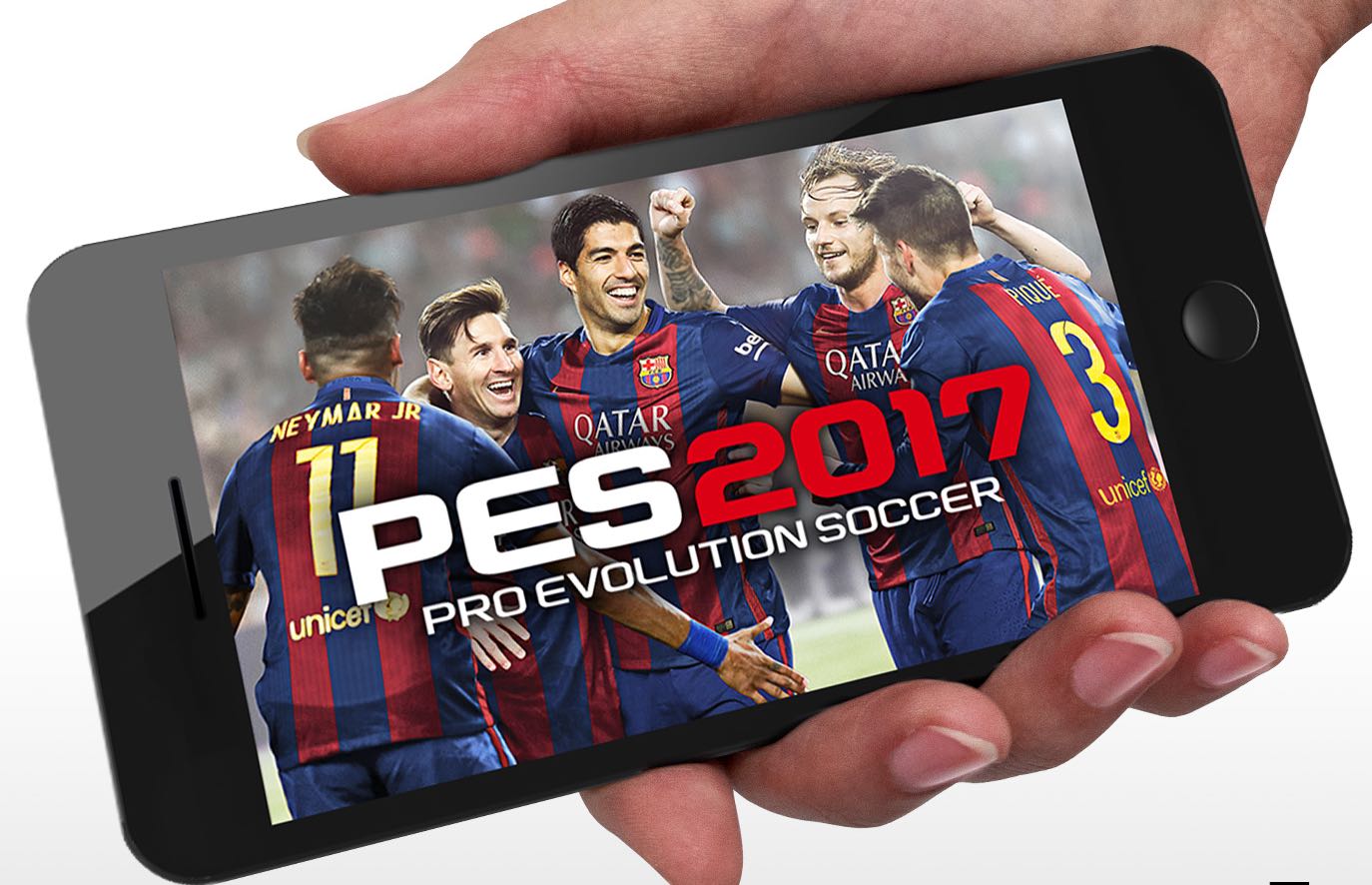
At long last, Konami’s Pro Evolution Soccer 2017 hits App Store

Konami on Wednesday announced that its official Pro Evolution Soccer 2017 mobile game for iPhone, iPad and iPod touch has made its global debut across 150 countries. The game is available free of charge with non-compulsory In-App Purchases.

Optimized for a realistic football experience on mobile with swipe-to-pass and tap-to-shoot mechanics, the soccer simulation is built on the same game engine used in the original Pro Evolution Soccer console series, providing a fun and realistic soccer experience on-the-go.

Watch the official PES 2017 mobile trailer below.

https://www.youtube.com/watch?v=mZIm9Eg2Kow

Featuring local and online multiplayer, official partnerships with club giants FC Barcelona, Liverpool FC and Borussia Dortmund, plus official licenses with top teams and players from Europe, Latin America and Asia, Pro Evolution Soccer is a no-brainer if you're a soccer fan.

Key highlights include:

The PES 2017 mobile experience—Take total control of every action on the field in a way that only the Pro Evolution Soccer franchise can deliver. Natural player movements, precision passing and in-depth tactics bring the true experience of the beautiful game to your mobile device. Swipe to pass, tap to shoot—Controller actions have been optimized to make playing on your mobile device feel as smooth and exciting as a PES action game should. Utilize advanced controls for precise passing and controlled shooting. Classic virtual pad controls are also available. Master your technique and feel the excitement of scoring the winning goal in the ultimate action soccer game. Official club partnerships— Scout and recruit thousands of soccer stars from the best teams in Europe, South America and Asia. Prepare to feel what it takes to play with or against stars like Lionel Messi, Neymar, Luis Suarez, Andres Iniesta and Gerard Pique. The official EUFA Champions League—Experience official visuals from the UEFA Champions League as you compete against the top teams in Europe. Build your winning eleven team—Acquire players through Scouts, Agents or the Scout Auction. Choose the best players to fit your unique tactics (e.g. Giroud has excellent physicality and Ozil excellent balance). Every player is unique and every match is a new experience. Local and online multiplayer—Challenge Friends in Local Match or discover new rivals in Online Match mode. PES 2017 mobile now lets you play PES on-the-go, anytime and anywhere.

As part of the launch, special scouts and agents will be available for a limited time through several in-game events.

Beginning today, you can earn players with high levels of shooting skills, like Lionel Messi and Pierre-Emerick Aubameyang, by participating in the Great Finishers event. Another event, called Step Up Challenge, lets you play against COM teams under certain conditions and receive prizes based on the number of wins earned.

Kick-Off Campaign bonuses will continue to be available through 4:59 UTC on August 23.

Kick-Off Campaign gives PES fans the opportunity to gain rare, minimum silver status-guaranteed players from partner clubs FC Barcelona, Borussia Dortmund and Liverpool FC.

For more details on these events, visit konami.com/wepes/mobile.

In case you've been sleeping under a rock for the past two decade or so, Pro Evolution Soccer is Konami's flagship series of football action games that have been enjoyed by football fans from around the world for more than 20 years.

The games sold more than 96 million copies worldwide, as of March 2017.

Download Pro Evolution Soccer 2017 for free from App Store.

Download Apple’s new Swift app development curriculum from iBooks Store

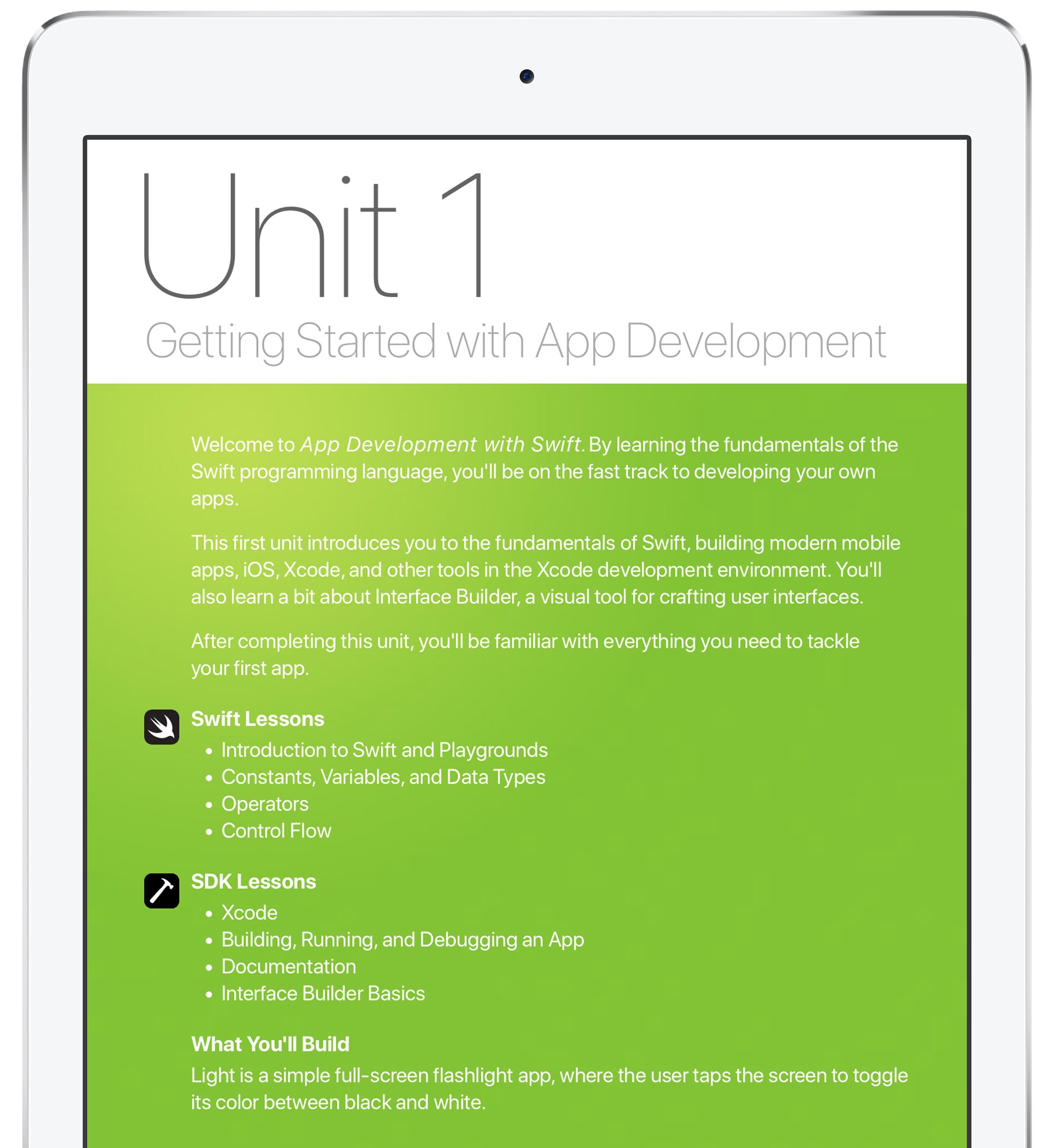
Apple on Wednesday announced a new app development curriculum targeting U.S. high school and college students who are eager to learn the secrets of mobile app development with the Swift programming language.

Titled “App Development with Swift”, the new curriculum is now available as a free download from iBooks Store. It's an extension of Apple’s existing K-12 Everyone Can Code curricula, which has been downloaded 430,000 times.

Noting that the app economy and software development are among the fastest-growing job sectors in America, Apple CEO Tim Cook says his company is thrilled to be providing educators and students with the tools to learn coding.

“Community colleges play a critical role in helping students achieve their dreams, and we hope these courses will open doors for people of all ages and backgrounds to pursue what they love,” said Cook.

The full-year course focuses on app design and development with Swift, the company's modern programming language. It includes various Swift Playgrounds exercises and Xcode tutorials, as well as homework projects, a teacher guide with solutions, grading advice and more.

Starting this fall, the following community college systems serving nearly 500,000 students nationwide will teach the new curriculum, among others:

Alabama Community College System Columbus State Community College Harrisburg Area Community College Houston Community College Mesa Community College San Mateo Community College District

Houston Community College will be opening an iOS Coding and Design School to teach the new curriculum.

“We are thrilled Apple is offering this incredible opportunity to advance student learning, which will especially help us bridge the gap in computer science training for minorities and women,” said Houston Community College Chancellor Cesar Maldonado.

“We can’t wait to see what these students will do and already have local businesses offering mentoring and internship opportunities.”

Apple says that select high schools will teach the curriculum as well. At many campuses, local businesses will also offer students mentoring and internships, added the firm.

More than a thousand schools across the US plan to teach with Everyone Can Code materials in the fall. Feel free to check out Apple’s existing free coding materials on iBooks Store.

Not to be outdone by Instagram, Snapchat unveils custom Stories of its own

Just a few hours following Instagram's announcement regarding all-new location and hashtag-based Stories in the app's Explore tab, rival Snapchat just announced custom Stories of its own. Now there's a new way to create Stories in Snapchat 10.9 for iPhone, iPad and iPod touch.

You can create a custom Story in a specific location or with your cherry-picked friends. “It's perfect for a trip, a birthday party or a new baby Story just for the family,” notes Snap.

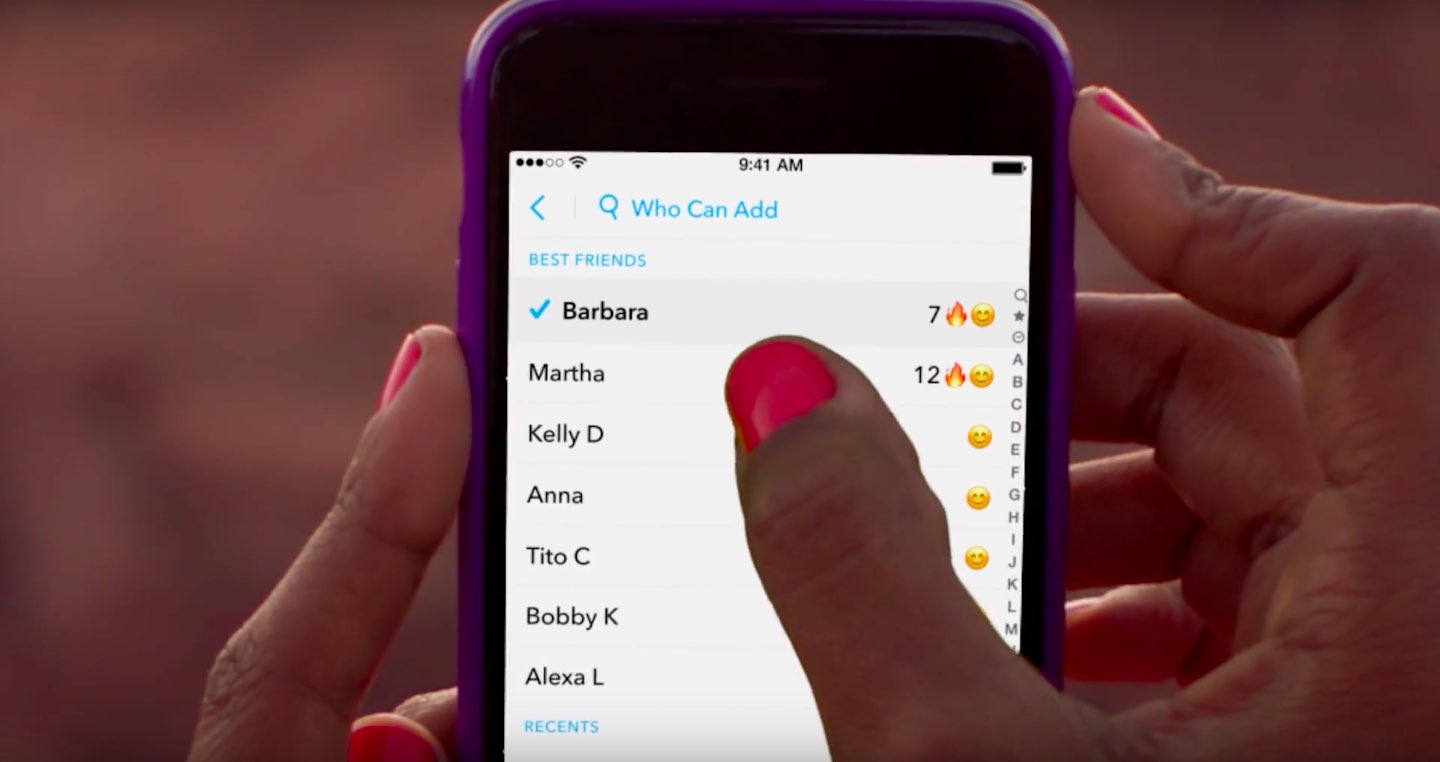
Tap the Create Story icon in the top-right corner of the Stories screen to get started.

https://www.youtube.com/watch?v=ohN8cv7nUmA

Song: “Sunroof” by courtship

Of course, you have the tools at your disposal to control who can add to your Story and who can view it. And by using geofencing, you can attach your Story to a specific location. Your custom Story disappears automatically if no one has contributed to it in the past 24 hours.

Aside from custom Stories, this edition of Snapchat puts your own Bitmoji selfie inside your Snapcode. To change the mood of your Bitmoji, just tap the Edit Bitmoji command.

Grab Snapchat for free on App Store.

Instagram rolls out location and hashtag Stories in Explore tab

Photo-sharing service Instagram today announced that all-new location and hashtag-enabled Stories are now available through the app's Explore tab. These newly added Stories features require Instagram version 10.22 for iPhone and iPad, available at no charge via App Store.

“Now you can see what’s happening around you and find stories related to your interests,” says Instagram. Location-based Stories appear in a new Story ring at the top of Explore.

Additionally, you can now search for any location around the world.

When you search for a location, you'll see a Story ring for that place at the top of the location page. Location and hashtag-enabled Stories appear at the top of the Explore tab only if their creators have used location stickers or a new hashtag sticker.

“We’re also beginning to introduce hashtag stories on Explore to help you find Stories related to your interests,” added the company. “When you search for a hashtag, you may see a Story ring at the top of the page filled with Stories using that hashtag.”

If your location or hashtag-enabled Story was included in the larger Story on Instagram, you’ll see a line at the top of your Stories viewer list which tells you how many people saw your Story as part of the larger Story. To use a location or hashtag sticker without your Story appearing on the Explore tab, tap the “X” on your Stories viewer list.

Instagram's previous update brought out Snapchat-like face filters for your selfies, an eraser brush and a new hashtag sticker. Location stories on Explore are available on iOS and Android as part of Instagram version 10.22 in App Store and Google Play.

Hashtag stories will be rolling out over the coming weeks.

You can learn more about these features in Instagram's Help Center.

Instagram for iOS is a free download from App Store.

Duet Display brings even more desktop power to your iPad drawing experience

Duet Display, an app billed as the first solution to turn your Apple tablet into a second display and a high-performance drawing tablet for your Mac or Windows PC, was updated on App Store today with some new features.

The new Duet Display now lets you have the drawing experience on your iPad with the speedy rendering and sheer hardware power of a desktop.

The update brings out a number of enhancements and new customizations, including a customized pressure curve, advanced gesture support, a more fluid drawing experience, improved color quality and more.

Here are the key highlights in this release of Duet Display:

Customized pressure curve—You can now change the way macOS or Windows receives the data, allowing for a personalized drawing experience. Advanced gestures—We have added a lot of gestures to both standard and pro users. This should make drawing and using your iPad as the primary device much simpler. Line lead—To provide a faster drawing experience, we have spent some time making a line preview to predict where the Pencil is before macOS or Windows knows where it is. We plan to continue improving this to create an instant drawing experience. Touch Bar—We implemented Touch Bar support last Christmas. Pro users have really benefitted the most as they are using their iPad more than their computer, so it makes quick interactions much faster. We have improved the stability and speed of it, and many more apps support Touch Bar now. Improved color quality—We have improved rendering quality and speed for pro users under the Pixel Perfect setting, delivering a higher quality display in less time. We plan to continue improving performance as much as we can.

Duet Display works over a USB connection as wired connections are significantly faster and far more responsive than wireless solutions. The app's speedy rendering engine has a much lower latency than Apple's AirPlay technology.

Duet Display has proven to be very valuable to artists, designers and video editors as it essentially replaces a Wacom drawing tablet with your iPad Pro and Apple Pencil.

The app supports finger drawing, too.

Aside from drawing support, Duet Display can be used to turn your iPad into a second screen for your Mac or Windows PC. For instance, you could use your iPad Pro to keep tabs on your social media feeds while editing a document on your Mac's primary display.

The ability to turn a supported iOS device an external monitor for a Mac should be especially handy while you're traveling or if you cannot afford an eternal display for your computer.

Duet Display for iOS is a $19.99 value on App Store.

To celebrate today's update, the app is on sale today for $9.99.

A pro-level upgrade which unlocks the ability to use your Apple tablet as a drawing tablet for your computer costs an additional $19.99 per year as an in-app subscription.

Duet Display 2.0 for Mac or Windows is available directly from the official website.

YouTube TV app gains AirPlay support

Google today updated its official YouTube TV app with support for AirPlay, an Apple technology that lets you play video streamed from your iPhone or iPad on a TV set through your Apple TV.

“Announcing AirPlay! There are a few bug fixes and minor improvements in this thing, too. But mostly AirPlay,” reads the changelog for YouTube TV on App Store.

Prior to today's update, YouTube TV only supported broadcasting content from the app to a television set via Google's Chromecast HDMI dongle.

Google launched its new streaming television service back in April 2017.

In exchange for $35 per month, cord-cutters can enjoy live TV streaming from Fox, ABC, CBS, NBC and other popular cable networks along with content from an additional 39 local broadcast networks and channels, like ESPN.

Some sports channels like Fox Soccer Plus, as well as premium networks such as Showtime, are available for an additional monthly charge. DVR with unlimited storage is included in the subscription at no additional charge.

https://www.youtube.com/watch?v=qediav063xQ

YouTube TV can be used with up to six accounts in a single household without needing to share passwords between family members.

YouTube TV is separate from the YouTube Red service, which costs ten bucks per month.

YouTube TV is currently limited to select cities, like Chicago, Los Angeles, New York City, Philadelphia and the San Francisco Bay Area.

For more information, visit tv.youtube.com/tv/availability.

You can try YouTube TV free for 30 days by signing up at tv.youtube.com.

Not Hotdog, GiftHead, Stigma, and other apps to check out this weekend

This week's edition of our Apps of the Week roundup includes a not-so-smart food identifying app, a personal shopper that is an expert at helping you pick out gifts, and a journaling app aimed at helping you improve your mood. And as usual, we have two great new games for you to check out this weekend.

Not Hotdog

If you're a fan of HBO's TV series Silicon Valley, you probably already know what this is. In last week's episode, budding entrepreneur Jian-Yang demonstrated an app called Seefood, which was supposed to be able to identify different foods using your phone's camera. Instead, all it was able to do was differentiate between hot dogs and non-hotdog items—thus, Not Hotdog was born. That's literally all the app does, but I got a little kick out of taking pictures of random things and sharing them with friends using the 'Not hotdog' caption. And you could too. Not Hotdog is available for free.

GiftHead

Here's a not-so-new app that you may not have known about. It's called GiftHead and it just received a huge update with a major redesign and support for 500 new stores. The app works like this: tell it who you're shopping for, what the occasion is and your preferred price range. Then pick a gift from the curated list of suggestions, and the app will point you to the right store. Rather shop online? The app can do that too. Other features include sale alerts, wish lists and gift reminders, so you'll never miss a birthday or anniversary again. GiftHead is available for free.

Stigma

Stigma is another not-so-new app that could be useful for folks that don't know about it. It's described as a "mental health" app, with a built-in journal, mood calendar, reminders and a word cloud that allows you to see the types of words you're using most in your journal entries. There's also a support network aspect, with PenPals (supportive peers), Support Groups, and a community you can share your journal entries with. Now the app itself is free, but there is a Pro service that starts at $2.99 per month with premium features like advanced analytics and longer journal entries. Stigma is available for free.

Old Man's Journey

Old Man’s Journey is a soul-searching puzzle adventure game about life’s precious moments, broken dreams, and changed plans. Immerse yourself in a visual narrative as you uncover stories of the old man’s life told through beautiful vignettes of his memories. Interact with the serene, whimsical environment as you solve playful puzzles and shape the landscape around you, growing the hills to create the old man’s path forward. Note that this game has won a ton of awards for its visuals and storytelling, but some of the iTunes reviews complain that the puzzles are too easy and the game is too short. We still think this is worth checking out. Old Man's Journey is available for $4.99.

Timber Tennis

From the makers of the hit Timberman comes Timber Tennis, essentially a unique take on the game Pong with a lumberjack twist. Take part in the annual Timber Tennis World Championship—beat all your old rivals by upgrading your skills, using super-shots and staying clear of other players' specials. Unlock a slew of characters and balls, and compete in local multiplayer against your friends. Note that this is a freemium title, with an in-app purchase to remove ads, and some of the early reviews complain that the ads are super intrusive. Even so, if this game is half as addictive as Timberman, it's worth checking out. Timber Tennis is available for free.

More apps to check out Microsoft refreshes OneNote apps with new design and accessibility features Apple’s free app of the week: Eggggg – The Platform Puker Things 3 is out with overhauled interface and multiple new features Hey Siri, make some room for Google Assistant on my iPhone Gmail for iOS now uses machine learning to provide smart replies Todoist gains 2-way Google Calendar integration, Dynamic Type support & more Instagram rolls out selfie filters, rewind option for videos, hashtag sticker & eraser brush

Microsoft refreshes OneNote apps with new design and accessibility features

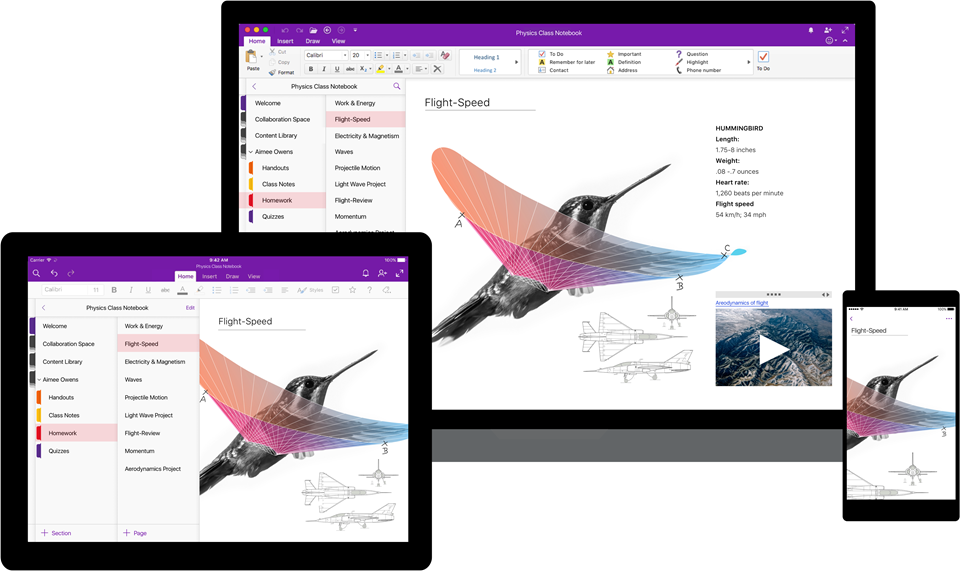
Software maker Microsoft on Friday rolled out new versions of its note-taking apps for iPhone, iPad, Apple Watch, Mac, Android, Windows 10 and the web. OneNote's interface has been tidied up and navigation improved in the latest release.

The app now includes new assistive features to help users with disabilities.


OneNote's revamped interface makes organizing your notes easier than before with an improved layout. You'll notice that the reworked interface puts your content front and center, with all of the notebooks, sections and pages moved to columns on the left side of the app.

This allows for efficient organization of your notebooks.

The company celebrated the redesigned OneNote launch with the following video.

https://www.youtube.com/watch?v=fmGVp76WyIU

The newly implemented accessibility features, available across iOS and macOS, let people with various disabilities efficiently navigate the app with screen readers, improved keyboard shortcuts and other assistive technologies.

And with the left-hand navigation controls, screen readers can easily navigate through the app.

OneNote is now available with a consistent experience across devices: with this update, says Microsoft, your experience will be the same regardless of what device you happen to be using.

The new redesign for OneNote is rolling out for Windows 10, Mac, iOS, Android and on the web over the coming weeks so check back later if it's not live yet.

OneNote for iPhone, iPad and Apple Watch is available free on App Store.

OneNote for Mac is available free on Mac App Store.