Microsoft releases another ad dissing iPad

Microsoft — the company behind the Surface RT (lol) — has posted another attack advertisement going at Apple's iPad. The ad makes fun of the iPad's lack of SD Card compatibility, its inability to run apps side by side, and its price. It's a decent ad, but their comparison points just don't stack up if you ask me.

Apple said to be working with Logitech and others on MFi gamepads

Yesterday we talked a little bit about a new feature (or rather, developer API) in iOS 7 that offers support for MFi (Made for iPhone) certified hardware game controllers. This will be the first time that Apple has officially supported third party gamepads.

Today a few more details have surfaced about Apple's plans regarding these controllers. A new report is out this afternoon claiming that the Cupertino company is working with the likes of Logitech and MOGA to produce a new line of iOS gaming peripherals...

Google+ notifications will soon sync across devices

One of the annoyances about notifications in today's multi-platform world is the alert conundrum. We've all been there: an alert comes in, you act on it on one device and yet it doesn't clear on the other. And with apps constantly producing all sorts of notifications, managing these things across our gadgets is tricky, to put it mildly.

Matter of fact, you'd be right to argue that notifications tend to get a little out of hand, up to the point where they turn your daily computing into a nightmare.

Apple feels your pain: that's why it gave iOS 7 a new Notification Sync feature where reading a notification on your iPad automatically marks it as read on your iPhone, and vice versa, courtesy of iCloud. Google isn't standing still either: today, the search monster started rolling Google+ notification sync across the web, Android and iOS...

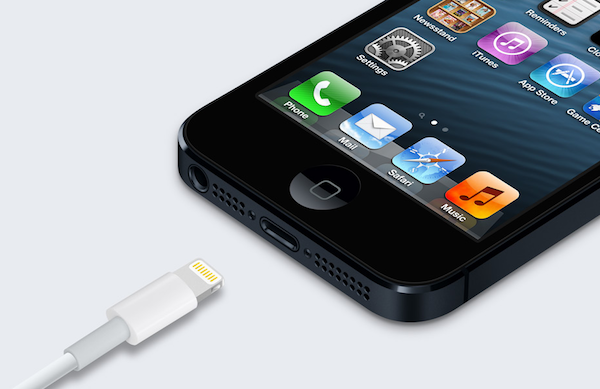
iOS 7: Charging

As you know, many an item has changed with iOS 7 from a visual perspective. We've already covered some of the details of the Lock screen, booting, etc. What about something as subtle as the visual cues when the device begins to charge? Indeed, those have been totally revamped as well, and the changes, I believe, are for the better. Take a look...

Apple’s key ‘rubber banding’ patent validated by US Patent Office

Apple's 'rubber banding' patent has been under heavy scrutiny in recent months, invalidated twice by the US Patent Office. It used the patent, which pertains to a software feature that allows content to 'bounce back' during scrolling, in its big $1 billion victory over Samsung.

But good news today for the Cupertino company. The United States Patent and Trademark Office (or USPTO) has said it will issue a re-examination certificate that confirms the formerly invalidated invention, clearing up any doubts of the patent's weight or validity...

Wallpaper Cyclr: randomly cycle wallpapers using Tumblr tags

One of the best ways to spice up the look of your iPhone is to don some new wallpaper. Wallpaper Cyclr is a jailbreak tweak that takes this basic premise and runs with it.

If pulling in random wallpaper from Tumblr based on tags you assign sounds like a good idea you, then you'll certainly want to take a look at Wallpaper Cyclr. This is a tweak that allows you to change up your wallpaper based on pre-set intervals, and it's always a surprise as to what Wallpaper you acquire on your device.

Twitter launches #FollowMe highlight reel

The micro-blogging service Twitter has announced an interesting new thingie in partnership with Vizify, called #FollowMe. For those unfamiliar with Vizify, it's a nifty little service which plugs in your favorite social media sites to design a series of interactive infographics that shows "the best of you".

Tapping that capability, #FollowMe lets you create highlight reel videos of your best Twitter moments, with literally little to no effort whatsoever. Go past the fold for the full breakdown...

‘AirPlayServer’ turns any jailbroken device into an AirPlay receiver

Looking for a quick and dirty way to turn any jailbroken iOS device into an Airplay receiver for audio? Have an old iPod touch laying around that's collecting dust? If so, then you may want to have a look at a recently released tweak called AirPlayServer.

AirPlayServer is a tweak that allows you to use a jailbroken iOS device as an AirPlay speaker. In fact, if you hook a pair of speakers up to the device's headphone jack, you'll really have something special. Have a look inside for a brief video demo that shows how it works...

ScreenshotPlus: pre-crop screenshots using a handy selection tool

If you're someone who's often taking screenshots on your iOS device, then boy, do I have a new jailbreak tweak for you. ScreenshotPlus is an extremely handy jailbreak tweak that allows end users to pre-crop screenshots prior to taking them.

The tweak is enabled using a standard Activator gesture, which brings up an overlay on the screen. The overlay features drag handles that can be used to adjust the dimensions of the screenshot in question. For those of you who want to get exact dimensions, there's a dimensions readout right below the screenshot area, and next to the button used for taking the screenshot.

Needless to say, this is a tool that can be very time saving if you take a lot of screenshots on your iOS device. Take a look at our video walkthrough inside for more information.

Apple makes ‘iWork for iCloud’ beta available to developers

Alongside OS X Mavericks and iOS 7, Apple showed off its new web-based 'iWork for iCloud' software suite during its Monday keynote. The suite, similar to Google Docs and Office 360, allows users to view and edit iWork, and other documents right from their browser. And Apple just activated a beta version of it for registered developers...

‘WiPi’ shows the Wi-Fi picker using an Activator gesture

WiPi is a recently released jailbreak tweak that allows you to quickly access your device's Wi-Fi picker. Using a simple Activator gesture configurable in the tweak's preference panel, it's a quick way to select a desired Wi-Fi network without having to resort to the Wi-Fi section in the stock Settings app.

Want to see how WiPi works in action? Then check inside for our hands-on video walkthrough.

Give your iPhone an iOS 7 makeover with this new theme

Folks feeling left out of all of the iOS 7 beta festivities will be happy to hear that there is now a way you can get in on the fun—no developer account required. A new theme just popped up in Cydia that promises to give your jailbroken iPhone an iOS 7-style makeover.

Now, obviously it's not going to be exactly like iOS 7. You're not going to get any of the new features that come with the major update, like the control center or the revamped Notification Center. But if you just want your iPhone to look like iOS 7, this theme is for you...