Sébastien Page

Sebastien is the Founder and Editor in Chief of iDB. Once a BlackBerry user, Sebastien instantly fell in love with the iPhone when it was first announced in 2007. Shortly after, he decided to start sharing his knowledge of the iPhone and its nascent ecosystem, which led to the creation of this blog. Sebastien currently owns 14 iPhones, 4 iPads, a MacBook Pro with Touch Bar, a MacBook Air, 2 Apple Watches, 3 Apple TVs, countless HomePods and AirTags as well as a few pairs of AirPods.

From iOS 8.1 beta to a new iPad event: everything about Apple’s week

Like every Sunday, we get to take a look at some of the most popular posts that were published on iDB during the week that just ended. Whether it is a news item, a new jailbreak tweak, a tutorial, or an app review, we sum it all up in one convenient place for you.

As always, if you like what you're reading, please feel free to spread the love by sharing our posts on your favorite social network.

We're usually hanging out a lot on Twitter and Facebook, more rarely on Google+.

Don't forget to listen to the latest episode of our new podcast, Let's Talk iOS:

Subscribe on iTunes

And of course, make sure to catch up with the new episode of Let's Talk Jailbreak:

ScribbleBoard: because drawing is more fun than typing

Typing is so iOS 7!

With the introduction of third-party keyboards in iOS 8, you can now tap and swipe your way through words like never before, but really, where is the fun in that? Enters ScribbleBoard, a keyboard that lets you draw little doodles instead of typing words. Your productivity will certainly go down the drain as you activate this keyboard, but what you will lose in efficiency will be gained in fun.

A closer look at the layers of security behind Apple Pay

Yoni Heisler gives a detailed look at the security mechanisms of Apple Pay, and explains why it may very well be the safest way to make any type of credit card payment. Based on discussions with a few credit card executives involved in the Apple Pay development process, Heisler paints a great pictures of the various security elements behind Apple Pay.

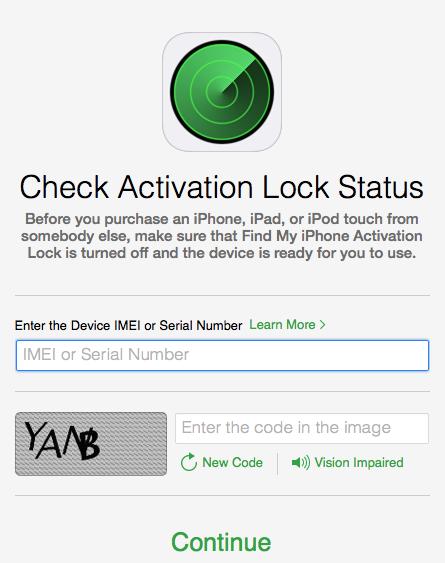
Apple releases tool to check the Activation Lock status of iOS devices

Apple recently released a tool that lets anyone check the Activation Lock status of iOS devices. Introduced along iOS 7, Activation Lock is a security feature that prevents anyone from erasing or activating your iOS device without entering your Apple ID and password first. The feature must be disabled before a device is passed or sold to another person. Failure to do so renders the device unusable for the new owner.

With the release of this new tool, Apple wants to make the process of checking for Activation Lock easier, and prevent people from buying a device that might have been locked because it was lost, stolen, or simply because the previous owner forgot remove the device from his account.

iPhone 5c was the best selling phone in Britain in August

The iPhone 5c was such a failure that it was the best selling phone in Britain (don't call it UK) during the month of August, not only outselling the Galaxy S5 by a large margin, but also the iPhone 5s.

Research firm Kantar has the exact numbers:

The iPhone 5c was the best selling phone in Britain in August with 8.9% share, outselling the flagship iPhone 5s with 7.6% and the Samsung Galaxy S5 with 6.0%.

iPhone 5c remains a misunderstood and underestimated device.

From bendgate to botched iOS 8.0.1 update: everything about Apple’s rough week

Like every Sunday, we get to take a look at some of the most popular posts that were published on iDB during the week that just ended. Whether it is a news item, a new jailbreak tweak, a tutorial, or an app review, we sum it all up in one convenient place for you.

As always, if you like what you're reading, please feel free to spread the love by sharing our posts on your favorite social network.

We're usually hanging out a lot on Twitter and Facebook, more rarely on Google+.

Apple releases iOS 8.0.1: The botched update.

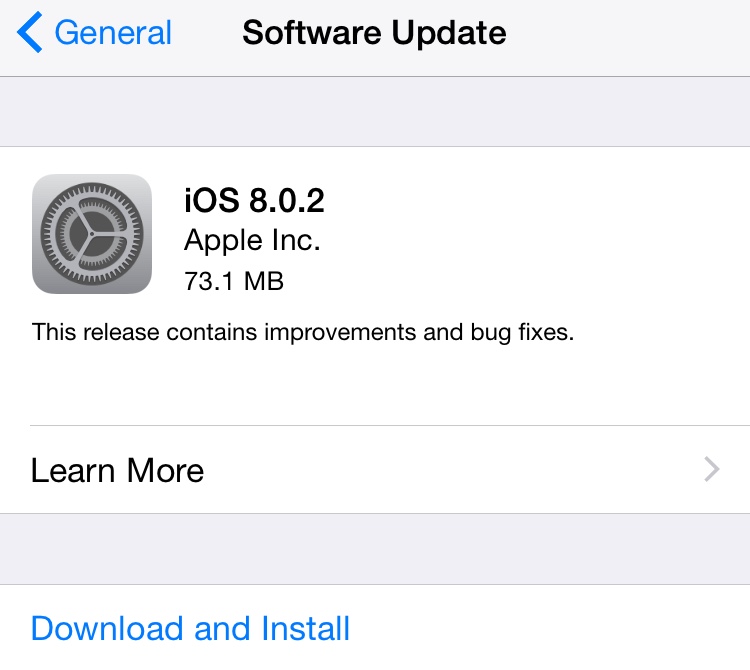
Apple releases iOS 8.0.2 with fix for cellular and Touch ID issues: Apple released iOS 8.0.2 to the public Thursday night, addressing issues that iPhone 6 and iPhone 6 Plus users encountered when updating to iOS 8.0.1, as well as several other improvements and bug fixes.

Apple no longer signing iOS 7.1.2: You can't downgrade anymore.

A rough week for Apple: With fanboys and Apple haters alike putting their own spin on both sides of the bendgate story, I thought I’d put some perspective to all this and share my thoughts on the situation.

Apple responds to bending iPhone concerns: In a quote to the Financial Times, a spokesperson for the company said that only 9 people have complained of the issue since the 6 and 6 Plus went on sale last week.

Apple offers peek at iPhone stress testing process: Apple invited a handful of reporters to visit its iPhone testing facility in Cupertino on Thursday, to offer a peek at where and how it puts its handsets through the paces.

Consumer Reports: new iPhones ‘not as bendy as believed’: Consumer Reports says the new iPhones “aren’t as bendy as believed,” after testing both handsets, alongside other top smartphones.

10 things you shouldn’t do to your iPhone 6: What most people would qualify as good old common sense doesn’t seem to be the case here, so to avoid any kind of confusion, we’ve come up with a list of things you shouldn’t do to your iPhone 6.

iPhone 6 and iPhone 6 Plus smoke competition in benchmarks: The new iPhone 6 and iPhone 6 Plus powered by the Apple-designed A8 processor leave the vast majority of Android competition in the dust in terms of CPU performance and battery life, according to a series of performance benchmarks conducted by the reputable hardware review website AnandTech.

iPhone 6 and 6 Plus beat all smartphones in camera benchmark: Achieving an impressive rating of 82 out of 100, both new iPhones have managed to beat Apple’s chief competitors in the smartphone space.

How the iPhone’s camera has evolved over the years: The folks over at Taptaptap have posted an interesting set of photo comparisons, showing how the iPhone’s camera has evolved over the years.

Video shows side by side speed comparison of all 10 iPhone models: YouTube channel EverythingApplePro posted an interesting video last weekend, showing multiple side by side speed comparison tests of all 10 iPhone models.

A first look at Minuum keyboard for iOS 8: Minuum is a keboard app that can be set as the default thanks to iOS 8. It features an intelligent auto-correct that learns your typing habits, predictive typing for getting to the next word faster, and a keyboard that can be minimized into a single line on the screen.

The best podcast apps for iPhone: Check out our list of the best podcast apps for iPhone and see which one you think is tops.

iOS 8′s battery shaming is a double-edged sword: Oliver fears that Apple’s new naming and shaming tactics will have two undesirable affects.

Wallpapers of last week: Apple logo for iPhone 6: A collection of wallpapers for the larger screen.

Apps of the week: Thank goodness for new apps and games to distract us from a crappy week.

Don't forget to listen to the latest episode of our new podcast, Let's Talk iOS:

Subscribe on iTunes

And of course, make sure to catch up with the new episode of Let's Talk Jailbreak:

Find iDB on Twitter, Facebook, Google+, App.net, YouTube, and in your RSS reader. Also make sure to subscribe to our new podcast!

How to customize or hide contacts shown in the App Switcher

Along with iOS 8, Apple introduced a new feature in the App Switcher that allows you to have quick access to your recently contacted contacts, as well as your favorite contacts. In essence, this is a great feature that can save you time, but it arguably also is a feature that has nothing to do in the App Switcher to begin with. What if you only want to see your favorites in there? Or what if you don't want to see any contact at all in the App Switcher? There is a solution.

In this post, we'll show you how to select what kind of contacts you want to show in the App Switcher (favorites and/or recents) or how to hide these contacts altogether.

Apple releases iOS 8.0.2 with fix for cellular and Touch ID issues

Apple released iOS 8.0.2 to the public Thursday night, addressing issues that iPhone 6 and iPhone 6 Plus users encountered when updating to iOS 8.0.1, as well as several other improvements and bug fixes. The update is available for iPad 2 and newer models, iPhone 4s and newer models, as well as iPod touch 5th generation via an over-the-air update or directly through iTunes.

iOS 8.0.2 fixes a critical issue where iPhone 6 and iPhone 6 Plus users who updated to iOS 8.0.1 on Wednesday lost cellular signal and the ability to use Touch ID. It also addresses a HealthKit bug that prevented apps supporting the new APIs to function properly, as well as several other bugs.

10 things you shouldn’t do to your iPhone 6

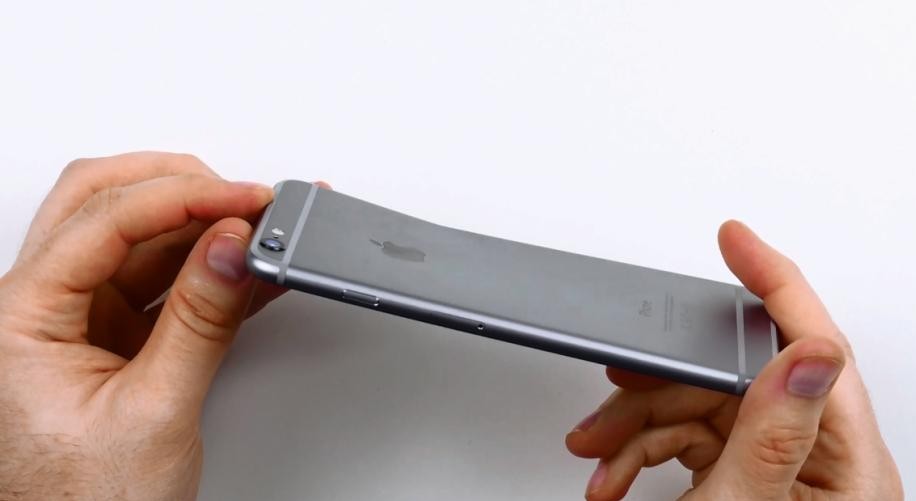
With every new iPhone comes a new controversy, and this year is no exception as the "bendability" of iPhone 6 has already been put to the test, clearly proving that when force and pressure are applied to the device, it will actually bend.  What most people would qualify as good old common sense doesn't seem to be the case here, so to avoid any kind of confusion, we've come up with a list of things you shouldn't do to your iPhone 6.

Apple provides workaround for those affected by iOS 8.0.1, says iOS 8.0.2 will be available in the next few days

Apple issued a support document Wednesday night detailing a "workaround" on how to revert back to iOS 8 for those users that were affected by the release of iOS 8.0.1 earlier in the day, an update which incapacitated iPhone 6 and iPhone 6 Plus devices.

Besides providing instructions on how to downgrade to iOS 8, the company noted that it is "preparing iOS 8.0.2 with a fix for the issue, and will release it as soon as it's ready in the next few days."

A rough week for Apple

Everything started so well for Apple this week. After the launch of the company’s two new devices, iPhone 6 and iPhone 6 Plus, Apple revealed on Monday that this was the most successful iPhone launch ever, with 10 million units being sold during the opening weekend. The only thing that prevented Apple to sell more iPhones during that time was simply that they couldn’t make them fast enough. That’s a nice problem to have.

But then things started turning sour on Tuesday when the first reports of what is now commonly known and referred to as #bendgate emerged online. If the negative press about bendgate wasn’t enough, Apple shot itself in the foot on Wednesday when it released iOS 8.0.1, an update supposed to fix several bugs, but which turned out to be the biggest software release fiasco in modern Apple history.

With fanboys and Apple haters alike putting their own spin on both sides of the story, I thought I’d put some perspective to all this and share my thoughts on the situation.