Sébastien Page

Sebastien is the Founder and Editor in Chief of iDB. Once a BlackBerry user, Sebastien instantly fell in love with the iPhone when it was first announced in 2007. Shortly after, he decided to start sharing his knowledge of the iPhone and its nascent ecosystem, which led to the creation of this blog. Sebastien currently owns 14 iPhones, 4 iPads, a MacBook Pro with Touch Bar, a MacBook Air, 2 Apple Watches, 3 Apple TVs, countless HomePods and AirTags as well as a few pairs of AirPods.

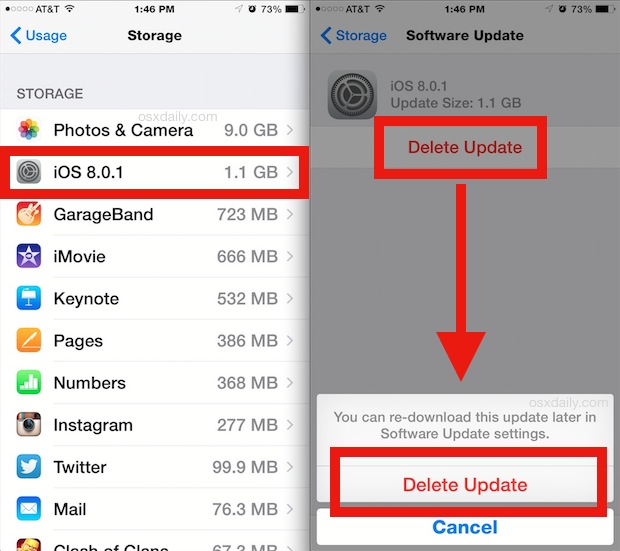
How to delete iOS 8.0.1 update download from your device to avoid accidental installation

Earlier today, Apple released iOS 8.0.1 which was supposed to fix a few bugs, but as users quickly realized, this update did more harm than good as it would disable cellular service and Touch ID on affected devices. We've already published instructions on how to downgrade back to iOS 8 for those users who downloaded and installed the update.

But for those who have only downloaded the update and not installed it yet, there is a way to delete it from your device and make sure you don't accidentally install it.

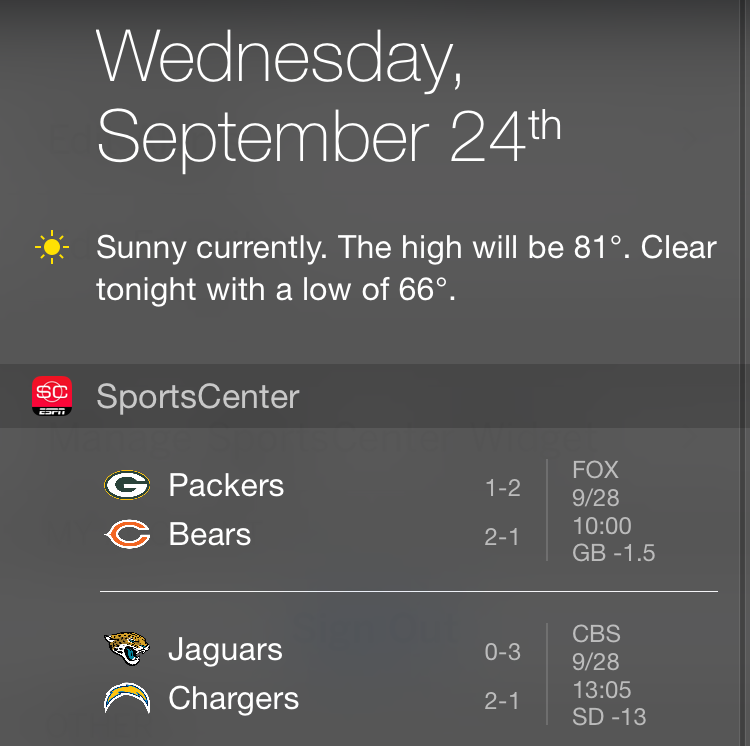
ESPN SportsCenter app update finally brings widgets to Notification Center

Sports fan rejoice, as ESPN has finally updated its SportsCenter app to make good use of Notification Center widgets in the Today tab. The SportsCenter app has been the one Apple used in its marketing materials related to widgets in Notification Center, so it is strange that it took ESPN a week since the release of iOS 8 to actually have this update ready for the public. But who are we to complain, right?

iOS 8 and iPhone 6 launch: everything to remember from this week

Like every Sunday, we get to take a look at some of the most popular posts that were published on iDB during the week that just ended. Whether it is a news item, a new jailbreak tweak, a tutorial, or an app review, we sum it all up in one convenient place for you.

As always, if you like what you're reading, please feel free to spread the love by sharing our posts on your favorite social network.

We're usually hanging out a lot on Twitter and Facebook, more rarely on Google+.

Apple releases iOS 8, now available for iPhone, iPad, and iPod touch: Apple has released iOS 8, the latest version of its mobile operating system, to the public on Wednesday after months of testing by developers.

Download iOS 8: download links for all devices that support iOS 8.

The best new features of iOS 8: to celebrate the release of iOS 8, we proudly present you this detailed overview of more than two dozen new iOS 8 features we think you’re going to fall in love with at first sight.

List of iOS 8 third-party keyboards: A comprehensive list of the keyboard apps that are available for users to download and install on iOS 8 right now.

iOS 8 apps with Notification Center widgets: we’ve compiled an extensive list of apps that support iOS 8′s new Notification Center APIs and are available to download and install on iOS 8.

iOS 8 apps with Touch ID support: we’ve been busy gathering a collection of apps that have introduced support for the new Touch ID API alongside the launch of iOS 8.

Photo apps optimized for iOS 8: we’ve brought together a list of the photo apps that have been updated to support Apple’s PhotoKit and can be downloaded now.

Where did your iOS 8 Camera Roll go? Apple Support Forums are already buzzing with disgruntled users who are venting their frustration with iOS 8 presumably removing some of their photos, a point driven home by the company’s inexplicable removal of the Camera Roll album in iOS 8. We explain everything.

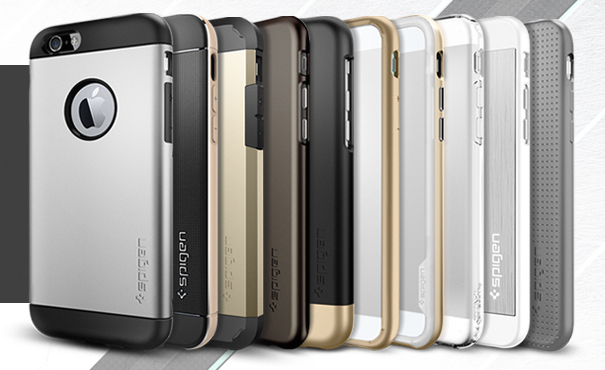
Early iPhone 6 case roundup: a collection of iPhone 6 cases available for sale.

iPhone 6 cases: a look at Spigen’s line up: over the weekend, we put together an early iPhone 6 case round up but it appears Spigen hosts one of the largest order-ready inventories. Inside we take a look of all the cases they have to offer.

Photographer tests iPhone 6 cameras: Teaming up with The Verge, professional photographer Austin Mann put the handsets’ enhanced cameras through the paces on beautiful locations in Iceland. The results are quite impressive.

PanguTeam confirms it’s working on iOS 8 jailbreak: good news for those of you missing out on today’s iOS 8 festivities in order to save your jailbreak, the PanguTeam says it’s on the case.

8 awesome things you can do with Activator: we’ve put together a list of some useful Activator actions/gestures you can set up on your iOS device.

‘AppBuyer’ malware steals Apple IDs and passwords from jailbroken devices: security research firm Palo Alto Networks reported this weekend about a new iOS malware that’s affecting jailbroken devices. It’s called ‘AppBuyer,’ and it’s programmed to steal a user’s Apple ID and password for the purpose of purchasing apps from the App Store.

The best to-do list apps for iPhone: whether you need something simple, or something complex, we’ve got a list for you today of what we think are the best to-do apps for iPhone.

Apps of the week: if you are excited about the new features in iOS 8 that you’ll be able to take advantage of, or just want something fun to pass the time with, we’ve got a list of apps and games we think you’ll enjoy.

iPhone 6 wallpaper packs: The Wallpapers of the Week section is dedicated to bringing stellar images to you on a weekly basis. Step inside for your newest downloads.

Don't forget to listen to the latest episode of our new podcast, Let's Talk iOS:

Subscribe on iTunes

We also recorded a special episode of Let's Talk iOS on iPhone 6 launch day. It's short and to the point:

And of course, make sure to catch up with the new episode of Let's Talk Jailbreak:

Find iDB on Twitter, Facebook, Google+, App.net, YouTube, and in your RSS reader. Also make sure to subscribe to our new podcast!
The survival guide to waiting in line for iPhone 6

We're almost there, folks! After months of rumors, speculations, and leaks from "sources familiar with the matter," iPhone 6 will be launching tomorrow Friday at 8am. For many of us, this is arguably one of the most exciting days of the year. If you have pre-ordered your iPhone 6, then you'll likely be waiting for it from the comfort of your home, or maybe it will just be waiting for you at the door when you come back from work.

But for those of us who haven't pre-ordered and opted to get in line to pick up an iPhone 6, some decisions have to be made, and a game plan has to be drawn. Today, I'll share with you some of the things I've learned from waiting in line for an Apple product several years in a row. This is not rocket science, but it might as well be.

Apple releases iOS 8, now available for iPhone, iPad, and iPod touch

Apple has released iOS 8, the latest version of its mobile operating system, to the public on Wednesday after months of testing by developers.

iOS 8 has been months in the making and was unveiled for the first time in June, at Apple's annual developers conference. Building on the foundations of iOS 7, iOS 8 can be qualified as a more opened version of the operating system, as developers are now able to tap deeper into the software and offer more powerful features to iOS users.

Download iOS 8

After several months of beta testing, Apple has released iOS 8 to the public on September 17, 2014. This update, available over-the-air or via iTunes is a massive upgrade for iPhone, iPad, and iPod touch users.

If you're looking to download a specific version of iOS 8, we've got you covered as we list all versions available for all devices below...

iOS 8 Tips app just got updated with 3 more tips

Apple updated the new iOS 8 Tips app with three more tips earlier today. In this over-the-air update, Apple is now explaining future iOS 8 users how to see when a message was sent, how to use Siri to find out what song is currently playing on the radio or elsewhere, and how to use Family Share. This is the second update to the Tips app since it was introduced in iOS 8 beta 4. The first update happened on August 21.

iPhone 6, Apple Watch, Apple Pay, and more: everything to remember from this week

Like every Sunday, we get to take a look at some of the most popular posts that were published on iDB during the week that just ended. Whether it is a news item, a new jailbreak tweak, a tutorial, or an app review, we sum it all up in one convenient place for you.

As always, if you like what you're reading, please feel free to spread the love by sharing our posts on your favorite social network.

We're usually hanging out a lot on Twitter and Facebook, more rarely on Google+.

This is the iPhone 6 and iPhone 6 Plus with Retina HD display: Putting an end to months of rumors, speculation and analysis, Apple finally showed off its eighth-generation iPhone with higher-resolution 4.7 and 5.5-inch screens, improved cameras, new sensors, a dedicated NFC chip for mobile payments and more.

iPhone 6 pricing, availability and more: Apple’s new iPhone 6 and iPhone 6 Plus will go on sale in the United States on Friday, September 19, and will start at $199 with a standard two year contract.

Apple seeds iOS 8 GM to developers: As expected, Apple has seeded the GM (or Golden Master) version of iOS 8 to developers ahead of its public September 17th release. Registered developers can grab the new beta from either the online dev portal as a standalone download.

iOS 8 wallpapers download: We have the full pack of iOS 8 wallpapers for iPhone and iPad for you to download.

Apple introduces new mobile payment service “Apple Pay”: Apple has been putting together a new mobile payment service. The service involves adding your credit cards to Passbook, and waiving your iPhone in front of what looks like an NFC reader to pay for goods and services in-store.

This is the Apple Watch, Apple’s first foray into wearables: In addition to the new iPhones, Apple’s finally taken the wraps off its highly-anticipated wearable device during the invite-only press event held Tuesday morning at the Flint Center for the Performing Arts in its hometown of Cupertino, California.

iPhone 6 and iPhone 6 Plus photo gallery: Along with our coverage of the event, we collected a fairly large amount of photos of both devices. All these photos are publicly available on Apple.com of course, but we thought we’d bundle them all here in one convenient location.

Hands on with iPhone 6, Apple Pay and Apple Watch: Select journalists were given the chance to go hands on with the aforementioned products after the event today, and have posted videos of their initial reactions. So naturally, we’ve rounded up some of those clips of folks trying out the iPhone 6, Apple Pay and Apple Watch for you.

Everything you need to know about iPhone 6, Apple Pay and Apple Watch: A lot has happened this week, and we understand that it might have been difficult to keep track of everything. So, as usual, we’ve put together this awesome roundup for you of everything important that happened at during the iPhone 6, Apple Pay, and Apple Watch event.

Are you eligible for an iPhone 6 upgrade? Here is how to find out: If you’re not sure what your current eligibility status is, we have a way for you to check if you’re going to be able to pick up the iPhone 6 or iPhone 6 Plus at the subsidized price, or if you’ll have to break that piggy bank you’ve been preciously keeping on your dresser for the past 15 years.

Where to get the most money for your old iPhone: There are a number of ways you can sell your iPhone, whether it is on Ebay, Craiglist, or any number of gadget reseller websites. We’ve got a list of where you can get the most money for your much loved, but now outdated iPhone.

These templates will help you decide which iPhone 6 size is right for you: The idea is for you to print these models out and compare them to other items, and we thought a good point of reference for scale would be the iPhone 5s.

Samsung uses Steve Jobs quote against Apple: ‘no one is going to buy a big phone’: Always eager to respond to Apple’s latest moves swiftly and boldly, Samsung took to Twitter following the iPhone 6/Apple Watch/Apple Pay press conference to share an interesting banner which uses Steve Jobs’s own words as a weapon against Apple.

The best password manager apps for iPhone and iPad: In light of recent hacking antics that have come to light regarding Apple’s iCloud service, we are all much more aware of how important it is to secure our personal data. To help you protect yourself, we’ve got a list of what we think are the best password manager apps for iPhone and iPad.

8 awesome things you can do with Activator: Today, we’ve put together a list of some useful Activator actions/gestures you can set up on your iOS device. This is just the tip of the iceberg because with Activator, you can create an endless combination of gesture controls.

Don't forget to listen to the latest episode of our new podcast, Let's Talk iOS:

Subscribe on iTunes

And of course, make sure to catch up with the new episode of Let's Talk Jailbreak:

Find iDB on Twitter, Facebook, Google+, App.net, YouTube, and in your RSS reader. Also make sure to subscribe to our new podcast!
You don’t have an iPhone 6 yet, but you can already win a case for it [winners announced]

You were barely able to pre-order  your new iPhone 6 Friday morning, but don't stop that from entering our iPhone 6 case giveaway, brought to you by the fine folks over at Spigen. Unlike Apple and the carriers, iDB's servers will most definitely be able to handle the traffic of this special giveaway, so if you have a couple minutes to spare, and want a chance to win a case for your yet-to-be-delivered iPhone 6, you've come to the right place.