Sébastien Page

Sebastien is the Founder and Editor in Chief of iDB. Once a BlackBerry user, Sebastien instantly fell in love with the iPhone when it was first announced in 2007. Shortly after, he decided to start sharing his knowledge of the iPhone and its nascent ecosystem, which led to the creation of this blog. Sebastien currently owns 14 iPhones, 4 iPads, a MacBook Pro with Touch Bar, a MacBook Air, 2 Apple Watches, 3 Apple TVs, countless HomePods and AirTags as well as a few pairs of AirPods.

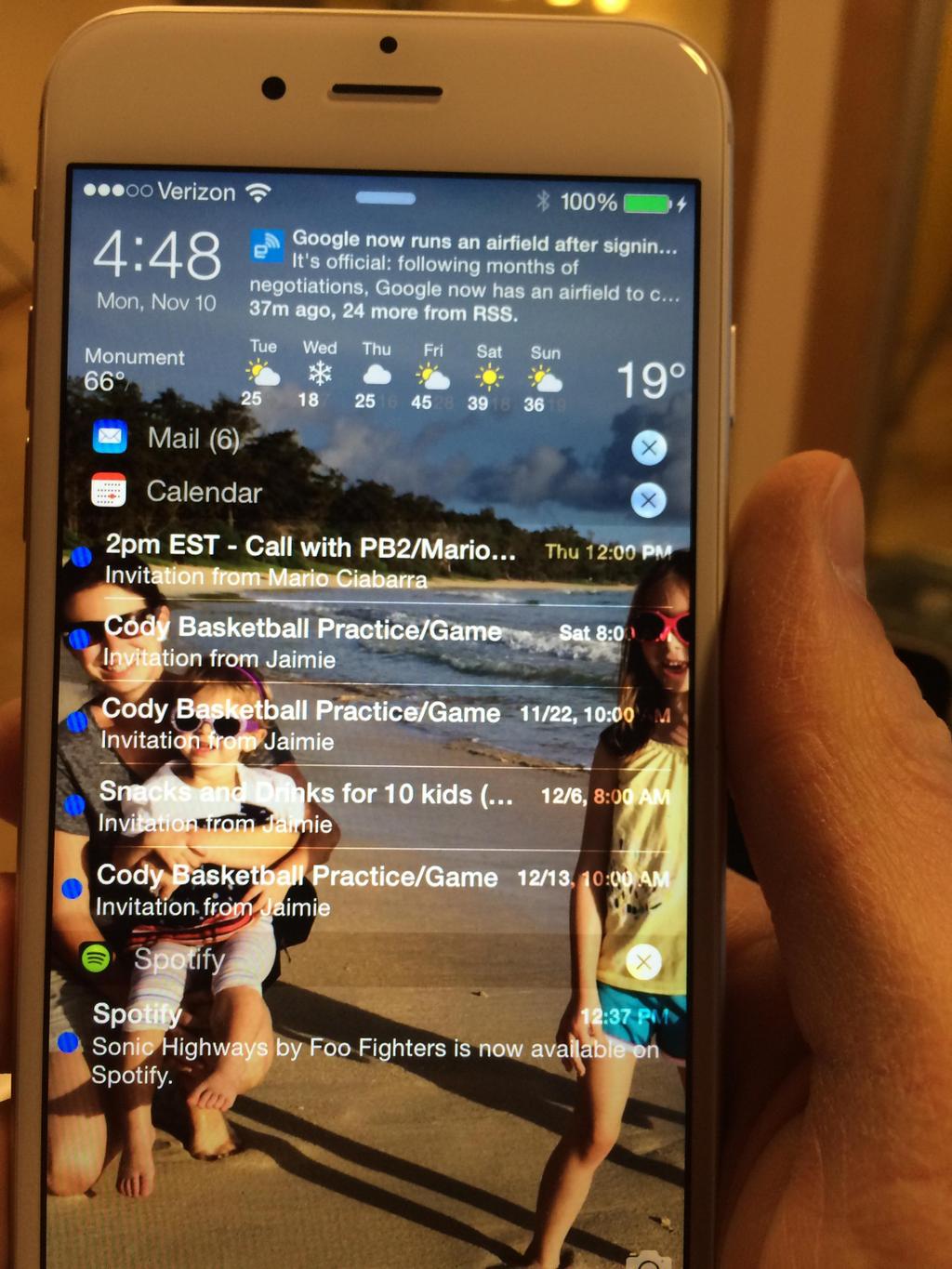
IntelliScreenX 8 teaser

Mario Ciabarra, the man behind IntelliScreenX among others, recently tweeted a photo of an iPhone 6 running ISX8, an updated version of the feature-rich tweak compatible with Apple's latest mobile operating system. While there is no specific ETA for ISX8 to hit Cydia, it appears that the tweak is in late development stage and could potentially be available sooner than later.

30 new and updated jailbreak tweaks worth checking out

With the release of the Pangu jailbreak for both Windows and Mac users, developers have been busy updating their tweaks for iOS 8 and iPhone 6 or 6 Plus, but also releasing new tweaks featuring new features.

Admittedly, we haven't been on top of our game covering all these new updates and releases. The sheer volume of these tweaks makes it very hard to have a proper look at everything that us being pushed to Cydia, but we don't want you to be left out either, so we've compiled a list of tweaks that were recently released or updated.

There are probably some tweaks missing, because again, it's really hard to keep track of everything that makes its way to Cydia, but that should give you a good starting point if you're looking for tweaks to add to your arsenal.

How to jailbreak iOS 8.1 with Pangu for Mac [video]

The Pangu Team released their Pangu utility for Mac earlier today, so Mac users who were waiting for compatibility with their operating system have no excuse to not jailbreak any longer.

In this post, we will show you how to use Pangu for Mac to jailbreak iOS 8.1. This post was created for an iPhone, but note that the steps are exactly identical, no matter what device you want to jailbreak (ie. an iPad or iPod touch). Likewise, any iOS 8 firmware version can be jailbroken using this tool, including iOS 8, and iOS 8.0.2.

Pangu for Mac jailbreak for iOS 8 now available

The Pangu Team has finally released Pangu for Mac, a utility to jailbreak iOS 8 to iOS 8.1 devices on Mac today. The tool comes roughly two weeks after the release of the Windows version of the tool.

The Pangu jailbreak utility has had its fair share of problems since it was released on October 22 but it's now stable enough to be given the green light by no less than saurik, the man behind the Cydia installer.

This week on iDB: the last moments of the iOS 8.1 jailbreak

Like every Sunday, we get to take a look at some of the most popular posts that were published on iDB during the week that just ended. Whether it is a news item, a new jailbreak tweak, a tutorial, or an app review, we sum it all up in one convenient place for you.

As always, if you like what you're reading, please feel free to spread the love by sharing our posts on your favorite social network.

We're usually hanging out a lot on Twitter and Facebook, more rarely on Google+.

Don't forget to listen to the latest episode of our new podcast, Let's Talk iOS:

Subscribe on iTunes

And of course, make sure to catch up with the new episode of Let's Talk Jailbreak:

Mark Zuckerberg explains why you had to download Messenger as a separate app

Facebook took a lot of heat back in July when it disabled messaging from the main Facebook app, forcing users to download the standalone Messenger app if they wanted to keep using the social network to send direct messages to friends and family. To most people, the move went vastly misunderstood, and it didn't help that the company stayed mum about it. At least until now, because in a Q&A session earlier today transcribed by The Verge, Facebook CEO Mark Zuckerberg finally addressed the issue. The reason? It's all about removing friction.

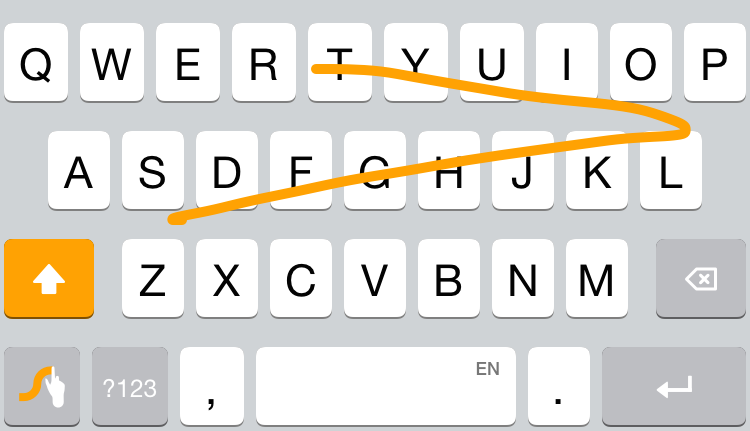
Swype keyboard is temporarily free in the App Store

I have a love/hate relationship with third-party keyboards. On the one hand, they theoretically provide a better way to input text on your iOS device. On the other, I've found them to actually make me waste more time than I would using the stock keyboard. But I'm not giving up yet on keyboards, especially on Swype, which has been my favorite one so far.

Normally priced at $0.99, Swype is currently available for free as Apple's App of the Week in the App Store for a limited time. If you aren't familiar with Swype, check out Lory's first look at the third-party keyboard. Since she published it, the app has also been updated with support for more languages and improved iPad layout, making it an even more solid option.

Neato lets you jot quick notes directly from Notification Center

Neato is a new application that mostly consists of a Notification Center extension that lets you quickly jot down quick notes from anywhere on iOS. After installing the free app from the App Store, simply add the Notification Center extension to start typing in notes from the Lock screen, Home screen, or directly from within an application.

Notes can be synced with Evernote or with Dropbox. Additionally, whatever you type can be easily shared to Twitter, or via email or text message.

iOS 8.1.1 apparently kills Pangu jailbreak

The cat and mouse game between Apple and the jailbreak community is still very much happening, if an unconfirmed message from an apparent member of the Pangu Team is to be believed.

Weibo user Daniel_K4, who is apparently a member of the Pangu Team recently posted that iOS 8.1.1 beta that was released yesterday patches exploits used by the Pangu jailbreak, incapacitating the jailbreak process on devices that will be updated to the latest OS version once it is released to the public.

Let’s Talk iOS 054: Things you don’t want to hear

Episode 54: Sebastien and Cody hold down the fort in Jeff's absence. A discussion about the iPad Air 2, Apple Watch, Apple Pay, and plenty of things you don't want to hear.

Subscribe on iTunes

This episode has no sponsor but you can always support Let's Talk iOS and iDB by downloading our Yosemite Interactive User Guide in the iBooks Store.

How to disable Notification Center and Control Center on the Lock screen

By default, access to Notification Center and Control Center is available system-wide on iOS, meaning that you can access both features from the Lock screen, from the Home screen, and from any app. These two features are very convenient, but can also represent a security or privacy concern. With that in mind, iDB reader Eric asked us this morning on Twitter how to disable both grabbers for Notification and Control Center on the Lock screen. In this post we will show you how to do just that.