Jeff Benjamin

Jeff has been with iDownloadBlog since 2010, acting as resident video specialist, and tutorial expert. He earned his degree in Computer Network Systems back in 2001, but decided Cisco routers and the like just weren’t for him. Since then, he’s been heavily involved with online writing. He’s written for numerous tech and video game sites since the late 1990′s, and has a knack for explaining things in a simple, clear, and concise manner. Jeff works primarily from the east coast on his Retina Macbook Pro, and shoots video with a Canon DSLR. During downtime he likes to travel the world, visiting the various Apple Stores across the globe. You can email him at jeff [at] idownloadblog.com and follow him on Twitter @JeffBenjam or on Google+.

Ask Jeff Episode 02 – That’s the company line

It's been a long time, but we've finally posted a new episode of Ask Jeff for your viewing pleasure. In this episode we discuss features from iOS 6, whether of not it's wise to upgrade to the iOS 6 beta, and various topics surrounding jailbreaking.

We've also decided to do something new this time around — taking questions via phone call. A very interesting discussion resides inside, be sure not to miss it...
Upcoming tweak brings another Mountain Lion inspired Notification Center to iOS

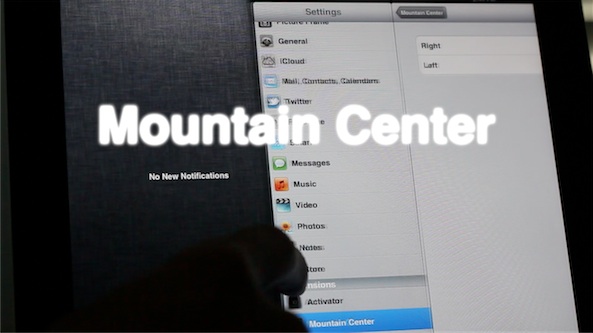
Mountain Center is an upcoming jailbreak tweak that brings an OS X Mountain Lion like Notification Center to iOS. Now if this all seems a bit familiar to you, that's probably because you've seen or read about MountainLionCenter, which performs a similar action.

Oddly enough, it seems that both tweaks were being developed around the same time, completely independent of one another, hence the overlapping of functionality. But there is good news, because the tweaks differ enough to warrant giving them both a separate look.

Mountain Center adds a few options that you won't find in MountainLionCenter, like the ability to invoke Notification Center from either side of the screen, and more. Take a look at our full video walkthrough inside...

Clockify adds a live clock to your Home screen and more

Clockify is a recently released jailbreak tweak that takes the fundamentals of Live Clock, and gives it a modern iOS 5 update. With Clockify you can add a live functioning clock on your Home screen, along with adding world clocks to the Lock screen and Notification Center.

There's a fairly impressive amount of customization to be had with Clockify, as you'll no doubt notice in our hands-on video walkthrough inside...

How to add download percentages to app installs

AppCent is a new jailbreak tweak that adds a percentage value beneath the app currently being installed on your iOS device. It's a very simple tweak, and for smaller sized apps you probably won't derive much value, but it's nice to have for larger apps that take a long time to download.

Although a progress bar indicating your download percentage already exists in iOS, there's something to be said for having actual numerical values that you can see and identify with...

How to install Cydia on iOS 6 beta

Last week a tethered jailbreak was released for iOS 6 running on the iPhone 4, iPhone 3GS, and iPod touch 4th generation. While it was great to have a jailbreak so soon, the jailbreak didn't include any GUI tools like Cydia, only SSH and afc2 support were added.

Fortunately, now that we have SSH access, we can transfer and install pretty much anything on our jailbroken iOS 6 devices, including Cydia.

Check inside for the full video tutorial that shows you how to install Cydia on iOS 6 beta...

BeeKeyboard: customizable Bluetooth keyboard shortcuts are finally coming to iOS

Although I've entertained the idea of using my iPad as a laptop replacement on and off during my tenure with the device, I always end up reneging on the thought. One of the primary reasons for this is the utter lack of keyboard shortcut customization within iOS.

Sure, some apps have minor Bluetooth keyboard interactivity, but those are few and far between. What about the ability to customize a keyboard's shortcut settings for all apps, and for those that do support a measure of keyboard support, how about even deeper customization?

That's where BeeKeyboard comes into the picture. It's an upcoming jailbreak tweak that will allow you to create custom shortcuts and add-ons for specific apps. Finally, the external keyboard just got a lot more powerful on iOS.

How to jailbreak iOS 6 beta with RedSn0w 0.9.13dev1

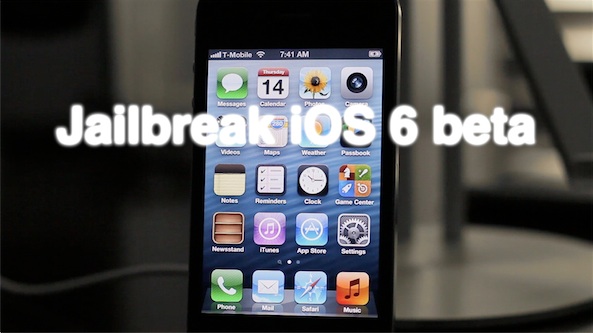
Earlier today, the iPhone Dev Team released RedSn0w 0.9.13dev1 to jailbreak the iOS 6 beta on certain iOS devices. Because this jailbreak is obviously aimed at developers only, the process and the results are a tad bit different that normal.

If you're a developer, and you have an iPhone 4, 3GS, or iPod touch 4th generation running iOS 6 beta, then step inside as we showcase how to jailbreak with this development version of RedSn0w.

RedSn0w 0.9.13dev1 released to jailbreak iOS 6 beta

As promised, the iPhone Dev Team has released RedSn0w 0.9.13dev1 for both Windows and Mac. This latest RedSn0w update is for developers only, as it allows you to perform a tethered jailbreak on iOS 6.

If you're not a legitimate developer, it's advised that you stay away, as there is no Cydia install performed with this jailbreak. The only thing you will have access to is SSH or afc2, which are certainly useful, but you have to know what you're doing.

Check inside for more details, and the download links...

iPhone Dev Team to release iOS 6 developer-only jailbreak

Indeed, there will be a jailbreak for iOS 6 in the very near future, but it might not be what you're expecting. This morning, MuscleNerd announced that the iPhone Dev Team will release an iOS 6 jailbreak "In the spirit of the experimental ecosystem JBers provide".

With that in mind, the team is releasing a developer only jailbreak for iOS 6. This means that you won't have access to a pretty interface like Cydia, but you will be provided with SSH access.

iOS 6: Clock app video walkthrough

[tube]http://www.youtube.com/watch?v=pye0iwkaa_E[/tube]

Finally, the iPad can lay claim to a Clock app of its own. That's right, with iOS 6, comes a new Clock app built from the ground up with the iPad in mind. The first word that might come to your head after initially laying eyes on the Clock app is "beautiful", as it's accented with a level of detail that Apple is famous for.

Included with the Clock app is a world clock capable of storing up to 24 different locations, along with the obligatory alarm, stop watch, and timer functions. Check out our full video walkthrough of the new Clock app for all of the details. Be sure to comment and let us know what you think about it.

iOS 6: Safari video demonstration

[tube]http://www.youtube.com/watch?v=tK2G-uRzNV4[/tube]

Safari doesn't look that different on iOS 6, but underneath the hood you'll find some interesting changes aimed at improving your mobile browsing experience. First of all, there's the ability to browse in full screen mode while in landscape on the iPhone. Secondly, there's the ability to sync tabs across other iOS 6 devices using iCloud. Next up to bat is a new update to Reading List that allows you to read those items while offline.

Take a look at our video demonstration inside that showcases all of these new features and more. Have you found anything in addition to these items? If you do, be sure to let us know in the comments.

MuscleNerd jailbreaks iOS 6 beta

It's true, MuscleNerd has successfully jailbroken iOS 6 on an iPod Touch 4th generation device. Unfortunately, that jailbreak isn't publicly available, and in its current form it's hardly what we'd expect anyway. While it's been technically jailbroken by the defacto leader of the iPhone Dev Team, essential items like Cydia still lack functionality, and it's just a tethered jailbreak.

Hence, it'll probably be a while before we see an official iOS 6 beta jailbreak from the Dev Team. It's just nice to know that they've already started tinkering around with the possibilities...