Jeff Benjamin

Jeff has been with iDownloadBlog since 2010, acting as resident video specialist, and tutorial expert. He earned his degree in Computer Network Systems back in 2001, but decided Cisco routers and the like just weren’t for him. Since then, he’s been heavily involved with online writing. He’s written for numerous tech and video game sites since the late 1990′s, and has a knack for explaining things in a simple, clear, and concise manner. Jeff works primarily from the east coast on his Retina Macbook Pro, and shoots video with a Canon DSLR. During downtime he likes to travel the world, visiting the various Apple Stores across the globe. You can email him at jeff [at] idownloadblog.com and follow him on Twitter @JeffBenjam or on Google+.

Google Chrome coming to iOS today

After many rumors, and much speculation, Google has confirmed that their popular Chrome browser is indeed iOS bound at day two of the Google I/O developers conference. When will we see Chrome come to iOS? Today.

Google Chrome has been developed to support both the iPhone/iPod touch and the iPad. This means that all of your bookmarks and other information synced to your Google ID should automatically be available once your sign into Chrome on iOS.

For Chrome desktop users, this means that our desktop and mobile browsing experiences may finally be in sync with one another. Needless to say, as an avid Chrome user, I'm totally pumped for this.


iOS 6: Shared Photo Streams

Shared Photo Streams is a new feature in iOS 6 that allows you to selectively share photo albums with friends and family of your choosing. Unlike the My Photo Stream feature which is geared only towards individual photo sharing amongst iOS devices and computers owned by you, Shared Photo Streams brings a social element to iOS photography.

The streaming element comes from the fact that you can dynamically add or remove photos from a shared album and they will almost instantaneously appear or disappear on demand. Album viewers can also comment and like your photos, and you will receive push notifications any time someone does so.

Take a look at our full video walkthrough above for a look into how Shared Photo Streaming works.

Hands on with the new Podcasts app

A short while ago, Apple released their official Podcasts app on the App Store. The release wasn't exactly a surprise, as it was rumored to be in the works for some time now.

The new Podcasts app is a free universal download, and serves as a much needed way to manage podcasts. Granted there are other podcast apps available on the App Store, but this is the first time that we've seen something from Apple directly.

Why it took Apple so long to create a podcast management app is anyone's guess. Whatever their reasoning, the bottom line is that it's finally here. Check inside for a full hands on video walkthrough of Apple's new Podcasts app.

RedSn0w 0.9.13dev2 released to fix SSH issues

The iPhone Dev Team quietly released RedSn0w 0.9.13dev2 to address issues with SSH and app crashes that some users were experiencing.

The developer versions of RedSn0w are for developers wishing to jailbreak their iOS 6 beta installations. Since this version of RedSn0w does not install Cydia, SSH access is imperative, hence the fix for the users experiencing difficulties.

How to jailbreak iOS 6 beta 2 with RedSn0w

As you may have guessed, you can jailbreak iOS 6 beta 2 with RedSn0w 0.9.13dev1. This is a tethered jailbreak, and since the iPhone Dev Team has not updated RedSn0w to work with this latest firmware version, you will need to point to the prior beta firmware in order to jailbreak iOS 6 beta 2.

Check inside for the full step by step tutorial to learn how to easily jailbreak your iOS 6 beta 2 installation.

LockSpring adds a respring button to your Lock screen

LockSpring is a free jailbreak tweak that adds a respring button and toggle to your Lock screen. It's an incredibly simple tweak, and chances are you already have the same functionality in another tweak installed on your iDevice. For that reason, most won't see the value in adding a standalone tweak like LockSpring to their repertoire.

On the other hand, if you're looking for a singular tweak that performs a respring function only with no extra fluff, then LockSpring may be worth taking a look at.

Deck HD released on Cydia

[tube]http://www.youtube.com/watch?v=NwWTDyg_saY[/tube]

Deck HD - the iPad version of the popular Deck tweak for the iPhone - has finally made its way to Cydia for download.

A while back we posted a full walkthrough showcasing Deck HD in action. What we found was a tweak that worked just as well as the iPhone version, and in fact felt even better to use due to the extra screen real estate, and exclusive iPad customizations.

Deck HD can be downloaded from Cydia's ModMyi repo for $1.99. If you decide to try it, be sure to share your experience in the comments section.

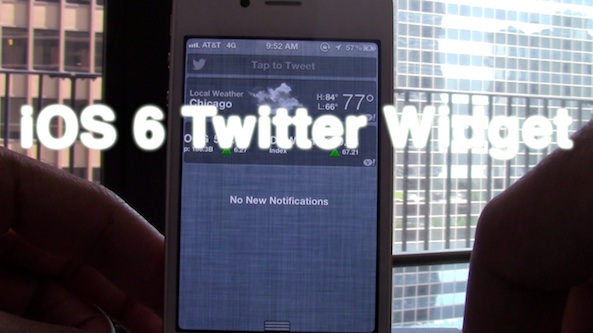
How to add the iOS 6 Twitter Widget to iOS 5

Now that iOS 6 has official built-in widgets for both Twitter and Facebook updates, wouldn't it be nice to be able to replicate those same widgets on iOS 5? Apparently that's the same thought the developer of iOS 6 Twitter Widget had when creating his tweak. This widget, as its name so plainly alludes to, allows you to have an exact replica of the iOS 6 Twitter widget on lesser firmware.

Take a look inside for the full video walkthrough...

MountainCenter now available on Cydia

[tube]http://www.youtube.com/watch?v=cC4BCZycKZM[/tube]

MountainCenter, the jailbreak tweak that brings OS X Mountain Lion's Notification Center to the iPad and iPhone, is now available on Cydia's BigBoss repo for $2.99.

While some may balk at that price point due to another similar tweak — MountainLionCenter — being available free of charge, Mountain Center provides you with more options, and support for devices other than the iPad. Be sure to check out our full walkthrough of MountainCenter for the entire scoop.

Which tweak will you be using? Let us know what you think in the comments section.

How to enable 3D maps on older devices

One of the biggest new features of iOS 6 is the new reinvigorated Maps app, which no longer relies on data from Google. The new Maps app also features turn-by-turn directions, and 3D capabilities.

Sadly, for owners of older devices like the iPhone 4 or the iPhone 3GS, you'll get the new Maps app sans 3D capabilities or turn-by-turn directions. As usual, the jailbreak community has come through with a solution to at least one of the omissions — 3D maps.

Check inside as we walk you through adding 3D maps to your officially unsupported older device...

Quickly shut down your device with QuickPowerDown

Fancy a way to shut down your device in the quickest fashion imaginable? Then you may want to give QuickPowerDown a look.

QuickPowerDown is a jailbreak tweak that allows you to outright bypass the "slide to power off" menu when shutting off your iPhone. Along with that, there is also a settings panel in the Settings app that lets you configure different actions to the power button...

How to add the iOS 6 photos menu to iOS 5

With iOS 6, the iPhone and its brethern gain an all new photo sharing menu interface that includes the likes of Facebook, Twitter, and more. Its interface is much more pleasing to the eye than the current bland sheet based interface used on iOS 5 and below.

Thankfully, you don't have to be a developer to enjoy the new iOS 6 interface, because there is a new jailbreak tweak that mimics the new interface and even provides greater functionality than what iOS 6 users have. Take a look inside as we go hands-on with iOS 6 Photos Menu...