Guest Author

Prevent Accidentally Updating Your iPhone With RecoveryGuard

Have you ever accidentally updated your jailbroken or unlocked iDevice, leaving you without a jailbreak or unlock for weeks or even months? Well, there’s finally a solution to stop accidental updating.

From the creator of MiTime and Pushfix, comes another extremely useful utility! RecoveryGuard is a new tool which prevents accidental upgrade and restore of your iPhone, iPod Touch, and iPad. Check inside for details on how it works...

N.O.V.A 2 Brings Exciting Online Gameplay to the iPhone

N.O.V.A 2 [iTunes Link] is the sequel to Gameloft’s hit game N.O.V.A. This game packs a large punch and offers ramped up graphics, vehicles, more enemies and weapons, and of course, more intelligent A.I.

N.O.V.A 2 offers 12 exciting action packed levels. If for some reason you don’t shoot your gun within 10 seconds of any part of the game then you're probably camping. In addition, each level features gold orbs scattered or hidden and can be used to upgrade your weapons, abilities or health at the end of the level.

Your arsenal consists of a slew of familiar weapons such as assault rifles, shotguns, plasma guns, laser guns and what not. Your space suit lends you some nifty abilities as well, such as slow time, and a weapon that's capable of putting the freeze on your enemies....

Dead Space For the iPhone Will Have You Shaking in Your Space Boots

Dead Space is a new and terrifying sci-fi action game for the iPhone and iPod Touch. Love to scream during horror movies? Then start downloading, because you’re in for a treat.

Based on the console versions of the game, this small screen rendition manages to retain its dark and tense atmosphere, coupled with hardcore gameplay.

The suspense begins from the get-go, but the real terror begins when the lights are out. Grotesque aliens’ aka Necromorph’s will jump out and charge at you from every direction and it’s your job to blow them to kingdom come...

iPhone Dev Team Successfully Ports Untethered Jailbreak Back to 4.1 SHSH Blobs

Late last month, the iPhone Dev Team officially released their jailbreak “backup plan”, which was released because Comex was not able to meet his Christmas ETA. The new jailbreak method, called “Jailbreak Monte” used your saved iOS 4.2b3 SHSH blobs to give your iDevice the first untethered jailbreak on iOS 4.2.1.

The method required you to have an Apple developer account to get a hold of the 4.2 beta 3 IPSW (although the firmware could be pirated, the iPhone Dev Team is strictly against piracy).

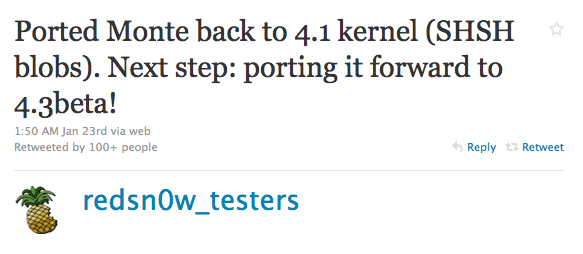
Sunday, via Twitter @MuscleNerd of the iPhone Dev Team announced that the untethered jailbreak Monte has been successfully ported back to the 4.1 kernel (SHSH blobs) for iOS 4.2.1.This means that you will now be able to use your saved iOS 4.1 SHSH blobs to get an untethered jailbreak on iOS 4.2.1...

How to Uninstall Unstable Apps When Cydia Won’t Open

Sometimes we install apps out of curiosity only to discover that they are unstable on our device. In some cases, it's an app developed for a specific iPhone or iPad model. In other cases, the app is only compatible with certain firmware versions. Other times you may have installed conflicting tweaks.

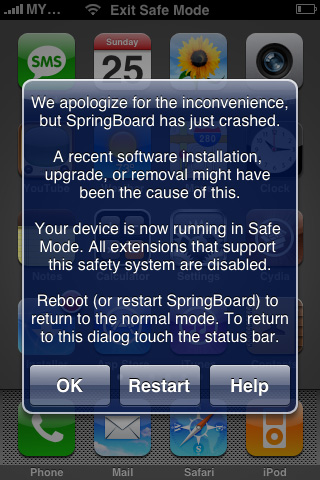
Whatever the reason may be, here is a fix for a constantly crashing Springboard with no way to open Cydia to uninstall unstable apps. If your iPhone boots to the lock screen, but crashes if you do anything beyond that, this guide will help you to remove problematic packages without Cydia.

Isaac Newton’s Gravity Will Bring Even the Smartest Gamers Back to Earth

Isaac Newton's Gravity [iTunes Link] was created by Namco and is an intuitive physics puzzler in which you will need to successfully guide a ball across a board to hit a switch.

Each level will give you different shaped pieces such as cubes or blocks to place on a map. You will select each piece by simply tapping on it and then rotating it in any direction.

Next, drag, drop and place it on the map. Once all of the pieces are set, hit the play button and your ball will roll out and hopefully reach it's destination...

iPhone Game ‘Death Worm’ Makes You Feel Like Bait

Death Worm [iTunes Link] was created by PlayCreek and is perfect for gamers with those midnight munchies for delectable human corpses. A couple months ago I reviewed Super Mega Worm and had so much fun with it that I decided to give Death Worm a round, or in my case many rounds!

Just like Super Mega Worm, you control a worm with only one purpose, to eat or destroy anything that moves.

This game packs a full course meal! First as an appetizer, we have animals such as birds, elephants and more.  Next for your entree you can choose between mindless pedestrians or police officers. Too light? How about Bazooka carrying Soldiers. Also as a side dish you can devour cars, trucks and other land vehicles. Finally for desert, we have a few different helicopters, planes or the ultimate surprise… UFO's!! Still hungry? Well you can choose between 3 different locations!

The Best iPhone Apps For Movie Lovers

As a former film major, I love to get all the details on movies. Fortunately for me, the App Store is full of film-buff apps for the iPhone. Whether you love to watch, rent, buy, organize, or attend movies, there is an app for you.

Below I have compiled a list of my favorite apps with a few words on how they serve film buffs.  Read on to see my favorites...

The Best of AirPlay: Getting the Most From Streaming

It seems that AirPlay, Apple's revamped AirTunes technology, has been catching on and rapidly expanding in the last few months that iOS 4.2.1 has been around. There are now many ways to stream media to and from devices, with functionality mimicking that of the Apple TV (and beyond).

With new solutions emerging on both the desktop and the iPhone, modern technology and innovative development have taken the legwork out of streaming and sharing. Here are the best ways to take advantage of this amazing technology and choose where YOU want to see your content...

How to Use Your iPhone as a Network Drive

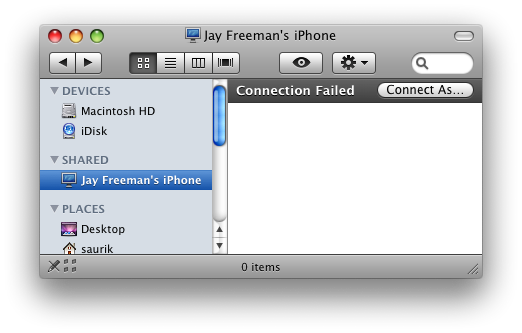
There are plenty of ways to access the files on your iPhone, whether through iTunes, SSH, SFTP, iFile, or a multitude of apps. However, adding automatic network sharing to your setup takes quite a few steps out of connecting to your device.

I tried these in an attempt to get my video game media center to read files on my iPhone from inside the network. If you'd like to turn your iPhone into a shared network drive for any reason, there are two particular Cydia packages that you should try today...

Where is Wi-Fi Sync 2.0 for iPhone?

Back in the fall of 2010, we were promised a beta of the new version of Wi-Fi Sync by December. Here we are in 2011, and still the awesome wireless iTunes syncing app is nowhere to be seen.

In a few recent tweets, the developer has announced that the app is still in development and should be available in two to three weeks. He also mentioned what some of these awesome features are, and from what I can tell, it will definitely be worth the wait...