News

Photos for Mac will sync faces across devices, support printing services & more

Photos for Mac is gaining some interesting new features in macOS High Sierra, which is the official name of the upcoming 10.13 version of the desktop operating system powering Mac computers and notebooks. For starters, the app will now synchronize any named or recognized faces across your devices via iCloud.

Facial recognition has received a boost, thanks to advanced convolutional networks and machine learning. You'll notice a new persistent sidebar within the app, allowing for one-click access to the commonly used features. You also get a new view for all your imports, allowing you to view them in chronological order and so forth.

Speaking of filters, you can now filter your photos and videos by things like your favorites, media type and more. There are also some new editing tools, like support for precise curve-based adjustments of your color, contrast and more. You can now select content areas by color as well.

The app now plays nicer with third-party apps like Pixelmator.

Now when you edit an image in Pixelmator and save the changes, Photos automatically updates the image in its library. Last but not least, Photos for Mac will feature support for additional third-party printing services, allowing users to easily order wall-mounted photo prints and even publish their images using website templates.

Apple did not say when the updated Photos app will release or if it will require macOS High Sierra.

Apple brings APFS to macOS High Sierra

Apple is bringing its renowned Apple Filesystem (APFS) to the macOS platform for the first time with the newly-announced macOS High Sierra operating system for Macs.

APFS first debuted in iOS 10.3 to replace the dated HFS, and the speed improvements were quickly noticed by users.

Music app undergoes major redesign in watchOS 4

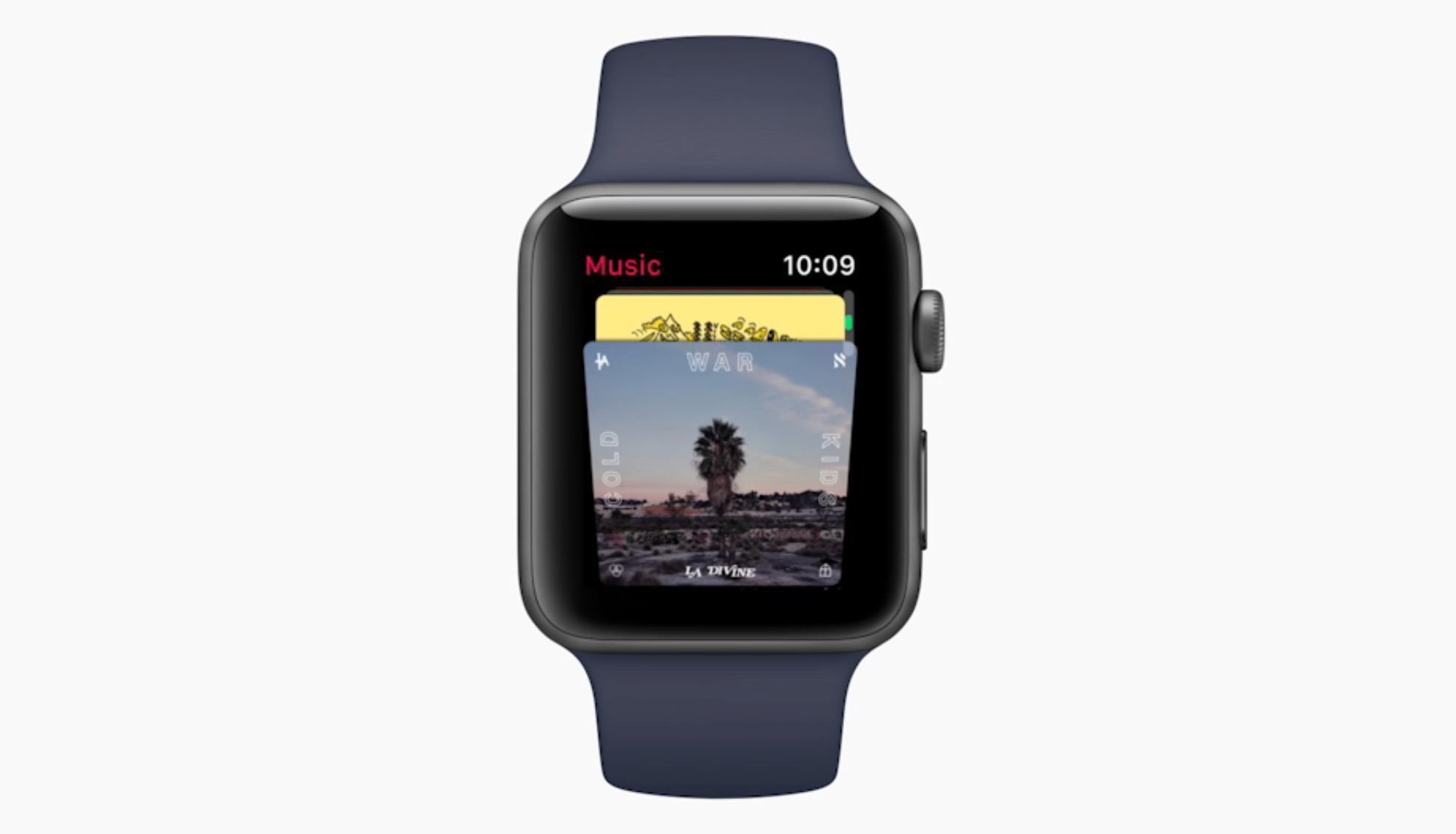
Apple has taken the wraps off the new Music app design on Apple Watch coming this fall. It looks to do away with the sometimes cumbersome, manual iPhone to Apple Watch synchronisation process of playlists, and instead promises automatic syncing based on what you like to listen to on your iPhone.

As a result, your favorite playlists and most frequently played tunes (including My New Music Mix, My Favorites Mix, Heavy Rotation, My Chill Mix) will automatically appear on Apple Watch, furthermore multiple playlists outside of those are going to be permitted as well.

The new design seems to abandon small fonts and lettering in favor of album covers and images where possible, though we have yet to see the full extend to which the app has been overhauled. In any event, the Digital Crown was touted as the go-to button for swift and effective music selection on your wrist.

Workout app gaining support for 2-way gym equipment sync, multiple workouts in a single session & more

Apple's Kevin Lynch, who is in charge of the watchOS software, said at Apple's Worldwide Developers Conference today that the stock Workout app for Apple Watch will be gaining some much-needed new features. For starters, you'll be able to connect your watch with a number of gym equipment in use today.

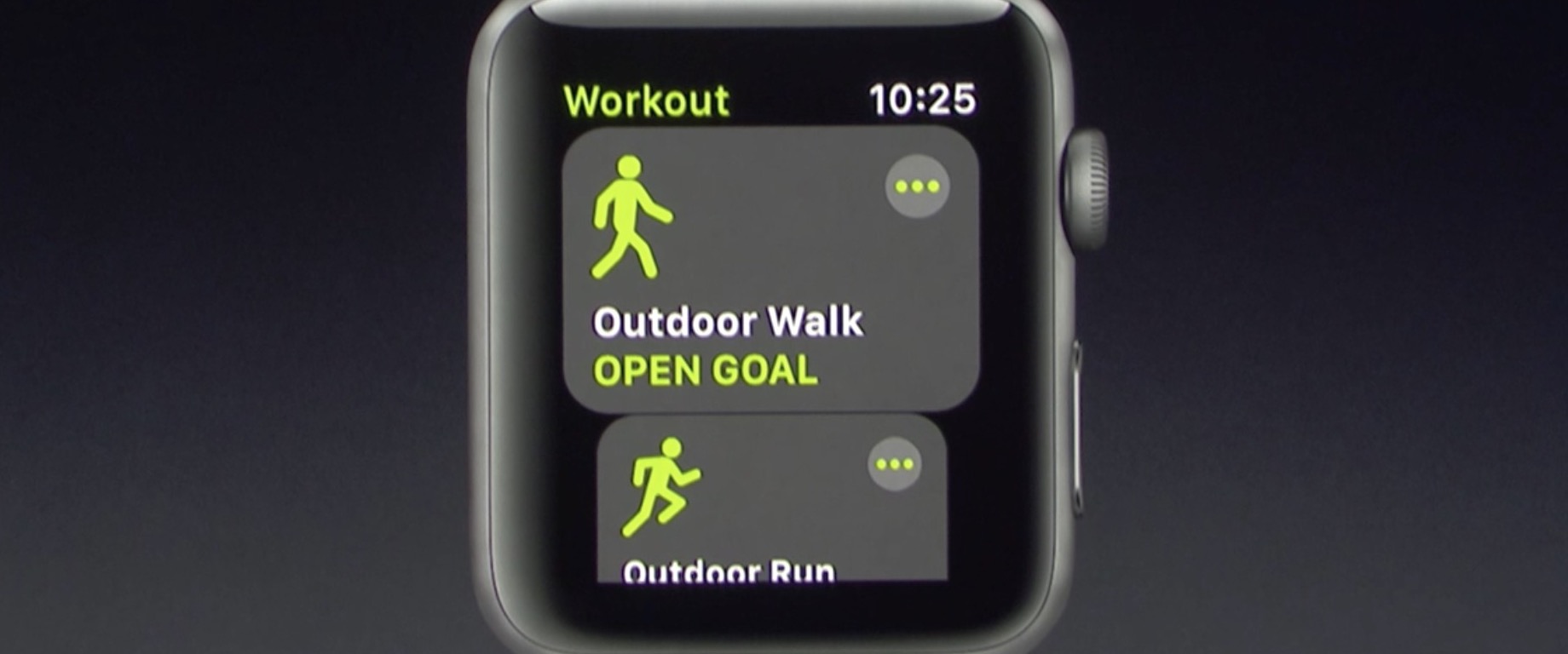
With support for multiple workouts, users can easily start a workout session like an outdoor walk, then switch to another workout such as an outdoor run. Apple is working with major gym equipment manufacturers responsible for about eighty percent of equipment in use in gyms today.

watchOS 4 will feature two-way data change in real-time with supported gym equipment. Your watch will send things like your heart rate to, say, the treadmill machine, while getting info like the distance and pace from the machine.

The user interface for the Workout app has also been reworked to be easier to use, with bolder headings and easier to select workout sessions.

The Pool Swim workout now has auto sets, a feature that automatically marks each set that you’re doing. Calisthenics buffs will be pleased to learn that the Workout app in watchOS 4 will be gaining support for a new workout type: Hight Intensity Interval Training, the most popular workout in the world.

These new features will be part of watchOS 4, which will be released as a developer-only preview later today and this fall for public consumption.

Apple updates TestFlight app with support for iOS 11 beta

Just a few minutes ahead of the keynote presentation at Apple's Worldwide Developers Conference, Apple has updated its TestFlight app with support for iOS 11 beta development.

With the updated app, now at version 1.5.1, developers can now issue beta builds of their apps for testing on iOS 11 devices. AS you know, iOS 11 will be previewed at the conference today and released as a developer-only beta later in the day.

Siri design patent updated to include smart glasses, making hotel reservations & more

Apple's Siri design patent in the European Union and Hong Kong has been updated ahead of today's live-streamed WWDC keynote to also cover “smart glasses” as a category. As noted by PatentlyApple, the patent now lists “smart glasses” under the “remote control for” category.

KGI Securities analyst Ming-Chi Kuo gave the rumored standalone Siri speaker a 70 percent chance of being formally unveiled during the keynote presentation, but he had nothing to say about any kind of Apple-branded smart glasses.

A sketchy report that appeared on Reddit this weekend, attributed to an alleged Foxconn insider, leaked more info about the purported Google Glass-like augmented reality accessory.

Apparently code-named “Project Mirrorshades,” the glasses are said to include polarized or prescription lens with smart optics from German maker Carl Zeiss, noise-cancelling microphones, a light sensor, bone-induction modules, an accelerometer sensor for tracking steps and head movement, magnetometer for navigation, a capacitive panel on one side, a ceramic battery, an Apple-designed chipset and more.

The bone conducting modules would presumable allow for Siri command and hands-free phone calls, among other features. The poster mentions there's a 65 percent chance that the project is cancelled so take the report with a pinch of salt.

Another new entry covers making hotel reservations. Siri can currently make a reservation at a restaurant, but not a hotel. The Cupertino technology giant is expected to announce plans today to make Siri work with a larger variety of apps, Reuters reported yesterday.

The updated patent is no guarantee that Siri could be used to control the rumored smart glasses or that Apple's voice assistant could play a major role in its augmented reality plans.

All shall be revealed in less than an hour and a half.

Any predictions?

WWDC 2017 attendees receive custom Levi’s trucker jacket and collectible Apple-themed pins

Apple's annual developers conference is set to kick off with a live-streamed keynote at 10am Pacific Time and several developers have now shared images of the swag they've received at this year's conference. As reported by AppleInsider and MacRumors, the company is giving out custom Levi's jean jacket and an assortment of collectible Apple-themed pins.

The black jacket, provided in sizes for both men and women, is embellished with a custom WWDC17 logo and has two interior pockets that Twitter users reported being large enough to fit an iPhone 7 Plus. To add to the WWDC swag, Apple is also including some sweet pin packs, plus a personalized pin for each developer to signify their home country.

Some of the designs for these collectible pins include the vintage rainbow-themed Apple logo, the Swift logo, the “hello” Mac greeting, the original Macintosh image, the Metal logo and an emoji with sunglasses. Separate pin collections are available, too, featuring a thumbs up emoji, an iMessage heart bubble, Activity rings and more.

https://twitter.com/_dskuza/status/871487325380812800

WWDC Scholarship attendees are receiving Apple TV development kits, too.

Apple is also promoting the conference with a custom WWDC-themed Snapchat geofilter that appears for users who are near San Jose's McEnery Convention Center.

A set of WWDC-branded stickers for iMessage is available via the official WWDC app.

Apple's online store is currently down ahead of the keynote, indicating some form of new or refreshed hardware announcement is likely.

Apple promoting WWDC 2017 with themed Snapchat geofilters

With the live-streamed WWDC keynote almost upon us, Apple has now created a bespoke Snapchat geofilter to help promote this year's developers conference. The sponsored WWDC 2017-themed geofilter automatically appears for Snapchat users who find themselves near the McEnery Convention Center in San Jose.

As first noted by 9to5Mac, the filter is available when sharing photos or videos with other Snapchat users. Simply choose it from the list of Snapchat filters to have Apple's official WWDC 2017 banner design applied to your item. Again, this is a filter that uses geofencing so only people attending this year's developer conference will see it in Snapchat.

The same stickers can be found in iMessage via Apple's official WWDC app, as shown above.

Snapchat is available at no charge from App Store.

Apple’s Activity app could be removable in iOS 11

Aside from spotting interesting references to a drag-and-drop feature for iPad and an all-new dedicated Files app, developer Troughton-Smith also noticed a placeholder listing for Apple's stock Activity app on App Store.

This is the first time the app has appeared as a downloadable item on App Store, suggesting Activity could be removable in iOS 11. The listing has since been removed from App Store.

No additional screenshots, descriptions or other information were provided.

Introduced as part of the iOS 9 update two years ago, the Activity app is one of the few stock apps that cannot be hidden from a user's Home screen. Check out Apple's support document for the full list of built-in iPhone and iPad apps that can be removed from the Home screen.

The Activity app only appears on the Home screen if a paired Apple Watch is present. Apple could be making Activity a downloadable item so that non-watch users could optionally download it and fill their Activity rings with other fitness tracking devices.

Apple Store goes offline ahead of possible new hardware at WWDC

Like clockwork, Apple takes its online store offline ahead of any major new production introductions. Today's live-streamed WWDC keynote is no exception: with just a few hours left until the keynote presentation begins, Apple Online Stores around the world have gone offline with a message saying “We'll be back. We're busy updating the Apple Store for you. Please check back soon”.

The rumor-mill, Apple analysts and pundits have been saying that the iPhone maker will unveil some new hardware products at WWDC, which is normally a software-centric event.

Some of the gadgets that could be formally introduced at WWDC include a dedicated Siri speaker, a new 10.5-inch iPad Pro model,  as well as refreshed MacBook, MacBook Air and MacBook Pro notebooks with Intel's Kaby Lake chips and updated system architecture.

Though Apple's been criticized for its seeming inability to update store listings without taking the whole web store down, risking losing potential sales, this is now more of a marketing vehicle designed to drum up excitement ahead of major events than it is a technical issue.

References to drag and drop on iPad spotted in Apple Feedback app ahead of iOS 11 reveal

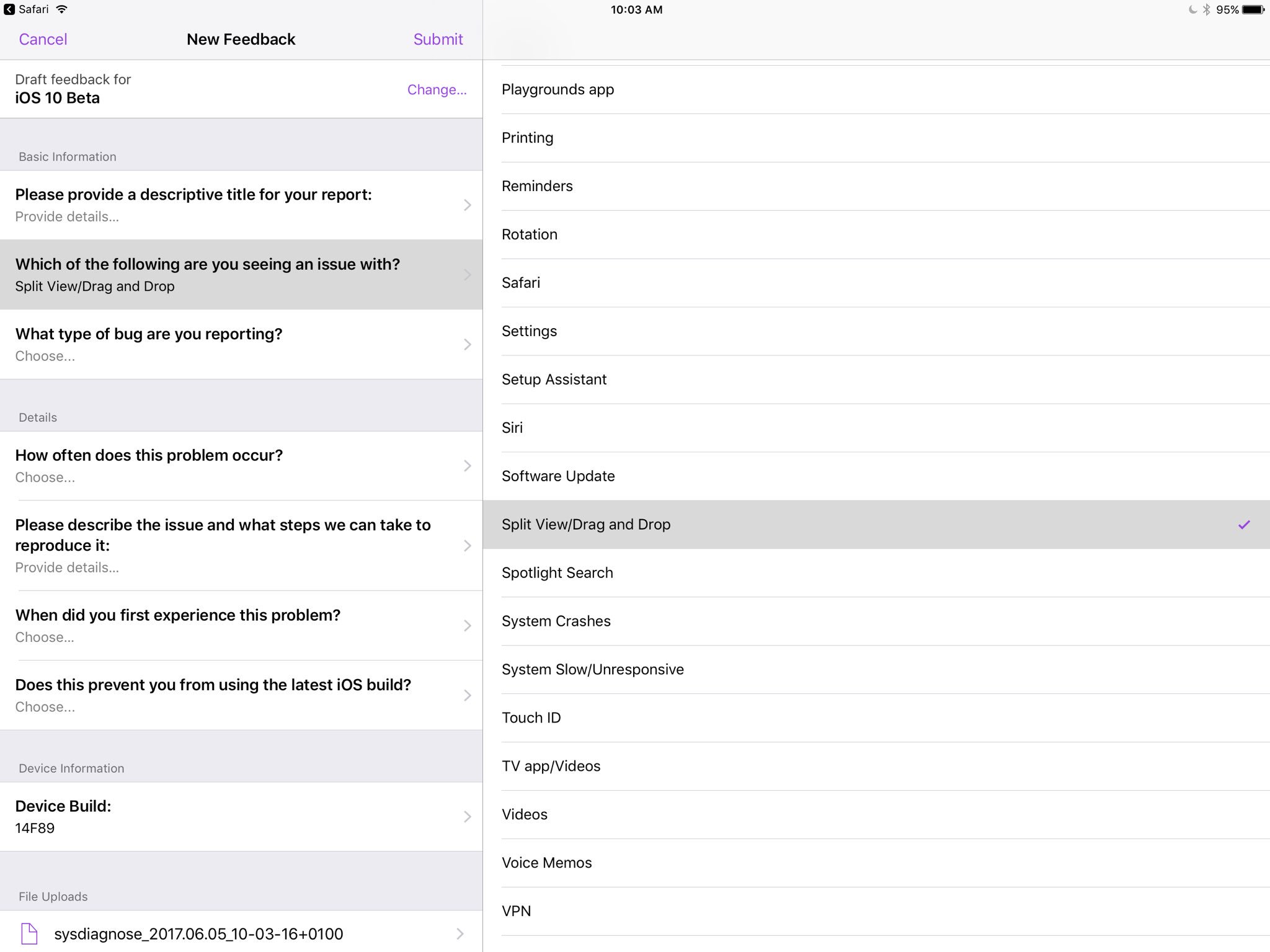
Apple's own Feedback app, that iOS beta testers use for reporting bugs, contains references to a drag and drop feature, as first spotted by developer Steven Troughton-Smith this morning.

An entry labeled “Split View/Drag and Drop” now appears in the list of preset options when filing a bug using the Feedback app. iOS, of course, lacks any drag and drop features that would admittedly be tremendously useful, especially in Split View mode.

That said, it's unclear that the Cupertino technology giant will formally announce drag and drop functionality in iOS 11 during today's live-streamed WWDC keynote.

Ukrainian developer Readdle's popular iOS apps were updated last week with the ability to drag and drop content between them in iOS's Split View multitasking mode on iPad, providing an early preview of how Apple's version of system-wide drag-and-drop might work in iOS 11.

https://www.youtube.com/watch?v=epzh9-rd-AI

MacStories editor Federico Vittici and his team painstakingly created some awesome iOS 11 productivity concepts, imagining new productivity features for iPad. Among them is—you guessed right—drag and drop functionality. “Because drag-and-drop would be fully multitouch-enabled, it wouldn’t block the iOS interface,” Vittici explained.

https://www.youtube.com/watch?v=UyFUDQ5LLZw

“Another finger could be used to navigate in a different 'drop area' of an app, or a user could keep dragging until the Split View app picker is shown and drop an item onto an app’s icon, opening a contextual action menu.”

Late Sunday, Troughton-Smith discovered a placeholder listing for Apple's unreleased Files app on App Store. It's since been removed and no screenshots or official descriptions were provided, but we do know it's going to require iOS 11 and 64-bit support.