Mac

Stay up-to-date on the latest Mac news, and tutorials. Get expert tips and tricks to optimize your Mac’s performance and learn about the latest Apple products and software updates. Discover the best Mac apps and accessories to enhance your user experience.

Safari 10.1.1 for Mac fixes yet another instance of address bar spoofing

Safari 10.1.1, pushed out as part of today's minor macOS Sierra 10.12.5 software update, fixes yet another instance of address bar spoofing. This is good news because the browser can now protect you from phishing attacks that would typically attempt to fool you into believing you were visiting a genuine website rather than a maliciously crafted webpage.

According to the company's security document, the software fixes a flaw where visiting a malicious website may lead to address bar spoofing. “An inconsistent user interface issue was addressed with improved state management,” states Apple.

Even folks who are extremely mindful of phishing are susceptible to address bar spoofing.

The sophistication of today's phishing attacks came to light when Chinese security researcher Xudong Zheng demonstrated how easily users could be fooled into visiting a fake website that seemingly shows the correct URL in the address bar.

To protect yourself from such attacks in the future, manually type in the URL of the website you want to visit or choose your favorite website from Safari's Bookmarks menu. Of course, you should avoid clicking any suspicious links in an email message, even if they appear to originate from a contact you personally know.

The patched vulnerability was discovered in Safari for macOS, not for iOS.

Apple credits Zhiyang Zeng and Yuyang Zhou of Tencent Security Platform Department with the discovery of the vulnerability CVE-2017-2500 and Zhiyang Zeng of Tencent Security Platform Department with the discovery of the vulnerability CVE-2017-2511.

Moreover, Safari 10.1.1 fixed an issue in Safari's history menu that could lead to an application denial of service after visiting a maliciously crafted webpage. The issue was addressed through improved memory handling.

Lastly, Safari 10.1.1 also includes patches for as many as seven vulnerabilities that were discovered in the WebKit rendering engine, five of which dealing with universal cross site scripting, while fixing an issue with WebKit's Web Inspector where an app could execute unsigned code.

Safari 10.1.1 is available for OS X Yosemite 10.10.5, OS X El Capitan 10.11.6 and macOS Sierra 10.12.5. Apple also released a minor update to iTunes for Mac and Windows today.

iTunes 12.6.1 contains unspecified app and performance improvements and a fix for a WebKit exploit on Windows 7 and later which could result in arbitrary code execution after processing maliciously crafted web content.

iTunes 12.6.1 with minor app and performance improvements now available

Alongside public releases of the iOS 10.3.2, watchOS 3.2.2, tvOS 10.2.1 and macOS Sierra 10.12.5 software updates for iPhone, iPad, iPod touch, Mac, Apple Watch and Apple TV, Apple earlier this morning also posted a minor update to iTunes for Mac and Windows PCs.

iTunes 12.6.1 contains only minor app and performance improvements, according to Apple's release notes.

A security document reveals that the app fixes a WebKit exploit on Windows 7 and later which may allow arbitrary code execution after processing maliciously crafted web content.

“Multiple memory corruption issues were addressed with improved memory handling,” Apple states. The vulnerability was discovered by the user “lokihardt” of Google Project Zero.

Satechi’s new hub gives your MacBook Pro ports for USB, 4K HDMI, SD/microSD & more

Popular Apple accessory maker Satechi today launched a sleek and compact hub that adds a bunch of missing ports to your MacBook Pro (late-2016 model), including two USB 3.0 ports (so you can charge your iOS devices without having to purchase a new cable), an HDMI port with support for 4K video output, a pair of SD/microSD memory card readers and more.

The hub has two Thunderbolt 3 dongles that take up both USB-C ports of the new MacBook Pros with Touch Bar (don't worry, you also have an additional passthrough Thunderbolt 3 port).

Here's a quick overview of all the ports on this hub:

Thunderbolt 3 (1x)—Data transfer speeds up to 40 Gb/s are supported. In addition, the port supports a single 5K display or two 4K external displays at 60Hz with passthrough charging for 13 (61W) and 15-inch (87W) MacBook Pro models HDMI (1x)—Video output in 1080p at 60Hz or 4K at 30Hz is supported USB 3.0 (2x) and USB-C (1x)—Transfer speeds of up to 5 GB/s are supported SD/microSD (1x)—Transfer speeds of up to 104 MB/s are supported

And now, watch Satechi's promotional video for the device.

https://www.youtube.com/watch?v=sTq9PorggHY

Priced at $100, the aluminum-clad Type-C Pro Hub is compatible with both Touch Bar and non-Touch bar MacBook Pro models. As a bonus, Satechi is offering these in two finishes, Silver and Space Gray, to complement your notebook.

You can buy the new Type-C Pro Hub starting today on Amazon..

Pagico 8.7 helps you make better plans and actually stick to them [sponsored]

If you haven't heard about Pagico before, it's a productivity app that allows individuals and team members to easily manage all their tasks, files and notes across iPhone, iPad, Mac, Windows, Ubuntu and Android devices.

With Pagico, you can organize everything related to your projects in one place, stay informed with handy flowcharts, access data anywhere, manage your day, visualize workloads, cross-link everything, organize stuff into collections, collaborate and much more.

Now bumped to version 8.7, the app sports some interesting new features designed to help you be more productive and stay on track with support for sub-containers, enhanced container duplication features, smart filters, teammate filters, improved email handling and printing, plus a lot more.

Developer MacPaw launches in-office exhibit of vintage Macs in Ukraine

Ukrainian developer MacPaw has put vintage Apple hardware on display at the company's office in Kyiv “to inspire techies and kids.” The 40-piece Apple hardware museum was formerly hosted in the very heart of New York City by Tekserve, a long-running Apple service shop.

In June 2016, Tekserve announced it was closing its Manhattan store after 29 years of service. “We love our customers, and we love what we do,” Tekserve CEO Jerry Gepner said when the closure was announced. “But there comes a point where that doesn't make sense anymore, as much as we love it.”

Their wonderful collection of vintage Mac hardware was auctioned off in August 2016. Developer MacPaw purchased the entire collection of 39 Mac computers for a cool $47,000 and gave it a permanent new home at its Ukrainian headquarters.

“We think there’s hardly a better place for historical Apple computers than our futuristic Apple-inspired office,” said MacPaw.

Check out the video tour of the museum, embedded below.

https://www.youtube.com/watch?v=W7BNPZdt1qU

The collection includes original Mac models dated from 1981 to 2017.

Here are some of the items on display:

128K Macintosh signed by Steve Wozniak NeXT Cube 20th Anniversary Mac Original iMac 1994 iBook PowerMac G4 Powerbook G4 Aluminum iBook Twelve-inch Powerbook eMac iMac G5 Powerbook G3 All iPhone models

There are a few non-Mac items, too, such as the “Iconic” book (an illustrated edition of Apple Design History), Apple's “Think different” poster collection, the official book “Designed by Apple in California”, plus a couple of WWDC relics.

According to MacPaw:

As the Tekserve shop grew and became a landmark Apple dealer, the team found themselves surrounded by beautiful Macs of all kinds. In twenty years they decided to turn the best of them, groundbreaking models, as they put it, into a museum-like exhibition. And later, when the shop was shutting down, an Apple Lisa, an alien Nextstation Turbo machine, and the rest of the grand collection had to find a new home on an auction.

The prospects looked pretty grim, because a collection like that had a high chance of ending up in some millionaire’s basement. Luckily, MacPaw’s CEO Olexandr Kosovan heard about the auction and made an instant decision. He secretly bought all of the iconic Macintosh computers before the collection was taken apart and sold piece by piece.

The museum currently has 70 items, including the 40 items from the Tekserve collection and the first Apple Keeynoard with the help of which the code of CleanMyMac Classic was written by Kosovan himself when he was starting MacPaw back in 2008.

Oleksandr Kosovan, MacPaw CEO and Founder said:

Apple changed my life in many ways. Driven by Steve’s vision for better and simpler products I was able to implement these ideas in our products development. I cannot say thank Apple enough other than paying this great tribute to the history of iconic Apple products.

Developers are planning on adding the few missing models to complete the collection (they welcome classic computer and hardware donations).

As an in-office exhibit, this museum is not open to the general public.

MacPaw are the developers of proven and successful macOS apps, including CleanMyMac, Gemini and the Setapp service billed as “the Netflix of Mac apps.”

Additional photos are available at the MacPaw website.

Microsoft launches Visual Studio for Mac

Software giant Microsoft today released Visual Studio for Mac, its integrated development environment that contains all the tools you need to develop apps and games for the macOS, iOS, tvOS, watchOS, web, cloud and Android platforms. Previously, Mac owners who wanted to use Microsoft's development tools needed a Windows computer or a virtual machine.

Available at no charge via visualstudio.com, Visual Studio for Mac lets you code, debug and diagnose your apps, use version control, collaborate efficiently with other programmers and much more. The Windows maker released a preview of Visual Studio for Mac last November.

“Developers get a great IDE and a single environment to not only work on end-to-end solutions—from mobile and web apps to games—but also to integrate with and deploy to Azure,” said Scott Guthrie, executive vice president of the Microsoft Cloud and Enterprise group.

“Whether you use C#, F#, .NET Core, ASP.NET Core, Xamarin or Unity, you’ll get a best-in-class development environment, natively designed for the Mac.”

As a new member of the Visual Studio family, the integrated development environment allows developers on macOS to build apps for mobile, web, and cloud with Xamarin and .NET Core, as well as games with Unity.

Key highlights include:

Designed natively for Mac—Visual Studio for Mac brings the developer productivity you love to macOS. The experience has been meticulously crafted to optimize the developer workflow for Mac. Collaborate efficiently—Manage your code in Git repos, hosted by any provider, including GitHub and Visual Studio Team Services. Share projects seamlessly with developers using Visual Studio across Windows and Mac. Deliver quality mobile apps—With Xamarin’s advanced debugging, profiling tools, unit tests, and UI test generation features, it’s faster and easier than ever for you to build, connect, and tune native mobile apps for Android, iOS, and macOS. Launch modern web apps—With support for ASP.NET Core in Visual Studio for Mac, you are empowered to create beautiful, modern web applications. Craft the front-end with the same web editor experience you know and love from Visual Studio and Windows and publish to the cloud directly from the IDE. Create intelligent services—Visual Studio for Mac enables the creation of .NET Core solutions, providing the back-end services to your client solutions. Code, debug, and test these cloud services simultaneously with your client solutions for increased productivity. Build cross-platform games—Using Unity and Visual Studio for Mac, you can create awesome games that run on any platform. Use the powerful coding, refactoring, and debugging features in Visual Studio for Mac to enhance your productivity.

System requirements are available in a support document on the Visual Studio website.

Microsoft says the software contains support for Voice Over. Many parts of the user interface, including the editor and solution explorer, have been made accessible through Apple's assistive technologies.

The software released ahead of Microsoft’s Build 2017 developer conference, which kicks off later this week. In 2105, the company launched Visual Studio Code, its free of charge cross-platform code editor for developers.

PDF Expert 6 for iOS is out with revamped look, enhanced search, new editing tools & more

Readdle, a prolific Ukrainian developer of fine productivity software for iOS and macOS, today pushed a major new version of its fast, robust and beautiful PDF editor, called PDF Expert.

Aside from an overhauled interface which allows you to navigate your documents in a most effective way, PDF Expert 6.0 for iPhone and iPad includes a brand new experience when adding and managing files and built-in editing tools for those times when you're required to edit that contract, update presentation slides or change the invoice logo while on the go.

PDF Expert for iPhone and iPad

“You make fewer taps in order to edit, zip, tag, move or sync files,” developers noted, adding that “bigger file preview thumbnails give you a better idea of the content of that Excel spreadsheet or PowerPoint presentation.”

Aside from the usual features, PDF Expert 6.0 now allows users to edit and modify text and images in their PDFs, as well as add links, redact information and more.

But first, watch the promotional video below.

https://www.youtube.com/watch?v=_Jrg8txgDVo

The new editing tools in the iOS app let you:

Edit and modify PDF text Add and replace images Add links to text and pictures Hide sensitive information using Redact feature

For those who work in the cloud, the app now allows you to edit, annotate or sign documents in your Dropbox or any other supported cloud storage service without needing to download the document locally—all your edits are now saved directly in the cloud version of the document.

With PDF Expert 6.0, PDF documents that contains sensitive data can be finally protected with a password. Lastly, the iOS app now lets you edit outlines to help structure data in huge documents and provides an enhanced search feature with the ability to search for a word or a document across multiple documents and file types.

PDF Expert for Mac

The Mac app was refreshed with enhanced navigation, faster search and other updates back in March 2017, here are your key highlights. To make the editing process even easier, the Mac app automatically detects the font, size and opacity of the original text.

This is very useful because no longer do you have to adjust the formatting after every single edit. “Now, you can edit PDF text and images, add links, work directly from the cloud without downloading files and much more,” Readdle noted.

The improved search is smarter and quicker than before. Perhaps more important than that, you can save all relevant discoveries into your search history to easily find them in the future.

Lastly, you'll notice the all-new toolbar layout with several page layout templates and the ability to customize your reading experience in macOS's Split View multitasking mode. Whether you’re comparing contracts or reading an article, you can now bring up the new rendering options to choose the most convenient layout to quickly accomplish your task.

The new editing tools in PDF Expert 6.0 for iOS require a one-time $9.99 In-App Purchase. All the other new features are free for existing users of the iPhone and iPad app.

New users can grab PDF Expert for iOS on App Store in exchange for $9.99.

PDF Expert for macOS is available for $60 via Mac App Store.

A free trial is available via the official PDF Expert website.

How to open your iTunes playlists in separate windows

In older versions of iTunes, you could easily open a playlist in a separate window. It was both a great time-saver and a boon to your productivity, especially on large screens.

For reasons unknown, Apple has removed that functionality from the iTunes 12 update which was overhauled around a single-window workflow.

Thankfully, the company has reinstated the ability to open playlists in new windows with iTunes 12.6. Here's how to open your playlists in their separate windows using iTunes for Mac.

How to open your playlist in a new iTunes window

1) Launch iTunes on your Mac.

2) Choose Music from the menu near the upper-left corner, then click the Library tab.

3) In the lefthand column, right-click or Control (⌃)-click your playlist underneath the All Playlists heading, then select the option Open In New Window from the popup menu.

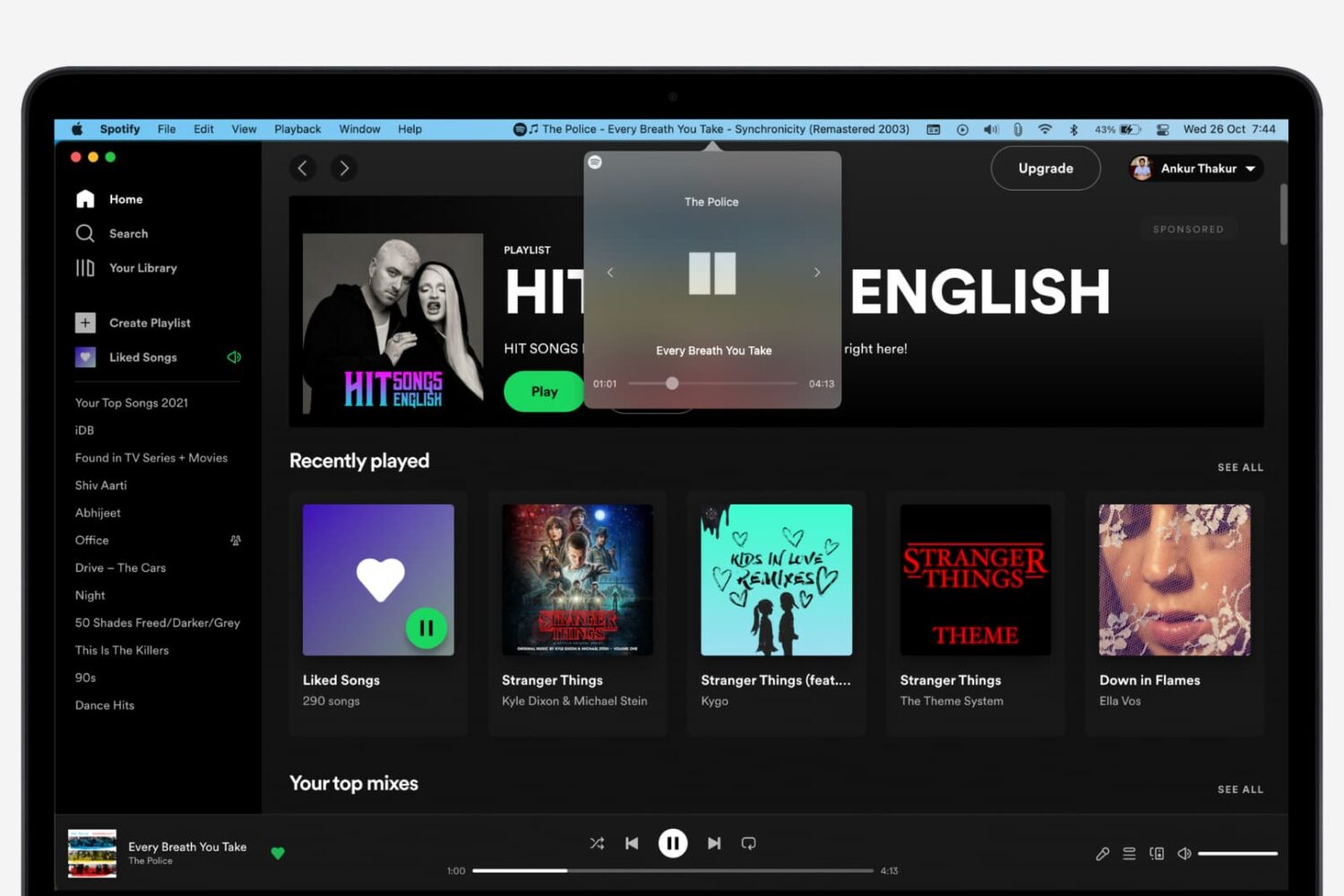
This will open a new iTunes window containing the selected playlist, as shown top of post.

You can drag songs at will between the playlist windows and open as many playlists in separate windows as you like. I don't have that many playlists created in iTunes so I was able to open “only” four playlist windows, but it worked like a charm.

How to open an Apple Music playlist in a new window

Playlists on Apple Music cannot be opened in their separate windows unless they're in your iTunes library. To do so, follow the steps below:

1) Launch iTunes on your Mac.

2) Choose Music from the popup menu near the upper-left corner of the window, then click either the Library or the For You tab.

3) Find a playlist on Apple Music and click the three dots in the lower-right corner of playlist graphics to bring up the contextual menu, then choose the option Add to Library.

4) With the selected Apple Music playlist now in your iTunes library, switch to the Library tab, right-click it underneath the Apple Music Playlists heading in the lefthand column, then select the Open in New Window command.

Just like that, the selected Apple Music playlist from your library opens in a new window.

iTunes playlists windows and Split View

Sadly, playlists windows in iTunes don't support macOS's useful Split View feature.

If iTunes supported Split View properly, it could have been a great multitasking feature. In other words, you cannot browse your iTunes library in the main window and have your favorite playlist in its separate window in macOS's Split View mode.

And that's it, boys and girls!

Pass along this article to other Mac users you support and don’t forget we accept your submissions regarding future coverage ideas via tips@iDownloadBlog.com.

If you have any questions, please post a comment below.

Apple clarifies only in-app commissions have dropped to 2.5 percent

Apple has clarified in an email communique by its iTunes Affiliate Support team that the recently reduced affiliate rates which went into effect May 1 only apply to in-app content, not to apps linked on websites and other outlets.

The company announced a policy change last month, saying commission rates for apps and in-app content would drop from seven to just 2.5 percent. The firm now clarifies that the change applies only to affiliate links used inside apps, not the ones on websites like iDB.

“Please note that only in-app commissions have changed,” reads the message from iTunes Affiliate Support. Here are the correct new app commission levels, according to Apple itself:

iOS apps commissions: 7 percent In-app iOS commissions: 2.5 percent Mac apps commissions: 7 percent In-app macOS commissions: 2.5 percent

Several website owners and bloggers linking to App Store and Mac App Store apps have reported that the seven percent commission for apps has in fact remained unchanged.

MacGamerHQ provides the following screenshots of Apple's email to iTunes Affiliate members.

Apple originally said about two weeks ago that beginning May 1, 2017 commissions for all apps and in-app content would get slashed from seven percent to just 2.5 percent globally. The poor wording of the message has been blamed for the misunderstanding.

“We will also continue to pay affiliate commissions on Apple Music memberships so there are many ways to earn commissions with the program,” Apple said two weeks ago.

Aside from slashing commissions for in-app content, items like music, movies, books and TV subscriptions remain subjected to the seven percent commission rate across all markets.

iTunes Affiliate Program lets website owners and developers claim a small percentage of the proceeds from linked apps and content.

The company's Affiliate Resources webpage offers a Getting Started guide on becoming an affiliate partner, an updated Program Overview section providing information on the commission raters, reporting, creating links and other useful resources.