After a longer than expected hiatus, App Recap is back! For those unfamiliar with it, App Recap is iDownloadBlog's daily column that strives to surface the best new Mac, iPhone, iPod touch and iPad apps you should focus on, notable updates to your favorite apps you should care about, not-to-be-missed deals and freebies in the App Store and Mac App Store, and interesting accessories, software announcements and other tidbits of interest to our readers. Without further ado, here's what's in store for you today.
Mac Apps
Developers of Clear release Typed, a gorgeous Markdown editor for Mac
Realmac Software, the creators of Clear, Ember and many other apps, on Tuesday released a beautiful Markdown editor for the Mac, Typed. Whether you run your own blog on a daily basis or just want an easy to use app for writing, Typed has you covered with full support for Markdown.
For those unaware of Markdown, it's a plain text formatting syntax designed by Daring Fireball's John Gruber which makes it easy to style your documents and easily convert them to HTML and many other commonly used document formats.
Typed features a minimal user interface with Auto Save support, customizable keyboard shortcuts, the ability to generate, preview and export HTML code and much more.
Pixelmator for Mac and iPad go half price in Black Friday sale
Pixelmator, the powerful Photoshop replacement for the Mac and iPad, has gone half price ahead of Black Friday tomorrow. Sébastien yesterday posted a running list of iOS apps and games on sale this week, but Pixelmator definitely deserve's a post of its own due to its tremendous popularity and quality.
This capable image editor features full support for the latest Yosemite and iOS 8 Continuity technologies such as Handoff and iCloud Drive. The Mac edition of Pixelmator has been marked down to $14.99.
The app normally costs $29.99 so you can save fifteen bucks if you purchase it discounted. And Pixelmator for iPad, which debuted in the App Store a month ago, is still just $4.99 as the team extended launch promotion for another week.
Good deal: name your own price on this awesome Mac software bundle
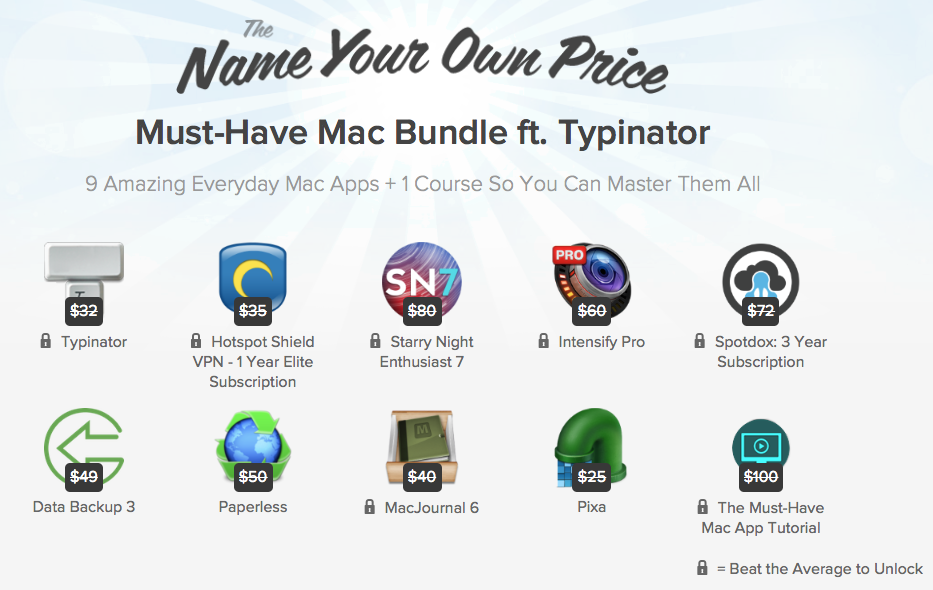
Good news Mac owners, StackSocial is running another one of its popular “name your own price” software promotions. There are 9 apps in the bundle, and 1 instructional course, which combined normally sell for $543. But, as the headline suggests, you can literally name your own price.
What's the catch? The deal site keeps a running average of what people are paying for the package, which is currently at $4.51. Pay below the average price, and you'll only get 3 of the applications mentioned below, but pay equal to or above the average price, and you'll get the entire package.
Fantastical is on sale: get up to 65% off this great app
Flexibits just announced that is is having a pretty big sale on Fantastical for iPhone, iPad and Mac, as well as on Chatology for Mac. Discounted by up to 65%, Fantastical is an award winning calendar application that has routinely been ranked as one of the best calendar apps on iDB.
This app records FaceTime calls to your Mac
I use FaceTime on a daily basis and have always hated it wouldn't let me save calls to my Mac in the form of a media file. Surely Apple could have implemented such a feature if they wanted, but they didn't and I think privacy is a big part of that.
If for whatever reason you need to record FaceTime calls to a Mac, Call Recorder by Ken and Glen Aspeslagh, twin brothers from Massachusetts, has you covered.
The app creates a QuickTime movie file containing an audio track for audio-only calls and a video track for FaceTime video calls. QuickTime is an industry-standard multimedia container, meaning you can play your saved video and audio chats pretty much anywhere, convert the files to other formats in software like iMovie or Adobe After Effects, upload them to YouTube and more.
Google’s new Bookmark Manager surfaces in latest Chrome Beta
Following Wednesday's release of a stable version of the 64-bit edition of Google Chrome for Mac, the Internet giant issued a new version of Chrome Beta for Mac, Windows and Linux that includes an all-new Bookmark Manager feature that previously leaked via screenshots (it was called Stars).
With Bookmark Manager, it will be a lot easier for Chrome fans to manage their saved bookmarks, delete unwanted ones, file them under folders and more.
And when creating a new bookmark, Chrome will let you select an image and add a note or snippet so you can find it more quickly later. “Google will also suggest a folder if it seems like it could be a fit,” the team said in a blog post.
Evernote for Mac rewritten for speed and energy performance, iOS app gets Work Chat and more
Evernote, the popular note-taking and productivity platform, on Thursday issued a major refresh to its Mac app while adding a new Work Chat for sharing and collaborating to the iPhone and iPad client, among other items.
After a complete rewrite, Evernote 6.0 for Mac is now significantly faster, more reliable and consumes less energy than ever before.
As if that weren't enough, the new Mac app comes with half a dozen new features, including sleek new look optimized for OS X Yosemite, search improvements, the ability to resize images and tables, to mention just a few.
iOS and OS X editions of Evernote are available free of charge.
You can now privately share tweets in DMs
After previewing future platform enhancements and features during its Analyst’s Day event, the popular social service Twitter on Thursday began rolling out one of the mentioned new features: the ability to private share a tweet through Twitter's direct messaging function.
Think about sharing tweets privately with any of your followers in terms of discussing public content in private conversations, the micro-blogging platform suggested.
To do this from Twitter's main iPhone client, long-press the tweet in your timeline and choose the new “Share via Direct Message” option. The person you share a tweet with will get a push notification, said the company.
Moreover, the tweet will display directly in the conversation.
64-bit version of Google Chrome for Mac launches
After releasing 64-bit Chrome for Windows and a beta version of Chrome for Mac with 64-bit support back in August, Google today announced that the app is out of beta and available to everyone.
Public release of the 64-bit Chrome for Mac edition marks the end of the road for 32-bit NPAPI (Netscape Plug-in APIs) plugins as the Internet company now requires developers to provide their extensions with 64-bit support.
Most users shouldn’t be affected, however, because the vast majority of plugins and extensions are readily available in both 32-bit and 64-bit form. Chrome 39.0.2171.65 (Google, we need to talk about version numbers!) also includes more than three dozen under the hood changes for stability and performance and comes with a set of new APIs allowing extension developers to take advantage of new features.
Continuity Keypad adds a beautiful phone dialer to OS X Yosemite
Out of all the features that Apple introduced with OS X Yosemite, Continuity is one of the most convenient and useful. With its ability to handoff apps between devices, make and receive phone calls, and send SMS messages from the desktop, Continuity has become one of the most-used features of OS X Yosemite. But despite its newfound call-handling features, Yosemite lacks a dialer for quickly making phone calls to numbers not in your address book, and that's where Continuity Keypad comes into play.
Calcbot by Tweetbot creators leaps onto the Mac
Developer Tapbots has made a name for itself with an excellent Twitter client for the Mac and iOS, Tweetbot. They have other apps in their portfolio, too, and on Thursday released a nicely done Mac edition of Calcbot, an intelligent calculator and unit converter that made its iOS debut in July of 2010.
Despite a somewhat steep asking price, keep in mind that Calcbot combines a compelling calculator and a powerful unit converter into a single, beautifully designed experience.
Calcbot is a $4.99 download from the Mac App Store.