Jailbreak

Check out the most comprehensive jailbreaking coverage on the internet, including the latest news, apps, tweaks, and detailed tutorials about everything jailbreak.

How to Change Your iPhone App Icons Without Jailbreaking

We Apple users are picky about our aesthetics. Some of us try to pretend that we aren't, but we are. Things like app icons matter to us. Apple doesn't make it easy to customize your iPhone's look on a system mod level, but luckily there are still jailbreak-free hacks out there to taunt Apple's need for aesthetic control.

I'm going to walk you through how to manually change app icons on your iPhone without jailbreaking. There are multiple reasons you may want to change an app icon; you think the developer's icon is ugly, you want a retina display-compatible icon, or you just want to mess with your friend while he's away from his phone. Here's how you do it:
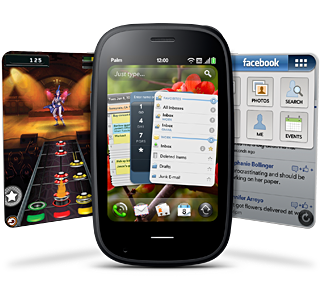
Two WebOS 2.0 Features that I Want for iOS 4

HP has just announced some new features for their 2.0 release of the recently acquired WebOS.  Some of them just seem to be playing catch-up with iOS 4.

There's also the infamous claim of "true multitasking."  We'll see.  But there's two features that I think would be awesome on the iPhone and I would love to see appear in Cydia (soon please!)...

PwnageTool 4.1.1 is Out to Fix Mac OS X 10.5 Issues

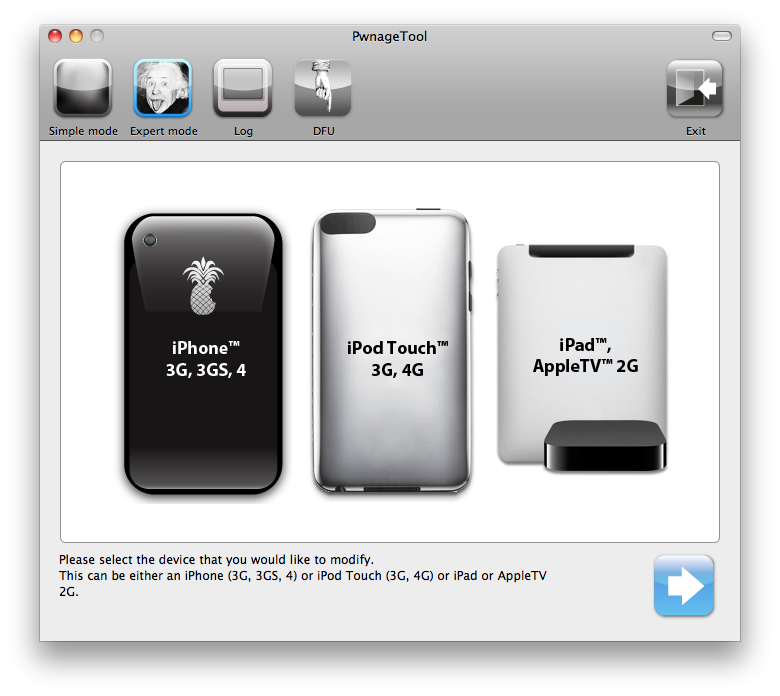
Couple of days back, PwnageTool 4.1 for Mac was released to jailbreak the iPhone, iPad, iPod touch and Apple TV on iOS 4.1. Some Mac OS X 10.5.x users were experiencing issues with this version so the iPhone Dev Team today released PwnageTool 4.1.1 to fix any issues on Mac OS X 10.5.x.

PwnageTool works only on Mac OS X and it's a jailbreak tool based on creating pre-jailbroken custom firmwares while preserving your baseband to be able to unlock your iPhone after upgrading using the custom firmware.

You can download PwnageTool and check our step by step guide posted here to jailbreak your device using PwnageTool for Mac then follow this guide to unlock iOS 4.1 using Ultrasn0w and tell us how it worked for you!

UPDATE: Version 4.1.2 is out. You can get it from our iPhone download sections.

What Everyone Should Know About Jailbreaking the iPhone

So you've heard about "jailbreaking the iPhone" before but you're not sure exactly what it is and why you should do it. Maybe you don't see the benefits of it. Maybe you don't think you have the technical skills to do it.

While this post will be useless to jailbreak veterans, it should be helpful for new iPhone users eager to learn more about jailbreaking...

Would You Pay for a Cydia Pro Version?

Now that I'm running a jailbroken iDevice again, I find myself browsing the Cydia store once again.  With the A4 and more memory, Cydia seems a little bit snappier than my previous generation device, but it's still a slow experience.  It seems that no matter how much faster Cydia can get, viewing app descriptions will only be as fast as it takes for the sponsored ads to load.

I'm a little curious how much money the repo sites make from the ads in Cydia.  It can't be that much, because I've never clicked one; I've also seen devs commenting on how few people click the ads for their free tweaks.  But they're still there, so they must make something, right? 

GreenPois0n First Impressions: the 4.1 Bugs

As soon as the Mac version of GreenPois0n came out, I went ahead and jailbroke my device.  It wasn't the same eye-candy that JailbreakMe was, or even Comex's first jailbreak, but it worked and I didn't have to wait long.  Here's a few quick things that I immediately noticed.

LockScreen PIN Delay

After a fresh reboot or a respring, I can no longer dive right in to tap the PIN to access my device.  The problem is either a delay or the first tap or two is not recognized.  But it definitely slows me down a little bit...

Angry Birds SMS Tones Cause Uncontrollable Urge to Smash Things

Can't get enough Angry Birds? As if the movie, toys, and recent news regarding Rovio (or rather, non-news) weren't enough to ruffle your happy feathers, you can also download Angry Birds SMS tones in Cydia - for free!

Search for "Angry Birds SMS" and you'll be on your way to feeding your block-busting, bird-flying addiction. Now you don't have to even play the game to hear the cry of the Boomerang Bird or Zooming Yellow Bird, just tell your friends to text you non-stop!

SSH Alternative to FontSwap for iOS 4

FontSwap has been one of my favorite reasons for jailbreaking, but it isn't fully compatible with iOS 4.0. It works if you change the Notes or Lockscreen font, but that's about it. It seemed like there was hope for an updated FontSwap, but the post from Guarav, the author, is now 3 months old. That's an eternity in iPhone-time.

So what's a jailbreaker to do? If you are comfortable using SSH or iFile there is a solution, thanks to iPhoneRuler.net. They have a list of iOS 4 compatible fonts and also instructions on how/where to install it...

Apple TV Gets Its First App

Now that we can jailbreak the Apple TV, we just need apps on it. The app is called nitoTV and it's basically a front end for the mplayer media player. It also includes additional capabilities to view RSS feeds, weather forecasts, and more.

I'm not sure how they got this app in there. All I can tell from nitoTV's Twitter account is that the app got copied over using SSH. There's probably going to be more to come in the near future.

[9 to 5 Mac]

Tutorial: Jailbreak iPhone 4.1 with PwnageTool

This guide and tutorial will show you how to use the freshly released PwnageTool to jailbreak your iPhone 4, iPhone 3GS, or iPhone 3G. There has been a couple jailbreak tools for iOS 4.1 released recently but only PwnageTool will preserve your baseband allowing you to update to a jailbroken 4.1, while still preserving your baseband so you can unlock.

PwnageTool is available for Mac only. If you don't have a Mac, try to find a friend who does, and simply use his computer to cook the firmware. This guide was written using an iPhone 4 but the steps are the same, no matter what iPhone model you have (only the firmware downloaded will change).

This being said, make sure to follow this guide to jailbreak your iPhone iOS 4.1 with PwnageTool. As always when hacking your iPhone, you are proceeding at your own risks...

Download PwnageTool iPhone 4.1 Jailbreak

The PwnageTool jailbreak for iPhone iOS 4.1 is out and available for download! It was supposed to be released last Sunday but it didn't for unknown reasons. This new version of PwnageTool will jailbreak the iPhone 3G, 3GS, and iPhone 4. PwnageTool will also work for the iPod Touch 3G and 4G. Additionally, it will work with the iPad and the new Apple TV.

LimeRa1n and GreenPois0n have been released over a week ago. The difference between these jailbreaks and PwnageTool is that PwnageTool will preserve your baseband. This is crucial for iPhone owners who want to unlock...

This is a Jailbroken Apple TV

We already knew the Apple TV could be jailbroken but until now we hadn't seen any actual proof of it. Well consider this image your proof then. It was tweeted a few minutes ago by hacker p0sixninja.

As you can see there is a new option added to the Apple TV that lets you "inject software", which probably will be a way to install apps or mods.

There is no ETA for this jailbreak and most importantly, there might not even be a single jailbreak apps for it yet. Stay tuned... I'll keep you posted.