iPod Touch

Top Jailbreak Tweaks of the Week

Welcome to our tweaks of the week. Last week you probably saw that the iPhone Dev Team released an unlock for iOS 5.0.1. That was perhaps the biggest news warranting a video, along with the Home button recalibration trick that seemed to be massively popular amongst viewers and readers.

As usual, please make sure to spread our iPhone, iPad, and iOS video instruction by sharing our posts on Twitter and Facebook.

Stuck on Gift Ideas? Give the Gift of Apps

We are so close to Christmas day now that we can almost smell the ham, but that isn't always good news. What if you haven't yet managed to pick up the perfect gift for that Apple-lovin' family member?

If you're all out of ideas, then how about giving the gift of apps?

If you know someone who is getting an iPhone, iPod touch, or iPad this Christmas, then they will just love anything app related. You can pick up iTunes gift cards almost anywhere these days, and here is a quick reminder of how you can gift the perfect app, right from inside iTunes...

Fight Crime Like Batman and Check Facebook With This Unique iPhone Dock

iPhone docks are usually pretty straight-forward accessories. Some have attached speakers, some have built-in alarm clocks, and some even have external screens to watch videos.

But the BodyGuard by ArmStar, as you can see in the above picture, is anything but usual. This wearable iPhone dock is made from kevlar armor and contains several crime-fighting gadgets...

How to Recalibrate Your iPhone’s Home Button to Make it More Responsive

Sometimes the Home button on the iPhone just starts getting a little funky, a little laggy, a bit unresponsive.

Most of the time, those issues are software based, unless of course you've dropped your iPhone in water while feeding your pet fish.

For us non-fish owners, we've confirmed that a simple recalibration is usually all that's needed to fix most issues with the iPhone's Home button. Take a look at our video tutorial inside...

iOS 3.1.3 Users Blocked From the App Store

Users of older versions of iOS may be left out in the app-less wilderness according to reports, with the App Store seemingly not impressed with users who have not updated their iPhones or iPod touches past iOS 3.1.3.

Apple has always been a strong proponent of users installing the latest version of an operating system, whether that be the latest and greatest release of OS X on a Mac, or the newest version of iOS available. It's a great way of squashing potential bugs and security holes while making sure developers have less OS fragmentation to deal with.

Some people don't want to update, though. Whether it be through a need to have a specific jailbreak work, or their iOS device simply doesn't have the chops to run the latest iOS release, some just do not want to upgrade. Reports have surfaced that devices running iOS 3.1.3 or earlier are unable to download apps from Apple's App Store...

Apple Working on Smart Kiosks for iOS Devices

The innovative minds of Apple's R&D (Research and Development) team never cease to amaze us. They've come up with all kinds of cool stuff — most of which never makes it into consumer products.

And the latest patent application from the folks in Cupertino is proof of that. Judging by the filing, Apple appears to be experimenting with self-serve "smart kiosks" that can interact with iOS devices...

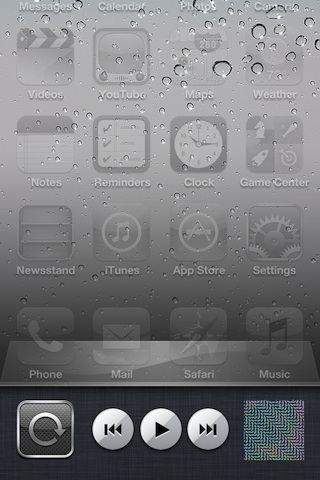
SwitcherCleaner Micromanages Your iPhone’s App Switcher

SwitcherCleaner allows for more fine tuned control over the apps in your App Switcher. It works by automatically placing the items found in your App Switcher into "quit" mode, and only displays apps that are actually running.

SwitcherCleaner is an offshoot of a previously released tweak entitled SwitcherMod. In fact, it borrows its only two features directly from SwitcherMod and brings them to iOS 5...

How to Jailbreak iOS 5.0.1 With RedSn0w Beta 9

As promised, a new and improved version of RedSn0w was unleashed just a few moments ago, and one of its primary features is the ability to jailbreak iOS 5.0.1 outright without the assistance of any additional firmware.

This makes for one of the easiest jailbreak methods possible for iOS 5.0.1. Check inside for a video walkthrough of the jailbreak process, along with a brief tutorial...

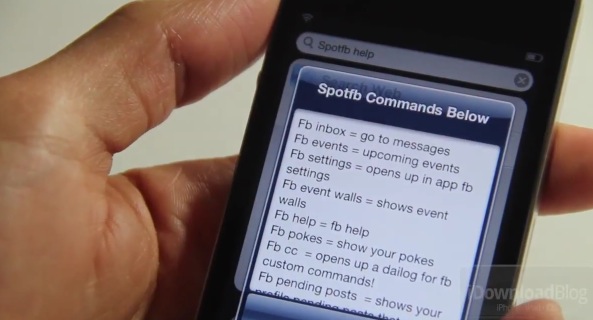
Spotfb: Execute Spotlight Commands to Launch Facebook Sections

Spotfb is a jailbreak tweak that allows you to launch different sections of the official Facebook app by means of predefined Spotlight commands.

All you need to do is swipe over to your Spotlight page, type the command, and tap return. It'll then launch the specific Facebook page that pertains to the command that you typed.

Honestly, we're not sure who would be willing to use such a tweak; it'd be much faster to just launch the app and venture to your desired section, wouldn't it?
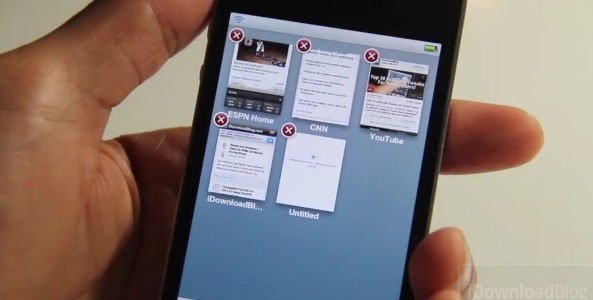
GridTab for Safari Improves the Tab Experience in Mobile Safari

We've covered it in the past, but GridTab for Safari was recently updated with iOS 5 compatibility, so we thought it was a great time to bring you a video walkthrough of this exceptional tweak.

The purpose of GridTab is simple — to improve the tabbed browsing experience in Mobile Safari. Does it achieve its goal in doing so? Check inside for the answer...

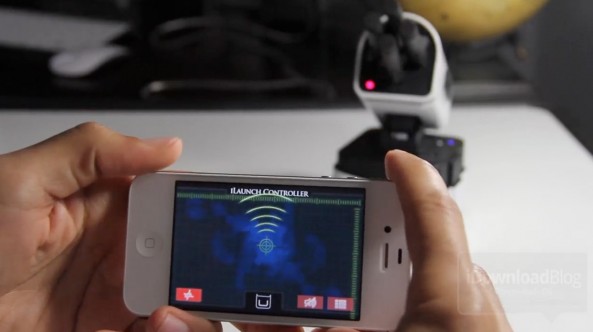
iLaunch Thunder: Launch Nerf Darts Via Your iPhone’s Bluetooth Connection [Updated]

In need of a great conversation piece for your desk? Look no further than the iLaunch Thunder from Dream Cheeky.

The iLaunch Thunder allows you to launch Nerf-styled darts via a rotatable base using nothing more than your iDevice, its Bluetooth connection, and the free iLaunch Controller app downloadable from the App Store.

In our tests, the iLaunch Thunder worked just as advertised, though it is pretty pricey at around $100. But that's okay, we're giving this one away...

Why Every Jailbreak Power User Needs iFile

iFile — you've most likely heard of it, but do you use it? If you've ever used a Mac, then you're familiar with Finder, and if you're familiar with Finder, than you're familiar with iFile.

iFile is essentially the iOS version of Finder, or Explorer for Windows. But for jailbreakers, there's a lot more here than meets the eye. Check inside for a video walkthrough accompanied by a good list of reasons as to why you should be using iFile.