iPod Touch

How to disable Apple Music Connect

If you choose to hide Apple Music on an iPhone, iPod touch or iPad, the Music app gains a new Connect tab.

Described by Apple as a place where “musicians give their fans a closer look at their work, their inspirations, and their world,”Apple Music Connect permits music lovers to view and follow an artist's stream, like and comment on their posts and more.

Apple Music Connect is basically Ping 2.0. The feature is a tad crude in appearance and feels rough around the edges so little wonder that some folks don't view Connect as valuable enough for it to deserve its own tab.

Wouldn't it be great if you could get rid of the Connect tab? Thankfully, there is.

You'd be forgiven for thinking that the Connect feature couldn't be disabled: Apple has made sure to burry and hide it in an obscure place. In this post, I'm going to explain precisely how you can disconnect from Connect in Apple Music on iPhone, iPod touch, iPad or Mac.

How Apple could reinvigorate the iPod line

It's no secret that iPod sales continue to decline year after year. Many of the people who were once targets for the iPod now opt for iPhones or iPads.

This isn't exactly a terrible problem for Apple to have. The company has never had qualms about cannibalizing its own products for the sake of the greater good.

But with Apple's historic, and now renewed, love of music, it just wouldn't seem right to let the iPod—at least its conceptual existence, and not so much the name—fade out into the sunset.

For that reason, I think that Apple should go back to the drawing board. Even if this year's rumored across-the-board iPod update is nothing more than just a meager spec bump and minor changes—I think that ultimately, the line is due for a complete overhaul.

How could Apple reinvigorate its flagship music player? By doing the following five things...

New iPods could be announced next Tuesday

If you're buying an iPod music player these days, hold off your purchase for just a little bit longer as Apple is thought to be unveiling new iPod touch, iPod nano and iPod shuffle models next Tuesday.

According to French blog iGen.fr, a pretty reliable source of Apple leaks, the iPod touch could get a substantial refresh in the form of a 64-bit processor.

The iPod nano and shuffle models are said to be receiving only cosmetic changes.

Standalone ‘Showtime’ streaming service debuts on Apple TV for $10.99 per month

After CBS announced a month ago that it would soon appease cord-cutters by rolling out a standalone video-streaming service over the Internet, Re/code revealed Tuesday that the network's premium cable television service called Showtime is now available through the Apple TV, no cable subscription required.

The standalone video-streaming service is available on Apple's $69 media-streaming box in exchange for a flat monthly fee of $10.99 with iTunes billing. A free 30-day free trial is available provided you have set up a valid payment method in iTunes.

A matching iOS app is coming at a later stage.

iOS 8.4 with Apple Music, Beats 1 and revamped Music app hits iPhone, iPod touch and iPad

As promised, Tuesday morning Apple released the free iOS 8.4 software update which introduces an all-new Music app with Apple Music and Beats 1 built-in. The over-the-air update is now available for the iPhone, iPod touch and iPad devices. As these things take some time to propagate, the software update may not show up in your region yet.

“This update introduces Apple Music—a revolutionary music service, 24/7 global radio, and a way for fans to connect with their favorite artists—all included in the redesigned Music app,” release notes accompanying the update explain. “iOS 8.4 also includes improvements for iBooks and bug fixes,” Apple states.

To apply the update over-the-air, open the Settings app on your iPhone, iPod touch or iPad and choose Software Update in the General section. Alternatively, connect your device via USB cable to a Mac or Windows PC running the latest version of iTunes and an update prompt should pop up automatically.

If you enjoy jailbreaking as much as we do, you're wholeheartedly advised to read this first in order to prepare for iOS 8.4 properly.

Stuck on 20% in TaiG? How to jailbreak iOS 8.3 with TaiG 2.1.3

As we mentioned earlier, TaiG has released version 2.1.3 of its jailbreak tool, and it's a significant update as far as fixes go. First and foremost, it works with virtual machines, so you no longer need to modify your virtual machine to use the tool. Secondly, it fixes the 20% hangup. With these things in mind, we thought we'd show you how to jailbreak using this latest TaiG update.

This post is primarily aimed at those who have yet to jailbreak, and are looking for guidance with the latest tool. In the video that follows, we'll show you the proper way to go about jailbreaking your iPhone or iPad, and we'll show you how well the tool runs on a virtual machine.

Showtime confirms online-only streaming service, launching next month on iOS and Apple TV

Showtime, a CBS-owned premium cable television service, has taken the plunge and will offer a standalone video-streaming service over the Internet with Apple as its first partner, the company confirmed Wednesday.

Simply called Showtime, the service will cost $10.99 per month and will be hitting the Apple TV, iPhone, iPod touch and iPad on July 12 ahead of season premier of several shows such as Ray Donovan and Masters of Sex.

A free 30-day trial will be available to new customers who sign up through Apple in July. Like HBO Now, Showtime's new service will be an Apple exclusive at launch.

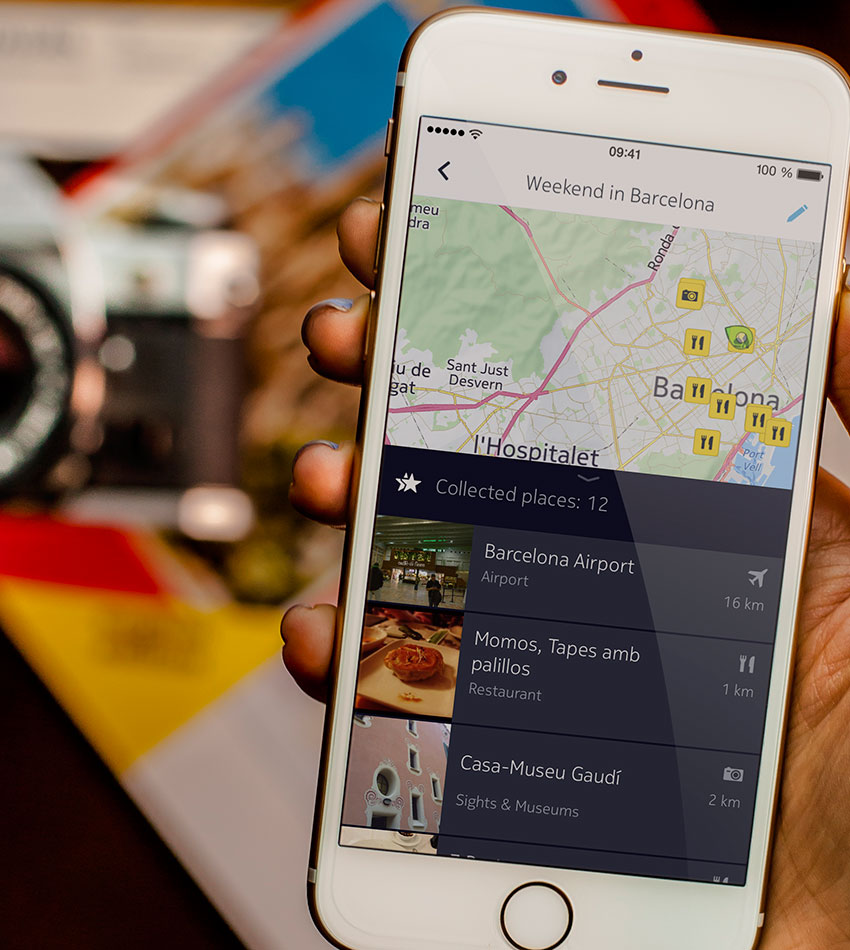
Review: Nokia’s new HERE for iPhone mapping app gives Apple and Google a run for their money

After launching its HERE mapping service on iOS only to pull it in December 2013 over unfavorable reception (it was based on HTML5, had limited features and wasn't optimized for iOS), Nokia last September and again in December promised to deliver a mapping experience the iPhone deserves.

Today, the company has made good on that promise and released a sleek new navigation and mapping software for the iPhone with the features and the polished feel that you'd rightly expect from a mapping app.

Nokia HERE features a nicely done user interface that honors iOS aesthetics while delivering a set of advanced features like turn-by-turn directions, rich database of points of interest and perks which cannot be found in Apple Maps, Google Maps and many other competing products, such as offline navigation and maps.

I've had a few days to play with the app ahead of its launch, this is what I was able to glean from my hands-on time with HERE.
Apple confirms ‘FREAK Attack’ patch for iOS and OS X due next week

A new exploit dubbed ‘FREAK Attack’ — which stands for “Factoring attack on RSA-EXPORT Keys” — that takes advantage of a security flaw dating back to the 1990s will be patched soon by Apple.

As we speak, the iPhone maker is readying a fix in iOS and OS X that will be available in software updates next week, a spokesperson for the Cupertino firm told iMore.

Plagued by this security flaw, users of Mac, iPhone, iPad, iPod touch and Android devices are at risk when visiting vulnerable websites that downgrade a secure HTTPS connection to a weaker encryption method.

Apple posts iTunes Best of 2014 charts

Like in years past, Apple ahead of the holidays published its list of the best and most popular apps, movies, TV shows, music and books available on iTunes. In the category of the top paid iPhone app, Heads Up! came in first. Facebook's Messenger is Apple's top free iPhone app and Clash of Clans emerged as the top grossing iPhone app, respectively. On the iPad side, Minecraft, YouTube and Clash of Clans have been rated as the App Store's top paid, free and grossing apps, respectively.

Without further ado, here's the rest of Apple's most popular apps and media in 2014.