iPhone Photography

2013 iPhone Photography Awards: you won’t believe your eyes

iPhone photography fans who haven't heard about the iPhone Photography Awards yet should definitely familiarize themselves with the competition.

Trust me, the quality of the images photography buffs are taking on their iPhones will leave you breathless. It's also a nice reality check for those who happen to hold their own photography skills in high esteem.

The creativity oozing from some of these shots can't be overstated, especially given the rules prevent photo manipulation other than the capabilities provided by the photographer's camera app of choice...

Sphere review: now with iPhone panorama upload

A few years ago, TourWrist hit the App Store with its high-quality panoramic photography service. User could use the company’s publishing tools to create “panos” that could then be uploaded to the app and made viewable by others.

In July, TourWrist was completely redesigned and is now Sphere. One of the biggest updates just came last week in the form of publishable Spheres using your iPhone’s panorama camera feature…

How to create stop motion animations with your iPhone and Google+ Auto Awesome feature

If you're going to understand this post, you'll first need to see my Auto Awesome in action. This might be a bit of a departure from a traditional lesson in iPhone Photography, but I always feel it's important to experiment with new technologies. I went so far down the Rabbit Hole trying to figure this out, I just had to share it!

If you're a Google+ user, you probably already know this. If not, they actually have some very cool things going on over there. One of those things is the 'Auto Awesome' photo tools. In short, 'Auto Awesome' can do very awesome things with the images you upload and like the name implies, it does it automatically. Things like 'auto enhance', 'auto HDR', 'auto panorama', and for this example, 'auto motion'!

All you do is upload several photos and Google automatically determines the appropriate awesomeness to apply. For example, if they are different exposures of the same scene, it will auto HDR them. If there is overlap in the scene from one image to the next, it will auto panorama them. If it's the same scene with subtle motion differences, it will do this...

SnappyCam Pro lets you shoot 8MP photos at 20 pictures per second

I take lots of pictures of live bands. I love getting the perfect shot of someone shredding away on their axe while jumping though the air. It’s pretty awesome. It’s also pretty difficult to do with an iPhone.

SnappyCam takes pictures at the speed of metal so you are practically guaranteed to get the perfect action shot. With the ability to use up all 8MP of the iPhone 5’s camera, you can take up to 20 frames per second. If you miss the shot now, it’s just your own fault…

Camera+ brings effects layering to iPhone, new Hollywood filters and borders

My favorite iPhone photography software, taptaptap's Camera+ for the iPhone and iPad, has been updated today with some long-expected improvements. Specifically, the tremendously useful effects layering feature, which was first added to Camera+ for iPad last September, is now at last available on the iPhone. Now the new Camera+ 3.9 for iPhone finally lets me layer two or more effects for unique results, with each layer having its own intensity.

Effects layering is non-destructive (your originals are always preserved) and indispensable for complex touch-ups or creating your own custom effects. In addition to that, both the iPad and iPhone build now comes with a brand new effects pack and contains other improvements, all mentioned right after the jump...

Free Dailymotion Caméra arrives, get downloading

Dailymotion, a French video-sharing website, today released its first video recording application on the App Store. The aptly named Dailymotion Caméra software can be used to capture, edit and share HD clips across Dailymotion's web, mobile and connected video platforms. Featuring the pause/resume recording functionality, the app also includes the obligatory filters, contrast/brightness controls, is flattened and doesn't cost a dime. What more could a gentleman ask for?

PhotoNova 2 gives you a powerful collection of mobile editing tools

I take a lot of pictures. I always have. I’m not a professional. I just like keeping visual representations of my memories. When I got my first iPhone, I was excited to see how many image-altering apps were available in the App Store to help turn my otherwise-mundane vacation photos into something special.

Now, there are so many photo editing apps that it is hard to weed out the good from the bad and find interesting and innovative ones.

PhotoNova 2 is one of those special apps that offer something a little bit different than your typical photo filter app. With it, you can add effects to specific areas of a picture, giving you more control over how you manipulate your images…

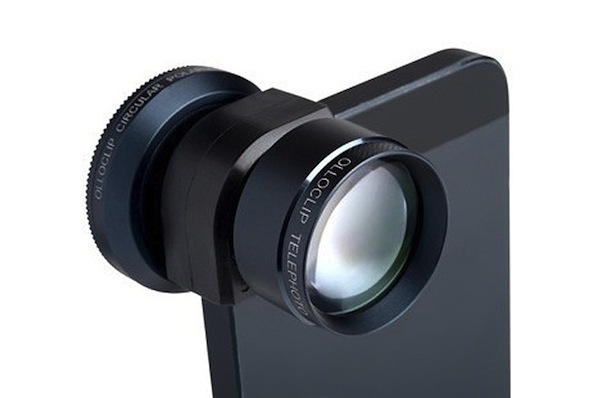
Olloclip introduces new telephoto lens for iPhone

In the world of iPhone photography accessories, there's perhaps no name more recognized than Olloclip. The company produces a popular 3-in-1 clip-on camera lens system for Apple's handset that includes macro, fisheye and a wide-angle lenses.

And today, they introduced a new telephoto lens, bringing the Olloclip line full circle. It's available in two flavors—one that works with the iPhone 5, and one that works the iPhone 4, iPhone 4S and the last two generations of the iPod touch...

Extend your iPhoneography creativity with Color Moves in Photoshop Touch

Welcome back to iDB's lessons in iPhone photography. If you remember the last lesson, I hinted that we could be taking a deeper dive into some post processing techniques. Specifically, that deeper dive will be looking at RGB color moves using Photoshop Touch.

I'm sure you are asking, what is an RGB color move and why would you want to do it? All the color information your iPhone records is composed of Red, Green and Blue (RGB) data. The idea of a color move is to brighten or darken the various RGB values in your images to expand your creative post processing. Maybe you want to make an image more red or blue. Maybe you want to create your own Instagram-like filter that is uniquely yours. In this quick lesson, you will learn how to do just that...

Take stunning black and white photos with BW+

A few days ago, we told you about the popular new photography app Camera Noir. The simplistic app takes great photos, but doesn’t offer too many options. While that can be a good thing, it is not for everyone.

BW+ is another app that only lets you take black and white photos, but this one offers a few extras that make it more interesting for iPhone photographers that want just a few more options…

Add subtle imaging effects to your iPhone photos with VSCO Cam

Camera filter apps are very common in the App Store. Many times, users feel like photography apps don’t really offer anything new to the genre. However, there are still a few ideas out there that have not yet been tapped into in the App Store.

VSCO Cam is a photo editing app that lets you tweak your image in slight ways in order to enhance their features instead of completely change them…

Giveaway: we have ten copies of FX Photo Studio Pro for Mac

FX Photo Studio, the already excellent iPhone photography app, is getting better with each new update. Recently, the iPhone version has gone free permanently and the iPad definition has been discounted to a $2 download.

iDB has teamed up with the fine folks over at MacPhun to give you, our readers, a chance to win a copy of FX Photo Studio Pro for Mac.

Mind you, we're talking a pro photo editing app here.

FX Photo Studio Pro supports image resolution up to 32 megapixels and a variety of photo formats, including RAW. The software normally costs twenty bucks on the Mac App Store and we have ten copies to give away.

Best of all, we're not requiring you to tweet out a message, like a Facebook page or anything like that. All you have to do for a chance to win is leave a comment at the bottom along with your Twitter handle. Good luck!