Discover all the handy ways to use your fingers, trackpad, or mouse to zoom in and out of Apple Maps on your iPhone, iPad, or Mac.
All the ways to zoom in and out on Apple Maps

From the latest news to the most comprehensive tutorials, learn how to get the most out of your iPad with our step-by-step guides and expert tips.
Discover all the handy ways to use your fingers, trackpad, or mouse to zoom in and out of Apple Maps on your iPhone, iPad, or Mac.

Not everyone is a fan of bing watching. I, for one, rarely watch a dozen episodes of Friends in a row. If you're anything like me, Netflix's autoplay feature is probably something of an annoyance to you.
It's especially worrisome if Netflix uses cellular data: forgetting to stop the playback after you've just finished watching an episode won't stop Netflix from playing the next one automatically, resulting in unwanted data charges.
iDownloadBlog's tutorial series is here to help you with that: in this quick how-to, we'll show you how to turn off the video autoplay feature across all your Netflix devices—they're calling it Post-Play—with just a few clicks.

Yesterday, iDownloadBlog detailed a cool new one-handed zoom gesture during video capture which Snapchat's latest update has implemented.
This incredibly convenient shortcut permits you to zoom in and out as you're shooting video with Snapchat's camera, in real time. As one of our commenters pointed out, Google Maps has long had a similar shortcut on its native iOS app.
With it, iPhone, iPod touch and iPad users can zoom in and pan around in one-handed mode, without needing to use a two-fingered pinch-zoom gesture. Here's how one-handed zoom mode works on Google Maps for iOS.

There's a new app in the App Store called System and Security Info that shows detailed information about your device and running apps from a security standpoint. It can do a lot of things, including monitor memory and disk usage, show running processes, and it even detects malware and other anomalies.
A few other things about the app also caught our eye. One, it's capable of telling if your iPhone and iPad have been jailbroken, and two, it appears that former jailbreak contributor Stefan Esser (also known as i0n1c) is involved in the project. In fact, it was Esser who penned the announcement blog post.

We don't hang out on Snapchat on a regular basis, but I myself use the app from time to time to check out new features. Earlier today, my boss Sébastien shared an amazing collection of handy Snapchat tips and trick, created by fifteen-year-old Victoria Samson.
Some of the tricks she demonstrates are quite brilliant, but her video how-tos don't cover Snapchat's latest feature addition—the ability to zoom while recording a video in one-handed mode using a simple gesture. That's precisely what this quick tutorial will discuss: using Snapchat's handy one-handed zoom mode during video capture.

About a month ago, Facer, a smartwatch customization platform, landed on the Apple Watch via a free of charge App Store app. Unlike most other apps for customizing watch faces, Facer puts your style and individuality on full display with thousands of custom watch faces and the ability to design your own with an online creator tool.
The app can pull watch face images from a variety of sources, including your Instagram feed, and it even has neat flash card style faces for learning things like languages, constellations, Solar System's planet names, the elements of the periodic table and so forth.

Microsoft issued an update to OneDrive, its free of charge mobile cloud-storage client, adding some new features.
In addition to a fresh coat of paint and a revamped app icon, OneDrive for the iPhone, iPod touch and iPad was bumped in the App Store yesterday to version 7.1 with support for Peek and Pop in-app gestures for previewing content with 3D Touch on the iPhone 6s and iPhone 6s Plus.
In the refreshed app, you can now peek at any folder or file by pressing it lightly, or pop right into it by pressing a little deeper.

Google+, the search giant's social thing, introduced a few new features in its mobile application for the iPhone, iPod touch and iPad, which can be downloaded at no charge from the App Store. Google+ 5.5 for iOS now includes search autocomplete, allowing you to search faster with suggestions appearing as you type.
The new Reply button on each comment lets you respond to posts with fewer taps and you can now create and delete circles from within the app's People tab.
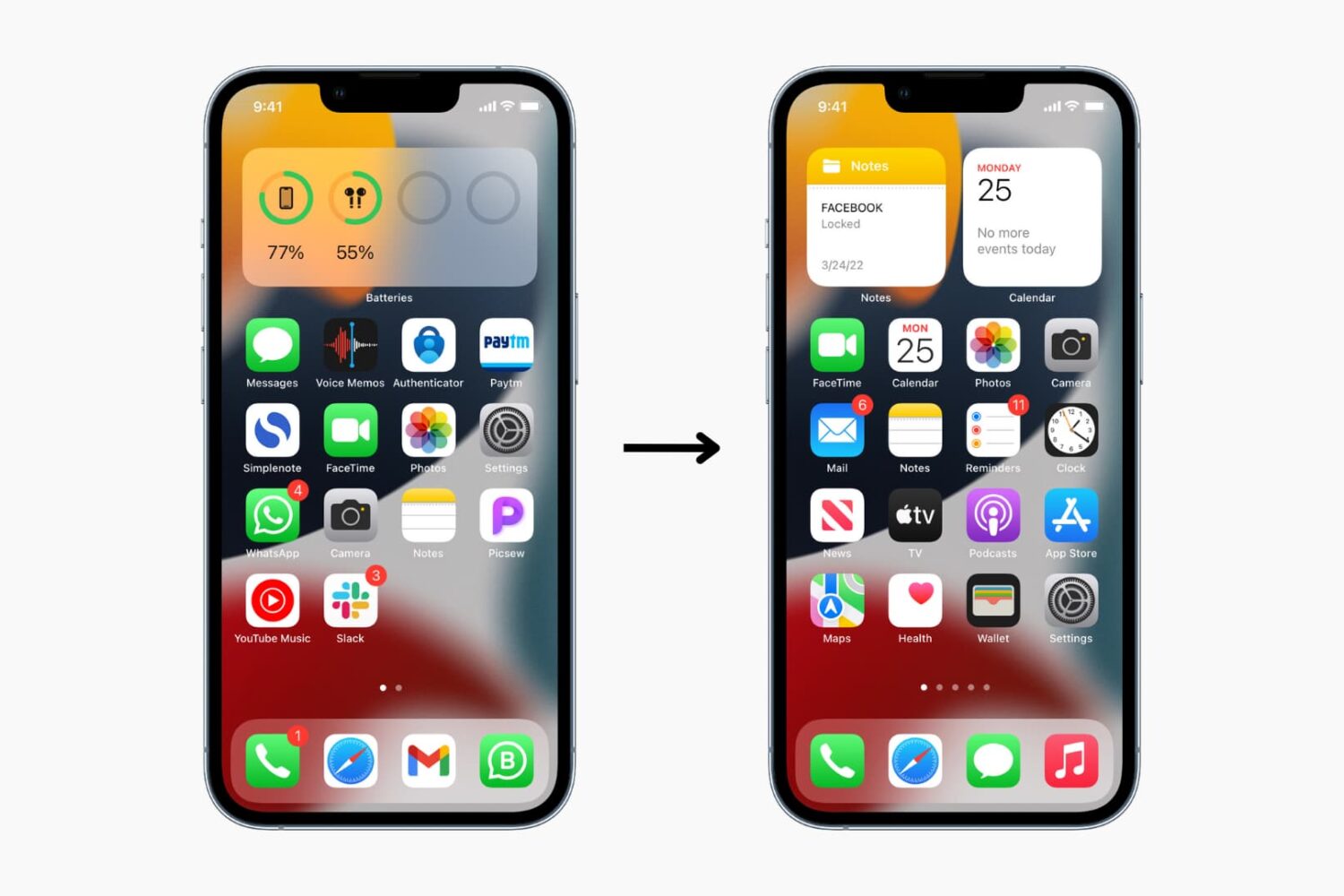
Learn how to reset the layout of all the apps and widgets on your iPhone or iPad Home Screen to factory defaults in just a few seconds.

Have you ever received one of those annoying messages that basically tells you FaceTime is having problems on your iPhone, iPod touch, or iPad? They can be incredibly annoying, but usually they're easy problems to fix.
In this piece, we'll talk about why you might be getting FaceTime errors on your iOS device and walk you through some ways to correct the problem.

Are you excited? You should be excited. One, it's the weekend, and two, we've put together another great list of apps and games for you to check out. This week's Apps of the Week roundup includes a news curation app, a sleep timer for audio apps, a new email client and two really great-looking games.

The Tapbots on Friday issued an update for their popular iOS Twitter client Tweetbot 4, bringing the app to version 4.3. The update includes a number of improvements, and a brand new feature called Topics that promises to make tweetstorming easier.
A Topic is a way to let you quickly Tweet a group of related Tweets without having to manually reply to yourself and/or add the same hashtags over and over. You can activate Topics by tapping the gear menu in the Compose screen, and they sync via iCloud.