iPod Touch

Spotfb: Execute Spotlight Commands to Launch Facebook Sections

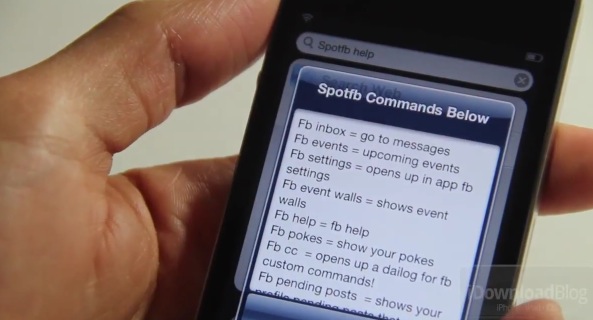
Spotfb is a jailbreak tweak that allows you to launch different sections of the official Facebook app by means of predefined Spotlight commands.

All you need to do is swipe over to your Spotlight page, type the command, and tap return. It'll then launch the specific Facebook page that pertains to the command that you typed.

Honestly, we're not sure who would be willing to use such a tweak; it'd be much faster to just launch the app and venture to your desired section, wouldn't it?
GridTab for Safari Improves the Tab Experience in Mobile Safari

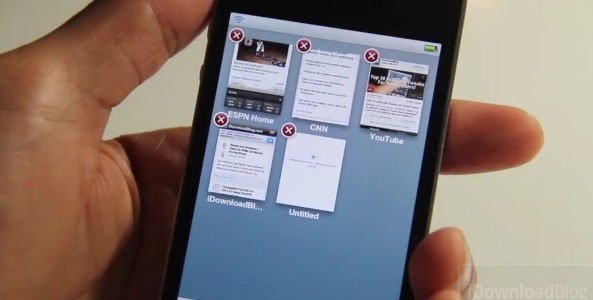
We've covered it in the past, but GridTab for Safari was recently updated with iOS 5 compatibility, so we thought it was a great time to bring you a video walkthrough of this exceptional tweak.

The purpose of GridTab is simple — to improve the tabbed browsing experience in Mobile Safari. Does it achieve its goal in doing so? Check inside for the answer...

iLaunch Thunder: Launch Nerf Darts Via Your iPhone’s Bluetooth Connection [Updated]

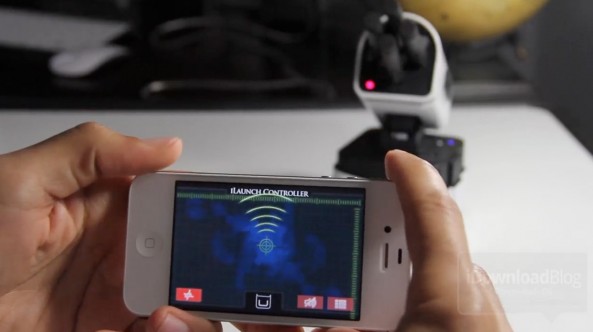
In need of a great conversation piece for your desk? Look no further than the iLaunch Thunder from Dream Cheeky.

The iLaunch Thunder allows you to launch Nerf-styled darts via a rotatable base using nothing more than your iDevice, its Bluetooth connection, and the free iLaunch Controller app downloadable from the App Store.

In our tests, the iLaunch Thunder worked just as advertised, though it is pretty pricey at around $100. But that's okay, we're giving this one away...

Why Every Jailbreak Power User Needs iFile

iFile — you've most likely heard of it, but do you use it? If you've ever used a Mac, then you're familiar with Finder, and if you're familiar with Finder, than you're familiar with iFile.

iFile is essentially the iOS version of Finder, or Explorer for Windows. But for jailbreakers, there's a lot more here than meets the eye. Check inside for a video walkthrough accompanied by a good list of reasons as to why you should be using iFile.

Halo Waypoint iOS App Released for Master Chief Fans

Someone at Microsoft just can't stop pushing out new iOS apps and games, with yet another release coming from Redmond showing up in the App Store.

Just hours after Microsoft's Kinectimals found its way onto iPhones, iPads, and iPod touches, another game-related app has landed, and this time it had help from Master Chief. Halo Waypoint ties right into all your Halo stats, letting players keep up to date with the competition as well as their own progress while away from their beloved Xbox 360.

Microsoft Releases Its First Game in the App Store

Microsoft is on something of a roll right now, with iOS apps rolling out of Redmond faster than you can say "Steve Ballmer." We've already had My Xbox LIVE and SkyDrive come from the mobile developers at Microsoft over the last few days, and now we've been treated to a new game.

Fans of the Xbox Kinect will know all about Kinectimals, a game that gives gamers a way to interact with virtual pets using the Kinect hands-free gaming accessory. If you are already a Kinectimals player on your Xbox 360, the new iOS app will unlock some more cubs for you to play with. You know, if that's your thing.

How to Display Album Art in Your App Switcher

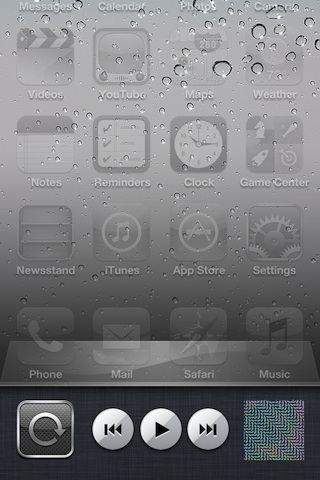
AlbumArt on AppSwitcher, a new jailbreak tweak available for free on Cydia, isn't the most elegantly named tweak out there.

But where its name may seem complex, its function is as simple as it gets. AlbumArt on AppSwitcher replaces the music icon that resides in your App Switcher with the album art of the tunes playing in your Music app.

Check inside for a video walkthrough of it in action.

How to Adjust Your Wallpaper’s Alpha Settings

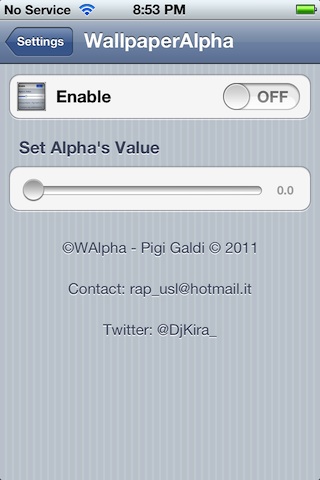
If you're searching for some additional control over your iPhone's wallpaper, then WAlpha is available to help.

No, it has nothing to do with Wolfram Alpha, I too thought the same thing and was a bit disappointed when I found out otherwise. Instead, WAlpha stands for Wallpaper Alpha, and it does one thing and one thing only: allows you to adjust the alpha settings for the wallpaper on your Home screen and Lock screen.

Apple Seeds iOS 5.1 Beta 2 to Developers

Apple has released iOS 5.1 beta 2 to developers. The update comes exactly two weeks after the company seeded the original version of the iOS 5.1 beta.

The new software is expected to feature a number of bug fixes and additions, including a sufficient patch for the long-time running battery bug and a rumored Siri enhancement. We've got the full change log...

How to “Downgrade” to iOS 5.0 Without SHSH Blobs [Updated]

We have decided to remove this post. We posted warnings about the usefulness and possible issues that could stem from its usage, but after further discussion and talks with developers, we decided it was in the best interest of everyone involved to remove the tutorial.

We apologize about any confusion that may have resulted from this, and we will more deeply consider any similar posts in the future, even if they contain the necessary warnings that this post contained. Ultimately, we don't want to confuse anyone, hence we felt that the post would be better off removed.

Use Your iPhone to Take a Virtual Peek Inside Apple’s Grand Central Store

Apple has posted a selection of photographs showing off its new Grand Central Station Apple Store on its website. While looking at the photos may be interesting, how does being able to view a 360 degree panorama sound?

But wait, there's more!

How about viewing that panorama on an iPhone, iPad, or iPod touch and being able to take a virtual tour of the store using the built-in gyroscope? Sounds awesome right? Well, it is...

Introducing Our New And Improved RedSn0w Page

The timing almost couldn't be any better. The Dev Team is working on a new and improved version of RedSn0w, and we just finished our new and improved RedSn0w tutorial page.

The new RedSn0w page includes a comprehensive breakdown of every feature present in RedSn0w. It also includes handy video tutorials to make understanding the tool's primary features easy to follow.

If you haven't seen our new RedSn0w page already, check inside for a glimpse of what's new...