iPod Touch

How to use bookmark folders in Safari

In Safari, you can save websites you visit frequently so you can quickly revisit them later without having to remember their URLs. Saved webpages are accessible in Safari's Bookmarks menu on the iPhone, iPod touch, iPad or Mac.

If you save a lot of bookmarks, they will clutter the Bookmarks menu over time so locating that favorite website of yours will begin to feel like finding a needle in the haystack. You can avoid this by creating themed folders for organizing your bookmarks.

This tutorial provides step by step instructions for creating new Safari bookmark folders for iOS and macOS. You will also learn how to rename, reposition and delete these folders and file websites into them, all of which will help you organize your favorite websites to your liking.
Apple boosts Maps with new Flyover cities, Traffic and Nearby data

Apple has updated its Maps backend with nearly two-dozen new cities now supporting the Flyover feature. In addition, the company has activated live Traffic data for Taiwan and added Finland to the list of countries that support iOS 9's Nearby feature. Three-dimensional Flyover data has been added to five new cities in the United States, with additional Flyover views now available in various cities across Europe, Africa and Japan.

Review: this exquisitely done astronomical clock for iPhone might cure your Apple Watch envy

It's funny how the Apple Watch's debut prompted Apple bloggers to become self-proclaimed horology experts. I never pretended to be one, but as an amateur astronomer think Apple should be credited for going to great lengths in paying homage to the traditional environment in which horology was developed by putting strong emphasis on the device's advanced timekeeping features and features like the cool Astronomy and Solar watch faces.

You don't need to own an Apple Watch if you're eager to discover the fascinating relation between time and the cosmos, all you need is a superb iPhone app by Swiss developer (how appropriate!) Celestial Dynamics, called Cosmic Watch.

Ubisoft confirms action RPG Assassin’s Creed — Identity is launching on February 25

Following its soft-launch on the App Store in Australia and New Zealand in September 2014, action RPG Assassin's Creed — Identity will be finally launching worldwide on February 25, French games maker Ubisoft confirmed yesterday on Twitter.

Filed as the first Assassin’s Creed action RPG game for mobile devices, Identity features open sandbox levels and lets you create, evolve and customize your own assassins and play them in the iconic Renaissance Italy setting.

New in Google app: 3D Touch for ‘I’m Feeling Curious’

Google today issued a nice little update to its mobile search application for the iPhone, iPod touch and iPad. In addition to the usual assortment of bug fixes and stability improvements, version 12.0 delivers a novel use case for the 3D Touch feature on the iPhone 6s and iPhone 6s Plus: if you press the Google app icon on your Home screen, you'll get a shortcuts menu with a new “I’m Feeling Lucky” option.

It's the mobile equivalent of Google's legendary “I’m Feeling Lucky” feature on the web which delivers a fun, interesting fact. But the new app has another surprise up its sleeve, provided your device is running iOS 9.

Revamped NHL app with HD live video, picture-in-picture support and more now available

Today, the National Hockey League (NHL) has rebooted its iOS application with tons of goodies, including full support for iOS 9 features like picture-in-picture mode on compatible iPad models.

The new NHL 7.0 app delivers high-definition live video streaming at a silky smooth sixty frames per second on the iPhone 6 Plus and iPhone 6s Plus.

It also provides the ability to subscribe to NHL Premium, a new package that lets you watch the dramatic final minutes of NHL games, including 3-on-3 OT and shootouts, and extended highlight packages, and includes a bunch of other enhancements that hockey fans will very much appreciate.

Mac email client Airmail hits iPhone with snooze, 3D Touch, interactive notifications and more

Airmail, the popular desktop email client for the Mac, is now available for the iPhone and iPod touch. Lightweight and fast, Airmail by Italy-based developer Bloop packs in a number of advanced features such as support for 3D Touch shortcuts on the iPhone 6s and iPhone 6s Plus, interactive notifications, snooze features, customizable actions and appearance, iCloud sync and much more.

The app is available in the App Store for $4.99.

Whimsical jetpack-flying game Piloteer selected as Apple’s Free App of the Week

Apple's editors have cherry-picked the Piloteer game as its new Free App of the Week on the App Store, meaning you can now download this $1.99 title at no charge until next Thursday. Created by Fixpoint Productions and released on the App Store in June of 2015, Piloteer has an average rating of four stars based on more than 155 reviews.

In this physics-based game, a renowned inventor is determined to overcome the stigma associated with flying a jetpack and convince the world that jetpacks should be revered by all. It sounds easier said than done, however.

76 percent of devices are now using iOS 9

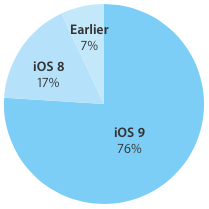
As measured by the App Store on January 25, 2016, and published on Apple's App Store dashboard for developers, iOS 9 is now powering 76 percent of iPhone, iPad and iPod touch devices, a one-percentage point gain versus the 75 percent mark that was recorded two weeks ago.

At the same time, the adoption rate for iOS 8 has dropped from nineteen percent as of January 13, 2016, to seventeen percent, a two-point loss.

Turn off HDR photo duplicates to save storage space

High Dynamic Range (HDR) photography is great for making the most from your iPhone's camera, especially in high-contrast situations.

With this feature, your iPhone takes multiple photos in rapid succession, each at a different exposure, and automatically blends them together. You get an image that has optimized highlights and really brings the shadows out of the noise, with way better detail in the bright and midtown areas.

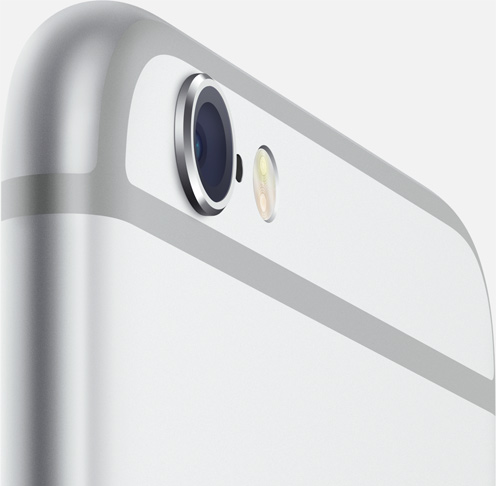
When you enable HDR photography by tapping the HDR icon in the Camera app, your iPhone will save two copies of the image in your photo library: the “normal” image (without HDR) along with its HDR counterpart.

This can put a strain on your iPhone's storage, especially when taking a lot of HDR photos. If your iPhone's storage is low, or you're the type of person who likes to plan ahead, read this tutorial to learn how to turn off HDR photo duplicates and save significant amounts of storage space on your device.