How to

Activation Error: how running an old iOS 7 beta version will get you in trouble

This is a typical illustration of why only developers should install a beta version of a software. In this case, I'm specifically talking about iOS 7 beta, which has been wildly popular among non developers since Apple first made it available in June.

Of course, we've tried to warn everyone that unless you're a developer, you shouldn't really mess with iOS 7 beta. Since yesterday, those that didn't take this warning seriously might have gotten themselves into trouble.

iOS 7 beta 6 was set to expire on October 6, and people who haven't updated to the GM or public release by then found out the hard way that a developer release should really be only for developers.

Many people were greeted today with a message on their iOS device saying "Activation Error - This device is not registered as part of the iPhone Developer Program," rendering the device unusable. Activation Required...

How to install MAME ROMs on a non-jailbroken device with Gridlee

As we reported on Saturday, Gridlee is a freeware arcade game from 1982 which was re-released on the iTunes App Store by David Loureiro. This would have been unremarkable, if Gridlee was a straight port from the source code and if it wasn't actually powered by an up-to-date and fully featured version of MAME4iOS Reloaded.

This means if you have a program capable of tunneling into the iOS file-system through USB, you can once again have a working version of MAME on a non-jailbroken device, complete with your own ROM images. As I can't think of anyone who would legitimately want to play Gridlee on an iPad, this was likely an intentional attempt to sneak the emulator back into the App Store, so we're guessing Apple won't be hosting the file for too long. Grab it while you can...
How to downgrade iOS 6 to iOS 5.1.1 on A4 devices

Have an iPhone 4, iPod touch, or below running iOS 6, and would like to downgrade back to iOS 5.1.1? Doing so is easy is you have your SHSH blobs saved for iOS 5.1.1 and can follow the steps inside. Unlike the beta period of iOS 6, you must have your SHSH blobs for iOS 5.1.1 save for you device now, because Apple has stopped signing iOS 5.1.1.

To downgrade, you will need the latest public version of RedSn0w. We will use the SHSH Stitching feature to combine the appropriate IPSW file for 5.1.1 and your corresponding SHSH blob for the device you wish to downgrade. It may sound a bit confusing, but it's extremely easy if you follow along carefully.

Take a look inside for the full walkthrough and video how-to.

How to install iPhoto on your first generation iPad

When Apple announced iPhoto for iOS at the press event for the new iPad, the company chose not to make the app compatible for the first generation device, leaving many customers out in the cold.

It is of course true that many original iPad owners may be looking to upgrade this year, but for those are still happy with their two-year-old devices, there is light at the end of the tunnel, with a relatively simple little hack allowing iPhoto to be installed on their devices. As is always the case though, there is a downside to proceedings.

For those that just want to forge ahead regardless, here's what you'll need to do...

Having Problems With Your Jailbreak? Try These Tips

Lots of happy people have successfully jailbroken their iPhone 4S and iPad 2 over the last 24 hours or so, but some are still having problems pulling off a successful jailbreak on both Mac and Windows.

We understand the frustration that some of you have been experiencing, and we really want to help you. True, the Windows Command Line Utility isn't exactly the easiest tool to jailbreak with, but it can be done, and has been done successfully by many of our viewers and readers.

That being said, there are still quite a few that seem to be having issues, so if that describes you, step inside, and let's discuss some things that might help...

How to Downgrade iOS 5.0.1 to iOS 4.3.3 For Untethered Jailbreak

If you absolutely must have an untethered jailbreak at this very moment, there is always the option of downgrading back to iOS 4.3.3.

Assuming you saved your SHSH blobs for the last firmware susceptible to an untethered jailbreak, you can follow this video tutorial and downgrade to iOS 4.3.3 in about 10-15 minutes. Inside we show you how, step-by-step...

How to Transfer Media From iOS to a Computer Without Using iTunes

When Apple originally launched iTunes it revolutionized device-to-computer media sync software. But after years of leaving the app largely unchanged, users have started calling for a revamp. In this day in age, iTunes feels antiquated.

Luckily, there are a couple of ways around using iTunes to transfer media from your iOS device to your computer, and vice versa. Using file transfer software, you can move virtually anything from your iDevice to your Windows PC or Mac and back again.

How to Use iTunes Match: The Complete Walkthrough

After a little bit of a delay, iTunes Match was released to the public today. iTunes Match is a service that's built into the latest version of iTunes. It lets you match, upload, and play music on a variety of different devices.

This is an extremely cool service that allows you to take your entire iTunes library with you on the go, even if you have a measly 8GB iPhone.

Unfortunately, we don't think that Apple has done a very good job explaining the full benefits of iTunes Match. For that reason, we've created this ultimate iTunes Match tutorial, FAQ, and video walkthrough...

How to Enable iTunes Match On Your iPhone or iPad

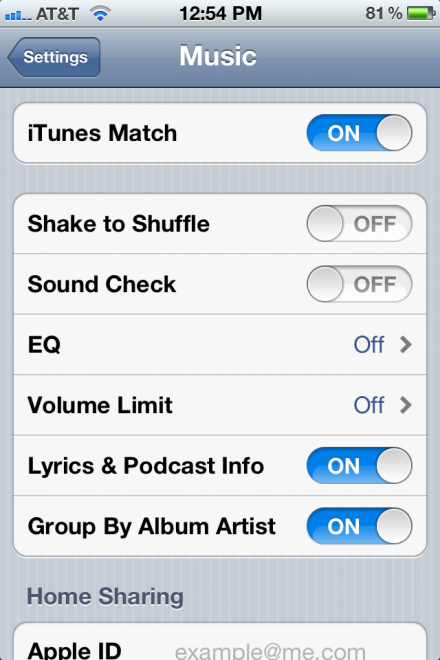
Apple released iTunes Match today, and users can now access their entire music library in iCloud on any authenticated iDevice running iOS 5. On the iPhone and iPad, iTunes Match can be easily enabled in the device's Settings.

Once enabled, iTunes Match will allow you to download and start playing any uploaded track at any given time on multiple iDevices.

How to Enable iTunes Match on Apple TV 2 [Video]

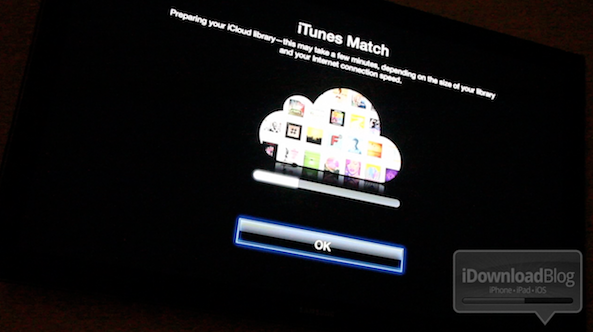
So by now you've probably heard the news: Apple has released iTunes 10.5.1 beta 2, and along with it comes iTunes Match Support for Apple TV 2.

But how do you go about enabling iTunes match on the Apple TV? It's actually much easier than one would expect.

Check out our video demonstration of iTunes Match on Apple TV inside...

How to Fix iBooks on a Jailbroken iOS 5 Device

Yesterday, a book about Steve Jobs was released; perhaps you've heard of it?

Sadly, if you're an iBooks reader with a jailbroken iOS 5 device, you won't be doing too much catching up on the late Apple CEO's affairs, or otherwise.

That's because iBooks crashes on iOS 5 devices that are jailbroken, rendering it quite useless. Fortunately, there is a workaround. Check out the video tutorial inside, for an in-depth walkthrough on the fix...