Try these troubleshooting solutions to fix "Hey Siri" or "Siri" invocation not working, preventing Apple's voice assistant from springing into action when you say the wake word.
How to fix “Hey Siri” not working on your iPhone or iPad

Try these troubleshooting solutions to fix "Hey Siri" or "Siri" invocation not working, preventing Apple's voice assistant from springing into action when you say the wake word.

Learn how to stop Apple's built-in Calendar app from deleting old events and restore past appointments if they're missing from the app.
By default, any time you set an alarm on your iPhone, it'll vibrate when the alarm goes off. For some people, this is a good way to help get woken up, but for others it's a waste of battery and can be completely annoying to hear that loud vibration on the night stand.
In this tutorial, intended for iPhone users only, we'll be showing you how you can set up an alarm so that your iPhone doesn't vibrate when it goes off.

I hate pop-ups, and chances are, you probably do too. They're not only a nuisance, but most of the time they're also designed to get in your way to purposely try and scam you and get you to click on malicious material.
Safari in macOS comes with anti-pop-up measures, but those with malicious intent are always coming up with ways to get around those measures.
In this post, we'll talk about what you can do in a scenario when you get these annoying pop-up messages on your Mac and why you might be getting them.

Have you ever received one of those annoying messages that basically tells you FaceTime is having problems on your iPhone, iPod touch, or iPad? They can be incredibly annoying, but usually they're easy problems to fix.
In this piece, we'll talk about why you might be getting FaceTime errors on your iOS device and walk you through some ways to correct the problem.

It's not that uncommon for the music, videos, and other content in your iTunes folder to disappear after updating iTunes. It doesn't seem to happen to everyone, but as many internet stories will tell you, it does occur to a number of users on some occasions.
In this tutorial, we'll show you how to get your iTunes music, videos, and more back when you notice it has gone missing after installing an iTunes app update.

In this piece, we’ll discuss why apps may download very slowly on your iPhone, iPad, Mac, or Apple TV despite having a good internet connection, and go over some troubleshooting steps to fix this problem.

I was trying to boot up my jailbroken Apple TV a few days ago when I suddenly got hit by the Black Screen of Death. It's something I had seen mentioned online before, but not experienced myself, so I was a little taken aback.
Conveniently enough, since I was communicating with nitoTV developer Kevin Bradley for the purpose of our podcast, I asked him if he had a quick fix for the issue, which he kindly offered.

Most of the time, when you want to use your Mac, you can just press the power button or lift the MacBook screen, hear a startup sound, and your computer will begin booting, so you can use it.
Sometimes, however, you don’t get so lucky. There may be a time when you go to use your Mac, and it doesn’t turn on at all.
As reliable as Macs can be, they can hiccup occasionally. In this piece, we talk about what you can do to troubleshoot if your Mac won’t power on after you press the power button.

Try these troubleshooting tips if your iPhone or iPad won't join or connect to a Wi-Fi network and you can't use the Internet on your device.
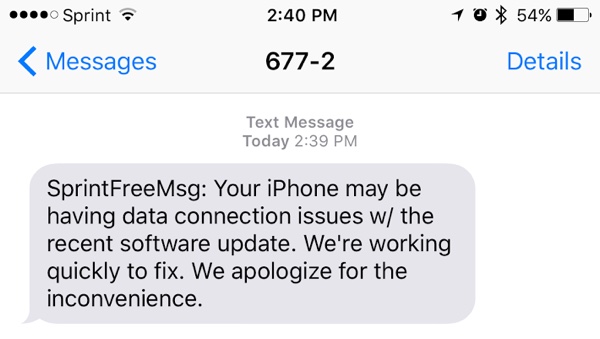
Sprint customers took to Reddit to complain about the inability to connect to Sprint's LTE cellular data network after upgrading to Apple's iOS 9.3 software update last week. The most recent iOS 9.3.1 update does not appear to have fixed the issue.
Sprint has acknowledged the issue in a text message to affected users and promised a fix, which will likely be delivered in the form of an over-the-air carrier settings update. “Your iPhone may be having data connection issues with the recent software update,” reads Sprint's message. “We're working quickly to fix. We apologize for the inconvenience”.

This troubleshooting guide explains the reasons your Mac might feel slow, and explores potential solutions to help restore its speed and performance.