Apple

YouTube TV app gains AirPlay support

Google today updated its official YouTube TV app with support for AirPlay, an Apple technology that lets you play video streamed from your iPhone or iPad on a TV set through your Apple TV.

“Announcing AirPlay! There are a few bug fixes and minor improvements in this thing, too. But mostly AirPlay,” reads the changelog for YouTube TV on App Store.

Prior to today's update, YouTube TV only supported broadcasting content from the app to a television set via Google's Chromecast HDMI dongle.

Google launched its new streaming television service back in April 2017.

In exchange for $35 per month, cord-cutters can enjoy live TV streaming from Fox, ABC, CBS, NBC and other popular cable networks along with content from an additional 39 local broadcast networks and channels, like ESPN.

Some sports channels like Fox Soccer Plus, as well as premium networks such as Showtime, are available for an additional monthly charge. DVR with unlimited storage is included in the subscription at no additional charge.

https://www.youtube.com/watch?v=qediav063xQ

YouTube TV can be used with up to six accounts in a single household without needing to share passwords between family members.

YouTube TV is separate from the YouTube Red service, which costs ten bucks per month.

YouTube TV is currently limited to select cities, like Chicago, Los Angeles, New York City, Philadelphia and the San Francisco Bay Area.

For more information, visit tv.youtube.com/tv/availability.

You can try YouTube TV free for 30 days by signing up at tv.youtube.com.

Apple’s new videos aim to lure Android users into switching to iPhone

Apple on Monday shared five short switcher videos through its official channel on YouTube. Titled “Photos”, “Jump”, “Fast”, “Privacy” and “Music”, each runs sixteen seconds long.

The latest ad campaign uses the new tagline “Life's easier on iPhone”.

The new clips promote some of the benefits of being an iPhone user, ranging from the official “Move to iOS” Android app (available free on Play Store) to the company's in-house designed chips that make iPhone the fastest smartphone in the world in terms of single-core CPU benchmarks to Apple's commitment to privacy and more.

Here are the videos.

Photos

https://www.youtube.com/watch?v=R-kbqiLxZwM

“Switch to iPhone. The Move to iOS app makes it simple to move your photos, music and more to iPhone,” reads the video's description.

Jump

https://www.youtube.com/watch?v=OmdC2eEeQAI

Music

https://www.youtube.com/watch?v=99w8cdTcliA

Fast

https://www.youtube.com/watch?v=8IKxOIbRVxs

“iPhone is designed to run fast. Life’s easier when you switch to iPhone.”

Privacy

https://www.youtube.com/watch?v=poxjtpArMGc

“We build iPhone with your privacy in mind. Life's easier when you switch to iPhone.”

Apple also updated its “Switch to iPhone” webpage with a new design and additional information aimed at encouraging Android customers to consider switching to Apple's phone.

The mini-site offers additional information on switching from Android to an iPhone with FAQ-style answers to questions like “Is the camera as good as they say?”, “Why is iPhone so fast?”, “What makes Messages so great?” and “Will I love my iPhone”, among other topics.

How do you like Apple's new switcher videos?

Apple’s revamped “Switch to iPhone” webpage offers additional information to Android users

Apple's webpage dedicated to Android users who would switch to an iPhone has been refreshed with a modern web design and additional FAQ-style information on key iPhone features like speedy Apple-designed chips, Apple Pay, iMessage and more.

The refreshed webpage is divided into the following sections:

Will it be easy to switch to iPhone?

“Yes, it will,” says Apple. “There’s no need to save your stuff elsewhere before switching from Android.” This section promotes Apple's “Move to iOS” Android app. Available at no charge on Google's Play Store, the app can securely transfer a switcher's content from an Android phone to their brand spanking new Apple smartphone. “And you can trade in your old smartphone, if eligible, for credit toward your new iPhone,” reads the section.

Is the camera as good as they say?

Apple prides itself with the fact that more pictures are taken on iPhone than any other camera in the world, as per Flickr's camera stats. This section mentions some of the most popular iPhone photography features and shooting modes, such as Slo-Mo, Portrait and Time-Lapse.

“iPhone also has cool features like Memories, which automatically compiles your favorite moments into a movie,” says the company. As of recently, Apple is promoting iPhone photography via a series of mini-video tutorials on getting the most from your iPhone 7 camera, hosted on its “How to shoot on iPhone” webpage.

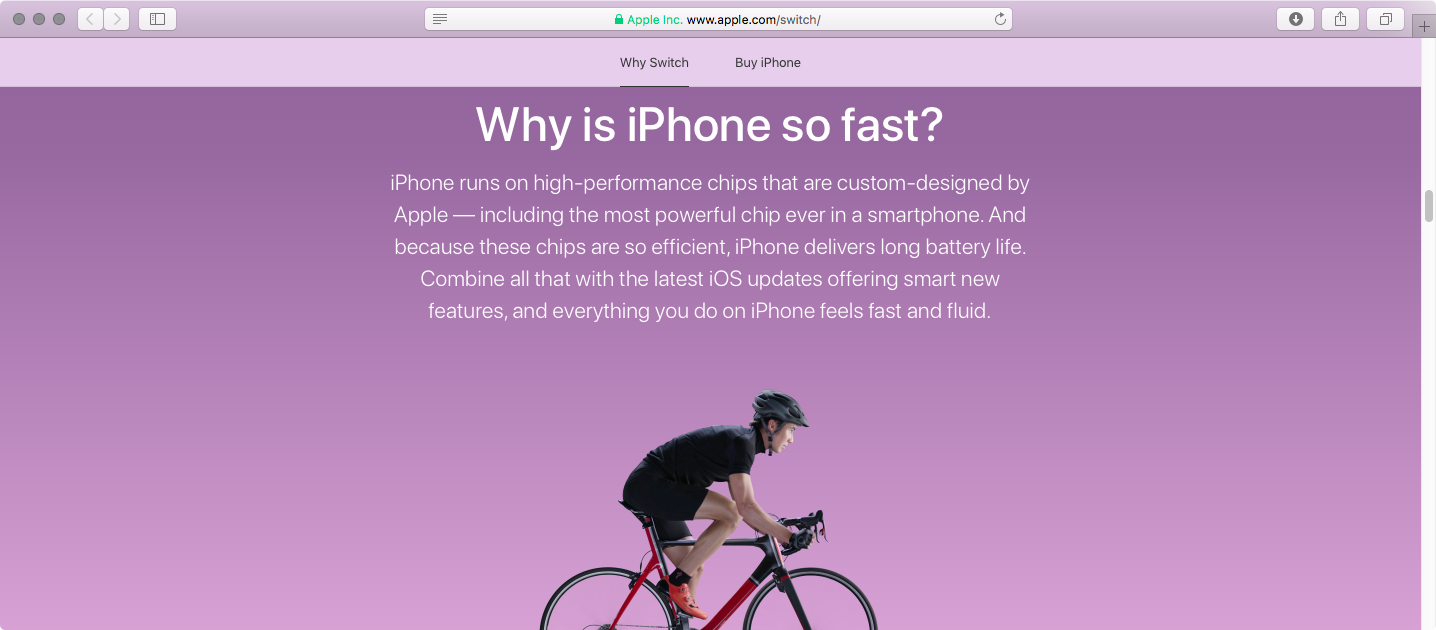
Why is iPhone so fast?

Even the last year's A9 chip that powers iPhone 6s is faster in single-core CPU benchmarks than today's top of the line Android handsets with quad-core chips outfitted with four gigabytes of RAM or even more. As you know, iPhones run on high-performance chips that are custom-designed by Apple for power efficiency. “Combine all that with the latest iOS updates offering smart new features, and everything you do on iPhone feels fast and fluid,” says Apple.

Will iPhone be easy to use?

Apple promotes its legendary ease of use, which it says is at the core of everything it creates. “With a swipe of your finger or a single tap, you can open apps, make a purchase with Apple Pay or customize your iPhone,” reads the webpage. Apple also mentioned the Tips app, preloaded on each iOS device to help users get the most out of their device, but that's hardly something I'd choose to highlight iOS's simplicity and intuitiveness.

How does iPhone help protect my personal information?

This is all about Apple's commitment to privacy and security, two major priorities with them. Since iOS 8, everything on your iPhone is “encrypted from the start” and protected by your passcode. Most flagship Android handsets have encryption disabled by default because full-disk encryption makes them sluggish due to the lack of hardware-assisted encryption.

https://www.youtube.com/watch?v=R17WDY3BIfo&t=5s

Subscribe to iDownloadBlog on YouTube

“Apple will not sell your information to anyone for any reason,” adds the mini-website.

The Cupertino giant notes yet another huge advantage it has over Android: its timely and easy-to-install software updates that don't have to be vetted by carriers and device vendors like major Android firmware updates do.

Can I get help from a real person?

“No matter where you are, we have real human beings ready to help,” says the firm. Apple's support team will help Android users learn about topics ranging from the switching process and software on their new iPhone to troubleshooting any issues they may have with their new phone. Support options listed here include phone, online chat, Apple's Support app and a dedicated Twitter handle @AppleSupport.

What makes Messages so great?

The expressive Messages app on iOS 10 “doesn’t just send messages, it also lets you hail rides, book restaurants, and even shoot lasers.” Apple is referring to new Messages features on iOS 10, like downloadable stickers, fullscreen effects and iMessage apps, as well as strong end-to-end encryption. “And, of course, you can use other messaging apps like WeChat, WhatsApp, or Facebook Messenger, too,” adds the company.

What about the environment?

Apple says:

We think about the environment all the time. Every time you send an iMessage, make a FaceTime call, or ask Siri a question, those tasks are handled by Apple data servers running on 100 percent renewable energy. And when you switch to iPhone, we’ll even recycle your Android phone for you.

Will I love my iPhone?

Of course you will.

Tim Cook likes to highlight Apple's customer satisfaction numbers that are the envy of the industry (customer sat, as he likes to put it), with a 451 Research-estimated 97 percent of people who have an iPhone saying they love it.

“That’s a lot of smiling selfies. A lot of happy emoji. And a lot of people who are glad they chose the world’s most loved smartphone,” reads the webpage.

How do you like Apple's reworked “Switch to iPhone” mini-site?

Be sure to watch short switcher videos Apple uploaded today to its YouTube channel.

Check out Nike’s four new Sports bands for Apple Watch

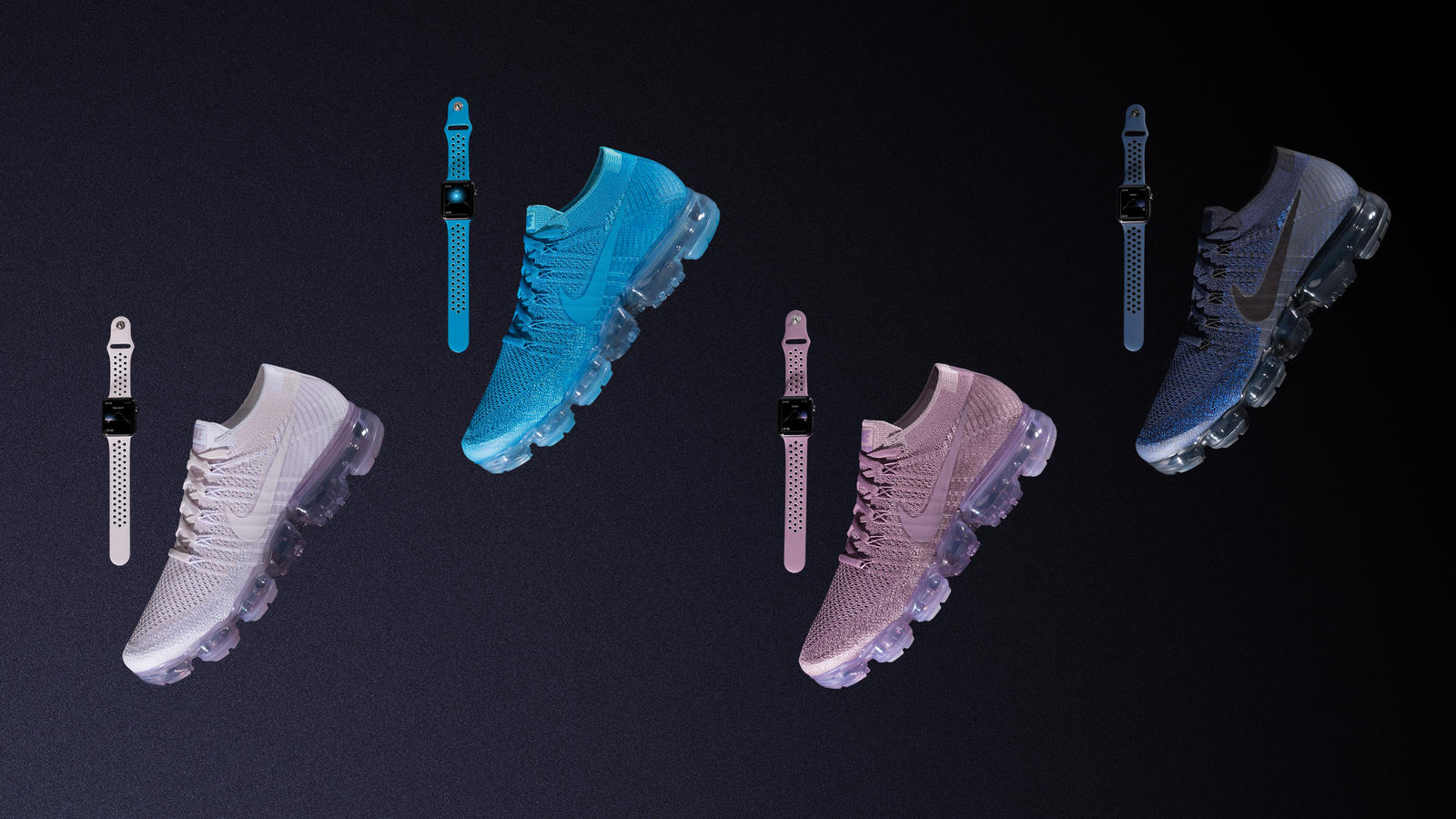
Footwear, apparel and sports accessories giant Nike on Monday announced four new bands for Apple Watch, designed to color-match the company's new Air VaporMax Flyknit “Day to Night” running shoe collection. The new bands work with any Apple Watch model, not just with the special-edition Apple Watch Nike+ collection, and are made from a flexible fluoroelastomer material that's lightweight and perforated for ventilation and sweat management, like other Sports bands.

The new bands are priced at $49 each as with other Sports bands.

They'll be available via Nike's online and retail stores on June 1, and Apple.com, select Apple Authorized Resellers and select specialty and department stores in early June.

The new Air VaporMax Flyknit “Day to Night” running shoe collection celebrates runners whenever they choose to run: at twilight, sunset and everything in between. Each of the new (previously unavailable) band colors is inspired by a shade of the sky, from dawn to dusk, according to the apparel giant.

The new band collection was designed to allow runners to “make a statement by matching their Apple Watch Nike+ bands to their footwear,” reads the press release. Nike's new running shoe collection launches next Thursday, June 1, at 10am, priced at $190.

In April 2017, Apple and NikeLab launched another limited-edition Apple Watch in the form of Apple Watch NikeLab, which pairs a Space Gray aluminum case with a new Light Bone band in a creamy color combination with black perforations.

Nike's new Light Bone/Black band combination for Apple Watch NikeLab coordinates nicely with their similarly neutral-toned “Oreo” and “White/Blue” VaporMax sneakers.

watchOS 3.2 added some new unique face colors, including the new band-matching Blue Orbit and Violet Dust options for Apple Watch Nike+ wearers and Camellia, Flamingo, Pollen, Mist Blue, Azure and Pebble as the new watch face color options for all Apple Watch models.

Nike began selling standalone versions of its unique Sports bands for Apple Watch earlier this year. Last but not least, earlier this month the company began selling iPhone 7 cases based on its Rosche and Air Force 1 sneakers, priced at $35 each.

Apple recently refreshed its own band lineup for Apple Watch with some interesting new Spring-themed straps.

Apple Music’s 3 month trial has gone from free to paid in some countries

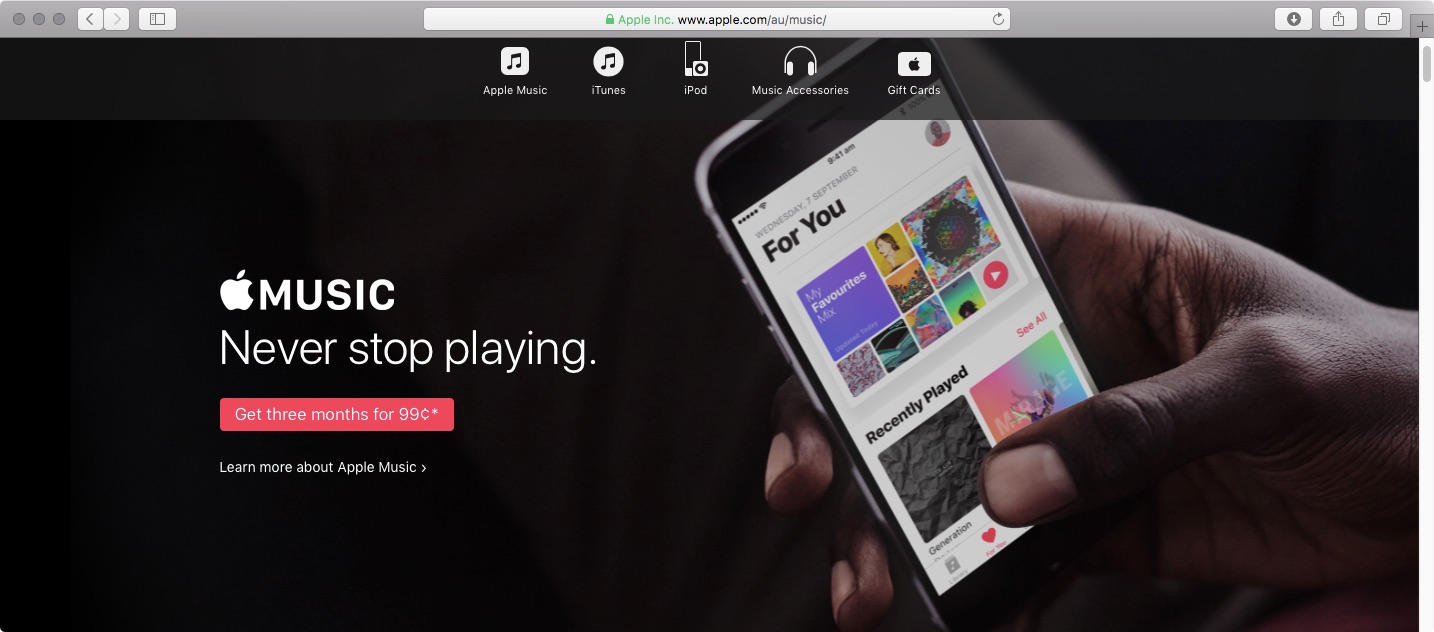
If you live in Australia, Spain or Switzerland, you can no longer try out Apple Music for three months for free. In those countries, Apple Music's three-month trial now requires a small payment. In Australia, three months of Apple Music is now AUD 0.99. In Spain, Apple Music trial is now a € 0,99 value and in Switzerland it comes in at SFR 0.99.

The trial was still free in those countries as of May 14, according to The Verge. In an email statement to the publication, Apple said: “Pricing and promotions for Apple Music vary from country to country.”

AppleInsider thinks the move may have something to do with Apple trying to recover some of those costs with paid trial periods.

https://www.youtube.com/watch?v=Yp1WwrX9APY

Subscribe to iDownloadBlog on YouTube

In all other countries, Apple Music's three-month trial remains available at no charge.

Apple Music lunched in 2015 with a fairly generous three-month free trial allowing customers to try the service before paying a monthly subscription.

It's interesting that rival Spotify also does not offer a free trial in Australia, Spain and Switzerland, charging the same fee for three months of its service in those markets.

On the other hand, Spotify's trial costs 99 cents elsewhere, too, including in the US and Canada.

Leaked molds offer size comparison between iPhone 8, iPhone 7s and iPhone 7s Plus

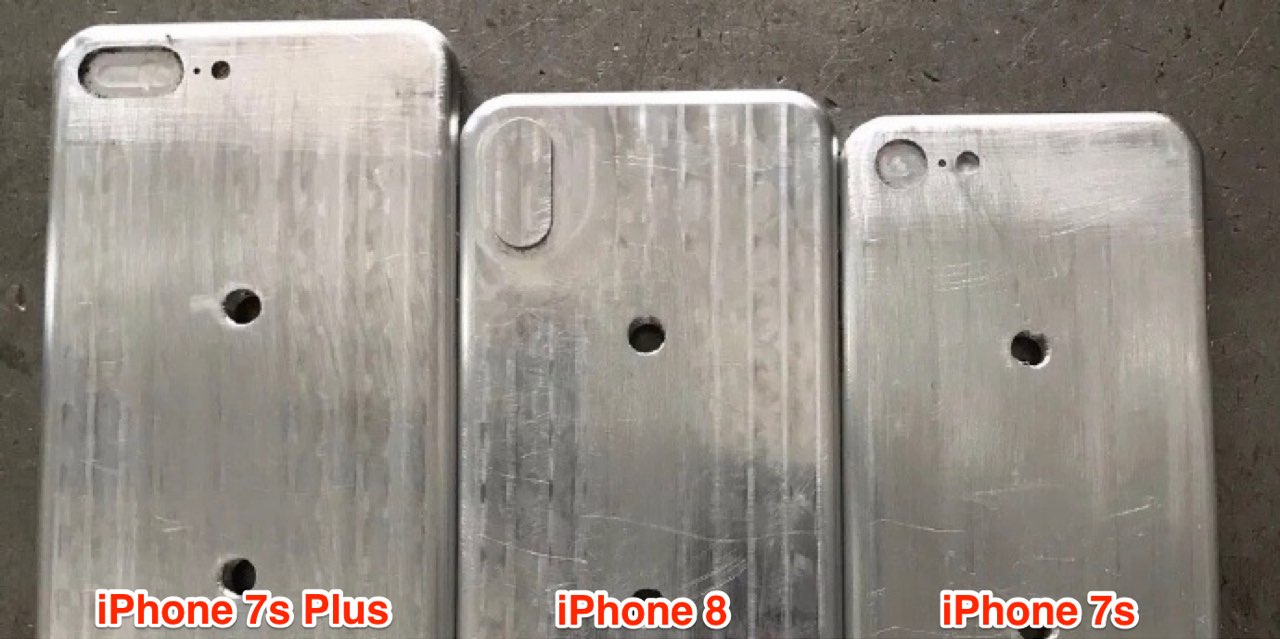
This weekend, leakster Benjamin Geskin published a batch of purported photos showcasing alleged manufacturing molds for Apple's upcoming 2017 iPhone refresh, offering a look at relative sizes of the OLED-based iPhone 8 model and the LCD-based iPhone 7s and iPhone 7s Plus range.

First surfaced on Chinese social network Weibo, the images serve as yet another indication that iPhone 8 will probably be just a bit wider and slightly taller than the 4.7-inch iPhones.

That's because iPhone 8 should squeeze a 5.8-inch OLED screen with a 5.1-inch active display area into a chassis roughly the size of a 4.7-inch iPhone by embedding the selfie camera, the sensors and the Home button directly into the display assembly.

Other iPhone 8 features we can glean from the images include a vertically aligned dual-lens system with an LED flash and a noise-suppressing microphone built directly into the bulge, plus an elongated Power button on the right side that some folks think could double as a fingerprint sensor if Apple is unable to integrate Touch ID into the OLED display.

Touch ID is built into the display itself, according to Geskin.

Don't let the holes near the middle confuse you: they're probably manufacturing artifacts.

While the iPhone 7s family is expected to feature slightly updated design and maybe even a glass backside to help with wireless charging, it won't have a nearly full-screen front face like iPhone 8. In other words, iPhone 7s and iPhone 7s Plus should retain their fairly large “chin” at the top and the bottom because, unlike with iPhone 8, their front camera, Home button and sensors won't be integrated underneath the LCD panel.

Please take this news nugget with some skepticism because iPhone shells are machined, not cast. For all we know, the molds pictured on these photographs could be (and probable are) made by a third-party for use in the production of iPhone cases rather than actual handsets.

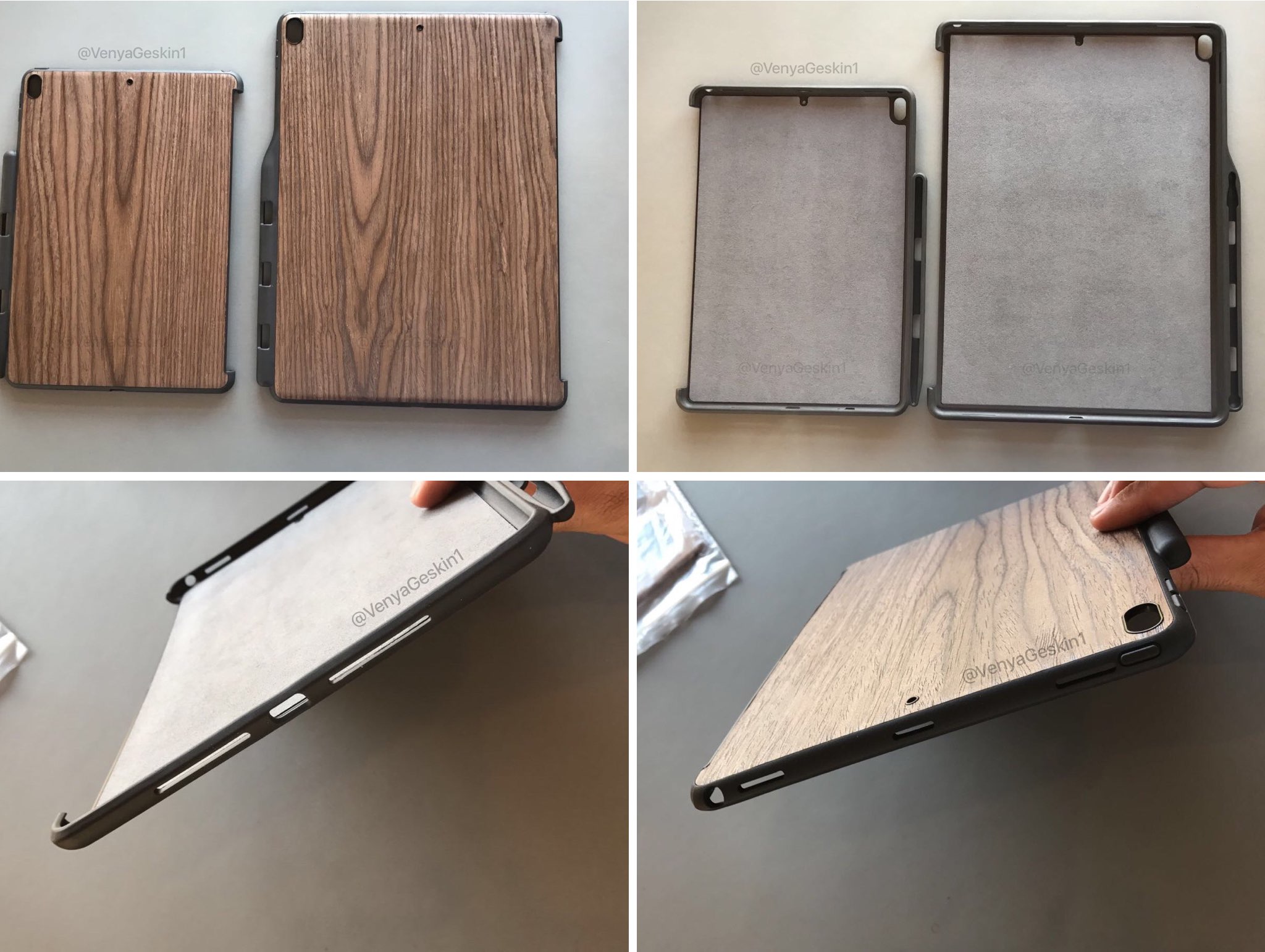
Geskin also published photographs of third-party cases for Apple's upcoming 10.5-inch iPad Pro model and a next-generation 12.9-inch iPad Pro, designed based on information obtained from a Foxconn source.

The purported cases suggest two things: 1) the 7.9-inch iPad mini lineup is indeed being discontinued, as previously rumored; and 2) 2017 iPads will relocate the microphones from the sides to the backside of the devices, like with the recently launched $329 9.7-inch iPad model.

Claimed cases for 10.5″ and 12.9″ iPad Pro suggest rear microphone and stereo speakers

Cases for Apple's new 10.5-inch iPad Pro model and a next-generation 12.9-inch iPad Pro are circulating the web today, showing rear microphone holes like on the recently unveiled $329 iPad model and cutouts for stereo speakers. Made by a third-party vendor, the design of these cases is based on information allegedly obtained from Apple's contract manufacturer Foxconn.

The current-generation 12.9-inch iPad Pro features the microphone cutout on the right side of the device. The images depict four large cutouts for what appears to be stereo speakers, two at the top of the wooden case and two at the bottom of the device on both sides of the Lightning port.

The cases include cutouts for the 3.5mm headphone jack on both the 10.5-inch and 12.9-inch iPad Pro. Published by leakster Benjamin Geskin, the photos also indicate that there may not be new iPad mini models this year.

According to BGR, the iPad mini lineup has just been “sized out of its own category,” prompting the Cupertino company to stop updating the device and phase it out gradually due to its constantly decreasing sales.

The 10.5-inch iPad model is expected to feature narrower side bezels so that the 10.5-inch display could be fitted inside a body roughly the size of the current 9.7-inch iPad models.

Check out breathtaking aerial views of Apple Park building lit up at night

Friday, drone pilot Duncan Sinfield posted his monthly Apple Park construction update showcasing breathtaking aerial views of the massive ring-shaped building lit up at night.

The mountain of dirt on Apple's new campus counties to shrink on a daily basis as contractors continually work on landscaping, planting mature trees around the site.

Solar arrays on the building's roof appear to be completely installed and light posts around the new campus are now active, too.

Aside from other impressive features and mind-boggling facts, the main building has nine entrances and sports a large café, basically an atrium-like space four stories high with a pair of huge glass doors that can be opened when it’s nice outside. The café was designed to hold 4,000 people at once, split between the vast ground floor and the balcony dining areas.

Here's Duncan's latest video.

https://www.youtube.com/watch?v=71ZK-NkluqQ

In order to be able to open and close the massive glass doors quietly, they hid the necessary mechanism underground. The glass doors weigh in at a whopping 440,000 pounds each.

“The only doors I know of in the world that size are on an airplane hangar,” said Nelli Diller, a managing director for Seele Group, a German company Apple contracted to create the largest, strongest pieces of curved glass in the world for its new corporate office.

Each of the 800 45-foot-tall panels of safety glass takes fourteen hours to create.

Seele had to expand capacity by working with its autoclave manufacturer to develop a much bigger cooker that could stack five panels at once. “The one we had was the biggest in the glass industry by far. This new one is just … giant,” said Diller.

Seele also built glass panels for Apple Stores.

Both Google Maps and Apple Maps offer three-dimensional views of Apple Park, although Google's 3D imagery appears to be a bit out of date.

For a video recap of the construction progress made on the 175-acre campus over the past year, check out a birds-eye video by videographer Matthew Roberts.

If you like these gorgeous aerial scenes of Apple Park lit up at night, be sure to check out Duncan's first nighttime footage of the new campus taken about a month ago.

Apple gave Wired a rare look inside the building with many previously unknown tidbits about the project and never-before-seen photographs of the meticulously designed interiors.

Apple began moving in first employees at the start of April, with about 500 new employees arriving every week thereafter. The iPhone maker expects to finish the move-in process, complete landscaping work and open the visitor center to the public by year-end.

Apple Park has a 100,000-square-foot fitness and wellness center for employees which includes a two-story yoga room, as well as access to medical and dental services.

“I’m a big believer in people staying active,” said Cook, who is something of a fitness buff himself. “It’s something that makes them feel better and more energetic. It’s all about the fixation on the customer, and the customers here are our people, our employees.”

Apple publishes 4 new “How to shoot on iPhone 7” video tutorials

Apple on Friday added four new video tutorials to the “How to shoot on iPhone 7” series on its YouTube channel. The four new videos were designed to teach customers how to shoot with zoom on their iPhone 7 Plus, convert their photographs to black & white, as well as take a one-handed selfie and edit it on the phone.

How to shoot with zoom on iPhone 7 Plus

“Get closer with 2x optical zoom. Or use digital zoom to get up to 10x closer,” says Apple.

https://www.youtube.com/watch?v=wsaA1s7oCKA

If you tend to use the zoom feature while shooting video on your iPhone 7 Plus, it may be a good idea to disable the automatic lens switching feature in camera settings to avoid any glitches that may occur when zooming in and out during video capture.

How to convert to black & white on iPhone 7

https://www.youtube.com/watch?v=RQoEsUJpy_Q “The right filter and a bit of experimenting with light levels give you a dramatic black-and-white image,” says Apple.

How to shoot a one-handed selfie on iPhone 7

https://www.youtube.com/watch?v=4miX5CNATEI

“The quick-draw selfie in three easy steps.”

How to edit a selfie on iPhone 7

https://www.youtube.com/watch?v=UUxahFzjGS4

“Use cropping and auto-enhance to create an even better selfie for sharing,” says Apple.

If you'd like, feel free to explore additional photography tips and techniques at Apple's website.

The clips join Apple's seven video tutorials on using iPhone 7's camera, published last week.

Our own iPhone Photography series is a valuable resource of free tips, tricks and advanced photography techniques, whether you are an experienced photographer or a beginner.

iOS 11 concept imagines new productivity features for iPad

Apple is going to preview iOS 11 along with other OS updates at its annual developers conference next month and we fully expect the mobile operating system to include advances that should make the Apple tablet a better laptop replacement than it currently is.

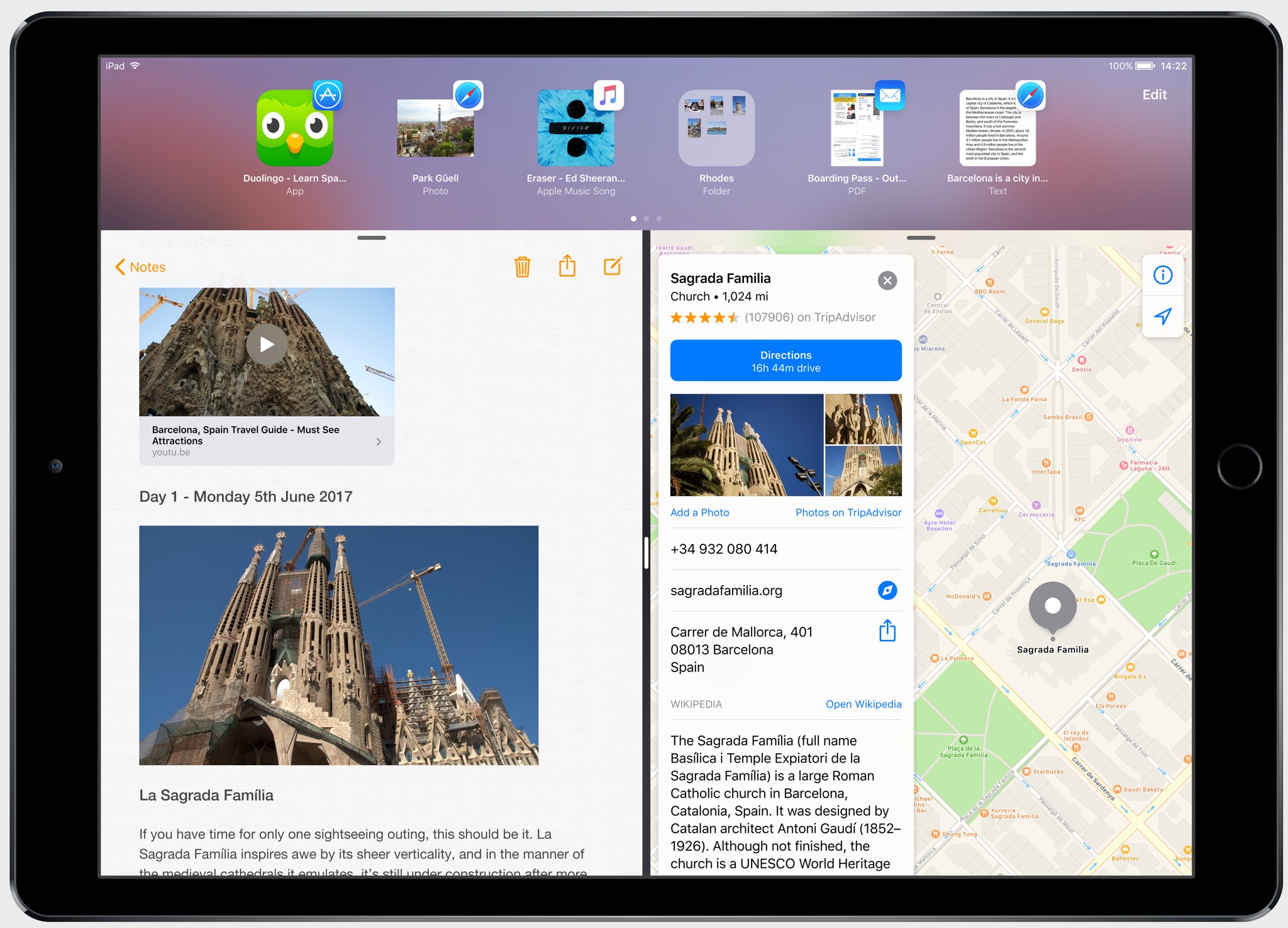
In the meantime, Federico Viticci and Sam Beckett of MacStories have put together an incredibly detailed concept of iPad-specific features that could be part of iOS 11, including the Finder, a new Shelf feature, drag-and-drop available system-wide and other perks.

With the Shelf feature, you would be able to clip pretty much anything with a simple drag-and-drop gesture. Sitting above apps both in full-screen or Split View mode, it would reveal itself automatically when you're dragging an item towards the top of the screen.

The Shelf would display your previously saved items as thumbnail previews and you'd be able to drop an item on top of another item to create a folder in the Shelf.

“The idea behind the Shelf is to make it as effortless as possible to hold something for later without the cognitive load of deciding which app or extension should receive it right away.”

The Shelf would be paginated and local to each iPad.

You'd be permitted to drop almost anything in it: from text selections and images to phone numbers and even songs. Tapping an item in the Shelf would pull up a custom Quick Look preview with additional information and actions relevant to the selected item.

And here's the concept video.

https://www.youtube.com/watch?v=UyFUDQ5LLZw

Next up: file management.

As you know, Apple currently offers the iCloud Drive app for browsing your iCloud files.

MacStories has envisioned a Finder for iOS because the argument that iPad doesn't need to expose its filesystem to the user “lost its validity when Apple introduced document providers in iOS 8 and the iCloud Drive app in iOS 9.”

Unlike Finder for macOS, its iOS counterpart would not expose system information beyond the actual files. You'd be able to browse your files in column and grid views, shared items via iCloud with full permission controls, apply tags, use the Versions feature and even take advantage of Siri integration to search across your files.

“All the pieces of the current system—iCloud Drive, the document picker and document providers—should be unified into a single Finder app and system-wide layer available everywhere,” said MacStories.

Instead of having files stored within app-specific folders on iCloud Drive, users would be able to create files in a top-level iCloud Drive view.

As a bonus, rather than list a bunch of installed document provider extensions in a popup, you'd get a full-blown Finder dialog to open files from any folder or app.

MacStories notes:

With a new set of APIs and user permissions, iOS 11 could allow apps to more easily open each other's documents in complex (but intuitive) workflows that aren't possible today.

And, obviously, automation could play a role in this down the road, opening the door to ideas such as folder-monitoring utilities and file automation either via Workflow or Hazel-like apps.

Finder for iOS would integrate with other features that MacStories has envisioned, such as the Shelf and system-wide drag-and-drop, but without the complexity of macOS.

But wouldn't drag-and-drop clash with iOS's standard gestures?

In a word, no. As MacStories explains:

Because drag-and-drop would be fully multitouch-enabled, it wouldn't block the iOS interface: another finger could be used to navigate in a different "drop area" of an app, or a user could keep dragging until the Split View app picker is shown and drop an item onto an app's icon, opening a contextual action menu.

App Store could be redesigned around Apple Music-inspired redesign, as show below.

Apple could even bring aspects of the watchOS interface to iOS and move beyond the static, inexpressive nature of its interface. “Touch-down states for icons and buttons would add useful context to iOS toolbar icons and menus as well,” reads the article.

A better Split View implementation is one of my favorite concepts proposed by MacStories for iOS 11. In addition to supporting drag-and-drop between the apps in Split View mode, you'd gain the ability to quickly select an app for Split View by choosing it from a Home screen like view complete with Spotlight integration for surfacing Split View-enabled apps.

Be sure to visit the MacStories concept for additional high-resolution mockups and detailed descriptions of other proposed enhancements, such as improvements to Notes and Control Center, better extension support in Safari and more.

Feel free to let us know your thoughts on this concept by posting a comment below.

Stevie Wonder performed at Apple’s headquarters to celebrate Global Accessibility Awareness Day

Marking one of Apple's traditional “Beer Bash” celebrations, multi-platinum Grammy-winning artist Stevie Wonder performed this week at Apple's Cupertino headquarters at One Infinite Loop.

The corporate event for company employees was organized in recognition of Global Accessibility Awareness Day, a global initiative focused on digital access and inclusion of people with different disabilities.

Apple CEO Tim Cook tweeted out an image of himself and Wonder hugging onstage as a thank you to the artist. “Thank you to the incomparable Stevie Wonder for lifting hearts and celebrating accessibility with us,” reads the tweet.

Prior “Beer Bash” celebrations at Apple's headquarters included performances by Maroon 5, One Republic, Darius Rucker and other music artists.

https://twitter.com/cookiecrook/status/865371872723992576

“There's nothing on iPhone or iPad that you can do that I can't do,“ Wonder, an Apple fan, said in 2011 commenting on the assistive technologies built into iOS and macOS.

The artist sang in Apple's “Someday at Christmas” 2015 holiday commercial.

Wonder is blind so having him perform on Global Accessibility Awareness Day is fitting.

Apple celebrated Global Accessibility Awareness Day with a series of inspiring videos highlighting assistive technologies built into its platforms, the accessibility-focused “Today at Apple” sessions at Apple Stores, an App Store section highlighting some of the best apps for people with disabilities and three Tim Cook interviews with accessibility activists.