Apple

Hands-on with iOS 11’s one-handed QuickType keyboard

As previously suspected, and officially announced at the Worldwide Developers Conference, iOS 11 provides a new keyboard feature making it easier to type in one-handed mode, whether you're a right or left-handed user. It works on both 4.7 and 5.5-inch iPhones and is easily invoked at any time via the keyboard's Emoji key.

Andrew O'Hara put together a short video demonstration of this feature in action. Watch it embedded below, then read the rest of the article before meeting us in comments.

https://www.youtube.com/watch?v=nq0xDpcCGKA

Subscribe to iDownloadBlog on YouTube

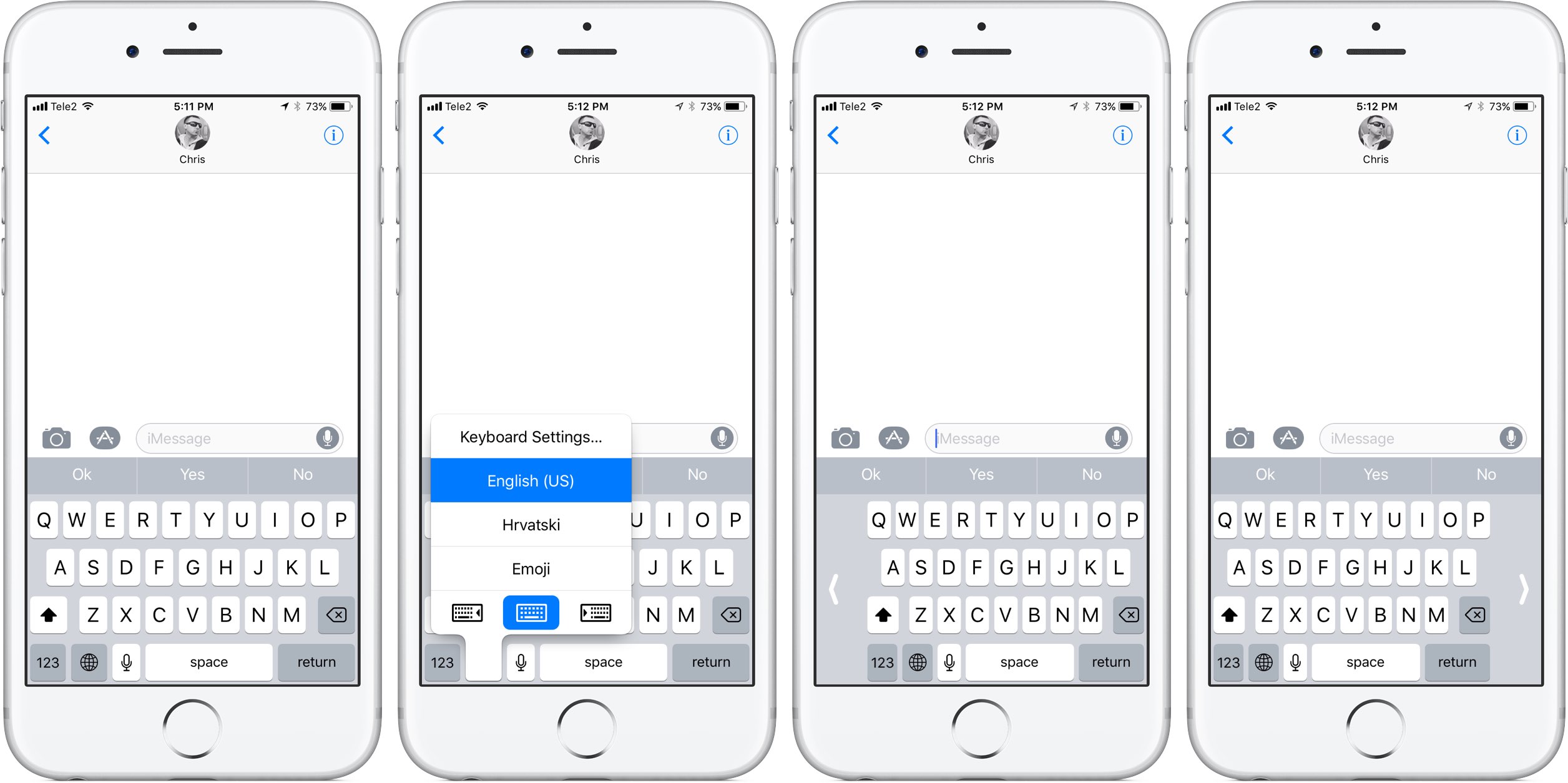
To activate this  keyboard mode, tap and hold the Emoji key on the keyboard.

You'll notice a trio of new icons lined up alongside the bottom of the menu. These icons let you move the entire keyboard either fully to the left or to the right of the screen so that typing with a single thumb is easier.

The keyboard shrinks exactly to the width of the keyboard on a four-inch iPhone.

To return to the normal-size keyboard, tap the Emoji key again, then hit the middle icon at the bottom of the menu. Alternatively, tap the arrow on either side of the keyboard to quickly get back to the normal layout.

What are your thoughts on iOS 11's new one-handed keyboard? Do you think you'll be using it on your iPhone when iOS 11 drops? Share in the comments section below!

ResearchKit gains 3 new active tasks researchers can incorporate into their studies

Apple launched its open source ResearchKit framework two years ago.

At the Worldwide Developers Conference earlier this week, the company announced some interesting updates for Research Kit version 1.5.

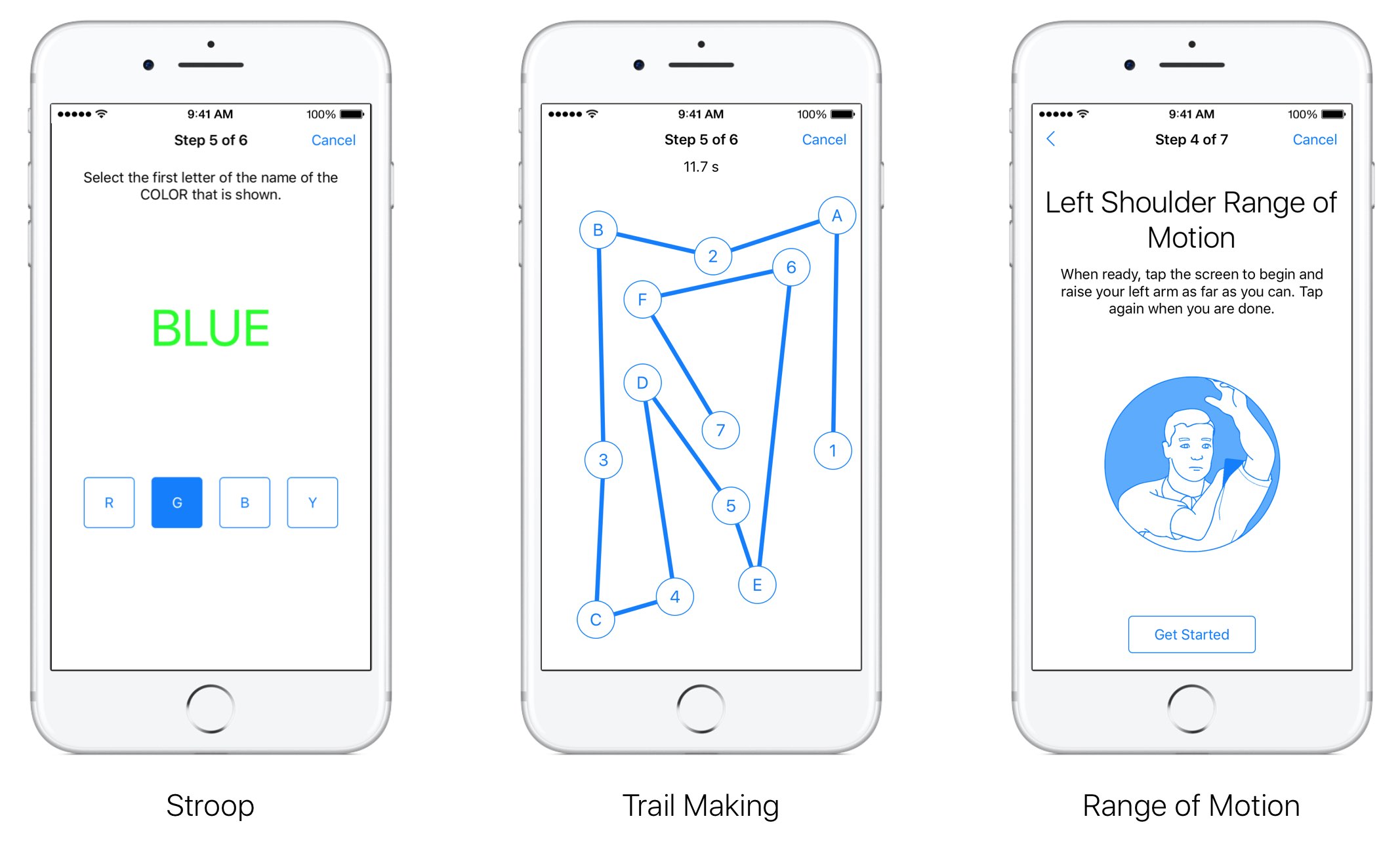
Researchers and app developers can now gather new types of data by taking advantage of three new “active tasks”. A new video instruction step makes it easier for apps to display rich video content to users from either a local or remote source.

“We have also updated the Tone Audiometry active task to include both a left and right button,” notes Apple. “This update will let participants not only indicate when they hear the tone but they can now also specify which ear they hear it in.”

The following new tasks are available as part of ResearchKit 1.5:

for: This test measures selective attention by asking participants to focus their attention on one stimulus and ignore another. The test displays concordant and discordant combinations of text and tint to the user who must ignore the text and instead select the button that reflects the first letter of the tint color. Trail Making: This active task measures visual attention and task switching by asking participants to connect a series of alternating labelled circles by tapping the circles on the screen in the correct sequence. Range of Motion: This test lets you measure both the flexed and extended positions for the shoulder and knee. When participants are ready with their device in the proper position they can simply tap the screen to indicate they are ready to proceed. As users complete the test, data from the accelerometer and gyroscope is recorded.

ResearchKit allows researchers and developers to create apps for medical research that use iPhone's many sensors to gather valuable data from the participants. With it, developers and researchers can incorporate visual consent flows, real-time dynamic active tasks and surveys into their apps.

ResearchKit works seamlessly with HealthKit, allowing researchers to access relevant data for their studies (with user consent), things like daily step counts, calorie use and heart rate.

Apple’s latest ‘Shot on iPhone’ ad features powerful narration by famous cosmologist Carl Sagan

Apple on Thursday via its official YouTube channel shared a new commercial as part of its ongoing “Shot on iPhone” campaign. Titled “Earth”, the video is narrated by late Carl Sagan who reads a poignant excerpt from his 1994 book.

It's a beautiful tribute to Earth following the US exit from the Paris accord.

The ad aired in front of a big TV audience watching the NBA finals, said AdWeek. The chosen passages from Sagan's book are set to videos of natural landscapes, shot by everyday Apple users on their iPhones.

Here are Sagan’s words, culled from a longer passage in the book:

The Earth is a very small stage in a vast cosmic arena. In our obscurity, in all this vastness, there is no hint that help will come from elsewhere to save us from ourselves. The Earth is the only world known so far to harbor life. There is no where else, at least in the near future, to which our species could migrate.

Like it or not, for the moment the Earth is where we make our stand. It underscores our responsibility to deal more kindly with one another and to preserve and cherish the only home we've ever known.

And here is the spot.

https://www.youtube.com/watch?v=YpUa7YvhUJo

“Our only home. Shot on iPhone through the lens of everyday users,” says Apple.

The video's description is accompanied by the hashtags #OurOnlyHome and #ShotoniPhone.

As mentioned, the narration is from Carl Sagan and Ann Druyan's book, titled “Pale Blue Dot — A Vision of the Human Future in Space,” available on iBooks Store for $14.99.

How do you like Apple's subtle dig at climate change deniers?

Apple’s new 21.5″ iMac with 4K Retina screen has user replaceable RAM and modular CPU

Apple during the Worldwide Developers Conference refreshed the iMac lineup with faster Intel chips and updated internal architecture. Good folks over at iFixit have now taken Apple's new $1,299 21.5-inch iMac model that has a 4K Retina display, discovering something really interesting.

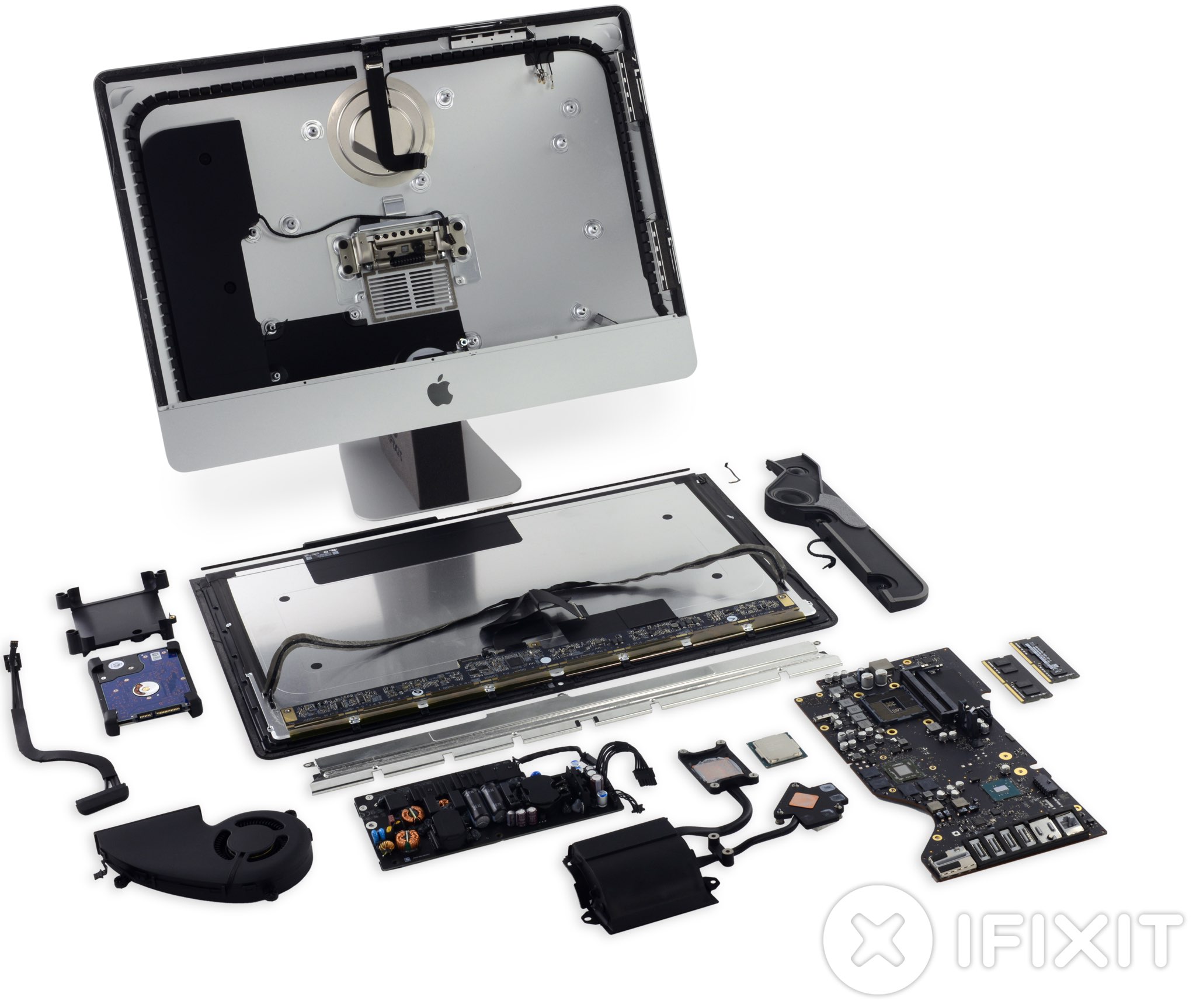
The machine features both removable RAM (via a pair of removable SO-DIMM slots) and Intel's Kaby Lake processor that—surprisingly—sits in a standard LGA 1151 CPU socket rather than being soldered onto the logic board.

The modular CPU design suggests owners of the all-in-one desktop might be able to replace or upgrade the CPU in the future without a reflow station. The last time the 21.5-inch iMac had user-replaceable RAM was back in 2013. 2012 models of the 21.5-inch iMac also came with a modular CPU.

The stock configuration they tore apart had Intel's SR32W Core i5-7400 Kaby Lake chip, 8GB of 2400MHz DDR4 memory, a Radeon Pro 555 graphics card with 2GB of VRAM and a 1TB 5400-RPM hard drive.

According to iFixit:

Our teardown confirms that the new 21.5-inch iMac with 4K display has both removable RAM and a modular CPU. Of course, Apple would say neither is user-replaceable. Accessing and replacing these components isn't exactly easy, but we’re saying it’s possible. Maybe even probable.

A tinker-happy user (armed with the right tools and guide) could at least double the base 8 GB of memory, turning their new iMac with Retina Display into an iMac Semi-Pro.

Here's the machine's socketed CPU.

Other teardown highlights:

A warranty void sticker on the heat sink discourages users from removing the modular CPU underneath. The Retina display is manufactured by LG Display. There's a single microphone below the display vs. dual microphones on previous models CMOS battery is replaceable A built-in 3.5-inch SATA hard drive is upgradeable There's no SSD connector on the board

And here's the user-replaceable RAM module.

Despite the upgradable RAM and CPU, iFixit gave the machine a 3/10 for repairability.

That's because the computer is difficult to open as everything is buried under “a finicky glass panel,” in iFixit's own words. A speciality pizza-cutter-like tool is required to breach the adhesive before any repair.

And because the cover glass and the Retina display itself are fused together, the cost of a display replacement will be high.

At any rate, this is still good news for anyone in the market for a new iMac. Upgradability is paramount with all-in-one designs like iMac's. And with replaceable RAM and CPU, customers will be able to get more use and more years out of their computer.
FunAppocalypse simulates the iPhone apocalypse in the skit from Apple’s WWDC keynote

When Apple kicked off the WWDC 2017 keynote this year, they presented a hilarious comedy skit that put into perspective just how important mobile apps are in our daily lives. As every iOS device went kaput, the world quickly delved into chaos.

iOS developer CPDigitalDarkroom decided it would be fun to recreate the apocalyptic scenario, and so he created a new free jailbreak tweak he calls FunAppocalypse that simulates the visual effects and sounds that were illustrated in the keynote skit.

The 13 features in iOS 11 borrowed from the jailbreak community

Apple releases a major new firmware upgrade for its mobile device lineup every year, and with the announcement of iOS 11 at the WWDC 2017 keynote on Monday, it’s somewhat ironic that Apple has once again borrowed many of its new feature ideas from the brilliant minds that make up the jailbreak community.

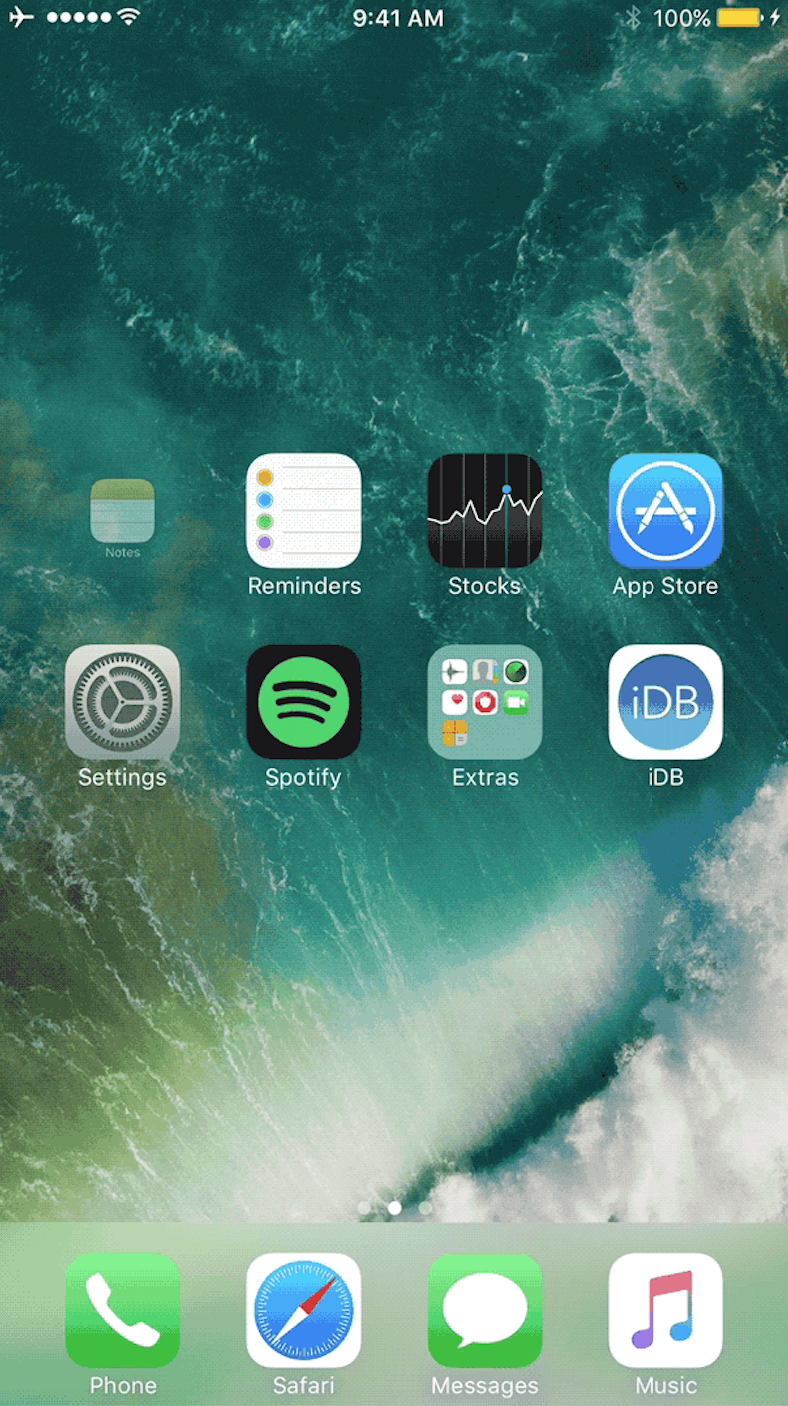
In this roundup, we’ll discuss 13 new features in iOS 11 that have previously existed in Cydia as jailbreak tweaks before the new firmware, which is set to release this Fall, was ever even announced.

Apple honors select app developers in its 2017 Design Awards

Unlike the name might imply, Apple’s Design Awards are not exclusively dedicated to chasing the pinnacle of visual design, but more comprehensively appraise other app elements such as user interface innovation, sound design and also gameplay for apps offering unique gaming experiences. The latter, games, have easily stolen the show this year with 5 out of the 12 winners coming from said category.

In a slightly embellished press release, Apple announced the names and links of all twelve winning applications, each coming with a punchy story to explain and celebrate the selection in addition to screenshots and pictures of each developer team.

iOS 11 makes it a cinch to share your Wi-Fi password with nearby devices

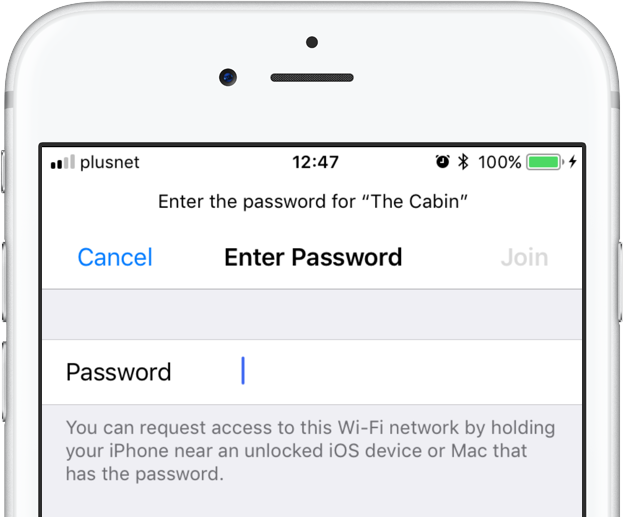
iOS 11 provides a nifty new feature for sharing your Wi-Fi hotspot password with nearby devices, without having to type the password on another device. When a nearby device running iOS 11 attempts to connect to your password-protected Wi-Fi network through Settings → Wi-Fi, a new message informs the owner they can now request access to the network.

To request Wi-Fi network access, they simply hold their device near an unlocked iPhone, iPad, iPod touch or Mac that's already connected to the network. A Wi-Fi sharing card pops up on the device already on the network, resembling the seamless AirPods pairing interface.

As first discovered by 9to5Mac, the device that has the network password automatically sends it to the nearby device over the air, allowing the receiving device to quickly and securely connect to your local wireless network.

This feature uses Wi-Fi and Bluetooth proximity information.

The beauty of this method, as I mentioned earlier, is that it just works—the device requesting access to your Wi-Fi network never sees the actual network password.

macOS High Sierra will support this time-saving feature as well.

Speaking of which, iOS 11 includes automated first-time setup and account login features.

For instance, a feature called Automatic Setup lets you securely import most of the settings and data to your new iPhone or iPad by holding it near an iOS device or Mac you already own, using a process that's very similar to that of pairing an Apple Watch to a nearby iPhone.

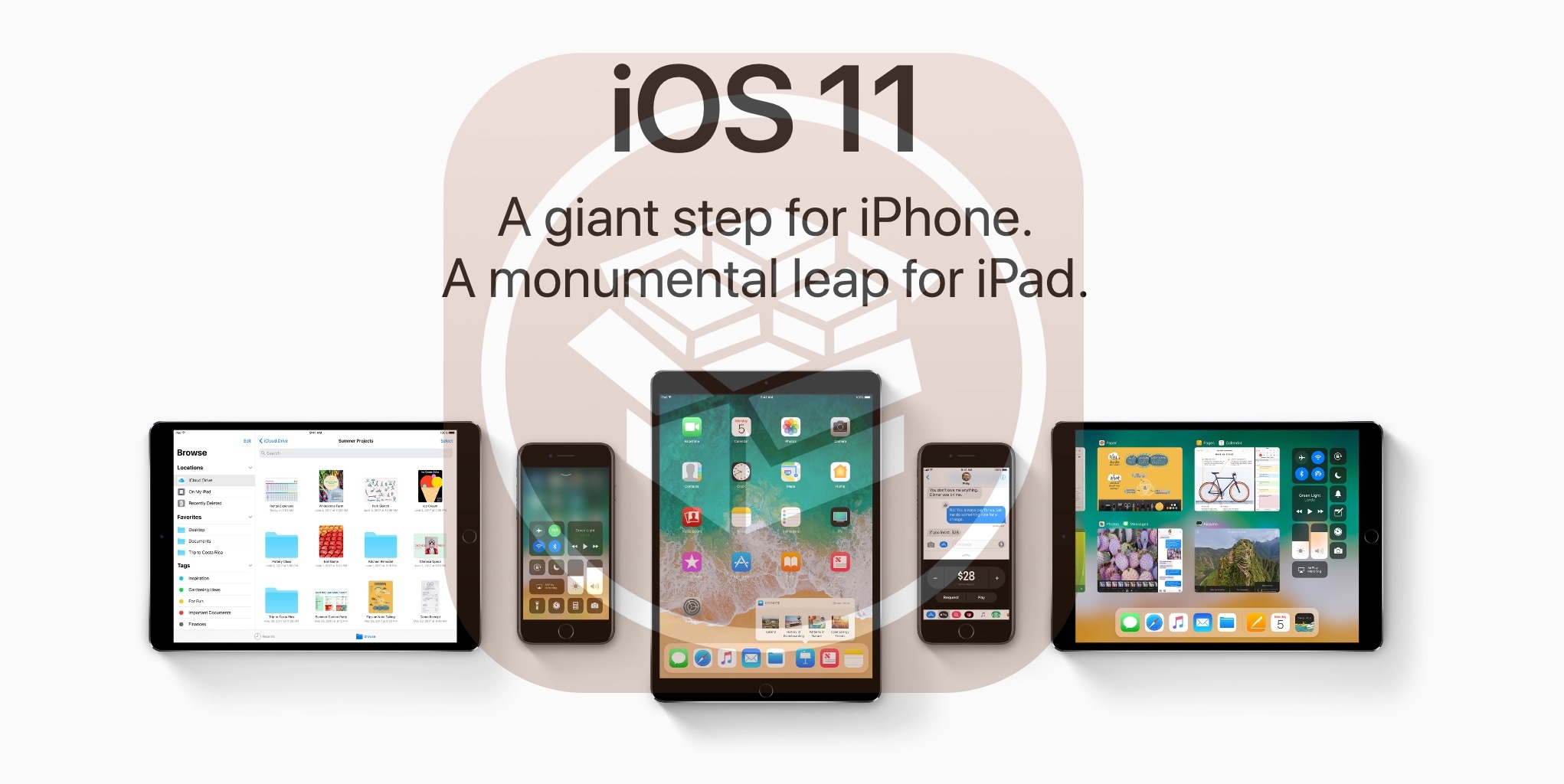
iOS 11 is compatible with all 64-bit iPhone, iPad and iPod touch devices. The software update will release as a free download to all customers this fall.

Apple cuts 2TB iCloud tier price in half

Apple has made some changes to paid iCloud storage upgrades.

Having nixed the previously available one-terabyte tier, the company has now made its flagship two-terabyte plan more affordable than ever.

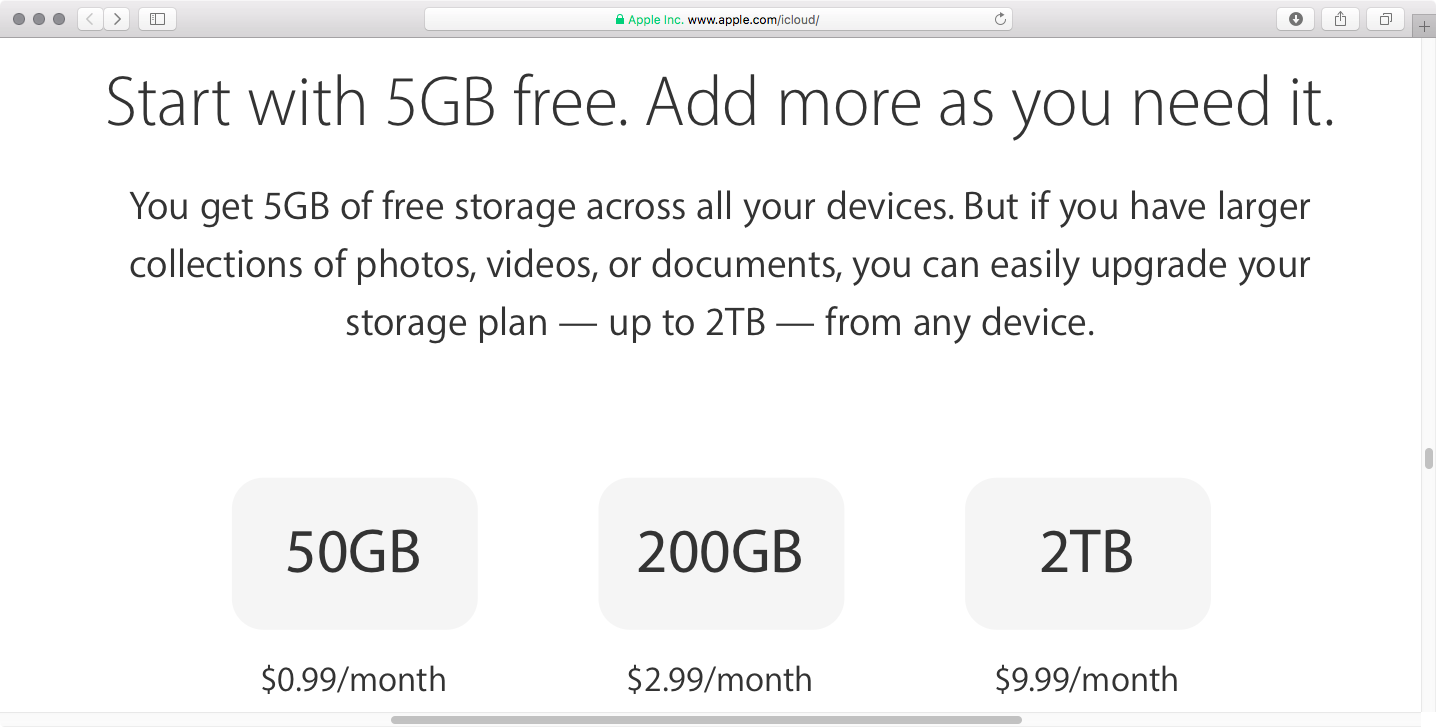
You can now get a whopping two terabytes of storage in exchange for a pretty competitive monthly fee of just $9.99 per month, or half the previous asking price of $19.99 per month.

As mentioned, the 1TB plan that used to cost $9.99 per month has been eliminated. The 200GB $2.99 per month and the 50GB $0.99 per month tiers have remained unchanged. The free tier is still limited to just five gigabytes of storage.

According to Apple's iCloud webpage, the following storage tiers are now available:

5GB for free 50GB for $0.99 per month 200GB for $2.99 per month 2TB for $9.99 per month

The new pricing is available in all markets.

You can use iCloud storage to store your entire Photos library, backup all the Apple devices you own, synchronize files between devices, keeping other files in your iCloud Drive, store your iCloud Mail message archive and much more.

And with iOS 11 and macOS High Sierra, Apple customers can now share a 200GB or 2TB iCloud storage plan with family members, if they like.

“Now you can share an iCloud storage plan with your entire family, notes Apple. “Choose 200GB or 2TB and give everyone space to store photos, videos, documents and more.

You can upgrade your iCloud storage directly on your device in Settings → General → Storage & iCloud Usage, then tap Manage Storage under the iCloud section and hit Change Storage Plan. On a Mac, go to System Preferences → iCloud → Manage for these options.

iOS 11’s volume slider no longer covers fullscreen videos

One of the most interesting changes in iOS 11 that hasn't been talked about at all during Monday's WWDC 2017 keynote is going to make a lot of you happy: the volume indicator on iOS 11 no longer obstructs the center of the screen obnoxiously.

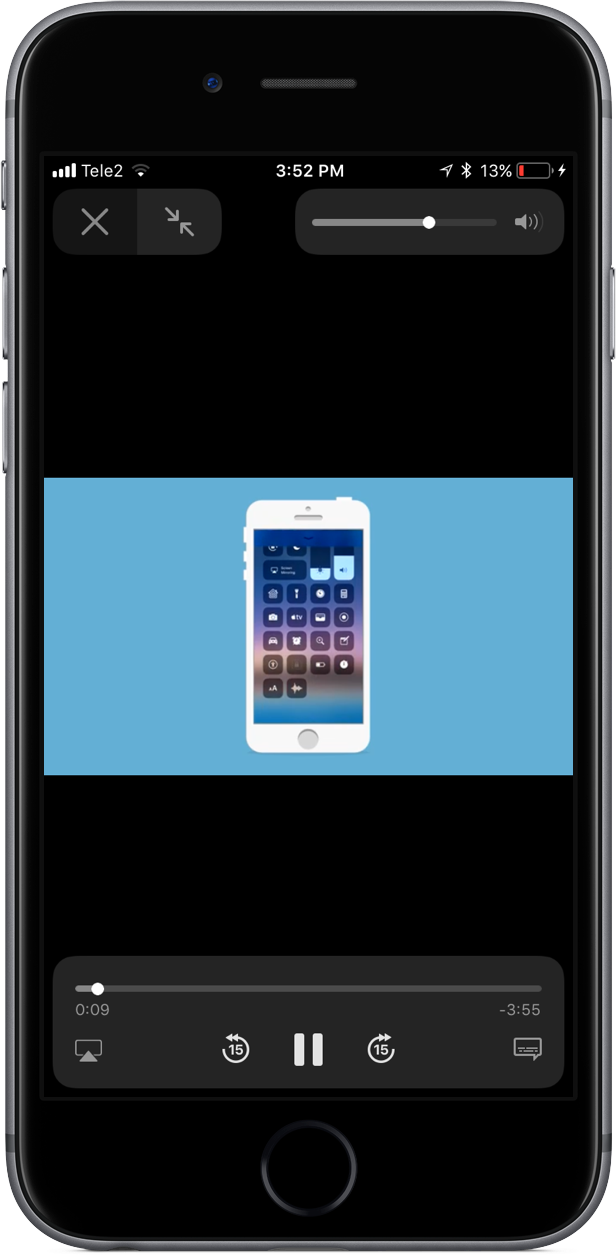
As noted by users on Twitter, the redesigned slider only appears when playing video in fullscreen mode. In other words, the good ol' volume control centered on the screen isn't going anywhere, it's just that playing video in fullscreen mode replaces the standard volume control with an unobtrusive slider that sits in the top-right corner of the screen.

This is actually part of a bigger update for iOS 11's system video player.

The iOS 11 video player has controls for subtitles (including YouTube's auto-generated subtitles), AirPlay and more. Plus, it supports full keyboard control so you can control video playback with more than a dozen shortcuts via your physical wireless keyboard.

iOS 11's new minimalist volume slider does not appear in apps and on websites that implement their own custom video player. As an example, many video-streaming apps, including HBO NOW and Netflix, override the system video player and use a bespoke one.

Google's mobile YouTube app also recently updated its video player with a thin volume slider positioned unobtrusively at the very top of the currently playing video.

iOS 11 is compatible with all 64-bit iPhone, iPad and iPod touch devices. The software update will release as a free download to all customers this fall.