How Complete My Bundle works

The much-improved App Store in iOS 8 features a number of enhancements. Case in point: app bundles. App bundles make it possible for developers to bundle up to ten of their existing iPhone and iPad applications in a single purchase at a reduced price.

Borrowing cues from the “Complete My Album” feature for music that debuted on iTunes in March 2007, app bundles are great promotional vehicles to drive sales and can serve as a nice reward for loyal customers.

But for the vast majority of ordinary users, app bundles are one of the least understood new features of the App Store in iOS 8. That it's still very unclear how the App Store's Complete My Bundle works is Apple's fault.

And it certainly doesn't make its users' lives any easier with cryptic feature descriptions and the App Store's non-intuitive bundle pricing mechanism. But don't sweat, here's everything you need to know in order to understand how Complete My Bundle works.

Camera+ offered for free for the very first time

Camera+ by Taptaptap, the award-winning iPhone photography app and one of the longest-standing camera and image editing apps in the App Store, is available free of charge for a limited time, but only through Apple's sleek Apple Store shopping application for the iPhone and iPad. That's a cool $2.99 saving right off the bat over the app's regular asking price.

No matter if you're only mildly into mobile photography or a seasoned photographer, you really shouldn't miss out on this promotion because Camera+ has never gone free since its inception in August of 2011. Again, you can't just follow the app's iTunes URL to grab Camera+ for zero bucks because the offer is exclusive to users who have the Apple Store application installed on their devices.

Jump past the fold for the full instructions.

iTunes music sales dipped sharply since start of 2014 as iPod turned 13 yesterday

If you need another proof that Apple made the right move dropping more than three billion bucks on Beats's audio accessories and music-streaming service, here's one.

According to people familiar with the matter who spoke to the Wall Street Journal on Friday, the decline of digital music sales on iTunes is accelerating with latest data showing between a thirteen and fourteen percent dip globally since the start of this year.

By comparison, the International Federation of the Phonographic Industry estimated that global revenue from music downloads fell just 2.1 percent in 2013. Clearly this development doesn't bode well for iTunes, but can Apple do anything about it? Read on for the full reveal.

Saurik brings AFC2 support to iOS 8

For those of you who prefer to manage iOS's file system via USB, we have some good news for you. Saurik recently pushed an AFC packaged called Apple File Conduit 2 to jailbroken iOS 8 users. The package, which is downloadable from Cydia right now, allows users to browse the entire iOS root file system when your device is connected to your computer via USB.

HuddleLamp combines all your Apple mobile devices into a massive multitouch canvas

What if you could combine screens of iOS devices sitting on your table into one massive multitouch enabled canvas that you could interact with?

That's what researchers with the Human-Computer Interaction Group at the University of Konstanz in Germany set out to create with their noteworthy HuddleLamp project.

Basically a tabletop with a built-in 3D camera that sits above, the HuddleLamp uses smart software which analyzes RGB and depth data to not only detect your mobile devices such as smartphones or tablets, but also track hand movement and determine their relative position to one another.

The results are impressive: the HuddleLamp can detect interactions above and between displays so you can swipe and toss information from one device to another, render a huge map across the devices with each screen showing only a portion of the map and what not.

Video shows iPad Air 2 being subjected to non-scientific drop test

Every time a new Apple mobile product comes along, you can bet that prolific YouTubers will be first out of the gate with those silly, non-scientific drop test videos. As you may have guessed, the iPad Air 2 is no exception.

Courtesy of YouTuber TechRax, we now know that the latest 9.7-inch Apple tablet's screen won't survive being dropped on the front glass panel from approximately five feet high. Watch the video embedded right after the break.

Tim Cook: bringing Apple Pay to China ‘is on the top of our list’

Repeating his favorite line that China, home to 1.33 billion people, is a key market to Apple, CEO Tim Cook said bringing Apple's revolutionary mobile payments system to the country “is on the top of the list”.

“China is a really key market for us,” Cook told state-run Xinhua news agency Friday. ”Everything we do, we are going to work it here. Apple Pay is on the top of the list.”

Cook and his teams at Apple were still “seeking to understand” the steps needed to make Apple Pay a reality for Chinese customers, the report added.

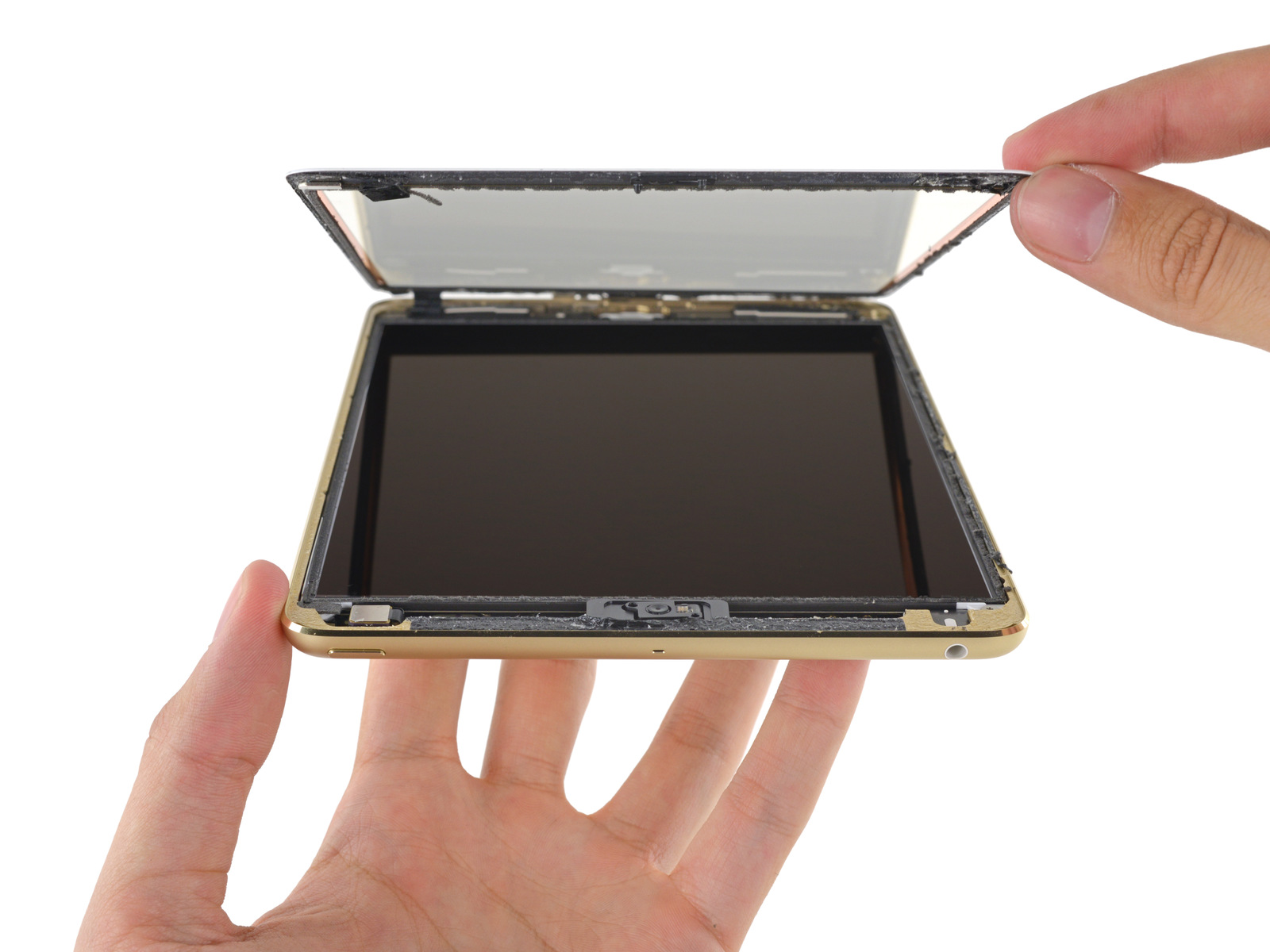
iPad mini 3’s ‘hastily glued’ Touch ID Home button makes screen repairs difficult

Following their analysis of the iPad Air 2's innards, repair experts over at iFixIt have now perfumed their ritual teardown dance with Apple's iPad mini 3. As you know, the iPad mini 3 is basically the iPad mini 2 with the addition of Touch ID and a gold color option so there isn't much to be analyzed here.

That being said, iFixIt was able to make a few noteworthy observations regarding the new tablet's repairability. Specifically, they found that Apple engineers glued the Home button bracket to the front panel assembly, making Touch ID and Home button repairs difficult.

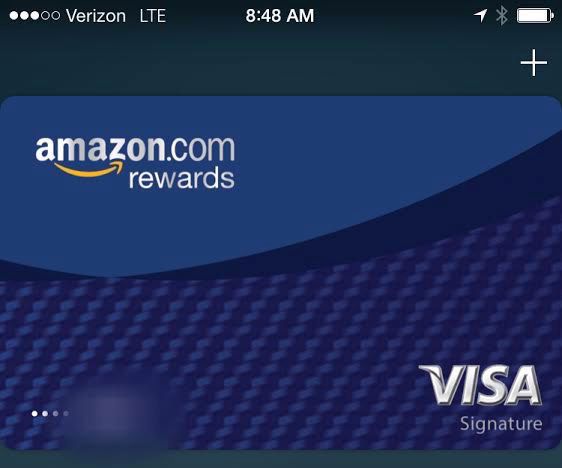
Apple Pay now accepts Amazon’s Visa Rewards card

In just two short days following Amazon's confirmation that it's been working to enable its Chasse-issued Amazon.com Rewards Visa co-branded card for use on Apple Pay, users can now load that card in Apple's mobile payments software, according to TechCrunch and reports on MacRumors forums, Reddit, Twitter and other social media channels on Friday.

Apple Pay users should now be able to add their Visa Rewards card in Apple Pay, either by entering the card details manually or snapping a picture of their card with the iPhone's camera. Twitter reports prove that doing so puts the correct card image with the Amazon logo in the Passbook application.

In celebration of 10th anniversary, Rockstar puts Grand Theft Auto games on sale

Rockstar Games is celebrating the 10th anniversary of Grand Theft Auto, the famous action-adventure video game franchise originally created by David Jones and Mike Dailly. And to mark the occasion, Rockstar has put the wildly popular Grand Theft Auto III, Grand Theft Auto: San Andreas and Grand Theft Auto: Vice City games on sale in the App Store.

This is a great limited-time opportunity to save as much as seven bucks on all three open-world action-adventure games.

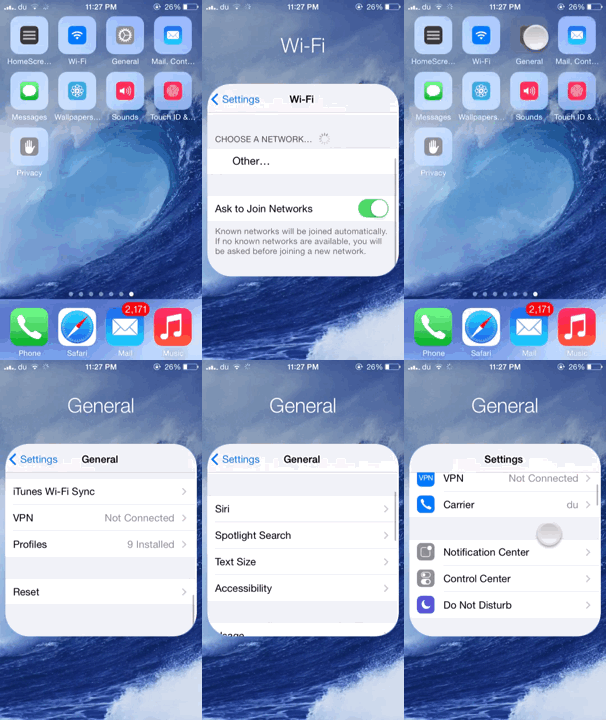
HomeScreen Settings 7 lets you preview various settings from the Home screen

We've seen tweaks that provide quick access to various settings by making use of Activator gestures, however HomeScreen Settings 7 is a brand new jailbreak tweak by popular jailbreak developer Elias Limneos that offers a unique functionality to quickly access some of your settings directly from the Home screen.

HomeScreen Settings 7 allows users to add any settings to the Home screen and directly access them from there without opening the Settings app. The settings appear as icons on your Home screen which look quite similar to the folder icon. Tapping on any one of them displays a small folder-like settings page which you can interact with.

LockSpeed adds your favorite contacts to your Lock screen

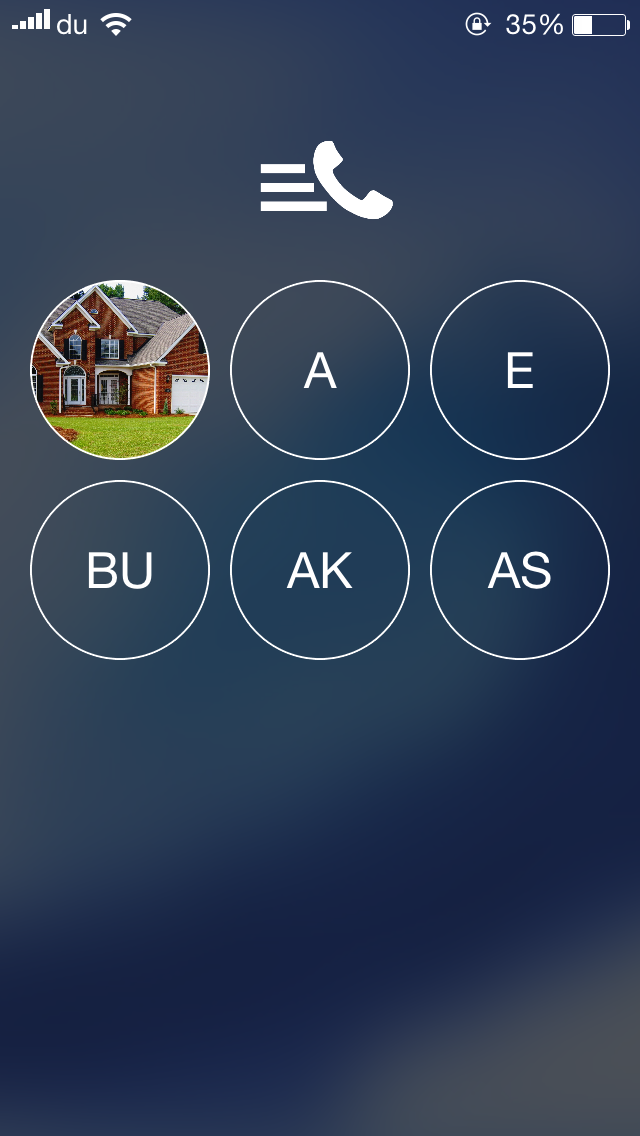
One of the useful features of the Phone app is the 'Favorites' section which I frequently us  to quickly make calls to some of my contacts. LockSpeed is a new jailbreak tweak that goes a step further and allows you to quickly reach your favorite contacts directly from the Lock screen without even unlocking your device.

Developed by Alexandru Laurus, LockSpeed adds the first 9 favorite contacts from the Phone app to the Lock screen on a separate page which can be accessed by swiping the screen from right to left. Doing so displays a new page with the all the favorite contacts added, which are presented by a circular icon with initials or picture if the contact already has one.