Sébastien Page

Sebastien is the Founder and Editor in Chief of iDB. Once a BlackBerry user, Sebastien instantly fell in love with the iPhone when it was first announced in 2007. Shortly after, he decided to start sharing his knowledge of the iPhone and its nascent ecosystem, which led to the creation of this blog. Sebastien currently owns 14 iPhones, 4 iPads, a MacBook Pro with Touch Bar, a MacBook Air, 2 Apple Watches, 3 Apple TVs, countless HomePods and AirTags as well as a few pairs of AirPods.

Did You Know Geohot Was a Musician Too?

Did you know that before becoming famous for his iPhone jailbreaks and unlocks, Geohot tried to get a piece of the music industry?

Fortunately for us, he's far better at hacking gadgets than he is at songwriting and singing. This was sent in by iDB reader Josh who apparently stumbled upon this little gem. Check it out...

Geohot even created a MySpace page with a couple other songs. What do you think of that?

What if Your iPhone Touchscreen Could Reconize Objects?

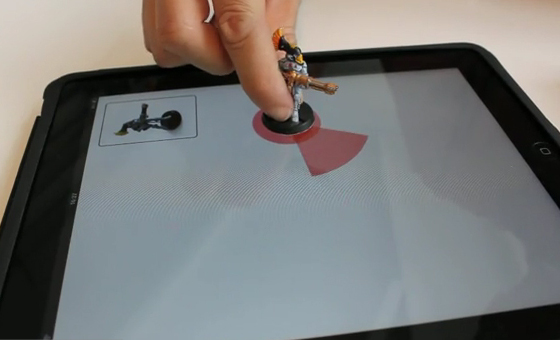
What if your iPhone or iPad touchscreen could recognize objects you put on them? Well, this is not too far from becoming a reality as some French engineers are currently working on it.

This technology works using printed tags that are applied to objects. These tags are detected by the multitouch screen that can recognize and differentiate them, depending on the tag. Watch this video to get a better understanding of how it works...

How to Update Your iPhone to iOS 4.1 Without Updating the Baseband

This step by step guide/tutorial will show you how to update your iPhone 4 to iOS 4.1 while preserving the baseband. Because we will not update the baseband, you will still be able to run the latest iOS version available, you will be able to jailbreak using LimeRa1n, and you will be able to unlock your iPhone using UltraSn0w.

This method works for both Windows and Mac. It is pretty simple but it does require you to read the steps carefully. As usual when hacking your iPhone, you are proceeding at your own risks. This being said, this is how to upgrade to iOS 4.1 without upgrading the baseband...

Don’t Forget to Save Your iPhone iOS 4.1 SHSH Blobs

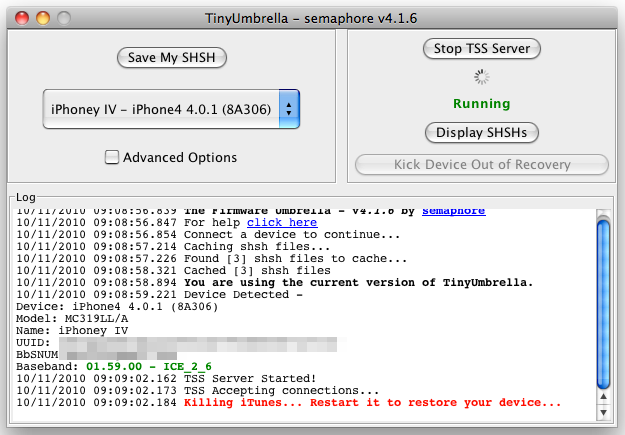
With the release of iOS 4.1.1 or even 4.2 right around the corner, it would be a wise thing to do to save your iPhone iOS 4.1 SHSH blobs either on Cydia, or locally with TinyUmbrella. Saving your SHSH blobs will be helpful if you ever want to downgrade your iPhone to previous firmware version.

Usually, Cydia does this automatically for you, but to be on the safe side, you can always run TinyUmbrella, which is what I just did. Here is how to use TinyUmbrella to save your SHSH blobs...

LimeSn0w Unlock by Geohot on its Way?

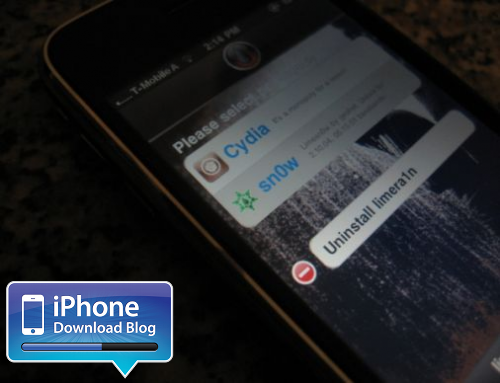
Just days after releasing his LimeRa1n jailbreak, is Geohot going to amaze us all over again with LimeSn0w, the first iPhone unlock for iOS 4.1? That's at least what this image I received from an anonymous tipster suggests. It shows what seems to be an iPhone 3GS on T-Mobile with information about LimeSn0w being an unlock for basebands 02.10.04 and 05.15.01.

While we thought there wouldn't be an unlock until iOS 4.2 comes out, this LimeSn0w rumor comes as a very good news, especially for those of you who accidentally updated to iOS 4.1 and cannot downgrade the baseband.

LimeRa1n Not Working? Try This

LimeRa1n not working? There are a couple things you might have missed that could explain why LimeRa1n is not working for you.

First, LimeRa1n is for Windows only, at least for the time being. Obviously, if you're trying to get LimeRa1n to work on a Mac, it's not going to work.

LimeRa1n also requires the latest version of iTunes to function properly. If LimeRa1n isn't working, make sure your version of iTunes is up to date.

For LimeRa1n to work, you have to run it as an administrator on your computer. You can just do that by right clicking on LimeRa1n and choosing "run as administrator" from the menu.

Another issue you might encounter with LimeRa1n is the following. You ran LimeRa1n without any problem, but when you think you're done, you don't see any LimeRa1n icon on your iPhone screen. If that's the case, try rebooting your iPhone. Alternatively, you may want to hard reset it by holding the Home and Power button together until your iPhone shuts down.

Getting error 3014? Try this.

Finally, many people report getting their iPhone stuck on the Apple logo when using LimeRa1n. If that happens to you, check out our previous post on how to get your iPhone out of reboot loop.

You might have encountered other issues and maybe you even have a solution for them. Please take the time to share your problems and fixes in the comments section below.

In the meanwhile, here are a couple links that might help you:

LimeRa1n download LimeRa1n tutorial
LimeRa1n Download

A quick note to let everyone know that so far, you can only download LimeRa1n for Windows. There is no Mac LimeRa1n download yet. According to Geohot himself, a Mac and Linux version of LimeRa1n should be available soon.

Update: There is now a Mac and Linux version of LimeRa1n.

There are many websites offering fake LimeRa1n download links. My recommendation is to be very careful with those. You can always download LimeRa1n from our iPhone downloads section, or directly from the LimeRa1n website.

I will update this post as soon as we have LimeRa1n download links for Mac and Linux.

If you're on a PC, here is a guide on how to jailbreak your iPhone iOS 4.1 with LimeRa1n.

GreenPois0n Jailbreak Delayed Because of LimeRa1n

LimeRa1n came out yesterday creating a bit of controversy in the jailbreak community. Because it revealed a different exploit from SHAtter, releasing GreenPois0n today would have given away those 2 exploits to Apple for them to patch in a near update.

Like I expected yesterday, Chronic Dev Team decided to do the right thing, and postpone the release of GreenPois0n so they have time to work on it while including the new exploit found by Geohot. Today the Chronic Dev Team officially spoke about the whole situation. This is what they had to say. No need to say they are pissed...

Top 10 iPhone News You Missed this Week

This is a summary of the most popular posts that were published on iDB this week:

GreenPois0n to be released on Sunday GreenPois0n will only jailbreak the iPhone 4, iPad, and iPod Touch 4G Important note about the iPhone 4.1 unlock How to jailbreak iPhone 3G iOS 4.1 with RedSn0w Is Geohot making a comeback? There won't be an iOS 4.1 unlock LimeRa1n jailbreak released Should you stay away from LimeRa1n? LimeRa1n to mess up GreenPois0n release Guide: how to jailbreak iPhone iOS 4.1 with LimeRa1n

From our sister iPad Blog:

If you have never shot an iPad with a gun, this is what it looks like An iPad made of Legos Amazing iPad animations How to jailbreak your iPad with LimeRa1n

From our sister Apple TV blog:

You can install apps on the Apple TV How to put your Apple TV in DFU mode The new Apple TV costs $64 to make Fix for the Apple TV Netflix error 112

How to Jailbreak your iPad with LimeRa1n

Geohot just released LimeRa1n, a jailbreak for all iDevices including the iPad. This step by step guide and tutorial will show you how to use LimeRa1n to jailbreak your iPad iOS 3.2.2.

LimeRa1n is still very buggy and I don't actually recommend using it, so proceed at your own risks...

Step 1: Download LimeRa1n from our here.

Step 2: Plug your iPad in and launch LimeRa1n then click “Make it Ra1n”.

Step 3: Follow the onscreen instructions: hold the Home and Power button together.

Step 4: Release the Power button.

Step 6: LimeRa1n will have your iPad enter DFU mode and will then work its jailbreak magic.

Step 7: Your iPad is almost jailbroken and you should see the following messages.

Step 8: If you don’t see the LimeRa1n icon on your iPad , simply reboot it, then launch LimeRa1n on your iPad and select Cydia to install.

Step 9: Once Cydia is installed, you can uninstall LimeRa1n from the LimeRa1n app on your iPad.

Let us know how it goes for you.

Tutorial: How to Jailbreak your iPhone with LimeRa1n

Geohot's LimeRa1n jailbreak has been released, and even though it comes with its fair share of downsides, it does work for some people. Thanks to iDB reader Whammy who send me screenshots of LimeRa1n in action, we're now able to get a tutorial for you.

This step by step guide and tutorial will show you how to use LimeRa1n to jailbreak your iPhone iOS 4.1. LimeRa1n will jailbreak the iPhone 3GS, and iPhone 4. It will also jailbreak the iPod Touch 3G and iPod Touch 4G. As usual, proceed at your own risks.

This tutorial was done with a PC but LimeRa1n will also work if you have a Mac, and the steps will the exactly the same.

LimeRa1n to Mess Up GreenPois0n Release

Talking about drama... LimeRa1n was released minutes ago and the first reviews are not very good. Worst part is Geohot decided to screw the whole jailbreak community by revealing his exploit whereas the Chronic Dev had been working on their own SHAtter exploit for weeks now.

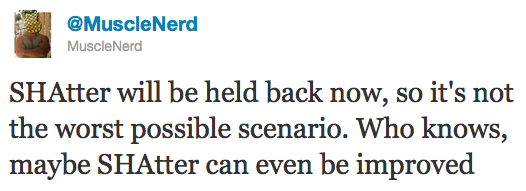
MuscleNerd just confirmed on Twitter that SHAtter will not be used this time for GreenPois0n. Instead of "giving away" 2 exploits to Apple, both iPhone Dev Teams have decided to hold on on the release of a SHAtter-based jailbreak and instead, they will use Geohot's exploit. This is good, but this could also mess up the release of GreenPois0n...