Year: 2016

How to view recent Safari history on your Mac

Not only does Safari give you the fastest way to surf the web on your computer, it's also the most energy efficient web browser on macOS that maximizes your Mac's battery life.

As so many Mac owners use Safari on a daily basis, their browsing histories are packed to the gills with records of previously visited websites.

Finding your way back to a previously visited site by searching the entire browsing history can be quite tedious with months or years of data stored in it.

Like on iOS, Safari for Mac provides a convenient shortcut that lets you quickly jump to any previously visited webpage on a per-tab basis.

Opera VPN offers a free and unlimited VPN service

VPNs can afford a lot of benefits to users. They route your data through special servers that can help you access content that is only available in certain regions, bypass firewalls that block content like iDownloadBlog or music streaming services, and protect yourself on public networks. They grant these features, usually in exchange for a monthly fee. The new Opera VPN app brings all of this and more, for free. However, it isn't without compromises.

How to easily transfer contacts, photos, and videos from an iPhone to another

Depending on your set up, transferring contacts, photos and videos from your old iPhone to your new one can be pretty simple. You might use iCloud to store all this data, in which case, your contacts and photos/videos will automatically come back once you sign in your new device. Or maybe you back it all up in iTunes, which allows you to sync all that data from your computer to your new iPhone. Maybe you don't do any of that, and if you're looking for a relatively quick and easy way to transfer all this data from one iPhone to another, then read on.

About XPS files and how to open them on a Mac

XPS files are essentially like Microsoft's version of a PDF file. They're easy to create and open on a Windows PC, but when it comes to macOS users, XPS files are anything but plug and play.

In this piece, we'll talk about XPS files and what they're used for, and then we'll touch on how to open XPS files on a Mac easily and for free without having to download any software.

Apple invests $1 billion in Chinese ride sharing service Didi Chuxing

Apple on Thursday announced that it has invested $1 billion in Chinese Uber competitor Didi Chuxing, reports Reuters. Speaking with the outlet, Tim Cook said the venture will help his company "better understand the critical Chinese market."

The move comes amidst slumping iPhone sales, which has driven Apple's stock price down to $90 per share, and other struggles in China. Last month, the State Administration shut down the iBooks Store and iTunes Movie sales in the country.

Action-puzzler King Rabbit goes free as Apple’s App of the Week

Apple on Thursday updated its App of the Week promotion with the game King Rabbit. This means that for the next 7 days, you'll be able to download the popular action-puzzler for both iPhone and iPad for free—a modest savings of $1.

For those unfamiliar with the title, King Rabbit is a puzzle-action crossover. Players are tasked with helping King Rabbit rescue his bunny citizens from devious enemies using keys, potions, bombs and other items they find along the way.

iOS 9 adoption is stalling amid slowing iPhone sales

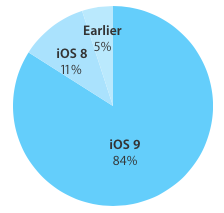
Last time we checked, iOS adoption rates stood at 84 percent of iPhone, iPod touch and iPad devices that were detected as running iOS 9. Moreover, eleven percent of hardware was on iOS 8 and the remaining five percent of devices used iOS 7 or older editions of Apple's mobile operating system.

These stats were valid as of a little more than two weeks ago. The new numbers Apple just posted to its App Store dashboard for developers, however, paint a not-so-rosy picture for iOS 9 adoption.

According to App Store device logs, the latest set of figures has not changed the slightest bit, or has not changed enough to move the needle versus two weeks ago.

App Store review times shortened to 2 days

Apple's oft-criticized review process for app submissions, which normally takes about a week or more, now takes as little as two days, according to developers who reported seeing dramatically faster App Store review times on submissions.

AppReviewTimes.com, a website that tracks average App Store review times using crowdsourced data, has confirmed that Apple's review process now takes an average of two days to approve an app, based on 332 reviews in the last 14 days.

Periscope for iPhone now lets you search videos and broadcast live from DJI drones

Periscope, a Twitter-owned app that lets anyone start a live video broadcast from their iPhone, today received a pretty substantial update on the App Store. Bumped to version 1.4, Periscope for iPhone now lets you search videos and broadcast live to the service from a compatible DJI drone.

In addition, the team shared a preview of their full beyond 24 hours approach that will be available in the coming weeks.

Microsoft to sunset Sunrise Calendar on August 31, here are a few viable alternatives

If you rely on the excellent cross-platform Sunrise Calendar to keep up with your schedule, Microsoft has some bad news for you: your favorite calendar app is breaking up with you as the Windows maker announced plans to shut down Sunrise on August 31. For those wondering, Microsoft bought this popular calendar app in February of 2015.

Fortunately, Sunrise alternatives are plentiful.

These fine MacPaw apps are currently half price

Celebrating yesterday's launch of Gemini 2, its duplicate file finder application, Ukrainian developer MacPaw is now offering a special 50 percent off store-wide discount on all their paid-for Mac applications, valid through May 17, 2016.

If you've been on the lookout for deep discounts on quality apps such as Hider 2, which lets you keep sensitive information and private files from prying eyes, CleanMyMac and CleanMyPC for optimizing the inner workings of your Mac and Windows PC or the aforementioned Gemini 2, this is it.

Google Translate app gains offline mode, instant camera translation from Chinese and more

Google's native Translate application for the iPhone, iPod touch and iPad received a major update yesterday in the App Store, bringing version number to 5.0 and introducing some rather interesting advances. For starters, Google Translate now works without an Internet connection, allowing you to translate words, phrases and sentences in 52 of the 103 supported languages when there is no cellular or Wi-Fi connection available.

The instant camera translation feature, called Word Lens, now works with Chinese: it reads both to and from English, both Simplified and Traditional Chinese. This feature is ideal for traveling: you just point your camera at, say, a restaurant sign in a foreign language and witness the appropriate translation appear like magic in live video feed.