Year: 2014

New Unix command line exploit makes Macs vulnerable to attacks

A new exploit in the Bash command shell found in many versions of Unix, including Apple's OS X desktop operating system, makes Mac computers vulnerable to so-called 'Shell Shock' attacks, security researchers at RedHat discovered Thursday.

Though the exploit lets attackers run malicious scripts remotely, most people are not at risk unless they've manually allowed SSH access from remote connections or a web server running server side scripting.

Here's how you can check if you're vulnerable and what you can do in order to avoid 'Shell Shock' attacks on your system.
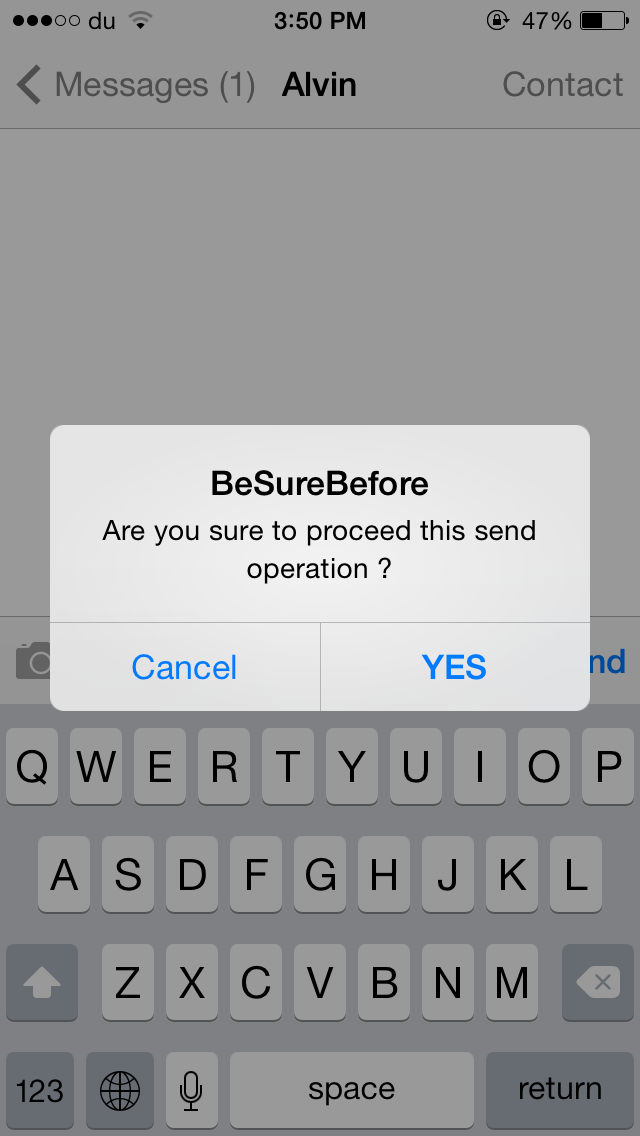
BeSureBefore ensures that you never perform an action accidentally on iPhone

There are times when you accidentally send a message or like a photo on Instagram without intending to do so. BeSureBefore is a new jailbreak tweak that prevents you from performing such actions mistakenly.

The tweak displays a confirmation message before you send a message or an email, call a contact, like a photo on Instagram and much more. For instance, when you press the Send button in the Messages app, a confirmation message pops up ensuring that you don't send the message accidentally, as shown in the GIF above. Once you confirm to deliver the message, you'll have to press the Send button again to proceed.

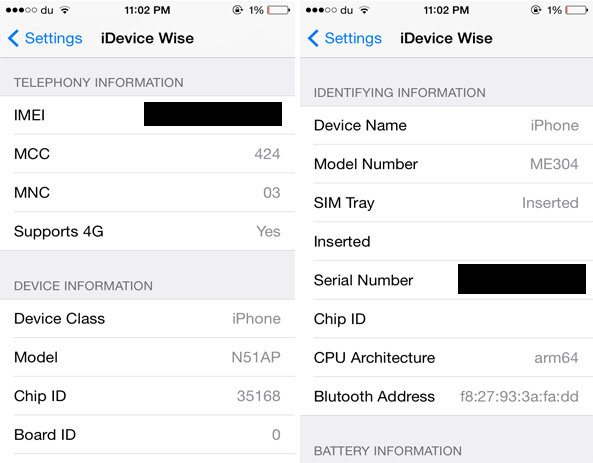
iDevice Wise provides detailed specifications about your iOS device

If you ever wanted to find out the complete specifications of your iOS device, you should check out a new jailbreak tweak developed by iNasser called iDevice Wise. The tweak displays each and every detail that you need to know about your iOS device ranging from its IMEI, Serial Number and Model number to Wi-Fi, Bluetooth Address and much more. It includes literally anything you want to find out about your device, even the detailed specs that a tech junkie will look after.

Apple provides workaround for those affected by iOS 8.0.1, says iOS 8.0.2 will be available in the next few days

Apple issued a support document Wednesday night detailing a "workaround" on how to revert back to iOS 8 for those users that were affected by the release of iOS 8.0.1 earlier in the day, an update which incapacitated iPhone 6 and iPhone 6 Plus devices.

Besides providing instructions on how to downgrade to iOS 8, the company noted that it is "preparing iOS 8.0.2 with a fix for the issue, and will release it as soon as it's ready in the next few days."

A rough week for Apple

Everything started so well for Apple this week. After the launch of the company’s two new devices, iPhone 6 and iPhone 6 Plus, Apple revealed on Monday that this was the most successful iPhone launch ever, with 10 million units being sold during the opening weekend. The only thing that prevented Apple to sell more iPhones during that time was simply that they couldn’t make them fast enough. That’s a nice problem to have.

But then things started turning sour on Tuesday when the first reports of what is now commonly known and referred to as #bendgate emerged online. If the negative press about bendgate wasn’t enough, Apple shot itself in the foot on Wednesday when it released iOS 8.0.1, an update supposed to fix several bugs, but which turned out to be the biggest software release fiasco in modern Apple history.

With fanboys and Apple haters alike putting their own spin on both sides of the story, I thought I’d put some perspective to all this and share my thoughts on the situation.

A first look at MyScript Stack keyboard for iOS 8

When Apple first announced that it would allow users to set third-party apps as the default keyboard, I got pretty excited. I know it doesn’t seem like that big of a deal, but similar to having a multitude of pens in varying styles and colors, I like having options when typing. It makes it more fun.

MyScript Stack is another third-party app that is now compatible as a default keyboard for iOS 8. Although, I’d be incorrectly describing it as a keyboard since its main feature is that you can handwrite letters instead of typing them.

Let’s Talk Jailbreak 74: Show off your widgets

Episode 74: The guys talk about what the new features in iOS 8 could mean for jailbreak tweaks. We also discuss the potential of the iPhone 6 and the iPhone 6 Plus when it comes to jailbreaking.

Subscribe via RSS

Sponsor: Visit GoToAssist.com and click on the Try It Free button. After your free trial, use the promo code ‘GoToAssist3030’ to receive 30% off the standard monthly rate if purchased before October 31st.

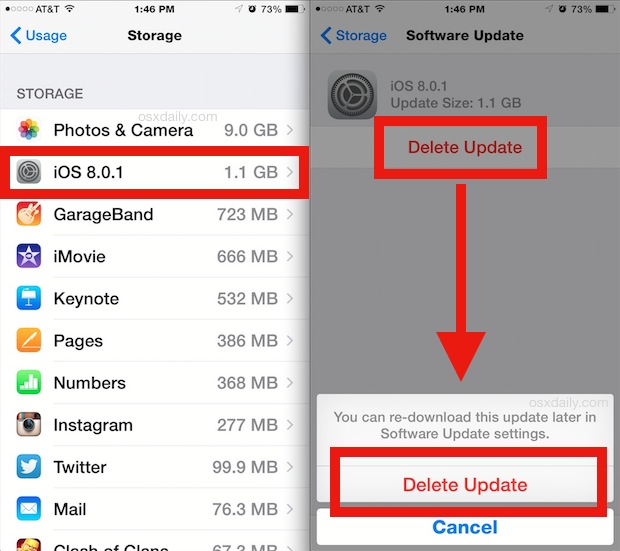
How to delete iOS 8.0.1 update download from your device to avoid accidental installation

Earlier today, Apple released iOS 8.0.1 which was supposed to fix a few bugs, but as users quickly realized, this update did more harm than good as it would disable cellular service and Touch ID on affected devices. We've already published instructions on how to downgrade back to iOS 8 for those users who downloaded and installed the update.

But for those who have only downloaded the update and not installed it yet, there is a way to delete it from your device and make sure you don't accidentally install it.

ESPN SportsCenter app update finally brings widgets to Notification Center

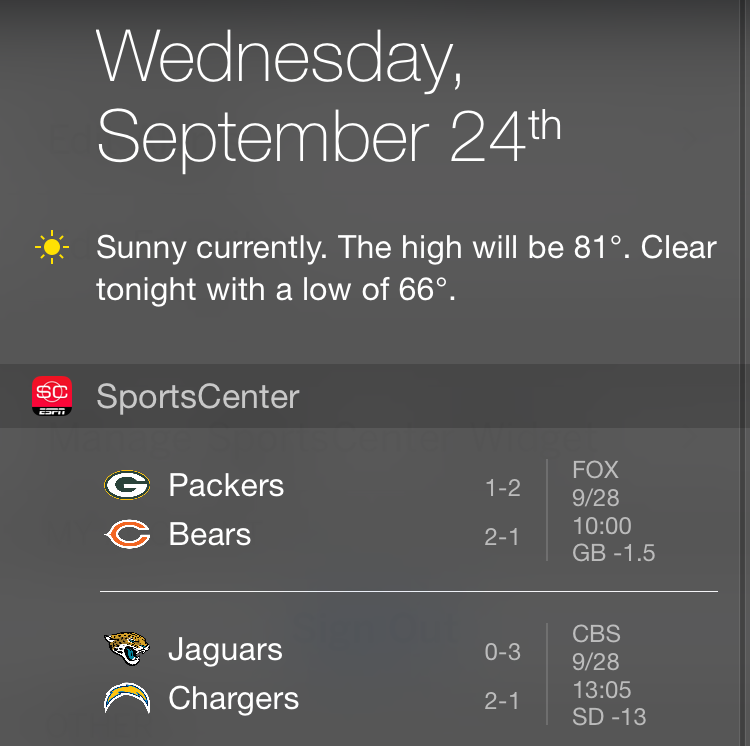
Sports fan rejoice, as ESPN has finally updated its SportsCenter app to make good use of Notification Center widgets in the Today tab. The SportsCenter app has been the one Apple used in its marketing materials related to widgets in Notification Center, so it is strange that it took ESPN a week since the release of iOS 8 to actually have this update ready for the public. But who are we to complain, right?

iOS 8’s battery shaming is a double-edged sword

As is always the case every time a new iPhone is released, or a major iteration of its software pops up on Apple's servers, the planet goes into meltdown about battery life. It's almost as predictable as Apple's iPhone release schedule, and it's getting old.

I was already pondering how Apple's newly released iOS 8 was performing for people when I read iMore's post covering its new battery shaming feature. Rene does a great job explaining how iOS 8 monitors app usage and then plots out a percentage of the battery drain that app has caused. The reasons for that drain are plenty, and the important thing to remember is that they're not all bad.