Video

iOS 6: Clock app video walkthrough

[tube]http://www.youtube.com/watch?v=pye0iwkaa_E[/tube]

Finally, the iPad can lay claim to a Clock app of its own. That's right, with iOS 6, comes a new Clock app built from the ground up with the iPad in mind. The first word that might come to your head after initially laying eyes on the Clock app is "beautiful", as it's accented with a level of detail that Apple is famous for.

Included with the Clock app is a world clock capable of storing up to 24 different locations, along with the obligatory alarm, stop watch, and timer functions. Check out our full video walkthrough of the new Clock app for all of the details. Be sure to comment and let us know what you think about it.

iOS 6: Safari video demonstration

[tube]http://www.youtube.com/watch?v=tK2G-uRzNV4[/tube]

Safari doesn't look that different on iOS 6, but underneath the hood you'll find some interesting changes aimed at improving your mobile browsing experience. First of all, there's the ability to browse in full screen mode while in landscape on the iPhone. Secondly, there's the ability to sync tabs across other iOS 6 devices using iCloud. Next up to bat is a new update to Reading List that allows you to read those items while offline.

Take a look at our video demonstration inside that showcases all of these new features and more. Have you found anything in addition to these items? If you do, be sure to let us know in the comments.

iOS 6: App Store video demonstration

[tube]http://www.youtube.com/watch?v=jXCrM1rzLZY[/tube]

Apple left little untouched with its iOS 6 overhaul, and that includes the App Store app. The App Store has remained relatively the same over the years, but this version is a completely new and improved iteration.

It's so different, that you might not even recognize it on first glance. Thankfully, the changes are for the better, as this new App Store refresh provides a much more intuitive and seamless experience overall. One of the best new features is the ability to download items without being kicked back to the Home screen time and again. It really is that much better than before. Please feel free to share your thoughts on the iOS 6 version of the App Store app in the comments.

iOS 6: Maps video demonstration

[tube]http://www.youtube.com/watch?v=IgLDkHJduRg[/tube]

The new Maps app is the premier new feature in iOS 6. Although I was a bit skeptical at first after seeing some early screenshots, I'm a definite believer after giving it some hands-on time. It is rightfully so that the new Maps app is Apple's most compelling upgrade to iOS.

Maps is leaps and bounds above anything offered in the previous Google powered Maps app. With 3D views, turn by turn navigation, and full integration with Siri, Maps is a truly amazing package. What do you think about it?

iOS 6: Siri video demonstration

[tube]http://www.youtube.com/watch?v=7h5KtC3m3YY[/tube]

Here is our first video demonstration showcasing some of the new Siri features included in iOS 6. As we previously reported, new features include sports scores, Movie info, including showtimes, trailers, reviews, and actor information, the ability to launch apps, and much more.

The new Siri is also iPad compatible, and we provide you with a sneak peak of the virtual assistant running on the iPad near the tail end of the video as well. Be sure to let us know what you think about Siri's new and improved features and iPad compatibility in the comments below.

Deck HD is coming to a jailbroken iPad near you

When I took the original version of Deck for a spin, I thoroughly enjoyed the experience. Here was a tweak that sought to add quick access to your favorite apps, settings, and toggles, and had the nerve to look good while doing so.

Deck also proved to be fairly popular with our readers and viewers, as our original video demonstration gained well over 100,000 views on YouTube.

Since Deck is an iPhone/iPod touch only tweak, what about the iPad users that would love to give SBCoders' hotbar tweak a try? You won't have to feel left out much longer, because Deck HD is coming with full iPad compatibility in tow. Take a gander at our full walkthrough inside for the video proof...

AnimateLockscreen now available on Cydia

[tube]http://www.youtube.com/watch?v=DVse_1b4nlY[/tube]

AnimateLockscreen, the highly anticipated jailbreak tweak that allows you to add custom boot logo animations to your iPhone's Lock screen, is now available for download on Cydia.

As noted in our previous walkthrough, AnimateLockscreen has almost 1,000 different boot logo animations at its disposal. If you're interested in trying it out for yourself, then head over to Cydia's BigBoss repo where you can download it now for $1.00. After trying it out, be sure to let us know what you think about it in the comment section below.

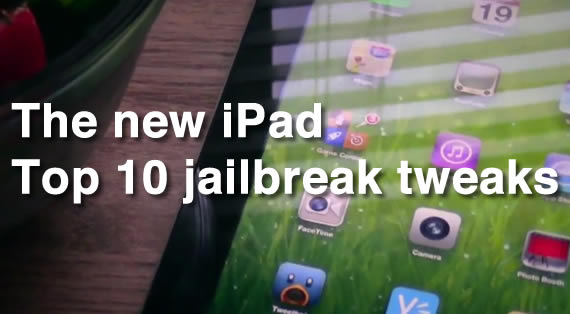
10 must have jailbreak tweaks for the new iPad

So you finally got around to jailbreaking your new iPad, and you're wondering which apps and tweaks are the best? Don't worry, iDB has you covered. We've taken the time to test out some of the best tweaks available for the new iPad to ensure that they perform as expected on the latest 5.1.1 firmware.

While many of the items shown here work great on the iPhone, the list was compiled strictly with the new iPad in mind. For that reason, just because you see an item on the list doesn't necessarily mean it'll play 100% nice with an iPhone or iPod touch.

Take a look inside for the top 10 jailbreak tweaks for the new iPad...

HTCLock lends an HTC styled interface to the iPhone’s Lock screen

The stock iPhone Lock screen leaves a lot of untapped potential on the table, and for that reason it's no surprise that we see so many jailbreak tweaks that focus on modifying the Lock screen.

HTCLock is the latest tweak to focus on the Lock screen. It allows you to launch apps easily using an HTC-styled interface. Check inside for the full video walkthrough...

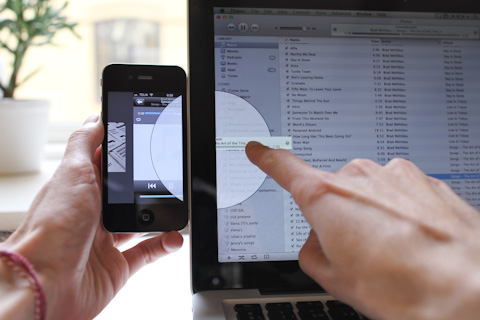
This is what AirDrop for iOS should look like

If you've ever used a Mac running OS X Lion, then there's a good chance you've played with AirDrop. The drag-and-drop feature allows users to share content between computers on a common Wi-Fi network with understated ease.

It's such a cool feature, in fact, that a lot of folks have wondered when Apple is going to bring it to iOS. Just imagine dragging and dropping files to your iPhone or iPad — it'd be awesome. Especially if it looked anything like this...

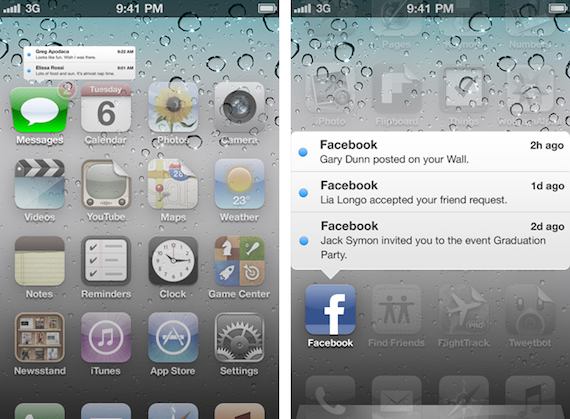
Gorgeous iOS concept shows off dynamic icon badges and more

With WWDC coming up on Monday, there's only a few days left to speculate on what new goodies Apple will unveil. We know for sure that iOS 6 is on the menu, but what new features will the update bring?

The consensus seems to be that, other than a number of revamped applications, Apple's mobile OS will remain largely unchanged from its predecessor. But that doesn't mean that we can't dream big...