Software

Apple is reportedly revoking some certificates used to jailbreak iOS 9.3.3 from Safari

Over the weekend, Pangu and 25PP launched a jailbreak for iOS 9.2-9.3.3, and not long after, iOS developers found a way to make the jailbreak possible via the Safari web browser without the need to use a computer.

Unfortunately, however, Apple appears to be blocking the enterprise certificate that has been used in this process, so attempting jailbreaks from the device itself isn't currently working.

How to level up in Pokémon GO

Pokémon GO has quickly become one of the most popular mobile games for both the iOS and Android platforms within just the few weeks that it's been available to play.

Some players have been playing since day one, while others have only been playing for a few days. Nevertheless, there are two main goals in this game: catching Pokémon, and leveling up your character.

In this piece, we'll discuss what you can do to speedily level up your character without wasting any time.

How to remove the iOS 9.3.3 jailbreak from your device

The iOS 9.2-9.3.3 jailbreak debuted over the weekend, and soon after, jailbreak developers managed to make a Safari web browser-based jailbreak that doesn't even require you to hook up to a computer to jailbreak iOS 9.3.3.

Of course, it's a semi-untethered jailbreak, and there are a lot of caveats to it, so if you're having jailbreaker's remorse and you want to know how to put your device back to a stock device, don't fret because we're going to talk about that in this tutorial.

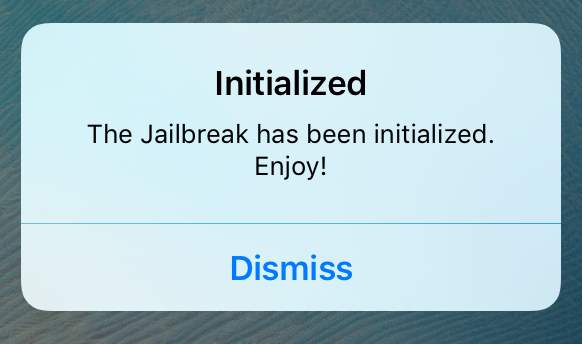
Initialized lets you know if your semi-untethered jailbreak was correctly intialized

The new iOS 9.2-9.3.3 jailbreak from Pangu has been all the rage over the weekend and into this week, and one of the things that stands out most about it is how it's a semi-untethered jailbreak.

For those who want to make sure their jailbreak is being initialized correctly after each reboot, Initialized is a new jailbreak tweak that notifies you every time your jailbreak is re-initialized.

How to jailbreak iOS 9.3.3 without a computer

For those who are unaware, Pangu launched a new jailbreak for iOS 9.2-9.3.3 over the weekend. Now, an iOS developer from the jailbreak scene has made it possible to jailbreak your iOS 9.3.3 device directly from your iOS device itself without the need for a computer.

It's officially JailbreakMe-style, and in this tutorial, we'll show you how to do it!

Properly rebooting your device after jailbreaking with Pangu or Yalu

Those of you who have jailbroken your iOS 9.2-10.2 devices with the Pangu jailbreak tool or the Yalu jailbreak tool should know by now that it's a semi-untethered jailbreak. This means you have to re-run the jailbreak app from your Home screen every time you reboot your device.

In this piece, we'll talk about how to reboot your semi-untethered jailbroken iOS 9.2-10.2 device properly so that Cydia works as expected after your device turns back on.

How to jailbreak iOS 9.3.3 with Pangu [tutorial]

Over the weekend, Pangu announced the release of a new jailbreak tool for iOS 9.2-9.3.3. The tool is not yet available in English as of this writing, but a Chinese version of the tool is available. In this tutorial, we'll show you how to jailbreak iOS 9.2 to iOS 9.3.3 with the new Pangu jailbreak tool for Windows.

How to split PDF files with the Preview app on Mac

PDF files are among one of the most widely-used forms of sharing documents with others across the internet; especially considering that the idea behind this file type is to have something that is universally readable on any platform.

If you do a lot of PDF handling on your Mac, then it might not be a bad idea to become familiar with how to split a PDF file, so we'll show you how you can do that in this tutorial.