Security

Manually checking for Java updates for your Mac or PC

Java, just like Adobe Flash, is often a major security flaw waiting to happen for both Mac and PC owners.

Although Apple takes security very seriously and just about forces Mac users with Java to check for Java updates automatically, it's still never a bad idea to check on your own from time to time.

Since we recently showed you how to check for Flash updates manually, it only made sense to follow up with a similar guide for Java, which is also a commonly-used web plugin.

In this tutorial, we'll show you how to see if you have the latest version of Java installed on your computer or not.

How to manually check for Flash updates on your Mac

Flash is among one of the most targeted web platforms for injecting computers with malware, including Macs, and that's why Adobe is always turning around with updates for Flash all the darned time.

If you're like me, then your security is important to you, and you may not trust automatic updates to deliver updates to you quickly enough.

This tutorial will show you how you can make sure Flash is up to date on your Mac, the manual way.

Google to ditch Flash for HTML5 by default in Chrome come this fall

The slow death of Adobe Flash continues as Google preps to put another nail into the beleaguered technology's coffin come this fall. According to a draft proposal from the search giant, a copy of which was obtained by Venture Beat, Google's desktop browser will default to showing HTML5 content and video, falling back to Flash as a last resort.

Chrome ships with a built-in Flash Player which automatically kicks into action whenever a piece of Flash content is detected on a webpage.

Apple just shot down an app that could detect iPhone malware

Stefan Esser’s iPhone app, called System and Security Info, can no longer be downloaded from the App Store, as first noted by The Next Web. Esser’s software let iPhone users know if their device had malware that could be used to spy on them, and could detect a jailbreak, too.

The app was removed from the App Store earlier this morning. Esser was basically told that detecting weaknesses in a user’s device could lead to “potentially inaccurate and misleading diagnostic functionality for iOS devices.”

How and why to report spammy iMessages to Apple

Sometimes your contact information ends up where you don't want it, and you end up with annoying spam iMessages from people, companies, or bots that try to scam you or steal personal information.

Fortunately, Apple's iMessage service comes with an abuse report feature that you can use to report senders who are misusing the iMessage platform and making it a less enjoyable thing to use.

In this piece, we'll talk about how and why you should be reporting iMessages that seem spammy.

A quick overview of the new System and Security Info app

Security has always been a top priority for Apple and its ecosystem, especially as of late. Tim Cook has made it clear that maintaining encryption and tight security protocols are here to stay. Users that are equally as concerned about protecting their personal information have had few options in actually monitoring their security however. A new app called System and Security Info from security firm SektionEins aims to help with that.

Ensuring your Mac is receiving updates about new malware and compromised web plug-ins

Among the plethora of built-in OS X features that help keep your Mac secure is something called File Quarantine, a download validation technology that checks any downloads for known malware when you try to open them.

File Quarantine is also available in compatible applications like Safari, Messages, iChat and Mail that download files from the Internet or receive files from external sources, such as email attachments.

Additionally, OS X blocks compromised versions of web plug-ins from functioning, including Java web apps and Adobe Flash content, to further limit your Mac's exposure to potential zero day exploits.

In this tutorial, we'll discuss how you can make sure that File Quarantine updates are turned on, which will allow your Mac to receive latest malware definitions and information about compromised web plug-ins from Apple.

Pop-ups in Safari on your Mac? Here’s what to do

I hate pop-ups, and chances are, you probably do too. They're not only a nuisance, but most of the time they're also designed to get in your way to purposely try and scam you and get you to click on malicious material.

Safari in macOS comes with anti-pop-up measures, but those with malicious intent are always coming up with ways to get around those measures.

In this post, we'll talk about what you can do in a scenario when you get these annoying pop-up messages on your Mac and why you might be getting them.

New app can detect malware and tell if you’re jailbroken

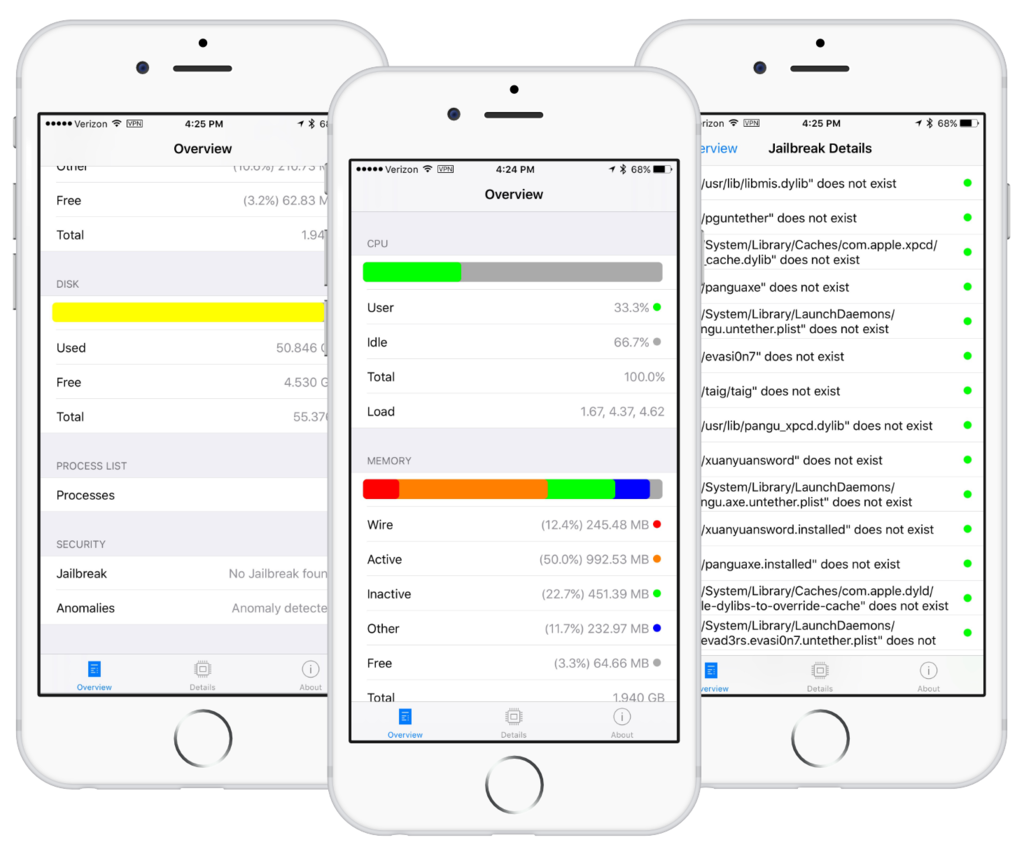
There's a new app in the App Store called System and Security Info that shows detailed information about your device and running apps from a security standpoint. It can do a lot of things, including monitor memory and disk usage, show running processes, and it even detects malware and other anomalies.

A few other things about the app also caught our eye. One, it's capable of telling if your iPhone and iPad have been jailbroken, and two, it appears that former jailbreak contributor Stefan Esser (also known as i0n1c) is involved in the project. In fact, it was Esser who penned the announcement blog post.

LogDog for iOS lets you monitor the security of your online accounts

LogDog, a service originally made popular on the Android platform for keeping your various online accounts safe from unauthorized activity, is now launching for iOS.

With LogDog, you can actively monitor your online accounts and keep an eye on where the most recent logins came from, what operating system and web browser was used, and more.

If you're always worried about your security, or even your privacy, this is an app you'll want to check out.

How to password protect PDF files on your Mac

Password protecting your PDF files is a great way to keep the contents from being revealed to those who you never intend to see them.

This great security feature can be taken advantage of right from the Preview app that comes bundled with your Mac, and in this tutorial, we'll show you how you can use it to enhance the security of your PDF files.