Security

Phil Schiller tweets link to Android-slamming mobile malware report

Phil Schiller, although probably the most active Twitter user of the Apple executive team, doesn't tweet much. And when he does, it's usually generic things like "new Flipboard app for iPhone is very nice," or "way to go Giants!!!"

But the Worldwide Marketing SVP switched things up a bit this morning, tweeting out a very deliberate link to a new mobile malware report by F-Labs that slams Android for its malware issues, telling folks to "be safe out there..."

Another iOS 6.1 trick to bypass the Lock screen

http://www.youtube.com/watch?v=oKOj0GMf810#at=49

So what's up with Apple and the iPhone's Lock screen? I mean, the various Lock screen vulnerabilities have persisted in iOS since the first passcode flaw was discovered in iOS 2.0 - and that was way back in July of 2008. And now, in addition to a simple passcode bypass trick a YouTube user detailed on Valentine's Day, another method of circumventing the Lock screen passcode has been discovered and highlighted in a video above...

How Eastern European attackers hacked Apple

Investigators now believe a group of sophisticated Eastern European criminal hackers are responsible for a cyberattack on Apple and other U.S. technology and media firms. Until today, those probing the computer break-ins thought China was behind the electronic assaults. In Apple's case, malware placed on an iPhone developer website may have been used to 'bait' visitors, according to one report Wednesday.

According to Bloomberg, which anonymously cited people close to law enforcement, malware which other victims described as "sophisticated," was placed on the popular developer forum to potentially gain access to data stored on corporate computers...

Apple: yes, we were hacked, here’s your fix

Apple is just the latest technology firm to announce it was the victim of hackers. Tuesday, the iPhone maker announced a limited number of employee computers were affected, however software would be released today protecting consumers. The malware infected a limited number of Macs through a vulnerability in the Java plug-in for browsers, the company confirmed.

The announcement - unprecedented from the usually tight-lipped company - included a statement by Apple attempting to calm consumer fears, saying there was "no evidence" that any data leaked out. This comes on the heels Facebook had also been targeted by hackers. Friday, the social networking giant said hackers based in China breached employee laptops, but no Facebook user data was taken.

UPDATE: less than three hours later, Apple has pushed out a Java update to patch the vulnerability...

Apple responds to the iOS 6.1 Lock screen glitch, says a fix is underway

http://www.youtube.com/watch?v=MDkLpj3MM-c

Earlier this morning iDB warned you of a newly discovered security flaw in the recently released iOS 6.1 software. It's not the end of the world, but it isn't dismissible either as intruders can easily gain access to your iPhone and potentially compromise your data using a simple trick.

In a nutshell, in order to exploit the vulnerability one simply has to make and immediately cancel an emergency call on the Lock screen and then hold down the Sleep/Wake button twice. But worry not, privacy buffs, says Apple. The Cupertino company is aware of the issue, a solution is being worked on and a fix will be pushed in a future iOS software update. There, feeling better now?

New iOS 6.1 Lock screen flaw compromises your iPhone

http://www.youtube.com/watch?v=MP-w436CfvQ

The iOS Lock screen bug has reared its ugly head again. This time around, the security exploit isn't as straightforward as a 2011 issue which let intruders bypass your iPad's Lock screen using a Smart Cover. In a nutshell, this new exploit discovered by a YouTube user involves making and immediately canceling an emergency call and holding down the Sleep/Wake button twice.

As detailed in a video above by The Verge, the method enables an intruder to bypass the unlock feature on the Lock screen and gain immediate access to your private stuff, including iMessages, FaceTime, photos and more. The flaw is iOS 6.1-specific and since it involves using the emergency calling feature, it's likely that iPads and iPod touches are not susceptible. Go past the break for more information...

Contractor modifies thousands of iPads for government use

CACI, or Consolidated Analysis Center Incorporated, is a federal contractor that delivers various information technology services to government agencies. Its primary focus is security, and it goes through great lengths to provide protected business solutions for its clients.

A good example of this is the work it's doing with Apple's mobile products. In a recent interview, CACI's CEO Dan Allen said that his company has altered 'thousands' of iPads so that they can be used securely by high-ranking government officials—including the President...

US authorities can access your iCloud data without a warrant

Cloud computing has really taken off in recent years as a cheap, flexible way for folks to store their documents and data. Apple's iCloud service, for example, has garnered more than 250 million users in just a little over a year.

But while we're all busy uploading our lives to the cloud, it's worth mentioning that it's not totally secure from prying eyes. A recently renewed Surveillance Act gives US authorities permission to access your data without a warrant...

iOS 6.1 patches Smart App Banner JavaScript bug

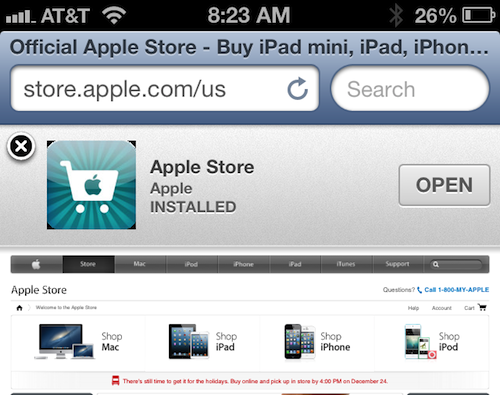
Last month, we reported that a JavaScript bug had been discovered involving Smart App Banners. Apple added the feature in iOS 6 as a way to help developers promote their apps and provide users with a direct link to download them.

Well as it turned out, these Smart Banners were enabling JavaScript in the iOS Settings app without user consent or knowledge. And this was considered to be a fairly serious security threat. But it looks like Apple has fixed it in iOS 6.1...

Accented characters make iOS passwords stronger, not enough to keep your data secure

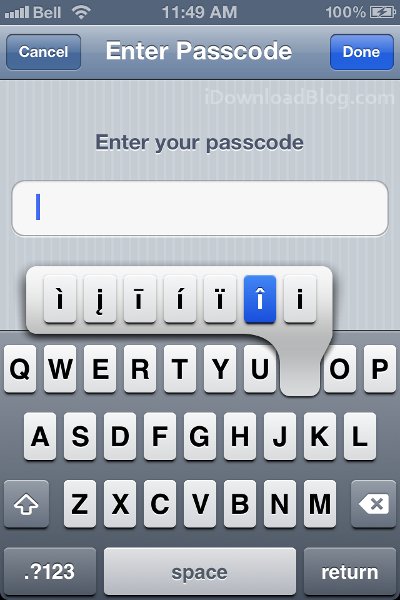
There's a suggestion floating around on tech blogs for setting 'unguessable passcodes' in iOS. The idea is to use alternate accented characters, which are hidden but easily accessible by holding down letters on the virtual keyboard. The thinking is these accented characters could be especially effective at thwarting guesses, as English speakers might not even realize that there are accents beneath the keys...

Temporary messaging apps can’t keep pictures and video secure

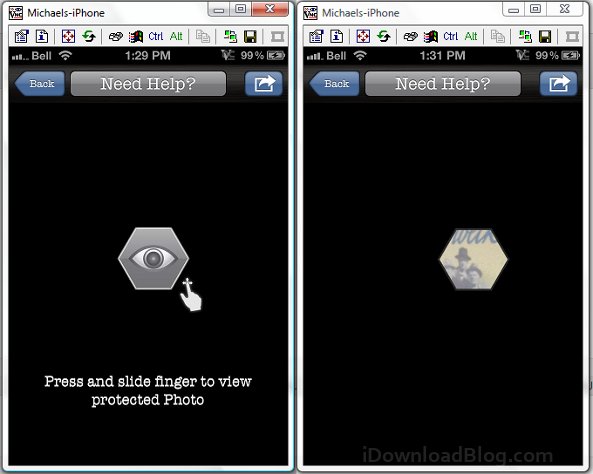
Want to send a picture or message but don't want it shared with friends, leaked all over the internet, and potentially traced back to you? Unless you're 100% certain that you can trust whoever you're sending a message to, then you shouldn't send it. The most popular temporary photo messaging apps can leak your data on devices that aren't even jailbroken, and with a few tweaks you can easily get past one of the most secure messaging apps available.

The current versions of Snapchat and Facebook Poke aren't secure apps. Evan Spiegal, Snapchat's founder, doesn't seem overly concerned about the possibility of users saving and sending their received pictures. In a comment to BuzzFeed Spiegal said: "The people who most enjoy using Snapchat are those who embrace the spirit and intent of the service. There will always be ways to reverse engineer technology products — but that spoils the fun!" That's not exactly what you want to hear if you're using the service to send pictures and video that you don't want publicly shared...

Use iFunBox’s ‘App Inspection’ tool to see which apps can access your data

We've seen services like Clueful catalog apps that can access our private information, and many of us are familiar with tweaks like Protect My Privacy and Firewall iP that attempt to keep our data secure. But what are our leaky apps actually doing, and what are the real risks?

Unfortunately we don't have all the answers for you, but you can do some snooping of your own. The most user-friendly tool for inspecting the APIs your actual installed apps can access is built into a popular iOS filebrowser called iFunBox...