Safari

How to build on suggested search queries in Safari

One of the worst things about Safari's autocomplete for search is that you can't build on a query like you can do with Google Chrome. Once you select a suggested query in Safari's omni-box, it auto submits the search.

While suggested queries are definitely a helpful service, the way that Safari goes about the implementation isn't very efficient. A recently revamped jailbreak tweak called Platinum seeks to improve Safari's search capabilities. Have a look at our full video walkthrough inside to see what I mean.

How to use a Safari bookmarklet to send websites to 1Password for iOS

Despite Apple's pretty handy password-saving and syncing feature in iOS Safari, I myself continue to prefer AgileBits' 1Password for iOS and OS X (our own Jeff is a recent convert, too). The reason is simple: 1Password allows me to save and sync just about any piece of information rather than just passwords and credit cards.

There's just one slight annoyance: to take advantage of 1Password's auto-fill feature for usernames and passwords, I must open a website in its built-in browser.

I generally tend to avoid the embedded web view in third-party apps and instead spend most of my mobile web browsing time in Safari. From now on, whenever you want to visit a website that requires a login, you can use this handy Safari bookmarklet to send the current tab to 1Password.

Though far from perfect, this removes some of the friction when visiting websites that require logins and auto-fill information kept in 1Password...

You can now get iDownloadBlog push notifications on your Mac

With the release of OS X Mavericks, Apple has introduced a way for readers to be alerted via push notification every time a new article is published on one of their favorite sites. Today, I am happy to announce that iDownloadBlog is able to deliver these push notifications to your Mac.

Showing as a banner in the upper-right corner of your Mac, these push notifications will allow you to instantly know when a new article is published on iDB, even if Safari isn't currently running.

Here is how you can subscribe:

Google agrees to pay $17 million to 37 U.S. states in Safari tracking settlement

Google's nefarious overriding of both desktop and iOS Safari users' privacy settings in order to better track their web browsing activity backfired after the United States Federal Trade Commission (FTC) in April 2012 took a long, hard look at the practice and decided to fine the search giant.

Google has previously agreed to pay $22.5 million fine to the government, with a judge approving the record-setting penalty. And now, the Internet giant will pay 37 U.S. states a cool $17 million to settle the Safari probe case...

Apple working on fixes for Mavericks Mail, iBooks, Safari and Remote Desktop Client issues

Apple's free Mavericks update contains a set of compelling headline features and nice-to-haves, like tapping the ambient light sensor to detect motion in order to prevent system sleep.

But as any Mac owner could tell you, each major OS X release brings with it inevitable early adopter issues in the form of bugs and various software-related issues and hiccups. Mavericks is no exception.

Though definitely more stable and less susceptible to teething issues than perhaps any OS X release thus far, Mavericks affects your productivity by introducing unreliable performance with Gmail accounts in Mail. Other stock apps suffer from typical 1.0 release issues, but rest assured that Apple is hard at work squashing these pesky bugs as we speak...

Enhance Safari’s tab button with this jailbreak tweak

Sometimes it's hard to get a firm grasp on the naming conventions used for releases on the Cydia store, and this jailbreak tweak — entitled Clota – is the latest such one. I'm definitely not sure what's behind the name, but the tweak works well enough.

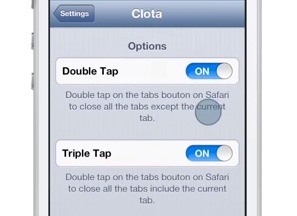
Clota allows users to add two new tap based gestures to the new tab button found in the Safari browser. A double tap on the new tab button will close all open tabs sans the current tab. A triple tap, on the other hand, will close all tabs. Check inside for our video walkthrough showcasing how it works.

Is iCloud Keychain available in my country?

With Tuesday's free release of OS X Mavericks, Apple users can now opt to have their Safari web passwords securely synchronized across their iOS devices and Macs through the power of iCloud. The useful feature dubbed iCloud Keychain made a brief appearance in iOS 7 betas before being pulled from iOS 7 Gold Master, only to re-surface in iOS 7.0.3. What you probably don't know is that iCloud Keychain isn't necessarily supported everywhere so Apple's published a handy list detailing iCloud Keychain availability by country...

Flash Player is finally sandboxed in Safari on Mavericks, says Adobe

Yours truly long stopped using the standalone Flash Player so you could imagine I'm fairly puzzled that folks to this date continue to rely on Adobe's plug-in. I know, if you're into Flash games/apps and other Flash-authored content, there's no escaping Adobe's multimedia run-time.

Among the reasons I keep Flash miles away from my Macs: the instability, resource hoginess and excessive proneness to malware and other types of vulnerabilities and malicious attacks.

With this week’s release of Safari in OS X Mavericks, the Flash Player will now be protected by a new operating system feature called App Sandbox, Adobe announced Thursday...

Safari 6.1 is out, brings Shared Links, Power Saver, Sidebar and more to Mountain Lion

In addition to a host of updates to its various iOS apps, Apple following today's iPad keynote has released the Safari 6.1 update, bringing some of the features that are part of the free OS X Mavericks update to Mountain Lion Macs. These include the Shared Links feature, the new Sidebar and Power Saver which improves battery performance when browsing plug-in heavy web pages on notebook systems...

Safari push notifications going live ahead of OS X Mavericks release

In a rare move, Apple last week issued a silent update to OS X Mavericks Gold Master as the company is supposed to share pricing and availability information about the software at today's iPad event. And conveniently just a few hours ahead of the big reveal, a few high-profile websites have now flipped the switch on Safari push notifications.

For those uninitiated, this is a new feature of OS X Mavericks that allows web applications to send alerts which go straight to the Notification Center, even when Safari isn't running.

Only a handful of websites have activated the feature, though others are expected to follow suit as soon as Mavericks goes public, which some watchers think might happen during today's event...

iOS 7: The ultimate Safari guide

The Safari browser in iOS 7 has undergone a complete overhaul, and as a result, it's significantly more usable. As third party browsers continue to gain in popularity on the platform, Apple has responded with a renovated Safari that is leaps and bounds better than its predecessor in many ways.

In this in-depth walkthrough, we guide you through every new facet of Safari in iOS 7. We show you how to get more out of Apple's revamped default browser.

iOS 7 Safari supports new shortcuts with external keyboards

Mobile Safari in iOS 7 has undergone some major under-the-hood changes which have vastly contributed to the overall speed increase in web page rendering times. The iOS 7 web browser is now nimbler, faster and greatly simplified, but that's not saying Safari doesn't pack in other improvements.

This includes the handy new Mac keyboard shortcuts. That's good news for people who use a Bluetooth keyboard with their iOS device as you can now open a new tab, close the currently active tab and even move the focus to the unified search/address bar using the familiar keystrokes...