New Apps & Games

Eightydays.me, Background, Pie and other apps to check out this weekend

It's the weekend again, and you know what that means! It's time for another addition of our Apps of the Week roundup. This week we have some great selections, including an app for helping you plan your trips and vacations, a wallpaper gallery, and an app for taking 360 videos. And as usual, we've picked out a couple new games for you to check out.

Picky, Dashpop, Timebomb Messenger, and other apps to check out this weekend

Happy holidays everyone! It's been kind of a slow week in terms of news and app releases, but don't worry, we were still able to put together a solid list of apps and games for you to check out this weekend. The roundup includes an app that uses AI to pick out your best photos, a new todo list app with a fun twist, and a messaging client that lets you decide when your messages can be opened.

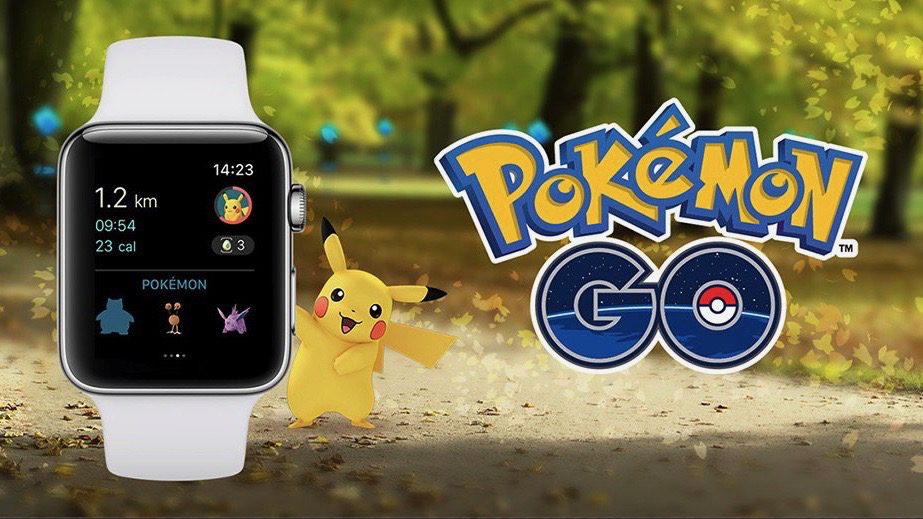
Pokémon GO launches on Apple Watch with Activity and Workout integration

To all of those who have been waiting to play Pokémon GO on the Apple Watch since the game developers teased it at Apple’s September keynote event, you can finally stop holding your breath because it’s now available.

Pokémon GO for the Apple Watch comes in an update (version 1.21.2) to the existing iPhone app from the App Store, so after installing it, you’ll be able to add it to your Apple Watch just like you would with any watch app you’re already using.

RollerCoaster Tycoon Classic hits iPhone and iPad

Games maker Atari today released RollerCoaster Tycoon Classic for iPhone, iPad and iPod touch on the App Store. Not to be confused with Atari's earlier release RollerCoaster Tycoon 4 Mobile, the $5.99 iOS title includes the best features found in the 1999 RollerCoaster Tycoon PC game and RollerCoaster Tycoon 2 for Xbox, which released in 2002. The new RollerCoaster Tycoon mobile experience includes 95 classic park scenarios from PC/Xbox titles.

There's also a built-in park designer, Retina-optimized graphics based on the visual style in Chris Sawyer’s original RollerCoaster Tycoon PC games, three downloadable content packs and much more.

djay Pro for iPhone is out: 4-deck mixing, waveform haptics, 3D Touch cue points & more

German developer Algoriddim today completed its lineup of apps for DJs by releasing djay Pro for iPhone following the launch of djay Pro for iPad a year ago and djay Pro for Mac two years ago.

The app puts the complete djay experience in the palm of your hand and provides some iPhone 7-specific features, like unique haptic feedback that lets you literally feel the beats while scratching and scrubbing the music, support for 3D Touch so you can quickly set a cue point by pressing and more.

djay Pro for iPhone is available on the App Store at the introductory sale price of $4.99.

How to delete your Super Mario Run game data without deleting the app

The popular new Super Mario Run game by Nintendo doesn’t have a whole lot of levels to play, but if you ever get to the point where you want to just delete all your in-game progress and start all over again, then you’ll be happy to know there’s a way to do that.

In this tutorial, we’ll show you how you can delete all your Super Mario Run game progress data without having to delete the game from your device and re-download it later on.

Tips for saving cellular data while playing Super Mario Run

Super Mario Run is one of the biggest hit games to launch on the App Store this year, and although it’s getting a lot of attention from both Nintendo and Super Mario fans, it also comes with a big caveat: it requires an active internet connection.

For anyone who plays the game at home on Wi-Fi, this isn’t a big deal. Unfortunately, if you’re relying on a cellular data network to play, then you might end up using more data than you’ve bargained for.

Darkr, Bookout, PRIMO, and other apps to check out this weekend

It's the weekend again, and once you get tired of playing Super Mario Run, you're going to be looking for other new apps and games to try. Never fear, iDB is here to help. In this week's Apps of the Week roundup, we have an awesome new black and white photo editor, a book-reading tracker, an app for buying things on-the-fly, and of course two new games for you to check out.

Download Super Mario Run in the App Store right now

As promised, Super Mario Run, Nintendo's first real smartphone game, launched on the App Store today, December 15. The side-scrolling, auto-runner platformer is available free of charge with a non-compulsory $9.99 upgrade to unlock the game's three modes completely.

If you don't see the GET button quite yet, force refresh the App Store app, then simply tap on the Notify button in the App Store description of the game. Enter your password or use Touch ID when prompted, and the game will begin downloading. If that doesn't work, iDB editor Jim Gresham suggests force-quitting the App Store app, rebooting the device, launching the App Store app, and then download the game.

The anticipated title is optimized for one-handed play: as Mario automatically runs from left to right, you just tap the screen to make him jump. The longer you touch the screen, the higher he jumps. As with other Mario games, you'll be avoiding various obstacles and collecting coins along the way whilst attempting to get our hero safely through the level in the fastest time possible.

How to bypass jailbreak detection in Super Mario Run

The highly anticipated Super Mario Run platformer game from Nintendo launched on the App Store Thursday afternoon, but anyone who has a jailbroken device is in for a surprise when they try to play, as it appears Nintendo built jailbreak detection into the game.

This is particularly common among a number of hit games from the App Store, including Pokémon GO, and causes the app in question to do nothing but crash whenever you attempt to launch it, but there is a way around it if you still want to play Super Mario Run on your jailbroken iOS devices, and we’ll show you how.

26 Super Mario Run moves to help you go further in the game

Super Mario Run just launched on the App Store, and as you can imagine, there has been a lot of energy from Apple and Nintendo fans around the world.

Being made for a smartphone rather than a handheld gaming unit as these kinds of games are usually made for, the game mechanics for Super Mario Run are a little different from your average Super Mario game.

In this post we'll be outlining the many different moves you can perform in Super Mario Run and explain what they do.