Jailbreak

Check out the most comprehensive jailbreaking coverage on the internet, including the latest news, apps, tweaks, and detailed tutorials about everything jailbreak.

How to add a round dock to the iPhone’s Home screen

Interested in rounding off the look of your iPhone's dock? If so, there's a new jailbreak tweak that you should check out, which is aptly entitled RoundDock. RoundDock is a brand new jailbreak tweak available on the BigBoss repo that will round the corners of your Home screen dock at the bottom of the SpringBoard.

22 new and updated tweaks that will keep you busy this weekend

I'm not sure about you but this week wasn't as exciting to me in terms of jailbreak tweak releases as it was the last few weeks. But maybe it's just me, because looking at the numbers, there are no less than 18 new tweaks, some of them more "full-featured" than others.

Maybe the most interesting thing about this week was the preview we got of CarPlay Activator, an upcoming jailbreak tweak that brings CarPlay directly to your iPhone screen.

But I'm digressing. This column is mostly about new and updated tweaks, and we have 22 of them in this post today.

How to take iPhone screenshots without the status bar

Everyone knows that the status bar tends to get in the way when taking screenshots. Either your battery's near death, which makes the screenshot looks a bit odd, or your signal strength is low, etc. Having a status bar tends to make screenshots look a bit asymmetrical. A new jailbreak tweak, aptly entitled NoBarScreen, allows you to take screenshots without a status bar.

This tweak will make sure you never accidentally set an alarm for the evening

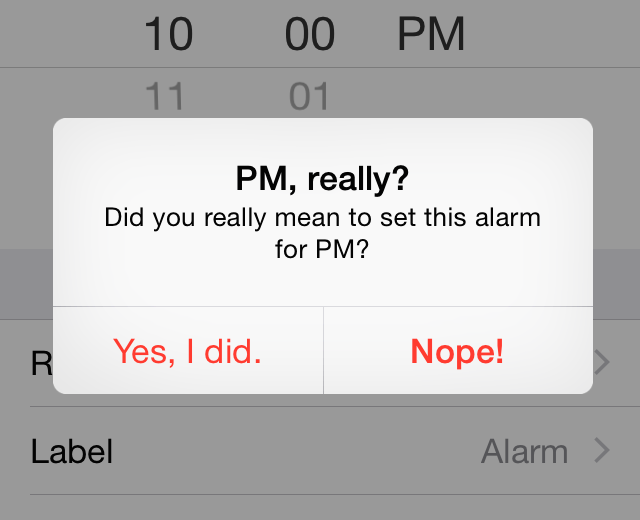
Born and raised in France where we use 24-hour clocks, the AM/PM time is something I had to adapt to when I moved to the States. It's not complicated to figure out, but it's easy to accidentally take one for the other. A new tweak called PM, really? wants to make sure you never accidentally set an alarm for the evening (PM), when clearly you wanted to be waken up in the morning (AM).

Hands-on with CarPlay Activator, a very promising standalone CarPlay tweak

I've had the privilege of going hands-on with Adam Bell's upcoming CarPlay Activator tweak for standalone iOS devices like the iPad and the iPhone. As we reported a few week's ago, Bell, known for his work in the jailbreak community with tweaks like Stride, posted a video of an in-progress CarPlay port for the iPad. The thoughts of such a release immediately got my wheels turning, as I'm sure it has for many others. Watch our full 9 minute video walkthrough for a deeper look into what makes this upcoming CarPlay tweak so promising.

Auxo for iOS 8 is in the works

For those of you who are fans of Auxo, one of the most popular and well-regarded jailbreak tweaks of all time, you can now rest easy. Last night, the folks at a3tweaks confirmed that an Auxo update is in the works for the latest jailbreak releases. That means that, yes, you'll soon be able to enjoy the Auxo experience on iOS 8 and the iPhone 6 and iPhone 6 Plus' glorious screens. 

You can still downgrade to iOS 8.1.1

I'm not sure why one would want to do that, but here is a friendly public service announcement to let you know that you can still downgrade to iOS 8.1.1 should you choose to. Following the release of iOS 8.1.2 yesterday, Apple still hasn't closed the signing window of iOS 8.1.1, which means that if for some reason you have issues with iOS 8.1.2, you can still downgrade to iOS 8.1.1 and enjoy a stable jailbreak with TaiG. 

Let’s Talk Jailbreak 85: Giving up on television

Episode 85: iOS 8.1.2 is released. The future of jailbreaking. TaiG for OS X. Jeff laments about Dell's terrible customer support. Giving up on TV and buying a projector. Our experience with a new CarPlay tweak.

Subscribe via RSS

This episode has no sponsor, but you can always support Let’s Talk Jailbreak and iDB by downloading our OS X Yosemite Interactive User Guide in the iBooks Store.

How to jailbreak iOS 8.1.2 with TaiG 1.2

TaiG has released version 1.2 of its iOS 8 jailbreak tool, and it's now capable of jailbreaking iOS 8.1.2. As has been the norm with the past few jailbreak releases, this is a Windows only jailbreak tool. If you're running Windows, you can follow our step-by-step tutorial. If you're on a Mac, you can use our virtual machine tutorial to run Windows on OS X and jailbreak.

TaiG updated with support to jailbreak iOS 8.1.2

As expected, TaiG has been updated to support the iOS 8.1.2 firmware. A few prominent developers sent tweets out earlier today stating as much, but now we have the proof in the form of an official release. You can find the updated TaiG jailbreak tool on our downloads page.

The iOS 8.1.2 update shouldn’t affect the TaiG jailbreak

According to several reliable sources within the jailbreak community, it looks like the TaiG jailbreak will remain working after the iOS 8.1.2 update. Although the TaiG tool will need to be updated to include iOS 8.1.2 support, it shouldn't take any new exploits or re-enginering on the developer end to include support for iOS 8.1.2.