Carrying over the complete Health database from your old to a new iPhone used to require restoring the new phone from an iCloud backup or an encrypted backup created in iTunes.
How to seamlessly synchronize Health database across multiple iPhones

Carrying over the complete Health database from your old to a new iPhone used to require restoring the new phone from an iCloud backup or an encrypted backup created in iTunes.

Learn how to stop the App Store on your iPhone or iPad from auto-playing videos to save cellular data or keep things still if you have motion sickness.
Apple on Wednesday released iOS 11 public beta 2, which has the same features as a third developer-only beta that was seeded to developers two days ago.
Before it can be installed on your device, you must sign in with your Apple ID at beta.apple.com in order to enroll your iOS device to access the latest public beta of iOS 11.
Next, from your iOS device visit beta.apple.com/profile to download the configuration profile.
Follow the onscreen instructions to allow installation of the profile, which will permit your iOS device to automatically receive over-the-air public beta software updates.
Lastly, go to Settings → General → Software Update to install the public beta.
Screenshot via Joey Antonini
You're wholeheartedly recommended to perform a full iCloud or iTunes backup of the device before installing any beta software. Do not install the iOS 11 public beta on your daily driver.
Here's our overview of the changes in the iOS 11 public beta 2.
https://www.youtube.com/watch?v=bixdLWqPIvA
Subscribe to iDownloadBlog on YouTube
For the complete list of all the changes in iOS 11 public beta 2 and developer-only iOS 11 beta 3 (which, again, have the same features), check out our previous article.
iOS betas are typically riddled with bugs and various issues until a Gold Master candidate is released ahead of public launch. You've been warned—performance issues, crashes, battery drain and various other problems and hiccups are a commonplace with iOS betas.
Apple typically optimizes iOS for speed and power consumption close to launch.
To report any issues and bugs to Apple, use the included Feedback Assistant app. The iOS 11 software update will release to everyone this fall.
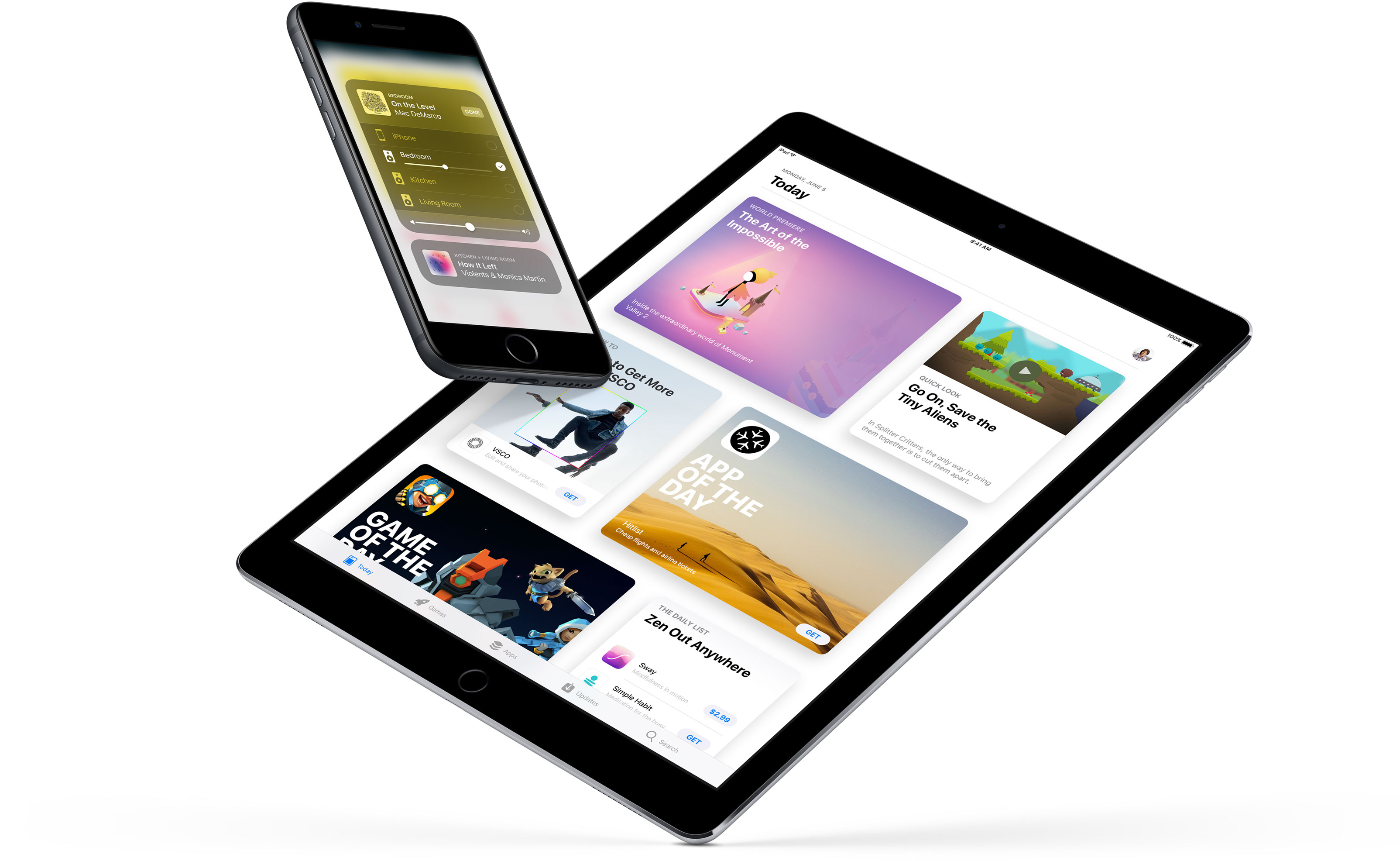
A third beta of iOS 11 for the compatible iPhone, iPad and iPod touch devices was released earlier today to Apple's registered developers and members of the paid Apple Developer Program.
The accompanying second public beta of iOS 11, which would have the same features as third developer-only beta, should be released through Apple's Beta Software Program later this week, probably tomorrow, allowing non-developers to take the latest beta for a spin on their iOS devices.
Here's everything new in iOS 11 beta 3, based on Apple's official release notes and community findings (which you can contribute to in the comments section).
https://www.youtube.com/watch?v=bixdLWqPIvA
Subscribe to iDownloadBlog on YouTube
New features in iOS 11 beta 3iOS 11 beta 3 takes advantage of a brand new syncing system for Safari's Bookmarks and Reading List features, which should increase performance and elevate your security. Migration to the new sync system occurs silently after all the devices signed in to your iCloud account are running iOS 11.
Safari content blockers are working again in beta 3. A new API allows native apps who will implement it to log in the user automatically by re-using a previously saved Safari password for the app's web-based version.
Siri in iOS 11 can translate text for you and the third beta adds support for translation requests from English US to Chinese, Spanish, German, French and Italian. New Siri voices for both genders of Brazilian Portuguese, Canadian French, Dutch and Swedish are available in beta 3, as well as new female voices for English and Mexican Spanish.
Plus, the Siri voice for both genders of Japanese and Chinese has been upgraded.
iOS 11's built-in screen recording feature now comes with a new Start Broadcasting option, which seems to do nothing in beta 3 beyond saving the screen recording to the Photos app. We expect subsequent betas will fully implement this feature.
https://twitter.com/iamgroot11/status/884476382129999872
Siri can now get directions when Do Not Disturb While Driving is active.
Elapsed time is now updated when using the system media player's play and stop controls , or when seeking during video content playback. Notifications in the Music app are now working and song metadata now syncs correctly with iTunes.
Messages on iCloud should now be available after a device has been offline.
Safari's view controller, a feature that lets you browse the web within apps complete with Safari features like Reader Mode, now sports an improved interface for 3D Touch previews and default preview actions.
When you open a link in an app that supports Safari's controller, like Tweetbot, you'll notice that Safari's toolbars have been collapse to show just the domain.
iOS 11 beta 3 implements SFAuthenticationSession, Apple's new API for authenticating a user with a web service. For what it's worth, some of my colleagues are experiencing issues using Google services with iOS 11, but this problem does not seem to be replicable for everybody 100 percent of the time.
Top fixes in iOS 11 beta 3Aside from these outward-facing new features and improvements, iOS 11 beta 3 includes a fair share of bug fixes, under-the-hood improvements and other changes. We'll only mention the most important fixes.
For starters, third-party keyboards should now work if not allowed full access. Audio should no longer drop during Skype calls. The Phone app should no longer crash when a voicemail message is deleted and carrier services like voicemail, messaging, call wait, call forwarding and others on Wi-Fi calling-enabled devices may now work for specific carriers/markets.
Pulling down the notifications shade when the device is unlocked now displays both your current and older alerts without the need for scrolling. An upward swipe for force-quitting apps is back on iPad, replacing the “x” button which appeared in prior betas when an app was held down in the app switcher.
Apps over 100 megabytes should no longer download over your iPhone's cellular connection after acknowledging the warning prompt. Speaking of which, connecting to a cellular network after restarting or powering on your device should now work correctly, as does activating a Sprint cellular data plan on your iPad.
Buttons for Day, Week, Month and Year in the Calendar app now trigger on the first tap.
The Offload App feature now works for apps that are shipped with iOS 11. The Settings app no longer crashes when you delete the Podcasts app or add/delete keyboards, while storage graph and size information now updates correctly.
You can now create a new Photos or Kaleidoscope face for your Apple Watch from the share sheet in the Photos app, as well as share Live Photos via AirDrop. Photographs captured on iOS 11 now show the correct orientation on versions of macOS earlier than 10.13.
In the Watch app, changes to Mail → Include Mail are now saved and watchOS email alerts now use your configured settings.
Tapping Learn More from the prompt that appears when you attempt to launch a 32-bit app now opens the App Compatibility section within the Settings app, as it should.
Apple says 32-bit apps will not run on future betas of iOS 11.
Migrating from your Android phone using Android Migration should work correctly while restoring a device from an iTunes backup will no longer yield white app icons on your Home screen. After restoring from an iTunes backup, you can now authenticate iCloud credentials during the iOS 11 setup process.
When restoring from iCloud Backup in Setup Assistant, you'll see the correct list of backups. Apple says that “certain services” should sync correctly on initial iCloud login.
Using 3D Touch with phone numbers, addresses and so on now works correctly throughout the system. AirPlay has been fixed to work as expected in apps. The SlingTV app now plays back audio and video normally and Kindle books sync as you'd expect.
Facebook Messenger now launches when the Facebook app is not installed. In Amazon Video, the video playback controls now work correctly and navigation bars should look correct.
Last but not least, iOS 11 beta 3 fixes the most annoying thing about the new Control Center where the Wi-Fi toggle would not work properly. Now if you hit the Wi-Fi icon in Control Center, your device disconnects from the current network and temporarily disables Wi-Fi networking (the same goes for the Bluetooth control).
And if your press the Wi-Fi control in Control Center to expand it, it now updates the network name when transitioning between networks. The 3D Touch shortcuts menu for the Camera app in Control Center has been improved as well.
In Apple's new File app, you can now use the QuickLook feature to preview iWork documents while file thumbnails should now display properly.
If you use HomeKit, Siri will finally recognize your smart home setup on devices upgraded to iOS 11 beta. You can now drop PDFs and books into iBooks and audiobooks now appear in your library after purchasing or re-downloading.
Say hello to new bugsThere are still many known issues to be resolved before the iOS 11 software update releases publicly.
For example, syncing 32-bit apps via iTunes may leave a placeholder for the app. In a similar vein, you many be unable to log in to the Pinterest app using your email address.
In Tweetbot, you may not be able to post tweets containing recently taken photos. The excellent VSCO camera app may throw an error when importing photos that have been recently taken.
Under some circumstances, rotating an iOS device may cause Apple Pencil to become unusable.
Restoring from an iTunes backup containing an offloaded app which is also present in the iTunes library on your computer installs the offloaded app and then re-installs it from App Store, which can result in the restored backup taking more space on your device than the size of the backup.
As a workaround, offload the app after the restore process completes.
Submit your own discoveriesIf you have managed to detect other user-focused changes or improvements in the new beta not mentioned in the article, post your findings in the comments below and we'll update the write-up as new information becomes available.
You can also submit them via tips@iDownloadBlog.com.
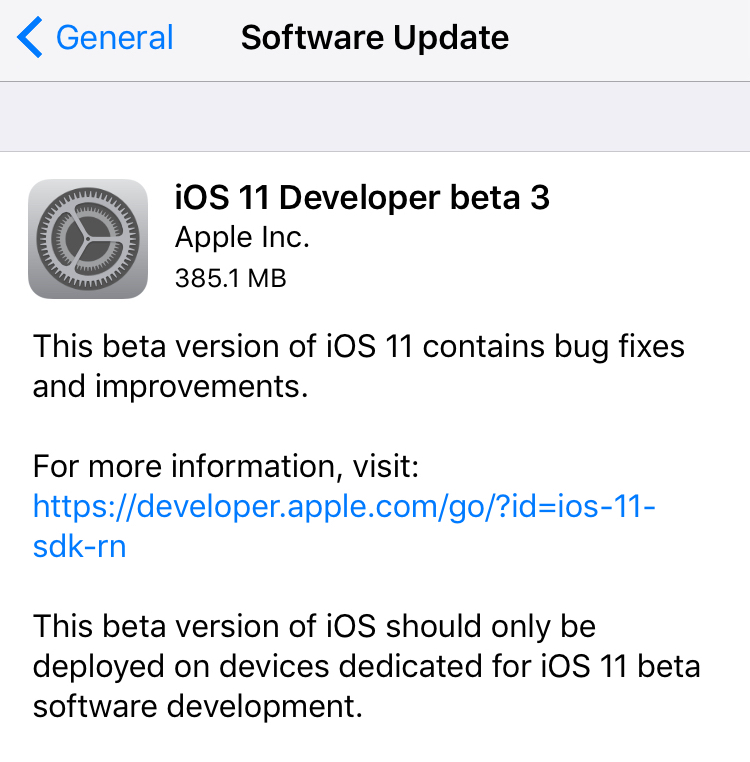
Apple today seeded a third beta of iOS 11 for iPhone, iPad and iPod touch to its registered developers and members of the Apple Developer Program. To deploy iOS 11 beta 3 (build number 15A5318g), use the Software Update mechanism in the Settings app on your device with an appropriate configuration profile installed, which can be obtained from Dev Center.
iOS 11 was originally released as a developer-only preview at WWDC in June, followed by iOS 11 beta 2 on June 21 and the iOS 11 public beta on June 26. The first public beta of iOS 11 has the same features as developer-only iOS 11 beta 2.
Here's Andrew's hands-on walkthrough of the changes in the previous beta.
https://www.youtube.com/watch?v=TZ5pwZMPRxI
Subscribe to iDownloadBlog on YouTube.
iOS 11 sports a redesigned App Store, new iPad multitasking features with the Dock and drag and drop, a Files app, AirPlay 2 with multi-room audio, new Siri capabilities, visual refinements, a customizable Control Center, a redesigned app drawer in Messages and much, much more.
TUTORIAL: How to switch from iOS 11 beta to official iOS release
iOS 11 will release for public consumption this fall across supported iOS device models.
If you have identified new outward-facing user features in iOS 11 beta 3, ping us on Twitter, shoot us an email at tips@iDownloadBlog.com or post your findings in the comments section and we’ll make sure to update the article with new information as it becomes available.
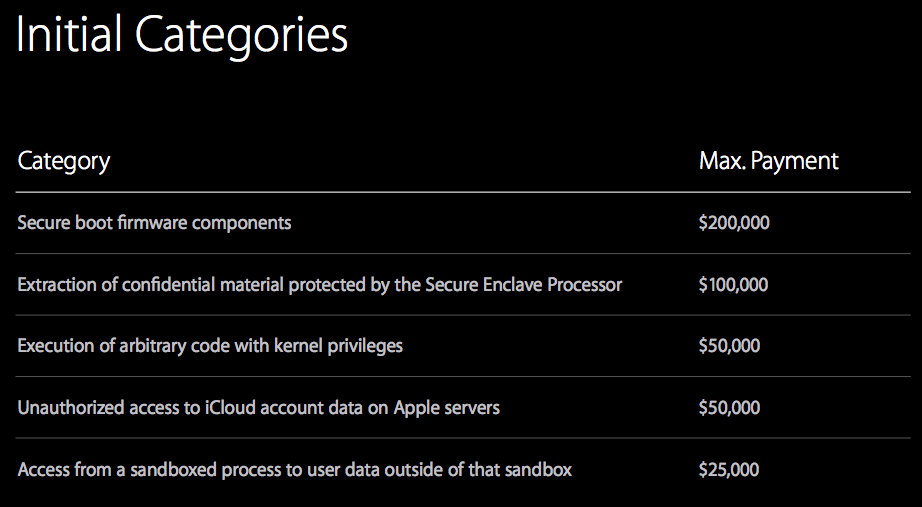
According to a report from Motherboard, iPhone, iPad and Mac bugs are too valuable to report to Apple, which leads to sky-high prices for iOS and macOS exploits on the grey market.
“For now, security researchers who have been invited by Apple to submit high-value bugs through the program prefer to keep the bugs for themselves,” reads the article. All of the eight bug hunters that the publication interviewed said they have yet to report a bug to Apple.
According to Nikias Bassen, a security researcher for the company Zimperium, and who joined Apple's program last year:
People can get more cash if they sell their bugs to others. If you're just doing it for the money, you're not going to give bugs to Apple directly.
Apple's bug-bounty initiative debuted at the Black Hat conference in August 2016.
The program offers between $25,000 and $200,000 for an iOS or macOS exploit, depending on where it is and what it does. For now, the initiative is invite-only.
As The Loop's Dave Mark put it, the question here is, are the bugs valuable enough for Apple to raise their bounties to compete with the grey market?

Instagram today announced that users of its popular photo-sharing service can now reply to Stories from people they follow with photos and videos. “From selfies to Boomerangs, now you can be even more fun and playful when you respond to friends,” said the company.
The new feature requires Instagram version 10.28 for iOS.
To reply to a Story with a photo or a video, hit the new camera button that appears while you're watching a Story. If you don't see the icon, the feature has not launched yet in your country.
Like with regular posts, you can pretty up your reply using Instagram's creative tools, allowing you to use face filters, stickers and the Rewind feature. “Replies also include a sticker of the Story that you can move around and resize,” said Instagram.
You'll get a message via Direct when someone replies to your Story with a photo or a video.
You can tap the message to view the reply and also see a sticker of the original story that’s only visible to you. As with disappearing media in Direct, your friends will know when you’ve taken a screenshot (Android only) or replayed a reply.
To learn more about these new features, be sure to check out Instagram's Help Center.
Instagram for iPhone and iPad is available free from App Store.

Since iOS 7.1, Apple's mobile operating system has included a feature that allows you to manually adjust the display's white point to your liking. A white point, also known as reference white or target white, defines the color white in reproduction.
Lowering the white point makes bright colors on your iPhone, iPad or iPod touch's screen more intense. Conversely, increasing the white point reduces the intensity of bright colors, thereby helping extend the run time of your iPhone or iPad.
The ability to manually adjust the white point so that it matches a white surface in your room is particularly handy for owners of devices that lack Apple's True Tone display technology.
How to adjust the intensity of bright colors on iPhone and iPad1) Launch the Settings app on your device.
2) Tap Accessibility.
3) Tap Display & Text Size underneath the Vision heading.
4) Slide the button labeled Reduce White Point to the ON position.
5) Now drag the slider underneath the button to the right to make bright colors less intense or move it to the left to lower the white point, which will make bright colors more intense.
Reducing the intensity of the screen's battery-hogging backlight by increasing the white point is one of the nearly dozen proven ways to save battery life on iPhone and iPad.
TIP: To get to this feature faster, set it as a triple-click Home button action in Settings → General → Accessibility → Accessibility Shortcut.
Again, don't confuse Reduce White Point with the True Tone feature.
True Tone ≠ Reduce White PointWhat exactly is the difference between True Tone and Reduce White Point?
True Tone is Apple's display technology currently found on iPad Pro models which changes the white point of the display on the fly while simultaneously adjusting brightness in order to compensate for the lighting in the environment
The Reduce White Point option does not take advantage of the ambient light sensors in your device like True Tone does. As a result, you cannot tell your device to adjust the white point of its display dynamically to match the current lighting conditions in a room.
Put simply, should lighting conditions change you'll need to repeat these steps to manually recalibrate the intensity of bright colors for the current ambient lighting.
Have you ever wanted to set the screen brightness on your iOS device below the normal threshold? If so, the Low Light filter in your Zoom accessibility settings is your friend.
Need help? Ask iDB!If you like this how-to, pass it along to your support folks and leave a comment below.
Got stuck? Not sure how to do certain things on your Apple device? Let us know via help@iDownloadBlog.com and a future tutorial might provide a solution.
Submit your how-to suggestions via tips@iDownloadBlog.com.
Apple on Wednesday seeded iOS 10.3.3 beta 6 to its registered developers and members of the paid Apple Developer Program. The new update has a build number of 14G57 or 14G58, depending on the device. It can be deployed to any compatible iPhone, iPad or iPod touch via the Software Update mechanism in the Settings app.
Your device must have an appropriate configuration profile installed, which can be downloaded from Dev Center. The latest beta arrives following iOS 10.3.3 beta 5, which was seeded to developers on June 28 (the first beta dropped on May 16).
Some of the fixes in iOS 10.3.3 are mentioned in Andrew’s walkthrough video of the first beta.
https://www.youtube.com/watch?v=Xvh5kOofWW0
Subscribe to iDownloadBlog on YouTube.
As mentioned, iOS 10.3.3 is a bug-fix release which enhances the security and performance of your iPhone, iPad and iPod touch. This is most likely that last point update to iOS 10 as Apple continues to beta-test the major iOS 11 software update ahead of its public release in the fall.
Apple also released macOS Sierra 10.12.6 beta 6 for developer testing today.
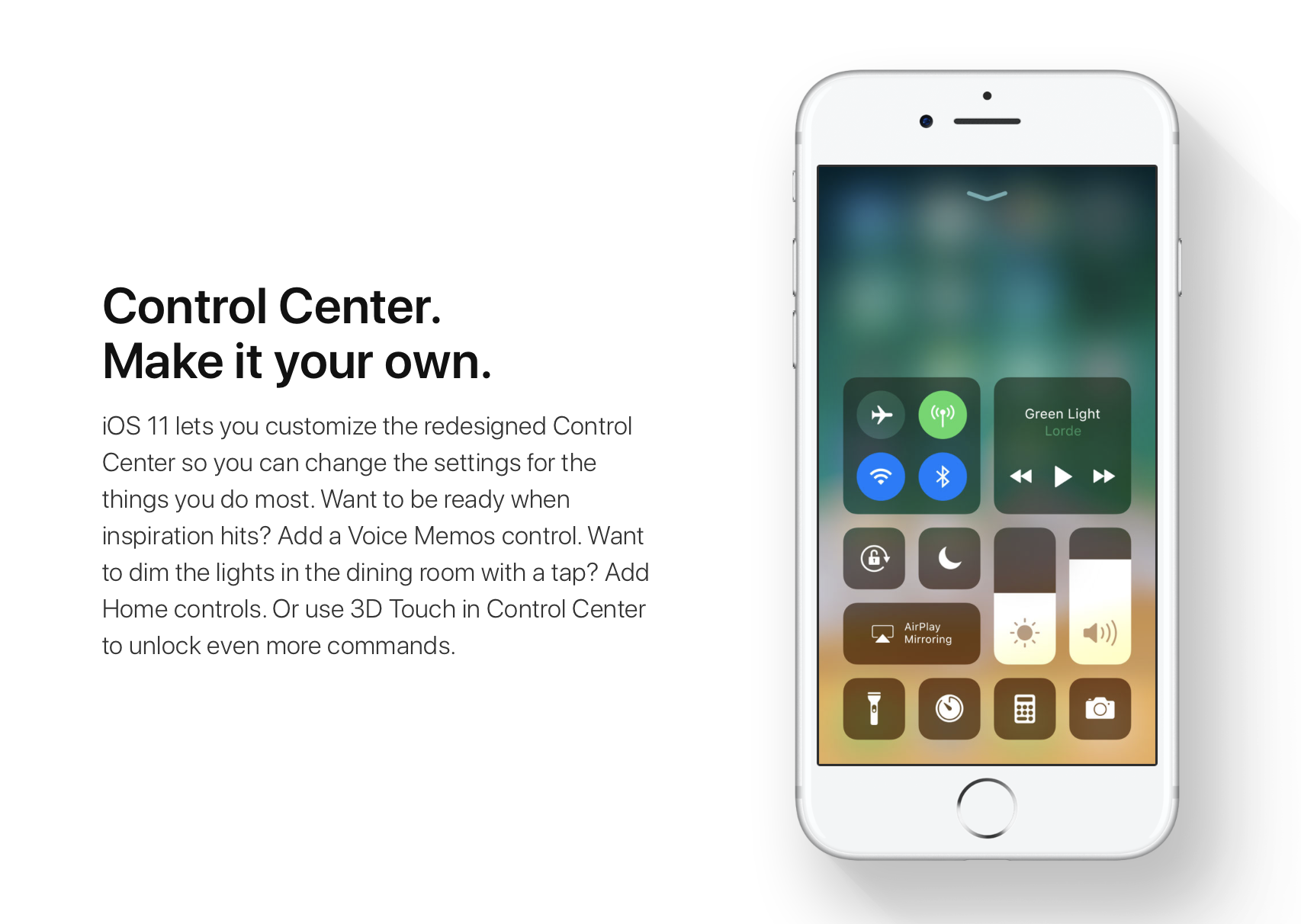
iOS 11 offers more customization for Control Center than ever, allowing you to make it your own by disabling toggles you rarely use. If puts frequently used controls all on one page, many of which can be expanded to reveal additional options when pressed with 3D Touch.
For instance, you can press the Home toggle lightly to bring up your HomeKit scenes, press the Now Playing toggle with 3D Touch to expand media controls, press the Apple TV Remote toggle to navigate your Apple TV or type some text into it, and much, much more.
So far, so great. But what if your device lacks 3D Touch?
Unlike prior iOS editions that didn't provide a fallback mechanism for 3D Touch interactions on non-3D Touch devices, iOS 11 allows you to use all of the features the redesigned Control Center has to offer without having to own a 3D Touch device.
Our resident video editor Andrew O'Hara details how iOS 11's Control Center works on devices that don't include 3D Touch features, like iPads and iPhone 6 and older models.
https://www.youtube.com/watch?v=cpSoo5_TqIQ
Subscribe to iDownloadBlog on YouTube.
Continue reading for step-by-step instructions on using Control Center without 3D Touch
How to use Control Center without 3D Touch1) Access Control Center by swiping up from the bottom of the screen
TIP: Enable Access Within Apps in Settings → Control Center to have your device respond to that gesture when you're using an app.
2) Tap and hold on the control to expand it.
In Andrew's example, he long-taps the Brightness toggle to access controls for turning Night Shift on or off. You can long-tap other Control Center items that are expandable. For example, long-tapping the Volume control enlarges the slider as if you pressed it with 3D Touch.
iPad lacks Taptic Engine so you won't feel haptic feedback when long-tapping.
That's it, boys and girls, now you know how to interact with Control Center on iOS 11 without actuating having to have a 3D Touch device. This tip should be especially useful for iPad owners as Apple's tablets lacks 3D Touch features.
TUTORIAL: How to force-quite iPad apps on iOS 11
Don't forget you can selectively enable or disable nearly two-dozen different toggles and change the order in which they appear in Control Center under Settings → Control Center → Customize Controls, including new system toggles and features like Screen Recording, Voice Memos, Low Power Mode, Apple TV Remote, Accessibility Shortcuts and more.
To lear more about iOS 11's Control Center, watch another walkthrough video below.
https://www.youtube.com/watch?v=UGWjmt6UXJI
Aside from drag and drop, iOS 11 brings five different types of tap gestures, including a longer tap to move multiple apps on the Home screen, a special half-long tap to pull up an extra Dock menu and a long-tap in the notifications overlay to access additional options.
Need help? Ask iDB!If you like this how-to, pass it along to your support folks and leave a comment below.
Got stuck? Not sure how to do certain things on your Apple device? Let us know via help@iDownloadBlog.com and a future tutorial might provide a solution.
Submit your how-to suggestions via tips@iDownloadBlog.com.

iCloud Photo Library is an optional feature on iPhone, iPad, iPod touch and Mac that uploads every photo and video you take or import to iCloud and keeps everything synchronized across all your Apple gear. I've been using it for years and it really “just works”.
On iOS 10 and earlier, Photos syncs with iCloud each time your device connects to Wi-Fi and the battery is charged. On iOS 11 and later, Photos can also use your iPhone's cellular data connection to sync and update the image library.
Do you take many photos on the go? Are you on a metered rather than an unlimited plan? Then you don't need me to tell you that you must ensure you're not wasting huge amounts of cellular data to this feature.
Here's how to stop the Photos app from eating into your iPhone's cellular data plan.
Before we get to it, keep in mind the following:
iOS 10 and earlier—Your Photos library syncs with iCloud each time your device connects to Wi-Fi and the battery is charged. iOS 11 or later—You decide if Photos syncs with iCloud via cellular or Wi-Fi only.In other words, you should double-check that cellular updates for iCloud Photo Library are turned off only if you're on iOS 11 or later. Folks on older iOS editions needn't do that because Photos syncs with iCloud only when their iPhone is connected to power and Wi-Fi.
How to stop iCloud Photo Library on iPhone from using cellular data12-megapixel images and 4K videos captured on your iPhone take up quite a bit of storage space. For most people, there's no point allowing iOS to gobble up cellular data just to keep the image library synchronized with iCloud at all times.
Thankfully, you can prevent this from happening, and here's how:
1) Launch the Settings app on your iPhone or cellular iPad.
2) Tap Photos in the list.
3) Tap Cellular Data.
4) Slide the button labeled Cellular Data to the OFF position.
This device will no longer use your carrier's cellular data for updating the Photos library. Any changes to your image library will automatically upload to iCloud as soon as the device connects to power and Wi-Fi.
TIP: If you really need Photos to be in perfect sync with iCloud at all times, even on the go, via cellular and Wi-Fi, be sure to slide the toggle labeled Unlimited Updates to the ON position.
The feature's description says “unlimited updates may cause you to excess your quota“.
Need help? Ask iDB!If you like this how-to, pass it along to your support folks and leave a comment below.
Got stuck? Not sure how to do certain things on your Apple device? Let us know via help@iDownloadBlog.com and a future tutorial might provide a solution.
Submit your how-to suggestions via tips@iDownloadBlog.com.
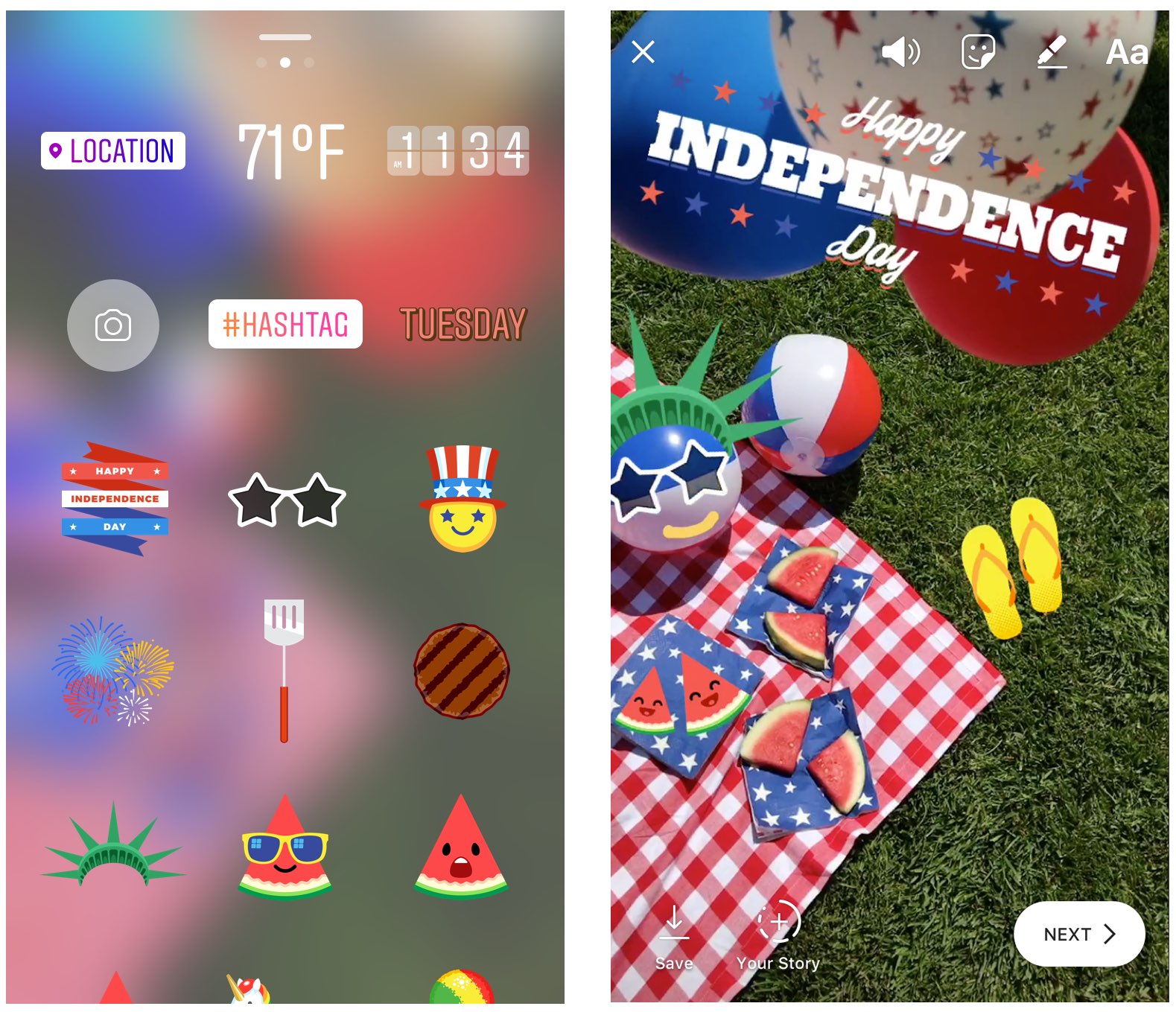
Instagram during the weekend launched stickers in its mobile app for iPhone and iPad which are dedicated to the 4th of July holiday and Canada Day celebrations across North America.
Instagram users in the United States can celebrate Independence Day by posting a Story adorned with one of the stickers in the app's new star-spangled sticker pack, ranging from backyard BBQs to fireworks at night.
Canadians get a sticker to celebrate Canada Day, available in both English and French.
The sticker was designed by Jenn Kitagawa, a multidisciplinary artist and illustrator who grew up in the prairies of Alberta and currently lives in Toronto.
Instagram is available at no charge on App Store.