iPod Touch

How to turn off Netflix’s autoplay feature

Not everyone is a fan of bing watching. I, for one, rarely watch a dozen episodes of Friends in a row. If you're anything like me, Netflix's autoplay feature is probably something of an annoyance to you.

It's especially worrisome if Netflix uses cellular data: forgetting to stop the playback after you've just finished watching an episode won't stop Netflix from playing the next one automatically, resulting in unwanted data charges.

iDownloadBlog's tutorial series is here to help you with that: in this quick how-to, we'll show you how to turn off the video autoplay feature across all your Netflix devices—they're calling it Post-Play—with just a few clicks.

How to use one-handed zoom on Google Maps

Yesterday, iDownloadBlog detailed a cool new one-handed zoom gesture during video capture which Snapchat's latest update has implemented.

This incredibly convenient shortcut permits you to zoom in and out as you're shooting video with Snapchat's camera, in real time. As one of our commenters pointed out, Google Maps has long had a similar shortcut on its native iOS app.

With it, iPhone, iPod touch and iPad users can zoom in and pan around in one-handed mode, without needing to use a two-fingered pinch-zoom gesture. Here's how one-handed zoom mode works on Google Maps for iOS.

How to use Snapchat’s new one-handed zoom

We don't hang out on Snapchat on a regular basis, but I myself use the app from time to time to check out new features. Earlier today, my boss Sébastien shared an amazing collection of handy Snapchat tips and trick, created by fifteen-year-old Victoria Samson.

Some of the tricks she demonstrates are quite brilliant, but her video how-tos don't cover Snapchat's latest feature addition—the ability to zoom while recording a video in one-handed mode using a simple gesture. That's precisely what this quick tutorial will discuss: using Snapchat's handy one-handed zoom mode during video capture.

Facer brings Instagram feeds, flash style cards and more to your Apple Watch face

About a month ago, Facer, a smartwatch customization platform, landed on the Apple Watch via a free of charge App Store app. Unlike most other apps for customizing watch faces, Facer puts your style and individuality on full display with thousands of custom watch faces and the ability to design your own with an online creator tool.

The app can pull watch face images from a variety of sources, including your Instagram feed, and it even has neat flash card style faces for learning things like languages, constellations, Solar System's planet names, the elements of the periodic table and so forth.

OneDrive implements 3D Touch previews for files and folders

Microsoft issued an update to OneDrive, its free of charge mobile cloud-storage client, adding some new features.

In addition to a fresh coat of paint and a revamped app icon, OneDrive for the iPhone, iPod touch and iPad was bumped in the App Store yesterday to version 7.1 with support for Peek and Pop in-app gestures for previewing content with 3D Touch on the iPhone 6s and iPhone 6s Plus.

In the refreshed app, you can now peek at any folder or file by pressing it lightly, or pop right into it by pressing a little deeper.

Google+ gains search autocomplete, Reply button on posts and more in latest update

Google+, the search giant's social thing, introduced a few new features in its mobile application for the iPhone, iPod touch and iPad, which can be downloaded at no charge from the App Store. Google+ 5.5 for iOS now includes search autocomplete, allowing you to search faster with suggestions appearing as you type.

The new Reply button on each comment lets you respond to posts with fewer taps and you can now create and delete circles from within the app's People tab.

What to do if you can’t make or receive FaceTime calls iPhone or iPad

Have you ever received one of those annoying messages that basically tells you FaceTime is having problems on your iPhone, iPod touch, or iPad? They can be incredibly annoying, but usually they're easy problems to fix.

In this piece, we'll talk about why you might be getting FaceTime errors on your iOS device and walk you through some ways to correct the problem.

How to repost Instagram photos, videos, and stories on iPhone

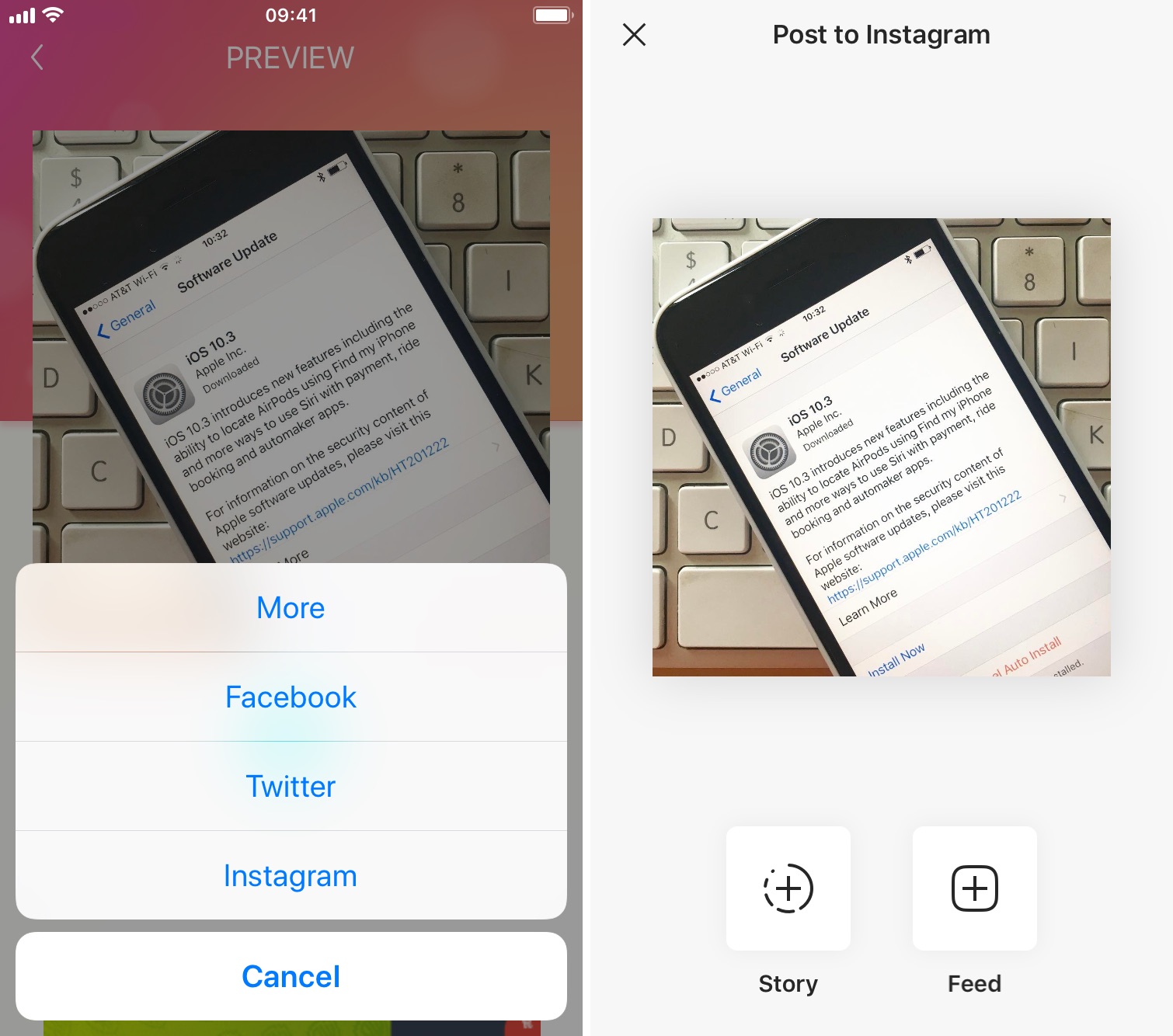
Repost photo to Instagram

The Instagram app lacks the option to repost Instagram photos, videos, and stories natively, so people usually screenshot photos to post them as their own. This works fine as a workaround but requires extra steps, such as cropping the screenshot. Maybe more importantly, it generates photos of poor quality.

Reposting, also known as regramming, is quite a common practice, even though the Instagram application doesn't provide a way to easily do that. As a result, you must use third-party applications. In this post, we will show you how to repost Instagram photos, videos, and stories from your iPhone using an app we developed ourselves called Reposter for Instagram.

Design of Apple’s ‘A11’ chip for 2017 iPhones and iPads has been finalized

Taiwanese component makers are currently scrambling to fulfill orders as the Cupertino firm is getting ready to kick off production of this year's upcoming iPhones and iPads.

Moreover, Apple's engineers should now be close to completing work on a 2017 iPhone and have certainly been developing a 2018 iPhone for some time now.

Trade publication DigiTimes wrote in a new report that Taiwan Semiconductor Manufacturing Company Limited (TSMC), a foundry that builds chips for Apple, has now taped out an Apple-designed 'A11' chip that will power 2017 iPhones and iPads.

Fun with iPhone: how to swap two faces in a photo with FacePlant

Sometimes there's no greater humor than that of which you can dish out by way of photo editing.

If you've ever wanted to swap two faces in a photograph for the giggles you know it's going to bring to the table between yourself and other people, then you've come to the right place.

In this tutorial, we'll show you how you can use a simple and free iPhone app to quickly swap two faces in a photograph right from your device.

How to use your iPhone as a mouse or trackpad

Your iOS devices have some of the best touch screens out there. As a matter of fact your iPhone screen makes for a great mouse, or trackpad.

The idea of using iOS devices as a trackpad for your computer isn't new, but Mobile Mouse Remote is a great app that provides this kind of functionality with ease of use in mind. It even packs some useful bonus features.

If you're interested in this kind of functionality for your iPhone, iPod touch, or iPad, then this is something you're going to want to check out.

Netflix picks up 3D Touch Home screen shortcuts, cellular video quality presets and more

Netflix today updated its iPhone, iPod touch and iPad application on the App Store with support for Quick Actions on the Home screen with 3D Touch.

This lets iPhone 6s or iPhone 6s Plus owners press the Netflix icon on their Home screen to quickly search, continue watching and access the Trending Now or My List sections from the shortcuts menu.

Other enhancements in this edition of Netflix for iOS include VoiceOver navigation improvements and new controls to manage streaming data usage on cellular networks.