Apps

Pulse News Mini for iPhone: the News at Your Fingertips

If you have been looking for an RSS reader, that doesn't look like an RSS reader, then you need look no further. Now, Pulse News Mini for the iPhone and iPod touch is nothing new. Maybe you have experienced its older sibling 'Pulse' on your iPad. But this little gem from Alphonso Labs Inc. is definitely worth mention. If you are like me and enjoy the benefits of an RSS feed reader, but find the typical app in this category boring and redundant, you have to check this out.

So why would you want an RSS reader in the first place? Well, like the expanded name 'Really Simple Syndication' suggests, RSS feeds are news headlines and articles pushed out by websites. This allows its readers access to information quickly. An RSS reader application on your iPhone would allow you to get news from 100's of different websites. Typically, you browse headlines and a snippet of the article in text format, like an email inbox, and can choose whether to read further into the article or not...

What in the World is Yobongo?

No, Yobongo is not a way of life or a youthful catch phrase, yet. Yobongo is a new location-based chat application that is definitely turning some heads in the tech industry. What makes them different than all the other group chat and messaging applications already available for iOS devices? Reality.

"Be Authentic," is the 3rd and final rule in Yobongo's chat guidelines. "The world is full of places to be someone you're not, this isn't one of them. We value authenticity and honesty."

The folks over at Yobongo, Inc. might really be on to something...

Improving Apps: How You Can Help

There are few things more frustrating than discovering a bug or a crash in an app or tweak you just downloaded. But instead of writing a poor review or swearing off the iPhone altogether, you can actually do something to help fix the problem.

Most developers encourage feedback and would like to pinpoint the exact problem so that they can increase their sales. Here are a few steps you can take to help developers quickly fix their apps so that you can use your apps in the way they are described to work.

Would You Pay for a Cydia Pro Version?

Now that I'm running a jailbroken iDevice again, I find myself browsing the Cydia store once again.  With the A4 and more memory, Cydia seems a little bit snappier than my previous generation device, but it's still a slow experience.  It seems that no matter how much faster Cydia can get, viewing app descriptions will only be as fast as it takes for the sponsored ads to load.

I'm a little curious how much money the repo sites make from the ads in Cydia.  It can't be that much, because I've never clicked one; I've also seen devs commenting on how few people click the ads for their free tweaks.  But they're still there, so they must make something, right? 

GreenPois0n First Impressions: the 4.1 Bugs

As soon as the Mac version of GreenPois0n came out, I went ahead and jailbroke my device.  It wasn't the same eye-candy that JailbreakMe was, or even Comex's first jailbreak, but it worked and I didn't have to wait long.  Here's a few quick things that I immediately noticed.

LockScreen PIN Delay

After a fresh reboot or a respring, I can no longer dive right in to tap the PIN to access my device.  The problem is either a delay or the first tap or two is not recognized.  But it definitely slows me down a little bit...

The iPhone App Store Adds “On The Grid” Category & it Looks Like Advertising

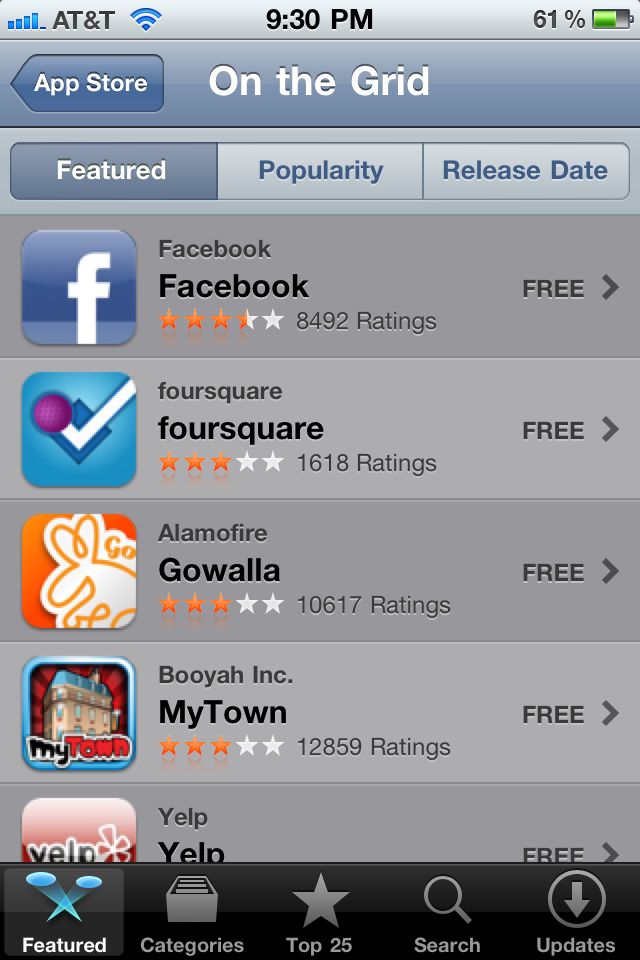
I must say that I have enjoyed the anticipation that has come with waiting to see which category the App Store will add under their featured apps section. This week I was sorely disappointed by the organization of location-based apps entitled "On The Grid".

It should come as no surprise that Facebook tops the list after adding their take on the service via Places. Foursquare and Gowalla are next on the list that only sports a dozen entries...

iPhone App Giveaway: 5 Copies of Pro Surfing to Win

The developers of the Pro Surfing game for iPhone and iPod Touch were so stoked to make it in my list of 45 favorite apps that they decided to give a few copies to iDB readers!

How Can You Win?

Pretty simple:

First, retweet this post on Twitter (see RT buttons at the top and bottom of this article) Write a comment on this page and tell us who your favorite surfer is and why. Make sure you leave your Twitter username in your comment because that's how winners will be notified.

Restrictions? Yes unfortunately this giveaway is only available to people in the US. Don't ask me why! That's a stupid restriction from Apple.

I'm traveling a lot lately but I'll do my best to notify the winners by Monday night.

Good luck, bra :)

UPDATE: Congrats to the winners of the Pro Surfing iPhone app @inthepit @seaslate @samaritan88 @Larissa_chaja @WilliamAleman Check your DM :)

The Best Twitter App for iPhone

There are hundreds of Twitter apps for iPhone in the App Store but after weeding out those with useless features, bad UI and the such, it basically comes down to a handful of applications that deserve our attention.

I've been asking people on Twitter what's their favorite iPhone Twitter app and I've been keeping track of the results. I've also had a close look at these 2 polls to come up with what I think is the ultimate list of the best iPhone apps for Twitter.

Of course we all have our favorites (mine is Tweetie 2), but we have to agree that the following apps are "la creme de la creme" of Twitter clients on the iPhone. For each application, I will also highlight what YOU like about them, according to my survey on Twitter.

Is iPhone Apps Piracy As Bad As They Say?

Lately there has been quite a bit of discussion about iPhone applications piracy. An article on MobileCrunch mentions Beejive, for which apparently 80% of downloads are illegal (aka cracked versions).

I want to share my views with you about this topic but first, I want to make things clear. I do not endorse app piracy (or any type of piracy for that matter). I believe developers deserve to get paid for their hard work. If I was a developer being ripped off, I would most likely complain too.

This being said, if you're a loyal reader of this blog, you know by now that I don't care about what the mainstream people do or think. I don't have to put a face on and pretend to be someone I am not. I am straightforward and say what I think. That's why you love me or hate me. What I'm going to say here will probably piss some developers off but I'm not here to please everyone...

The Best Free iPhone Weather App

The weather app that comes with your iPhone is usable, but it doesn't provide much information.  Sometimes an icon doesn't tell you exactly what you can expect weather-wise.  Heading into these autumn and, eventually, winter months we'll need more information about the weather.

Even with the advent of the App Store, there hasn't been a free weather app that just knocked my socks off.  Perhaps I am a bit tougher to please than the average iPhone user because I have been a weather producer at the television station I work at.

Well, the must-have free weather app is finally here and it's no surprise that it was created by The Weather Channel [iTunes link].  It features the current conditions, an hourly forecast, a 36-hour forecast and a 10-day forecast.  I really like the hourly forecast.  Today, I see that the rain is going to start to pick up at around 6 p.m.  Very useful.

The "Explore Map" option (pictured, above) features doppler radar, which shows you exactly where it is raining, snowing or both.  Another extremely useful feature.

There's also an updated video of the forecast for the major city near your area.  And finally, there's a "Severe Weather Alerts" tab.  "The Weather Channel" can detect your location using your GPS if you allow it.

So, if you haven't bought a full-featured weather app already, get "The Weather Channel."  It's free, and I highly recommend it.

DataCase vs. Air Sharing

[digg-me]One of the reasons I chose an iPhone is because of the large amount of onboard memory.  However, a non-jailbroken iPhone can only sync files through iTunes.  That means you are limited to the files you can upload to your high-tech device.  That's where applications from the App Store come in.

There are many apps that can fill this need.  However, two seem to stand out from the rest.  Datacase [iTunes link] was one of the first of the wifi file syncing apps.  And, Air Sharing [iTunes link] is apparently the most popular wifi file syncing app.  As of this writing, Air Sharing is No. 48 on the iTunes Top Paid Apps list.  That ranking, however, may or may not be skewed by the fact that it was offered as a free app for a limited time.  Keep in mind that these apps can only view documents and not edit them.

For a long time, I believed Air Sharing (pictured, left) was superior to DataCase because of how smoothly it handles PDF documents.  However, it appears that DataCase has made significant updates to compete with Air Sharing.

I downloaded the same files to both apps to compare how each app performs.

PDF - Winner: DataCase. Like I said earlier, I believe both apps handle this file type fairly smoothly.  When turning to landscape mode, there is a noticeable pause on both apps.  But, I'll give the nod to DataCase.  DataCase has controls to go to the first and last page, which is helpful for PDFs that are hundreds of pages long. Datacase also has a great bookmarking feature, to tab pages that you frequently go to.  Air Sharing does have an accelerated page turning function if you hold down the button.  But, that doesn't cut it when you're trying to get to page 200.

Excel - Push. Both apps perform equally well when viewing Excel documents.  But, then again, I don't have really complicated Excel documents.

MP3 - Push. Both apps had no problem playing the same MP3 file using QuickTime.

Pictures - Air Sharing. I downloaded a JPG to both apps.  I'll give the slight edge to Air Sharing because I can use a double-tap OR a pinch out to zoom.  A single tap in Air Sharing removes the border for full-screen viewing.  In DataCase, a single-tap removes the borders but cannot recognize a double-tap to zoom.

MHTML & QuickTime Movie - Push. Although you can upload them, both apps equally failed at displaying an MHTML file and playing a QuickTime movie.  Granted, MHTML is a weird file type but I knew both could view HTML files.  And for some reason, neither app can play QuickTime movies which is really disappointing.

Setup - Air Sharing. Air Sharing is by far easier to set up.  It has instructions right inside the app.  DataCase's setup is a bit quirky, for Windows XP users at least.  It's best to go to the Veiosoft website to learn how to set up DataCase.

Graphical Interface - DataCase. Air Sharing has a straightfoward look to it, which is not bad in itself.  But, DataCase brings a lot to the table.  The opening screen of DataCase shows a doughnut which is a graph of the amount of free space on your iPhone.  As you fill up Datacase, you will see colors which represent the different types of files.  Also, when you're uploading large files (pictured, above) DataCase tells you how far along you are in your uploading.  It's also nice to see which types of files are taking up the most space.  And, you can filter out certain file types when navigating.  One nice feature that Air Sharing does have, however, is the ability to easily navigate through a string of folders.  On the other hand, I'm not sure why you can't create folders in the Air Sharing app alone.  You have to do it in the shared folder on your desktop.

Both apps are $6.99 in the App Store.