Apps

EDGE Extended is free for a limited time

Remember Edge, a puzzle game developed by Mobigame? Originally released in the App Store in December 2008, it was one of the best looking, most addictive and innovative games available on the iPhone at the time.

The highly popular title was followed by the official sequel, called Edge Extended, which made its App Store debut in August 2011. Edge Extended has gone free briefly just once since its inception and now Mobigame has discounted the game to zero bucks for a limited time to celebrate the launch of the new Apple TV.

Minimal puzzler ‘rop’ goes free as Apple’s App of the Week

Heads up gamers, Apple has just named MildMania's 'rop' its App of the Week for this week. This means that from now through next Thursday, you can pick up the popular puzzler for free for both iPhone and iPad, a $1 savings over its usual price.

For those who haven't played it, rop is described as a mind-bending, minimal puzzler with nearly 200 beautiful levels. In each of those levels, you must rearrange the different pieces of rope on a hexagonal grid to match the shape that you are given.

Microsoft folds Sunrise functionality into much-improved Outlook for iOS app

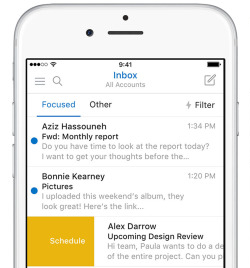
Developers of Microsoft-owned calendar app, called Sunrise, announced in a blog post that the app won't be receiving updates going forward as the team has worked hard on integrating Sunrise functionality into the Windows maker's much-improved mobile Outlook client for iPhone and iPad.

Sunrise Calendar was last updated in the App Store more than four months ago, adding integration with Office 365 events. Just yesterday, Outlook for iOS received a fresh new look alongside a brand native Apple Watch app built on watchOS 2.

At the same time, Microsoft announced that the mobile Outlook app has gone from a couple hundred downloads to more than thirty million installs on smartphones and tablets.

Skype for iOS adds 3D Touch actions, spooky Halloween emoticons, video filters and more

Microsoft today issued a pair of updates to Skype's messaging, VoIP and video calling apps in the App Store.

While the apps continue to be separate downloads on iOS rather than a universal binary (come on, Microsoft!), Skype for iPhone has gained useful 3D Touch actions available both from the Home screen and within the app itself.

In addition, both editions of Skype have picked up improved conversation and contact management, as well as ghostly Halloween video message filters and emoticons.

Scanbot picks up Magic color filter, improved edge detection and more in latest update

Scanbot, a comprehensive mobile scanner app for documents and QR codes, has been refreshed in the App Store today with several new features and refinements, including more accurate edge detection and a new color filter for text documents which produces scans that often look better than the original.

Scanbot is fully compliant with iOS 9, supports 3D Touch shortcuts on the Home screen and actions within the app and can recognize a wide variety of bar codes, including UPC-A, UPC-E, Code 39, Code 39 mod 43, Code 93, Code 128, EAN-8, EAN-13, ITF14, PDF417, Aztec and DataMatrix.

Viber rolls out Apple Watch app

Mobile messaging platform Viber today rolled out a new version of its iPhone app in the App Store which enables native experience on your Apple Watch. While pretty basic, the app is functional, easy to use and efficient.

With it, you can read and respond to messages straight from your wrist, and even send stickers created exclusively for the Apple Watch, all without having to pull an iPhone out of your pocket. Viber is available at no charge in the App Store.

Facebook bringing order to notification hell with revamped Notifications tab in mobile app

After seemingly neglecting its outdated notification system for years, Facebook today announced a revamp and new features for the Notifications tab in its mobile application.

Hopefully, this'll help us cope with a firehouse of alerts from Facebook that we're being inundated with on any given day.

A more useful, Google Now-like Notifications tab now distinguishes clearly between Facebook's most important notification types.

Specifically, you'll see timely alerts for friends’ milestones, birthdays and life events, upcoming events that you’ve joined and sports scores and TV reminders, the latter two based on Pages you’ve liked.

How to disable Location History on Facebook to extend iPhone battery life

Yesterday, Facebook issued an update to its main iOS client to help extend your iPhone's battery life by preventing it from playing audio silently in the background.

File the move under the 'too little, too late' drawer: if history is anything to go by, waiting for Facebook engineers to deliver a fully battery-friendly iOS app might be a fool's errand.

The biggest contributor to Facebook's infamous battery drain has got to be the app's continuous monitoring of your location, which continues after leaving the app. In this tutorial, we'll teach you how to prevent this by disabling a feature called Location History, thereby helping reclaim some of the juice lost to the battery-hogging app.

App Store starts experimenting with landscape screenshots and videos

Apple has seemingly begun experimenting with landscape screenshots and video in the App Store. A handful of App Store apps now offer landscape screenshots, video posters in landscape or both.

Twitter users and SplitMetrics have also noticed the change recently, which impacts the iPhone and is also showing on iTunes. Before the change, landscape App Store screenshots would show in portrait mode, requiring users to turn their head.

Did latest Facebook update fix battery drainage?

After publicly acknowledging that it was aware of reports which slammed its mobile application over excessive battery drain, Facebook yesterday issued an update to its App Store app which has apparently fixed the long-standing issue.

Facebook engineering manager Ari Grant took to Facebook to detail the issue and what they've done to prevent the mobile app from eating up your iPhone's battery.

Chrome picks up iPad split-screen multitasking support in latest update

Google today pushed a small update to its Chrome mobile browser in the App Store. The new edition, officially bumped to version number 46.0.2490.73, brings support for iOS 9's new Split View multitasking mode on the iPad Air 2, iPad mini 4 and iPad Pro.

Moreover, Slide Over multitasking view and Picture-in-Picture video mode are supported in this Chrome edition as well. These are certainly welcomed additions for those of you who do a lot of research online as you can now browse the web with Chrome and run another app like Notes side-by-side.

Fleksy keyboard introduces custom theme photo builder in new update

Fleksy Keyboard, one of the most popular software keyboards in the App Store, has received a major update this morning. The update to the freemium app strives to solve the problem of users constantly demanding that developers add an ever-growing collection of new UI themes to the app, so they've added a new custom theme photo builder feature to Fleksy Keyboard 7.0.

The ability to personalize the keyboard has been one of the top requests from users, Fleksy says, and has prompted the company to come up with a system for users to build exactly the keyboard that suits their liking, and even share their creations with friends and other Fleksy users.