iOS 5

New in iOS 5: Panoramic Photo Feature?

The list of additions in iOS 5 seems to get longer by the minute. While Apple's WWDC keynote stated that there are over 200 new features in the upcoming software update, Scott Forstall and company only touched on 10 of them.

The remaining 190+ features are left for developers and beta testers to stumble upon, as everyone else awaits the software's official release this fall. The latest find seems to suggest that iOS 5 will give users the ability to capture panoramic photos...


TinyUmbrella Updated for iOS 5 Beta 1

A quick note for jailbreakers out there, TinyUmbrella has been updated to bring support for the iOS 5 beta 1. TinyUmbrella's developer, Notcom, also added a new, nifty alert to remind users to "Request SHSH from Cydia" and "Set Hosts to Cydia on Exit" as soon as possible.

Make sure you don't use TinyUmbrella to update to iOS 5 while preserving your baseband as the "fixrecovery" feature hasn't been updated yet...

New in iOS 5: Delete Individual Calls

The jailbreak killer hit again! New in iOS 5 is the ability to delete individual calls in your phone call logs. Strangely enough, we had covered a similar jailbreak tweak called CallDelete just a few days ago.

Once again, it's a very simple yet useful feature that should have been in iOS from its creation. But hey, if Apple gave us everything we want now, what would they give us next year, right?

New in iOS 5: Flagging Email in Mail App

If you've been looking for a more elegant way to mark your email in Apple's Mail app, iOS 5 may have what you're looking for. In iOS 5, you now have the ability to "Flag" messages in the Mail app as important. The flags can be used to access certain emails for quick reference, or show you what messages are the most important to you.

New in iOS 5: Save and Read Webpages Later with Reader

In iOS 5, Apple has taken services like Instapaper and Read It Later head-on with a new feature called "Reader." Like the similar feature that has existed in Safari on the Mac, Reader for iOS 5 will strip a webpage in Mobile Safari of unneeded images and ads for a more enjoyable reading experience.

Articles can also be saved for reading later on any iDevice that's set up with your iCloud account. Bookmarking is a thing of the past.

New in iOS 5: Suggested Routes in Maps

If you go to the Google Maps website and look for directions to a specific location, chances are there are different ways to get there. This is what Google calls "suggested routes." The website lets you easily see those alternate routes and you can select the one that fits you best.

"Suggested Routes" is a new feature in the Maps app of iOS 5. Just like Google Maps on the web, the app will offer you suggested routes if available...

48 Hours in – What Apple Needs to Fix in iOS 5

So here we are, two days after Apple released the first beta of its feature-packed iOS 5 mobile operating system. This also means we've had 48 hours to play with test out iOS 5 on both iPads and iPhones of varying specification and we've come to some conclusions. While the OS is a surprisingly stable first effort, there are still some rough edges to smooth out.

Here are a few of the things we've discovered over the last couple of days - perhaps this will put you off installing the beta considering there doesn't appear to be a way to go back to good ol' iOS 4.3.3...

New in iOS 5: LED Flash Alerts

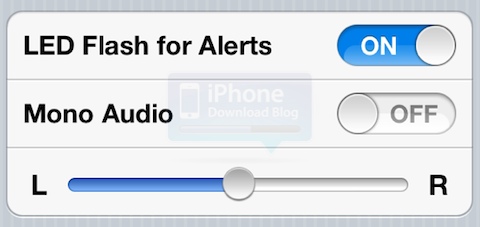
I remember a long time ago when I had my BlackBerry, one of the simple features I appreciated the most was the little LED flashing everytime I received a call, or if I had an unread text message. It was an unobtrusive way to tell me something was going on.

iOS 5 is bringing this idea to the iPhone 4. If you go to Settings > General > Accessibility, and turn LED Flash for Alerts ON, your iPhone camera flash will now flash when receiving a call or an alert...

Speed Test: iOS 5 vs iOS 4.3.3

So I've been playing with iOS 5 beta 1 on my iPhone 3GS for a couple of days now and my first impression is that it looks really good. Good enough to make me consider giving up my jailbreak and unlock to install iOS 5 on my iPhone 4 - don't worry, I won't.

One thing I've noticed about Apple's latest beta is that it is a little sluggish. I know an iPhone 3GS isn't the ideal device to test a new OS on, so I thought I'd put it to the test against the same device, but on the current iOS 4.3.3...

New in iOS 5: Easy Hotmail Set Up

I remember a few years ago when the iPhone first came out, getting your Hotmail emails on the Email app was just a struggle. Then Microsoft figured it out and let its users easily set up Hotmail on the iPhone and other devices.

Adding an Hotmail account on the iPhone is going to be even easier with iOS 5 as it is now a default option, just like Gmail, Yahoo, or AOL are...

FaceTime to Go 3G in iOS 5, Carrier-Pending of Course

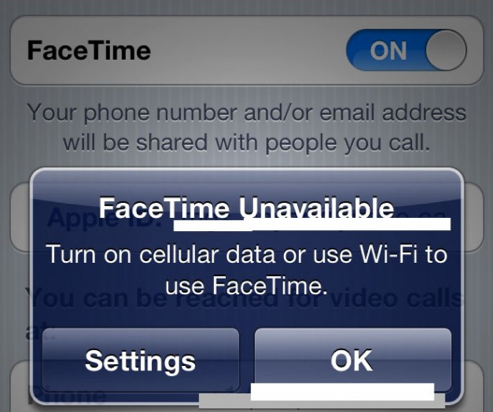
I'm sure most of you have seen the T-Mobile commercials that poke fun at the iPhone 4's inability to make video calls outside of a Wi-Fi area. The tagline at the end of the ads is always "Introducing the new T-Mobile MyTouch 4G, video chat without needing Wi-Fi."

Although the commercials don't account for services like Skype or jailbreakers using the My3G utility, they are otherwise spot-on. Apple's popular FaceTime video chat service has been restricted to Wi-Fi usage since its inception last year, but that could all change in iOS 5...

New in iOS 5: Emoji

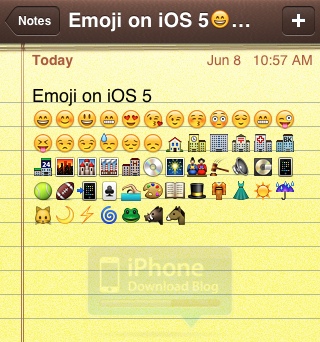
No more workarounds needed to enjoy Emoji icons on your iPhone with iOS 5. This feature is now completely integrated in Apple's latest OS and can be activated in just a few simple steps.

To activate Emoji in iOS 5, go to Settings > General > Keyboard > International Keyboards > Add New Keyboard > Emoji. Once turned on, you can easily switch between your primary keyboard and the Emoji keyboard by hitting the "globe" icon on your keyboard...