Apps

Drawing with pressure and other 3D Touch tips and tricks for Notes

With 3D Touch shortcuts and gestures available for iOS's stock Notes application, you can elevate your productivity and accomplish certain tasks faster and with fewer taps than without 3D Touch.

iPhone 6s and iPhone 6s Plus owners can take advantage of their device's pressure-sensitive screen to quickly start a new note from the Home screen, preview a specific note’s content, sketch using pressure-sensitive drawing tools, quickly delete, share and copy notes and more.

Imbued with the information in this tutorial, you'll take full advantage of 3D Touch interactions that are available to you in Notes so that you can be more productive.

Phenomenon: an intuitive tweak that combines the App Switcher with Control Center

In terms of utilitarian thinking, the current App Switcher and Control Center interfaces in iOS 9 do their jobs just fine.

It's those with creative minds that continue to look past the individual interfaces and find new ways to combine them together into all-in-one interfaces that continue to power App Switcher replacement jailbreak tweaks in Cydia.

Yet another new Cydia release to do such a thing is a jailbreak tweak called Phenomenon, which we'll be showing you in this review.

Tip: find tons of messages you didn’t know existed inside Messenger’s secret folder

What if I told you that you most likely have tons of messages you didn't even know existed, stowed away in a little-known folder on Facebook?

While messages from your Facebook friends and Messenger contacts are delivered straight to your inbox, the system filters out those it deems spam and tucks them away into a hidden vault.

Some of those filtered messages could be from a distant family member trying to re-connect with you. Others might be vitally important. If you suspect Facebook is hiding messages you should've been aware of, this tutorial will teach you how to access a treasure trove of messages that you never knew you had.

Apple updates iMovie for Mac with various visual and speed improvements

Apple on Thursday pushed out a solid update for iMovie for Mac, bringing the popular video-editing software to version 10.1.2. The release brings about several improvements, including faster project creation, easier clip selection and more.

The focus of the update seems to be visual cues and speed. Apple added a New Project button in the Projects Browser and Larger project thumbnails on the visual side, and the ability to begin editing a project with a single click on the speed side.

Dragon Hills goes free as Apple’s App of the Week

Apple on Thursday updated its App of the Week promotion in iTunes with Dragon Hills. This means that from now through next Thursday, you’ll be able to pick up the action-packed adventurer for free—a solid savings of $2.

In Dragon Hills, players take control of a dangerous dragon to help the furious princess on her revenge mission. You'll slide down the hills jumping into and out of the ground, crashing and destroying everything on your way.

Periscope gains live-sketching feature, broadcasts come alive within Twitter for iOS

Wouldn't it be great if you could doodle over live video broadcasts on Periscope? With Periscope's latest iPhone app refresh, now you can! The latest version of the Twitter-owned app lets you draw with your finger on top of a live video feed in any color you want, like a boss.

Your drawings automatically disappear after a few moments, similar to the Apple Watch’s sketching feature, and remain visible on Periscope replays.

Google Maps for iOS gains Travel Times widget, Night mode and other new features in latest update

Google yesterday pushed an update for its native Maps application on the App Store, bringing out a few newsworthy features and enhancements.

Google Maps 4.18 for iOS introduces a new Travel Times widget which lets commuters check a live travel time estimation to their home or work right within the Notification Center's Today view.

In addition, the app's gained a new built-in option for sharing directions with contacts. Plus, there's a brand new Night mode and distance units settings in navigation.

Add artistic flair to your photos with Filters, a free Mac app with 30 effects

Like the iPhone, iPad and iPod touch, the Mac supports third-party extensions inside Apple's stock Photos app.

This potentially powerful capability makes it simple for Mac owners to touch up their photographs using compatible third-party filters without leaving Photos.

Filters, a new app from California-based MacPhun, boosts your photography with as many as thirty artistic and creative filters.

You can use Filters either as a Photos extension or run the software standalone in case you prefer to edit your images outside of Photos.

Android TV now plays nice with iOS

If you're invested in Android TV and own a compatible TV set or set-top box, you'll appreciate that you can now control your Android TV from the comfort of your couch with an iPhone, iPad or iPod touch, as Google was kind enough to release the official Android TV app on the App Store.

The free of charge app works with all Android TV devices and includes remote functionality much like Apple's own Remote app lets you control Apple TVs with an iOS device.

This is what your Instagram app might look like soon

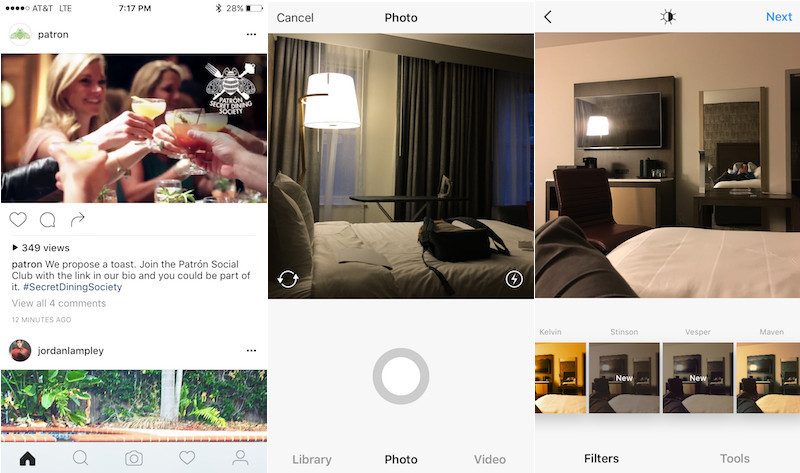
Instagram's reportedly been testing a fresh new design for its mobile application for iOS and Android, MacRumors discovered yesterday. If leaked screenshots are anything to go by, in adopting much of iOS's aesthetics the overhauled app sports a simpler, monochromatic look providing a cleaner, flatter appearance.

It's unknown when the new design will launch for everyone. For now, Instagram appears to be testing the forthcoming app refresh with a small subset of its massive user base.

YouTube’s revamped Home feed is smart, too, thanks to Google’s deep neural network algorithm

Google just said that YouTube's mobile apps for iOS and Android are gaining a revamped homepage design today. The newly redesigned Home feed within the mobile app has a clean look and a simple format “that invites you to discover and enjoy,” said Google.

More importantly, the overhauled Home feed now does a better job spotlighting content you might be interested in with smarter recommendations based on deep neural networks and larger high-resolution video thumbnails which make it easy to identify videos you want to watch.