App Updates

Microsoft completely overhauls Bing for iPhone, implements iOS deep links and more

In an effort to increase pressure on Google, Windows giant Microsoft today pushed a completely overhauled Bing for iPhone into the App Store. The software features a new branding identity reflected on the app's Home screen icon and a matching new-look interface with tight iOS integration via deep linking.

In addition, the app now works offline so you can go back to your bookmarks and search history even when you don’t have an Internet connection.

“We designed the app to bring together the information you need, connected to the apps you trust, to help you 'find' and 'do' faster and easier than ever before,” wrote the team.


Tweetbot for Mac updated for El Capitan’s Split View multitasking and more

The Mac edition of Tweetbot, Tapbots' popular Twitter client, has received an update this morning in the Mac App Store. The refreshed app now supports El Capitan's Split View multitasking mode and can be taken to OS X's native full screen mode as well.

With design refinements made to match Tweetbot 4 for iOS, this edition of Tweetbot for Mac also brings out muting changes and introduces an overahuled tweet details view that now shows conversation and replies in the same order as its iOS counterpart.

New space-saving features coming soon to Google Photos for iOS

If your iPhone is constantly running out of free storage space—and your Camera roll is packed to the gills—you'll be delighted to know that Google is rolling out new space-saving features to the Google Photos app.

Google Photos for iOS will soon bring out a brand new “Free up space” option in settings and will keep track of your phone’s storage space for you and tell you when backed up photos should be removed from your device.

Tumblr for iOS update turns your photo bursts and videos into animated GIFs

Yahoo-owned blogging service Tumblr is pushing an update to its iPhone, iPod touch and iPad application in the App Store today, and it brings with it a headline new feature: a tool which helps turn your photo bursts and videos into animated GIFs that can be easily shared on the service, as first reported by The Verge.

This removes much of the friction that comes with having to do the conversion yourself. The update is being rolled out as we speak so you might not see it just yet.

Fantastical gains Peek and Pop commands

Flexibits' calendar app, Fantastical for iPhone, was updated yesterday in the App Store with expanded support for pressure-sensing 3D Touch technology on the new iPhones, going beyond Home screen shortcuts that developers added last month.

Now iPhone 6s or iPhone 6s Plus owners can use Peek and Pop commands in Fantastical to preview upcoming events and reminders without leaving the main view, or jump straight into them from the preview by pressing the screen a little harder.

Waze gains 3D Touch shortcuts on iPhone 6s

Google-owned social-mapping and traffic service Waze today pushed an update to its iPhone application in the App Store, adding handy shortcuts available upon pressing its Home screen icon on the iPhone 6s and iPhone 6s Plus.

Waze's 3D Touch shortcuts provide access to popular features like address search, location sharing and turn-by-turn navigation based on your work and home address on file.

WhatsApp picks up 3D Touch Peek and Pop, redesigned settings and more

Facebook-owned WhatsApp today issued a new update to its iPhone application in the App Store which brings extended support for 3D Touch on the iPhone6s and iPhone 6s Plus with Peek and Pop gestures for previewing chats without actually opening them.

The app's also gained a redesigned settings interface, the ability to browse your starred messages in one place and optionally include rich previews when sharing links.

Review: Vevo’s revamped iOS app is a lot cleaner and more fun to use than Apple’s Music

In case you missed it, Vevo has completely redesigned its lagging iPhone and iPad application in the App Store. I watch music videos from Vevo artists on YouTube on my desktop. On mobile, not so much and I blame Vevo's hopelessly outdated design, inconsistencies and complicated features for that.

Bumped to version 5.0, the new Vevo experience starts with a black-and-white logo and a matching app icon.

The headline change here is an all-new interface—it gets out of your way, unlike Apple's own Music app, and sports a tremendously useful mini-player. It's almost too weird to say that Vevo's new iOS app is a lot easier and way more fun to use than Apple's stock Music app has ever been, but it's true.

Foursquare revamps iPad interface, adds Peek and Pop gestures on iPhone 6s

Foursquare's main iOS app was refreshed earlier today with some new 3D Touch goodies and a redesigned interface on the iPad. Foursquare for iPhone, iPod touch and iPad was part of the initial wave of third-party applications that enabled support for handy Home screen shortcuts via 3D Touch on the new iPhone 6s and iPhone 6s Plus.

Today's update added 3D Touch-based Peek and Pop gestures, meaning you can now preview content within the app and pop right into it, without lifting a finger off the screen.

Microsoft refreshes Office apps for iPad Pro, with an important caveat

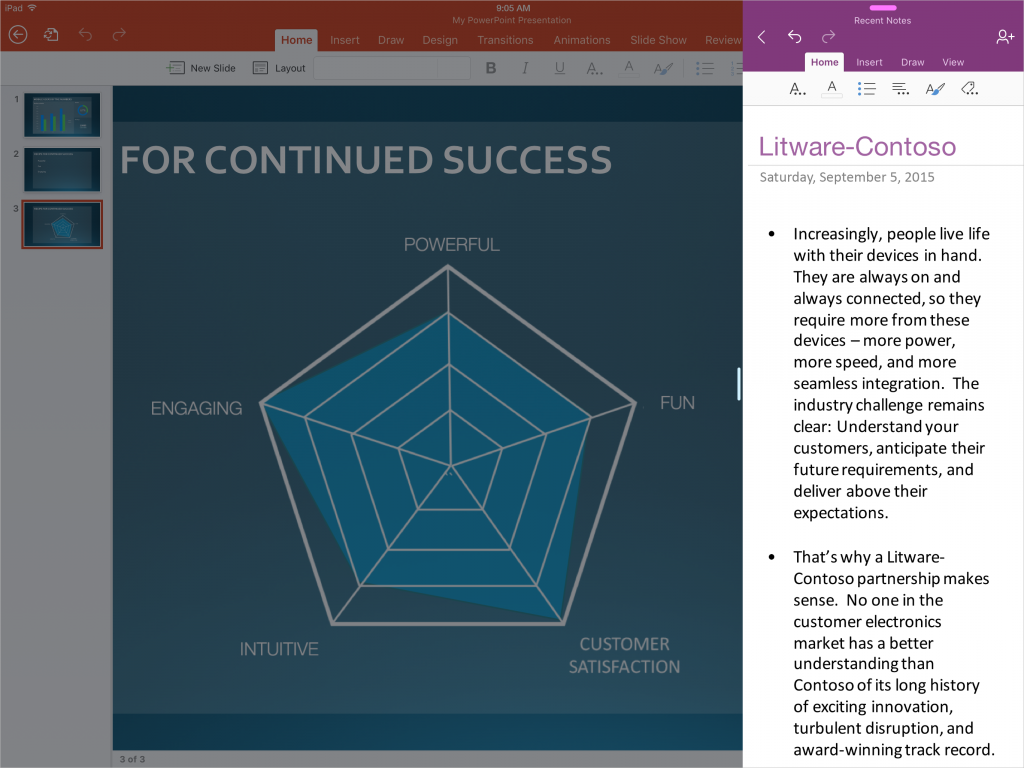
Windows giant Microsoft today released compatibility updates for its mobile Office app in the App Store—Word, Excel, PowerPoint, Outlook, OneNote and OneDrive—aimed at lucky iPad Pro owners.

Featuring full support for iOS 9's new Slide Over and Split View multitasking modes, these apps now take full advantage of the iPad Pro's massive 2,732-by-2,048 pixel resolution 12.9-canvas that in landscape mode basically runs two full-sized apps concurrently.

Periscope gains skipping ahead in replays, Trending section, 3D Touch shortcuts and more

Twitter-owned live-broadcasting app, Periscope, was updated in the App Store last evening with half a dozen new features and refinements aimed at improving the usefulness of video replays whilst improving content discovery with new tools such as an-all new Trending section to help you find content from popular broadcasters.

Pericope also has a tvOS app for the new Apple TV and recently refreshed the iPhone version with muting, Handoff support, instant replays, finding location-enabled broadcasts, verified badges, Follower Only mode, Global section and more.

All of iOS 9.1’s new emoji are now available on SwiftKey for iPhone and iPad

All those burritos, tacos, middle fingers and other emoji characters enabled by the iOS 9.1 software update are now available on SwiftKey's keyboard for your iPhone, iPod touch and iPad.

The latest update to SwiftKey's free of charge keyboard in the App Store essentially adds all of the new iOS 9.1 emoji, including the unicorn, many new facial expressions and gestures (yes, the middle finger, too) and a man in a business suit levitating.