App Store Apps

Firefox web browser is now available for iOS

After an apparent soft launch back in September, the team at Mozilla has fully taken the wraps off of its Firefox web browser for iOS. The popular browser is now available globally, and for all iOS devices as a universal app.

The 39.6 MB download is available free of charge on the App Store, and comes in at version 1.1. Learn more about what this highly anticipated release entails inside.

Foursquare revamps iPad interface, adds Peek and Pop gestures on iPhone 6s

Foursquare's main iOS app was refreshed earlier today with some new 3D Touch goodies and a redesigned interface on the iPad. Foursquare for iPhone, iPod touch and iPad was part of the initial wave of third-party applications that enabled support for handy Home screen shortcuts via 3D Touch on the new iPhone 6s and iPhone 6s Plus.

Today's update added 3D Touch-based Peek and Pop gestures, meaning you can now preview content within the app and pop right into it, without lifting a finger off the screen.

Microsoft refreshes Office apps for iPad Pro, with an important caveat

Windows giant Microsoft today released compatibility updates for its mobile Office app in the App Store—Word, Excel, PowerPoint, Outlook, OneNote and OneDrive—aimed at lucky iPad Pro owners.

Featuring full support for iOS 9's new Slide Over and Split View multitasking modes, these apps now take full advantage of the iPad Pro's massive 2,732-by-2,048 pixel resolution 12.9-canvas that in landscape mode basically runs two full-sized apps concurrently.

Facebook releases Notify for iPhone for news, sports, weather and other alerts

Facebook on Wednesday announced it's releasing a brand new mobile application, Notify for iPhone. Conceived as a mobile notifications app for news, sports, weather and more, Notify was designed to deliver push notifications “that matter from sources you love, right on your lock screen, all in one place.”

Notifications are grouped into “stations” which cover varied categories, from sports and celebrities to news, movies, music, shopping and more. Notify is an English-only iPhone app available for free in the App Store.

Periscope gains skipping ahead in replays, Trending section, 3D Touch shortcuts and more

Twitter-owned live-broadcasting app, Periscope, was updated in the App Store last evening with half a dozen new features and refinements aimed at improving the usefulness of video replays whilst improving content discovery with new tools such as an-all new Trending section to help you find content from popular broadcasters.

Pericope also has a tvOS app for the new Apple TV and recently refreshed the iPhone version with muting, Handoff support, instant replays, finding location-enabled broadcasts, verified badges, Follower Only mode, Global section and more.

Mavenfall uses 3D Touch for deeper gameplay

With battle card games like Magic: The Gathering and Pokémon TCG dominating the market, it seems impossible for new titles to make a splash with card gamers. Mavenfall stands out from the pack with a few special features that are unique in the card game world, at least for now. Taking advantage of the iPhone 6s and 6s Plus 3D Touch, Mavenfall lets players go deeper into the battle.

Console-grade hack’n’ slasher Implosion – Never Lose Hope is IGN’s Free Game of the Month

Implosion - Never Lose Hope by Rayark Inc. has gone free via IGN's ongoing Free Game of the Month promotion.

This triple-A hack and slasher promises to bring console-grade gaming experience to your iPhone, iPod touch and iPad. The download can be redeemed at no charge through IGN, by following our instructions.

Released in April 2015, Implosion retails for $9.99 and has never gone free in the App Store so you're looking at a significant saving if you're into these kinds of games. The game holds a rating of four and a half stars based on nearly 900 App Store reviews. Read on for the instructions on redeeming your free copy.

Apple announces Tech Talks tour for Apple TV developers

Following the posting of a new tvOS beta, Apple on Tuesday announced that it is taking to the road next month to help developers take full advantage of the new Apple TV. Beginning December 7, the company plans to hold TV Tech Talks in 10 cites around the globe.

During these events, developers will get in-depth technical information on building and designing for tvOS, learn refined coding techniques, and obtain valuable instruction from experts. Seating is limited, so those interested will have to register for a chance to attend.

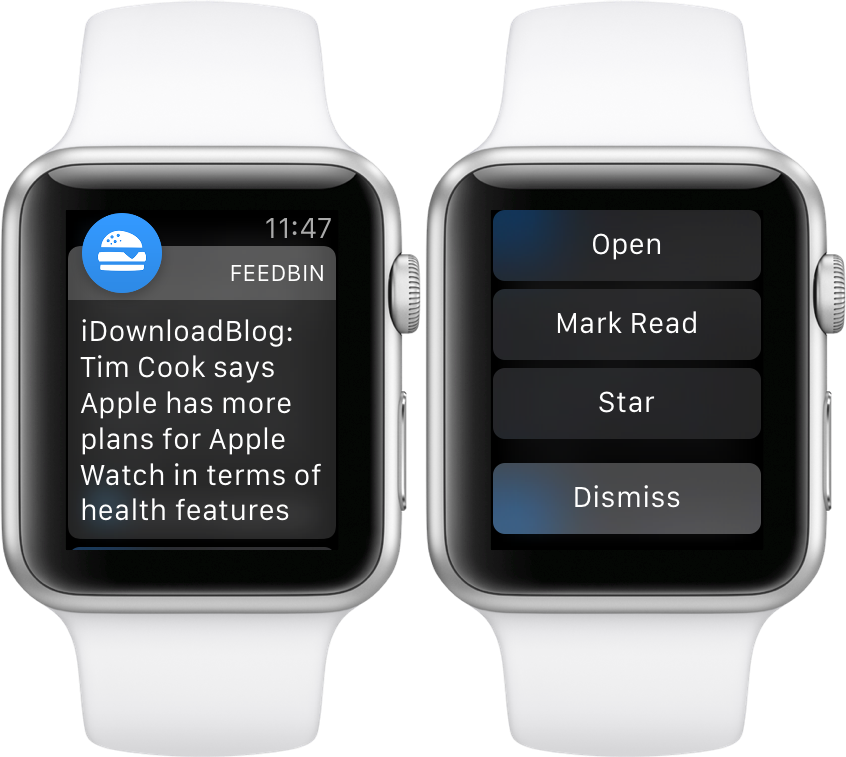
Feedbin Notifier review: the best way to get RSS notifications on Apple Watch

Feedbin Notifier is an iOS and watchOS companion app for Feedbin—my favorite feed reading service. Feedbin is a paid service at $3 a month that provides you with one of the best post-Google Reader experiences that I’ve used.

I’ve experienced a lot of feed reading services. I’ve used Feedly, Feed Wrangler, I’ve even installed a custom Fever installation on my web server. Not to throw any of those services under the bus, because they each have their strong points, but Feedbin is the best overall feed reading package available.

Feedbin Notifier (free on the App Store) is an app that sits on top of the Feedbin service, and notifies you whenever new articles in your feeds meet specified criteria. It sounds simple enough, but if you’ve ever tried to get reliable notifications for RSS feeds, then you likely understand that it’s not as easy to pull off as it sounds.

The thing about Feedbin Notifier, and I’m going to use an overused catchphrase here, is that it just works. If you wish to have reliable notifications for all of your favorite RSS feeds, then you owe it to yourself to try Feedbin coupled with the Feedbin Notifier app.

For the record, this isn’t a review of Feedbin as a service, although I do plan on following up with a post about Feedbin in general sometime in the future. In this post, however, I want to talk about notifications. More specifically, I want to talk about notifications on Apple Watch, and how Feedbin Notifier is now my favorite app for Apple Watch.

All of iOS 9.1’s new emoji are now available on SwiftKey for iPhone and iPad

All those burritos, tacos, middle fingers and other emoji characters enabled by the iOS 9.1 software update are now available on SwiftKey's keyboard for your iPhone, iPod touch and iPad.

The latest update to SwiftKey's free of charge keyboard in the App Store essentially adds all of the new iOS 9.1 emoji, including the unicorn, many new facial expressions and gestures (yes, the middle finger, too) and a man in a business suit levitating.

Full offline maps with navigation and more coming soon to Google Maps for iOS

Although Google Maps for the iPhone, iPod touch and iPad in its current incarnation supports saving a limited area as an offline map (just type 'OK Maps' into the search field), the full offline functionality used to be an Android exclusive, but that's about to change soon.

According to Google today, full offline maps in Google Maps are coming soon to the iOS edition of the software.

1Password updated with Teams support, new All Vaults view and more

AgileBits on Monday issued an update for its 1Password app, bringing the mobile client to version 6.1. The team is calling this the "Unity Edition," and it brings about support for 1Password for Teams, a new All Vaults view, and various other smaller improvements.

With 1Password for Teams, everyone gets the simple, convenient security of 1Password, and you get the tools you need to control and manage access to your important info. This includes features like end-t0-end encrypted sharing, anti-phishing defense and more.