Mac

Stay up-to-date on the latest Mac news, and tutorials. Get expert tips and tricks to optimize your Mac’s performance and learn about the latest Apple products and software updates. Discover the best Mac apps and accessories to enhance your user experience.

DigiTimes: 12″ MacBook Air with Retina screen ramping up for Q1 launch, replacing 11-incher

Contract fabricator Quanta Computer is ramping up production of the highly anticipated MacBook Air model with a twelve-inch screen as Apple preps to launch the forthcoming ultra-portable during the first quarter of this year, if a new report by DigiTimes, a Taiwanese trade publication, is an indication.

Well-informed blogger Mark Gurman recently claimed that Apple is expected to raise the bar on notebook portability by engineering a lighter, thinner computer without a fan that ditches standard USB ports, the SD Card slot, Thunderbolt I/O and the MagSafe power connector in favor of a single, fully reversible USB 3.1 Type-C port.

Poll: should iOS 9 pause on innovation?

Earlier in the month, Instapaper creator and Tumblr co-founder Marco Arment offered a scathing critique of Apple's declining software quality. I generally disagree with Marco on most topics he blogs about, but this time he got me thinking that Apple's “it just works” mantra no longer applies. And as software woes continue to persist, the problem clearly is much larger than the relatively benign Maps debacle.

From that botched iOS 8.0.1 update, delayed improvements and an over-the-air iOS 8 installer requiring a whopping 4.6 gigabytes of free space to a bunch of issues plaguing OS X 10.10 Yosemite such as performance bottlenecks, its insatiable resource requirements, ridiculous Apple Mail hiccups, intermittent Wi-Fi issues and more - the firm appears to have “lost the functional high ground,” as Arment put it.

And with plenty of far-reaching technologies being introduced simultaneously — Handoff, iCloud Drive, custom keyboards, photo and storage extensions, new ways to share content, HealthKit, HomeKit, WatchKit and CloudKit, to mention but a few — small wonder Apple is finding itself in the middle of a pretty rocky transition, to say the least.

Throw in things like iCloud and CarPlay and suddenly diminishing software quality exhibited in the latest releases of iOS and Mac OS X becomes a major customer pain point. Apple is an aspirational brand so winning back user trust is paramount.

So, what should Tim Cook & Co. do? Do they continue to stick to the annual OS release schedule? Or should they give engineers enough time to smooth out the rough edges and ship software when it's ready rather than for their marketing benefits, even if it means making us wait longer for latest and greatest software innovations?

Spotlight bug exposes your Mac’s IP address and more to spammers

An unusual oversight in how OS X's Spotlight feature handles privacy settings in Apple Mail leaves the door open to spammers, phishers and online tracking companies who can obtain private data such as your IP address, current operating system version, browser details and more, whenever an email message is previewed in Spotlight.

First discovered by German technology news site Heise, the bug takes advantage of a common information harvesting technique and a Mail setting which determines whether or not the program loads remote content in emails.

Eye-candy renderings of one-port MacBook Air with laser-cut Apple logo that shines at the edges

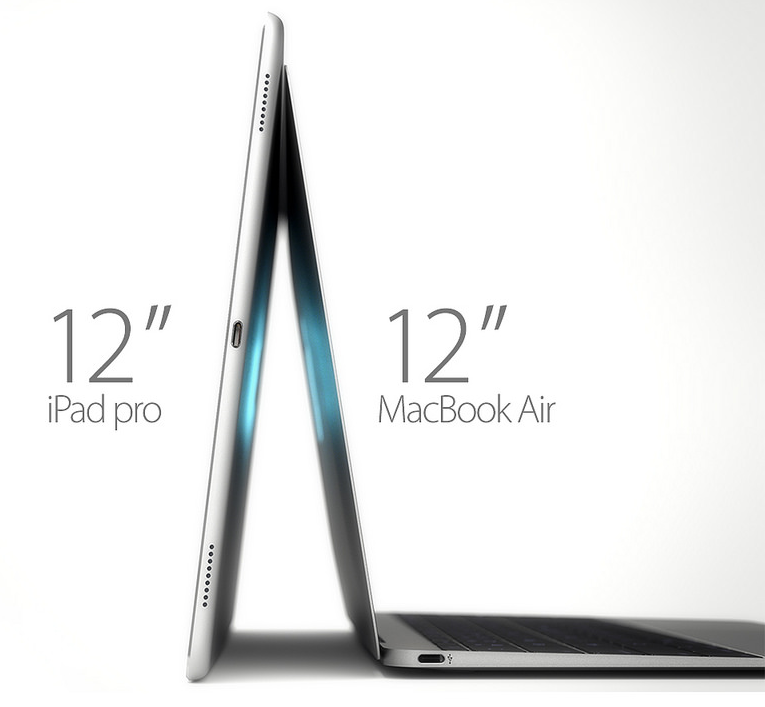
Our favorite rendering artist, Martin Hajek, has created a gorgeous batch of renderings based on the mockups and information from 9to5Mac's scoop regarding Apple's rumored one-port 12-inch Air.

The images give a closer look at some of the rumored features of the purported notebook that've been making rounds, such as distinct iPhone-like finishes in Silver, Space Grey and Gold.

I've included the gorgeous renderings for your enjoyment right below.

Poll: how do you feel about Apple’s reportedly radical MacBook Air redesign?

A well-sourced report from 9to5Mac's Mark Gurman has ignited a heated debate on social media about the practicability of a brand new twelve-inch MacBook Air model as it's said to ditch standard USB ports, the SD Card slot and even its Thunderbolt I/O and MagSafe power connector in favor of a single, fully reversible USB Type-C port.

Critics who call it a step back usability-wise, not forward, mention the original MacBook Air which released in January 2008 with just one USB port on it. On the other hand, they forget that USB Type-C does a lot more than standard USB. For starters, it can safely replace Thunderbolt for video and data I/O and MagSafe for charging.

That being said, there are still some fundamental questions like how am I supposed to connect an iPhone to the machine if the only USB port is used for charging? I'll ellaborate on the viability of a one-port MacBook Air further below, but first tell us, if you will, your initial reactions to the purported design of the forthcoming notebook.

Apple seeds new OS X 10.10.2 beta to developers

Apple has seeded a new beta of its upcoming OS X Yosemite 10.10.2 this afternoon. The update, labeled build 14C94b, is available through the Update tab in the Mac App Store and the Dev Center for all registered Mac developers.

Today’s release comes a few weeks after the previous OS X 10.10.2 beta, and Apple has once again asked developers to focus their testing efforts on Wi-Fi connectivity—a long-standing Yosemite issue—as well as Mail and VoiceOver.

How to enable text selection in Quick Look on Mac

Anyone who has used a Mac for more than a minuscule amount of time has more than likely come across Quick Look, the pop-up window that is invoked with a press of the space bar when a file or folder is highlighted on the desktop or in Finder. Quick Look's usefulness becomes evident when file names aren't descriptive enough by allowing users to view the contents of many different types of files without having to open them in a full-fledged application like Pages for documents or Preview for images.

By default Quick Look can only display a static view of a file that only grants users a peek at the contents without any real function. Imagine, however, being able to copy a document's text without having to open it in TextEdit or Pages. This is incredibly useful in a variety of situations, from dealing with templates to Word documents to code snippets, where having multiple applications and documents opened shouldn't be necessary for copying from one location and pasting to another. The good news is that this functionality is completely possible and perfectly easy to enable.

Liberate OS X’s Spotlight search with Flashlight

For years now, Alfred has been a staple of OS X workflow applications, enhancing search on the Mac and adding many features in the process. Spotlight search remained rather antiquated in comparison until Apple revived it with OS X Yosemite, but there's still much to be desired. While Alfred will continue to hold its well-deserved position as a staple Mac app, Flashlight has the potential to reach far beyond the abilities of Alfred to make OS X's native Spotlight search an incredibly powerful and useful tool.

Imagine using ⌘+SPACE as a text-based Siri, in which typing the phrase "remind me to Write Flashlight review at 2pm" or "text Mike I'm on Steam, wanna play?" will do exactly as expected. However, Flashlight not only allows reminders to be made and messages to be sent directly from Spotlight – its potential reaches much further.

Alleged details for Apple’s next-gen 12-inch MacBook Air surface

Details of the long-rumored 12-inch MacBook Air surfaced today, as 9to5mac broke specifics surrounding the device's dimensions, edge-to-edge keyboard, and lack of traditional ports. Although the device's screen size is larger and of a higher pixel density than that of the 11-inch MacBook Air, its dimensions are narrower than its smaller counterpart by approximately a one-fourth inch. It is, however, slightly taller due to the larger screen size, with an approximate one-fourth inch increase in height.

Bezels have been reduced around the entire screen of the device, as well as surrounding the keyboard, and the keyboard itself has been made narrower by reducing the space between each individual key. The 12-inch MacBook Air's function keys, as well as arrow keys, have also been tweaked in order to reduce the keyboard's overall footprint.

Rumor: 12.2″ MacBook Air entering mass production in the first quarter of 2015

Apple's rumored ultra-thin MacBook Air model with a 12.2-inch screen is reportedly entering mass production in the first quarter of 2015, Taiwanese trade publication DigiTimes reported Monday citing sources from the upstream supply chain.

The Wall Street Journal said in October that production of the ultra-slim notebook with “a higher resolution” screen would commence in December of this year. DigiTimes also added that the Apple Watch is on track for a Spring 2015 release.

Duet Display lets you use iPhone or iPad as an extra display for your Mac, without lag

Although Duet Display is not the first app to allow your iOS device to act as an extra display for your Mac (Shape's $10 iDisplay comes to mind), it's the first app to have done screen extending right.

Built by ex-Apple engineers who worked at the company for three years on the iPad and iMac, the software delivers a Retina display at a smooth sixty frames per second with no lag whatsoever.

Featuring touch control, Duet Display makes interactions with your Mac fun and smooth while taking advantage of the fact that an additional display increases productivity by giving you up to 48 percent more pixels to work with.