Apple Watch

Stay up-to-date on the latest Apple Watch news, and learn how to get the most out of your device with our comprehensive tutorials. From updates to features to troubleshooting tips, we’ve got you covered.

Apple posts two new ”Go” ads for Apple Watch Series 2

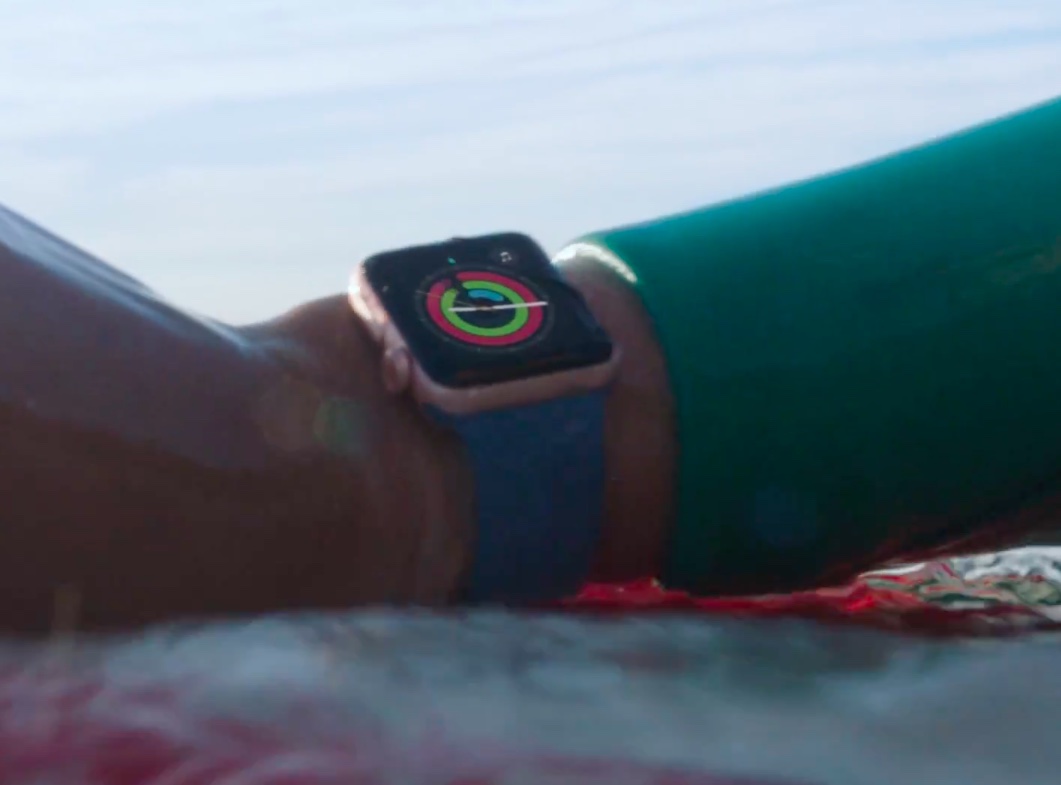
“Go” concept of latest Apple Watch ads has worked out well for Apple because the company just posted a pair of new commercials for Apple Watch Series 2 on its YouTube channel. Titled “Go Ride” and “Go Surf,” the 30-second videos highlight water resistance and position the wrist-worn device as the perfect companion for cyclists and surfers. Check them out and let us know how you liked them.

Deliveries gains full iOS 10/watchOS 3 support & many new features in latest update

Deliveries, my favorite package tracker for iPhone, iPad, Mac and Apple Watch, received a major update on the App Store this morning. Bumped to version 8.0, Deliveries is now fully compatible with iOS 10 and watchOS 3 and supports many new iOS 10 features, from rich notifications and haptic feedback to a reworked widget, deeper 3D Touch support, faster background updating for the Deliveries widget and its Apple Watch app, improved suggestions when you add a delivery, an iMessage sticker pack and more.

watchOS 3.1.1 disables Lock feature in Control Center—here are four workarounds

Don't bother trying to lock your Apple Watch by tapping a dedicated Lock button in Control Center!

That's because watchOS 3.1.1 update (currently pulled over bricking complaints) has killed that button. It's not a bug—the feature disappeared from Control Center in the first beta of watchOS 3.1.1.

I'm unsure as to why Apple has tweaked how manual unlocking works, but am certainly not a fan of the change. Actually, I've felt so ticked off by this apparent “feature” of watchOS 3.1.1 that I've decided to come up with a few workaround solutions for those of us who manually lock our watches before going to sleep.

1Password for Apple Watch is now a native app

1Password developer AgileBits was there on day one with a brand new Apple Watch app when the wearable device made its April 2015 debut. As useful as it was, the app wasn't exactly a speed demon and was limited in functionality by only supporting items stored in your Primary vault. Those issues are now a thing of the past as 1Password for Apple Watch is now a 100 percent native app that takes full advantage of the speed and performance enhancements afforded by running directly on Apple Watch hardware.

As a bonus, the new app now permits you to add items from any vault to your Apple Watch, including items stored in your 1Password.com account vaults.

Apple temporarily pulls watchOS 3.1.1 following bricking complaints

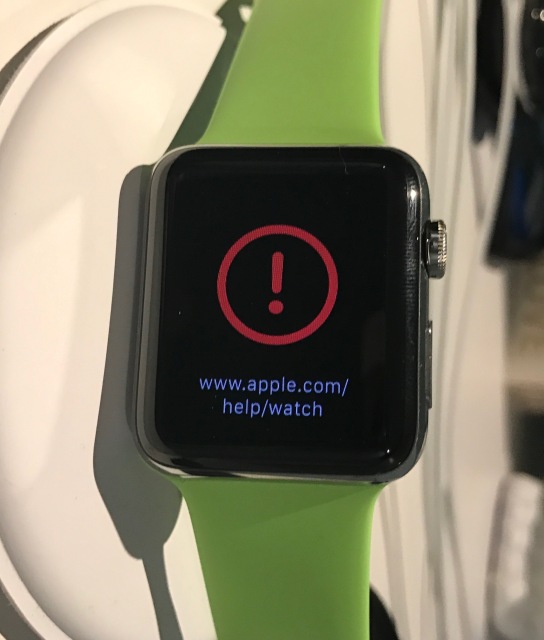
Apple on Tuesday pulled watchOS 3.1.1, following complaints that the software is bricking some Series 2 Watch models. The update, which was released yesterday, includes support for new Unicode 9.0 emoji, some customization features, and more.

According to the complaints, after installing watchOS 3.1.1, affected Apple Watches begin displaying a red exclamation point and the URL www.apple.com/help/watch. A force restart does not fix the issue, and these Watches will likely need servicing.

10 great gift ideas for fitness geeks

Welcome to the latest edition of iDB’s ongoing Gift Ideas series, where we provide curated roundups of some of our favorite products. Throughout the year we cover and test a number of devices and accessories, so we decided to use that experience to help those searching for the perfect present. Today’s roundup is focused on fitness geeks.

watchOS 3.1.1 released with latest Unicode 9.0 emoji, changeable skin tones, bug fixes & more

Happy updates day, everyone! Apple is today unleashing a barrage of updates for its software platforms, starting with a feature-packed iOS 10.2 release and tvOS 10.1 with support for Single Sign-On, Apple's new “TV” app and more. Also available today: watchOS 3.1.1, a minor release with bug fixes, performance improvements and support for more than a hundred new Unicode 9.0 emoji which are also available in iOS 10.2 and via the upcoming macOS 10.12.2 software update.

Check out new Christmas ads for Apple Watch Series 2

Apple's United Kingdom branch today shared a pair of new ads via its dedicated UK YouTube channel.

The two television commercials run fifteen seconds long each and promote Apple Watch Series 2 ahead of Christmas. Titled “Go Play” and “Go Run,” positioning Apple's latest GPS-equipped watch as the perfect assistant for a healthier life and the perfect fitness companion. Check them out and let us know what you think in the comments.

Twelve South’s HiRise Duet keeps your iPhone and Apple Watch charged simultaneously

When you’re a proud owner of both an iPhone and an Apple Watch, you might feel reluctant to have two separate charging docks, each with their own separate wires running across your desk to keep them charged.

Fortunately, Twelve South has you covered with their all new HiRise Duet charging platform, which not only gives you a place to charge your iPhone upright, but also provides an integrated charging disc for your Apple Watch.

10 great gift ideas for Apple Watch owners

Welcome to the latest edition of iDB’s ongoing Gift Ideas series, where we provide curated roundups of some of our favorite products. Throughout the year we cover and test a number of devices and accessories, so we decided to use that experience to help those searching for the perfect present. Today’s roundup is focused on Apple Watch owners.

How to switch to Power Reserve mode on watchOS 3

If you are not closely tracking every subtle interface change that Apple puts into practice on iOS, macOS or watchOS, it is likely you have entirely lost sight of a smaller feature or setting before. This is because, in short, Apple likes to relocate and thereby slowly supplant features no longer withstanding the test of time. With watchOS 3, the complete renovation of the operating system and reinvention of the Side button on top of it has had a similar ripple effect for numerous older features.

Power Reserve mode has become one of such cases, a feature still of much use despite the improved battery performance on Apple Watch Series 1 and 2. It used to be as easy as holding down the Side button and swiping to activate Power Reserve, but mind you, nothing is permanent with Apple and it has been silently relocated since. In case you have been caught napping on Power Reserve, let's quickly fill you in on how to deploy the potential life saver on the latest watchOS.