Interview: BigBoss repo maintainer talks security and user responsibility

By jailbreaking their devices, most users usually know what they expose themselves to. When breaking the walls Apple has constructed to protect their security and privacy, jailbreakers put their fate in the hands of a handful of people. If done with basic principles in mind, jailbreaking can be very safe. I, for example, have been jailbreaking every iOS device I have owned since 2008, and I have yet to encounter any issue whatsoever.

Being cautious starts by being aware of what you install on your jailbroken device. Limiting yourself to the default repositories is good practice, as these repos do an outstanding job at analyzing jailbreak apps and tweaks before making them available for download, ensuring that the final user is as safe as possible.

But there is always that slight chance that a malicious tweak might have gone through the cracks and made its way into Cydia for millions of potential users to download. Nothing is 100% safe, but safety measures can be put in place to ensure the highest level of security. This is the job of repo maintainers.

We have talked to representatives of the two largest default repositories on Cydia to ask how they ensure the safety of their users. In a two-part series, we will publish their answers, starting today with Optimo, repo maintainer for BigBoss. Tomorrow, we will publish answers from Kyle Matthews of ModMyi.

Apple acquires mapping visualization startup Mapsense

Apple has acquired Mapsense, a San Francisco-based startup that specializes in tools for analyzing and visualizing location data, Recode reports. A spokesperson confirmed the buyout, saying "Apple buys smaller technology companies from time to time, and we generally do not discuss our purpose or plans."

The deal is said to be worth anywhere between $25 million and $30 million, and it includes Mapsense's 12-person team and technology. That tech includes a cloud-based tool that allows users to manipulate graphical models of maps that hold huge sums of data, and a recently launched platform for developers.

iMovie for iOS updated with 4K video editing on iPhone 6s and much more

At its 'Hey Siri' media event last week, Apple demonstrated how the all-new 'A9' microchip ticking inside the iPhone 6s and iPhone 6s Plus has enough oomph to edit 4K video by showing off native 4K video editing on both new iPhones and the iPad Pro with iMovie.

Today, iMovie for iOS receives a timely refresh in the App Store to bring this feature to the latest devices along with more than a dozen other enhancements for older iDevices.

1Password 6 is out with new design, support for iOS 9 features and more

AgileBits on Wednesday pushed out a significant update for their 1Password iOS app, bringing the popular password manager to version 6.0. The release includes a number of new features and improvements, including a refreshed design and broader support for iOS 9.

The new look isn't a major departure from its predecessor, but it's instantly noticeable. The developers said that they felt 1Password had become a bit "too monochrome," so they decided to brighten things up. You'll also notice new category icons and an improved browser.

How to migrate your data from Android to iOS

Apple just released its Move to iOS app for Android. This is an app that you can download from the Google Play store that will make it easier for Android users to migrate to iOS.

During the initial iOS 9 setup, users are given the option of how they want to proceed with setup, and migrating from Android is one of those options. If a user selects Move Data from Android, they will then be pointed to the Move to iOS app on their Android device for easy migration.

In this post, I'll walk you through the full migration process, which involves pairing the two devices together in order to transfer Android user data to your iOS device.

Twitter: one of the first apps to embed Quick Reply within notifications on iOS 9

One of the new features of iOS 9 that Apple hasn't actively advertised has the tremendous potential to be actively used on an everyday basis by the vast majority of users: it at last permits third-party developers to implement Quick Reply functionality within banner alerts, the Notification Center and notifications shown on the Lock screen.

Twitter is one of the first applications out of the gate to have readily adopted this feature in its most recent update that just hit the App Store. And if you own an iPad with iOS 9, you can now use Twitter in iOS 9's new side-by-side multitasking mode.

People are reporting on Twitter that Quick Reply is broken in this update and a few members of our team were able to independently confirm this.

AT&T raises LTE throttling threshold for unlimited customers to 22GB

AT&T on Wednesday updated its website with a minor but noteworthy change to its throttling policy. The carrier says it will no longer throttle subscribers on grandfathered unlimited data plans in congested areas until they surpass 22GB of data in a single bill cycle.

The move represents a significant change from AT&T's previous stance on throttling, which was to start slowing down unlimited data plan customers in high-traffic areas after just 5GB of usage, and it probably has something to do with the FCC's $100 million fine.

Apple releases iOS 9 user guides for iPhone, iPod touch and iPad

Following the release of iOS 9 earlier today, Apple has now posted matching users guides for the iPhone, iPod touch and iPad on the web. These new iPhone and iPad user guides for iOS 9 are available as free downloads from the iBooks Store.

The guides cover the basics of iOS 9 and focus on stuff like stock apps, various user interface improvements and new features such as enhanced Spotlight with Proactive search, 3D Touch on the new iPhones, the new News and iCloud Drive apps, side-by-side multitasking features on iPads and more.

How to search within third-party apps using Spotlight on iOS 9

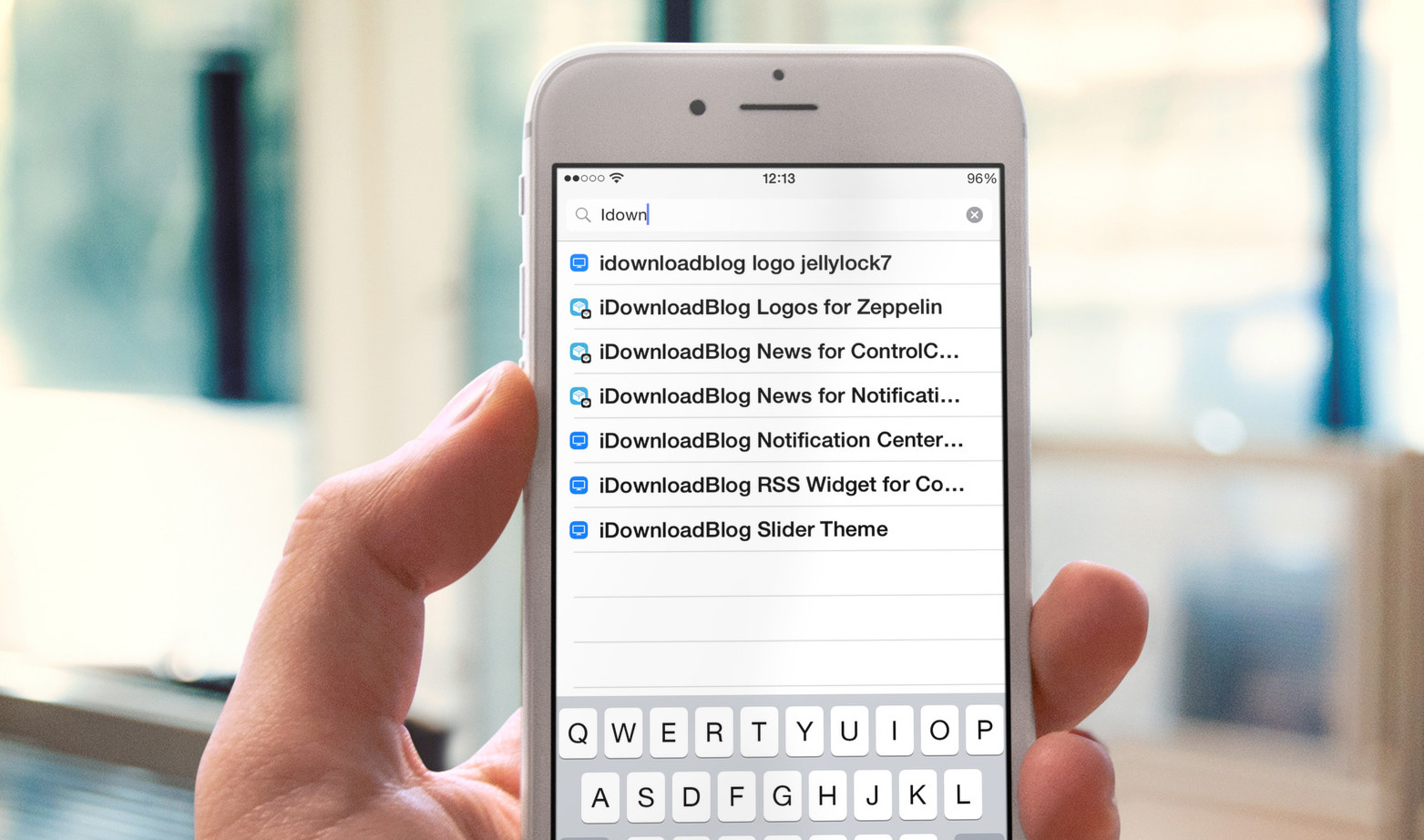
One of the biggest new features found in iOS 9 is the adoption of universal search. Universal search is a new feature that allows you to search for content within apps directly from Spotlight search.

On previous versions of iOS, searching was limited to the web and first party Apple apps pre-installed on iOS. For example, with older version of iOS you could search for contents within the Notes app, but couldn't do so for third-party note apps.

With iOS 9's new Spotlight search abilities, you can now search and discover content buried deep within the apps on your iPhone. It makes Spotlight feel truly useful and brand new.

iTunes 12.3 is out with support for iOS 9, El Capitan, two-factor Apple ID authentication and more

Following release of the free iOS 9 software update with new features and core OS enhancements for the iPhone, iPod touch and iPad, Apple on Wednesday also issued a matching update to iTunes for Mac and Windows PCs.

The new iTunes 12.3 introduces OS X El Capitan-friendly design while enabling support for Apple IDs protected with two-factor authentication and syncing with iPhone, iPod touch and iPad devices with iOS 9.