Jailbreak

iOS 4.3.2 Goes Live, Fixes iPad 2. Jailbreakers Beware!

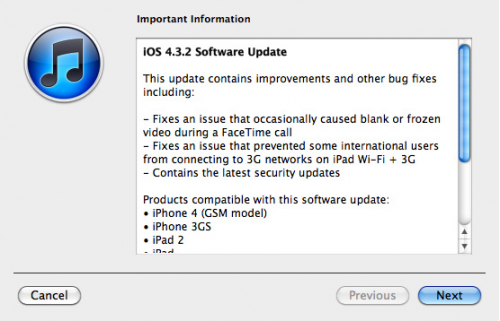
We reported a few days ago that iOS 4.3.2 would be released within the week. Well it looks like BGR's sources were right on the money. The latest version of the firmware went live today and was said to fix multiple issues.

It corrects a known FaceTime glitch for the iPhone, but more importantly appears to correct the 3G connectivity issue with Verizon iPad 2s. The problem had been plaguing Verizon iPad 2 adopters for nearly a month.

What's also interesting is that the update also lists that it contains the latest security updates. Jailbreakers should beware of updating to any new iOS software without official word from the Dev Team or Chronic Dev.

These guys need to test the current jailbreak with the new software to make sure everything still works. It's very possible that Apple patched the exploits that made the jailbreak work.

A re-tweet by Comex today said "So 4.3.2 was originally built the same day @i0nic's untether was released .... what can we conclude from this info?"

If you have an iPad 2, there is no jailbreak available, so you can update if you want. However I only recommend that you do so if you need the fix for 3G connectivity, otherwise you could endanger yourself of not being eligible for a future jailbreak.

If you have an iPad 1 and are jailbroken or are planning to be, stay away from this new firmware until we receive official word that it's compatible. Stay tuned and we'll keep you updated on the latest iPad jailbreak news.

Were you experiencing the Verizon iPad 2 glitch? Did 4.3.2 fix it?
More iPad 2 Jailbreak Updates

Some people believe that media outlets misinterpreted tweets from p0sixninja the other day, stating that he and the Chronic Dev team were almost done with an iPad 2 jailbreak. Even MuscleNerd sent a message out on Twitter, trying to stop the hype.

"Despite recent rumors, the only iPad 2 JB close to reality is Comex, patience please."

His message came in light of dozens of tech blogs (including us) reporting that the Chronic Dev team was getting close to finishing an iPad 2 jailbreak. The new Apple tablet has been out almost a month now and iDevice hackers have yet to produce a viable solution to jailbreak it.

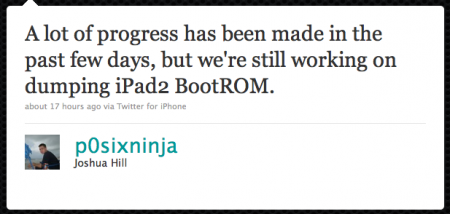
While we aren't sure of Comex's latest jailbreak status, it appears that MuscleNerd was wrong about the Chronic Dev team's progress. p0sixninja tweeted yesterday,

"A lot of progress has been made in the past few days, but we're still working on dumping iPad 2 BootROOM."

Although he mentions that there is no ETA, he does mention that his iPad 2 has already been jailbroken, and gives a shout out to Comex for all of the help.

A Twitter follower asked p0sixninja if he and Comex were working together, to which he replied

"That's up in the air right now. We'll see how things progress between me and @MuscleNerd in the next few days."

It doesn't matter who finishes first, I just hope we see a jailbreak solution for the iPad 2 before Apple releases iOS 4.3.2. For those unaware, Apple patched Comex's original iPad 2 exploit in iOS 4.3.1, delaying a jailbreak solution for the new tablet for a month (and counting). As always, we'll keep you updated on the latest iPad 2 news.

What do you think, are we getting close to an iPad 2 jailbreak?

iPad 2 Jailbreak Release Coming Soon!

If you have jailbroken your iDevice before, you should recognize the name Chronic Dev. Much like the notorious iPhone Dev Team, Chronic Dev plays a large part in the jailbreaking community.

Their software, GreenPois0n, made jailbreaking as easy as plugging in your device to a computer.

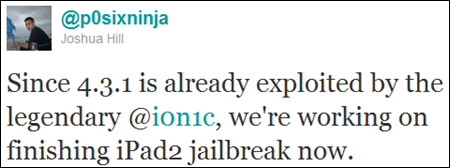
Although they've been relatively quiet lately, it appears they plan to come back in a big way. Chronic Dev team member Joshua Hill, aka @p0sixninja, mentioned on Twitter yesterday that his team was focused on finishing their iPad 2 jailbreak.

Since a jailbreaking solution has yet to become available for the iPad 2, this is pretty big news. The 4.3.1 exploit released last Sunday by the Dev Team does not work on Apple's latest tablet, and there has been no word from Comex on his current progress.

When will the iPad 2 jailbreak be finished? @p0sixninja tells a Twitter follower that they are in early stages, and jokes that progress depends on which way the winds blowing. Since he uses the word "finishing" in his early Tweet, I have to assume he was just kidding.

Tech site Redmond Pie believes the iPad 2 jailbreak will be packaged in with the new version of GreenPois0n, which is expected to be released soon and work on all iDevices.

Keep checking back and we will keep you updated on the latest iPad 2 jailbreak news.

Anyone dying to jailbreak their iPad 2?

Top 5 Reasons to Jailbreak Your iPad

Earlier this week, the jailbreak for Apple's latest iOS 4.3.1 was released. Anyone with an iPad on the latest firmware, couldn't even attempt hacking it until last Sunday night. It was then that the Dev Team finally released a much-awaited jailbreaking solution to the masses.

But why on earth would anyone want to hack their iPad? This is a question I get asked a lot by friends and family members. In all honesty, I could go on for hours on why I have my iDevices jailbroken. Everything from my iPhone to my Apple TV2 has received the jailbreaking treatment, and everything in between.

But in the interest of time and space, I figured I would just put together a top 5 list of reasons why you would want to jailbreak your iPad. Hopefully it benefits some of you that may still be on the fence about the whole idea.


1. It's super easy

Although hacking iOS software is extremely complex, programmers like the Dev Team develop software to make the process extremely simple. These programs make jailbreaking as easy as following a few on screen instructions. If for some reason you do mess up, you can generally just restore in iTunes and start the process over.

2. Cydia

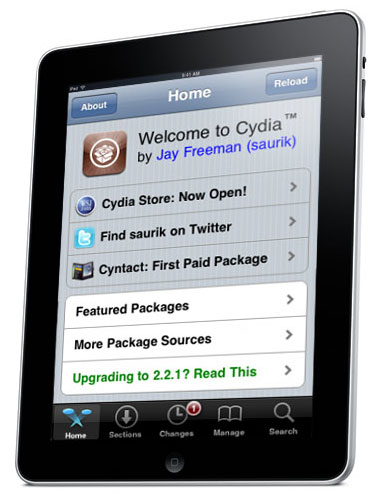
For those of you who aren't familiar with jailbreaking, Cydia is an app store very similar to Apple's App Store. It is generally the only icon that is initially added to your home screen once you have jailbroken. It contains everything from apps to iOS tweaks. Every other item on this list comes from Cydia.

3. Customizable Themes

Apple didn't build a lot of customization options into iOS. It's only been in the last year that they've allowed you change the wallpaper on your iDevice home screen. Customizable themes, allow you to give your iPad a complete makeover.

4. Tweaks

Tweaks can enable extra features, or build on old ones. Their overall purpose is to make using your iPad simpler. SBSettings is a popular tweak in the jailbreak scene. It enables a drop down menu, accessible from your iPad's top status bar, with shortcuts to Wi-Fi and bluetooth. You don't have to open Settings and go through menus to enable bluetooth, you can just tap the shortcut in SBSettings.

5. Cast Out Applications

Everything from productivity apps to full featured messangers are available in the Cydia store. Many of these were denied entry into Apple's App Store for violating one of their submission rules. Without Apple's strict limitations, developers are given the opportunity to be truly innovative.

Like I said the list could have gone on much longer than that, especially if it were broken down into specific tweaks and apps that I liked. If this interested you enough that you would like to give jailbreaking a shot, try our easy step by step guide here, or here if you have Windows.

What are the top 5 reasons you jailbreak your iPad?

Jailbreak Your iPad on 4.3.1 with PwnageTool [Tutorial]

The long-awaited jailbreak for Apple's iOS 4.3.1 is finally here. It is the first official jailbreak since Apple released iOS 4.3 almost a month ago. Those with iDevices wanting to take advantage of some of the new features in 4.3, haven't been able to upgrade without losing their jailbreaks.

That all changed in the wee hours of last night, when the Dev Team members finally released the anticipated software. The exploit is available in 2 different forms of software: PwnageTool, which is for Mac users only, and RedSn0w, which will work on either Windows or Mac.

This step by step tutorial will show you how to jailbreak your iPad on iOS 4.3.1, using PwnageTool. This software is for Mac users only. If you are on a PC, follow our RedSn0w tutorial here.

Important Note: Just remember this is not for the iPad 2, there is no jailbreak available for this device yet.

Before we get started, you want to make sure your iPad is on iOS 4.3.1. Backing up your iPad to iTunes is also recommended, better safe than sorry. But don't worry, the process is super simple and will have your iPad jailbroken in no time.

Step 1: For this tutorial, you'll need PwnageTool 4.3, which you can download here. Make sure you select the 4.3 version, as it is the only one that will work. I always download my tools to my desktop so they're easier to find.

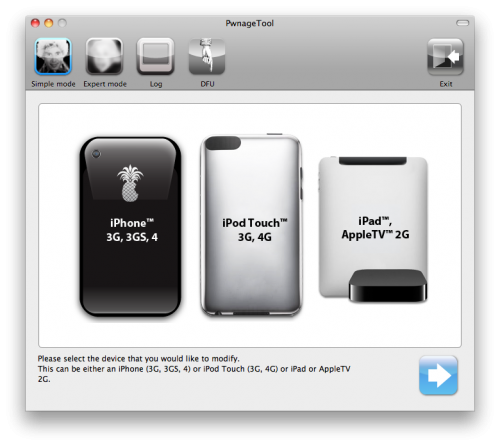
Step 2: Load up PwnageTool, select the iPad/Apple TV option and click the blue arrow. With this method, PwnageTool should actually locate your iPad firmware on your hard drive for you, so there is no need to download the .ipsw file.  Select the iPad firmware and click next.

Step 3: Sit tight as PwnageTool does its thing, it can take a while. It is taking the file you selected and jailbreaking it. Then we will load the jailbroken firmware onto your iPad.

Step 4: Once done, you will be prompted to connect your device via usb. PwnageTool will now help you put your device into DFU mode. If you don't get it the first time, don't fret. Just wait until it's finished giving DFU instructions, and click try again. If you did it correctly, it should look like this:

Step 5: Now you can close PwnageTool. Open iTunes with your iPad still connected, and you should receive this message:

Step 6: Don't just click restore because you will just install Apple's original firmware. While holding down your Mac's Option key, click restore. This should open up a window for you to browse for the file. Select the custom firmware from your Desktop that PwnageTool just created, and restore it.

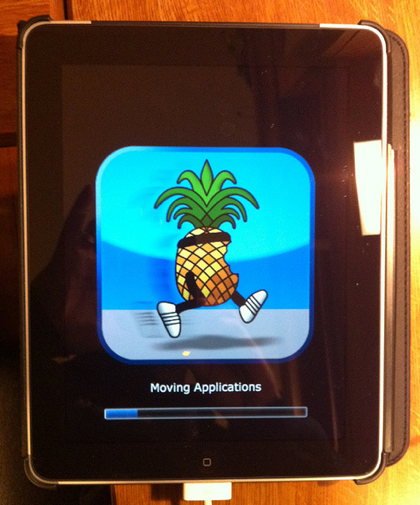
Step 7: It may take a while for iTunes to install the custom firmware on your iPad. But once completed, your iPad should restart itself and the Cydia icon should be on your home screen.

That is how you jailbreak your iPad on 4.3.1 with PwnageTool, any questions?

Jailbreak Your iPad on 4.3.1 with RedSn0w [Tutorial]

The long-awaited jailbreak for Apple's iOS 4.3.1 is finally here. It is the first official jailbreak since Apple released iOS 4.3 almost a month ago. Those with iDevices wanting to take advantage of some of the new features in 4.3, haven't been able to upgrade without losing their jailbreaks.

That all changed in the wee hours of last night, when the Dev Team members finally released the anticipated software. The exploit is available in 2 different forms of software: PwnageTool, which is for Mac users only, and RedSn0w, which will work on either Windows or Mac.

This step by step tutorial will show you how to jailbreak your iPad on iOS 4.3.1, using RedSn0w. If you are a Mac user and prefer to use Pwnage Tool, stay tuned. We will provide a tutorial for that software shortly. Either method is extremely easy, and will have your iPad jailbroken in no time.

Important Note: Just remember this is not for the iPad 2, there is no jailbreak available for this device yet.

Before we get started, you want to make sure your iPad is on iOS 4.3.1. Backing up your iPad to iTunes is also recommended, better safe than sorry.

Step 1: For this tutorial, you'll need RedSn0w which you can download here. Make sure you select version 0.9.6rc9, as it is the only one that will work. I always download my tools to my desktop so they're easier to find.

Step 2: For this method, you will need the actual 4.3.1 firmware file. If you don't know where to find it on your hard drive, just download it to your desktop from here. Make sure you download the iPad file, 4.3.1.

Step 3: Launch RedSn0w and click Browse. Find your 4.3.1 firmware from the previous step and select it.

Step 4: The software will then give you a few options before continuing. For most of us, all we need is the Cydia icon. Make sure there is a checkmark by Install Cydia and click Next.

Step 5: Plug in your device to your computer and turn it off. Now get ready to follow some onscreen instructions. RedSn0w will walk your through a few steps to put your iPad into DFU mode.

Step 6: If you're successful, RedSn0w will start its magic. Don't worry if it doesn't happen right away, just turn your iPad off, click back and try it again.

Step 7: Once the software is done loading the exploit, your iPad will restarted, and your home screen should load up with the Cydia icon installed. Success!

That is how you jailbreak your iPad on iOS 4.3.1 with RedSn0w. Any questions?

Dev Team Releases Jailbreak for iPads on iOS 4.3.1


After weeks of waiting, a jailbreak solution for Apple's latest firmware has finally been released. The announcement that so many iDevice hackers have been waiting for, arrived extremely early this morning courtesy the Dev Team.

The jailbreak released is for iOS 4.3.1. It covers the iPhone 4, iPhone 3GS, the latest 2 generations of the iPod touch, the Apple TV2, and of course the iPad. As we've reported previously, the iPad 2 cannot be jailbroken with this software.

But don't worry, if you have an iPad 2 and are itching to customize it, known iPad hacker Comex is hard at work to bring you an iPad 2 jailbreak solution. We are told he has a working exploit, but hasn't figured out how he wants to package it for mass distribution. We will certainly let you know when we have more information on his progress.

If you have an original iPad, and are wanting to jailbreak it, feel free to go ahead and upgrade to iOS 4.3.1 via iTunes.You will also want to make sure that your iTunes is updated to the latest version. If you've done both of those already, sit tight, we will bring you a complete step by step guide on how to jailbreak your iPad shortly.

Is anyone ready to jailbreak their iPad?

Original iPad 4.3.1 Jailbreak to be Released Today

Those of you who have been waiting on a jailbreak for iOS 4.3, pay attention!  There was some major news in the community early this morning and it looks like the jailbreak we reported on yesterday could be released sooner than expected.

MuscleNerd was at it again this morning, tweeting details of the impending jailbreak announcement. The popular iPhone hacker claims that the Dev Team is looking to release the jailbreak today for Apple's new software. If you recall, there hasn't been an official hack released since Apple launched iOS 4.3 alongside their iPad 2.

After weeks of silence, it looks like the Dev Team is ready to drop the much anticipated software. It will become available for Mac users via Pwnage Tool and PC users via RedSn0w. For those who haven't used either title, they are very similar to GreenPois0n which we cover here. These programs make jailbreaking your iDevice as easy as plugging it into your computer, and following the onscreen directions.

Although it is looking like the software won't go live until late tonight, i0n1c has been telling the Twitter world that if the topic #sundayisfunday becomes trending, the Dev Team might be enticed to release the jailbreak early.

As a reminder, the jailbreak released today is only for devices running iOS 4.3.1 and excludes the iPad 2. MuscleNerd was kind enough to give those that await the iPad 2 jailbreak some info as well. Although the exploit works, he mentions, it isn't suitable for mass distribution yet.

Original iPad owners looking to jailbreak Apple's latest firmware, stay tuned. We will let you know when the software is available, as well provide you with an easy step by step tutorial to help you through it. Those of you with iPad 2s, keep checking back for the latest in the iPad 2 jailbreak story.

Anyone looking to jailbreak their original iPad on 4.3.1?

The Dev Team's 4.3.1 Jailbreak Doesn't Work With iPad 2


If you just recently got an iPad 2 and are wondering if there is a jailbreak available, there isn't. The iOS 4.3.1 jailbreak that is so close to being released by the Dev Team, will not work on Apple's new tablet. Those who were looking forward to hacking their new gadgets will have to wait a little longer.

A series of tweets from known iDevice hacker MuscleNerd yesterday helped shine some light on the current status of the iOS 4.3 jailbreak. He hinted that the 4.3.1 jailbreak by the Dev Team, popular iDevice hackers, will be released sometime in the near future.

It will likely be distributed via RedSn0w and Pwnage Tool, and should work fine for iOS 4.3.1 on the original iPad. Although MuscleNerd claimed the RedSn0w-bound exploit would't work on Apple's latest tablet, he did mention that Comex has found another solution that does.

For those who weren't aware, Comex had a jailbreak for 4.3 almost ready to go, and then Apple dropped iOS 4.3.1 last week. This update magically patched the hole that Comex was using for his hack, forcing him back to the drawing board.

Comex's new exploit is based on the same one he used for Jailbreak Me, so hopefully iPad 2 owners get the benefit of a Userland jailbreak. This method is the easiest by far from a user's perspective, as it just requires them to navigate to a website in Safari. Other jailbreak techniques require additional software and multistep processes.

The bottom line is that an official jailbreak for the iPad 2 is imminent, we just aren't sure of when that will be. As always we will keep you updated on the latest iPad and iPad 2 jailbreak news.

Does anyone have an iPad 2 and are dying to jailbreak it?

iPad 2 Jailbreak Exploit is Most likely Not Patched by Apple

When we told you about Comex's jailbreak, we warned you about ASLR (Address Space Layout Randomization). It was one of the new security measures Apple implemented into iOS to thwart off jailbreakers, and was expected to delay a jailbreak release for quite some time.

Well Comex later commented that while he had an exploit that worked, he knew 4.3.1 would release very soon, and did not want to risk Apple patching his exploit with the new firmware. Thus he would wait until that release, which happened earlier today, to release a jailbreak solution.

Those worried that Apple somehow disabled the jailbreak in the update need not worry. Popular jailbreak spokesman MuscleNerd, confirmed via twitter today that it didn't look like Apple fixed the glitch that Comex used in his hacking of the iPad 2.

Of course he also warns to hold off on updating to 4.3.1 until things are confirmed and stable. It has also been confirmed that Comex's exploit is a 'userland' jailbreak, which means it can be done straight off the iDevice. Those who remember the 'Spirit' jailbreak series remember jailbreaking was as easy as typing jailbreakme.com into Safari.

Things are looking good for an official jailbreak release for the iPad 2 and other iDevices with iOS 4.3.1. Stay tuned to ziPadblog for the latest in jailbreak info.

Does anyone have an iPad 2 and is excited to jailbreak? Tell us in the comments below.

iPad 2 Jailbroken By Comex

Apple's latest version of its popular tablet is a hit. Analysts are predicting Apple sold close to a million iPad 2s over launch weekend. But if you are an early adopter and want to jailbreak, you're pretty much out of luck.

Apple's latest iOS 4.3, which the iPad 2 shipped with, has upped the anti for hackers with new security measures. The most notable being ASLR (Address Space Layout Randomization), which has slowed down jailbreakers in a 4.3 solution.

But thank goodness we have the devoted Dev-Team members and their pals. These guys always seem to do the impossible, and this time might have done it again. Long time iOS hacker, Comex, has jailbroken his iPad 2 within just a few days of its arrival.

Anyone in the jailbreak community should recognize the name, as he is the hacker behind previous jailbreak tools such as JailbreakMe and Spirit. There's no word on when his exploit will be ready in a user-friendly package but it shouldn't be too far off. We'll keep you updated.

Did anyone purchase an iPad 2 early and are anxious to jailbreak it? Let us know

Jailbreak Your iPad with GreenPois0n [Guide]

This guide will show you how to jailbreak your iPad iOS 3.2.2 using GreenPois0n, the latest jailbreak tool by the Chronic Dev Team. If you have already jailbroken your iPad with LimeRa1n and it is working fine for you, then there is no need to jailbreak again using GreenPois0n.

At the time I am writing this, GreenPois0n is for Windows only, although a Mac version should be available soon.

Step 1: Download GreenPois0n and run it as an administrator.

Step 2: Power off your iPad, and connect it to your PC.

Step 3: Walk through the steps to put your iPad into DFU mode to prepare for jailbreak.

Step 4: Once you’re in DFU mode, click the ‘Jailbreak!’ button to jailbreak your iPad.

Step 5: Now, just wait until the status bar shows complete, and your iPad will reboot to the home screen.

Step 7: You should now have a new “Loader” icon on your springboard. Launch Loader. Select Cydia > Install Cydia.

Step 8: One Cydia has successfully been installed, you will be asked if you want to remove Loader. Hit “Remove” and your iPad  will automatically reboot.

Your iPad 3.2.2 should now be successfully jailbroken using GreenPois0n. If you have any question or comment, make sure to add them in the comments section below.