
Guest Author

CoBrowser Allows You to Share a Webpage From Your iPhone to Another iDevice

Ever wanted to share a webpage from your iPhone to another iDevice or to a friend's iPad who is sitting in the same room? Now you can with CoBrowser by Collect3.

CoBrowser allows your iPhone to download an entire webpage images and all to your iPhone and then share it via Bluetooth to any other iDevice such as an iPod Touch or iPad. The nice thing is the other devices don't even need to have an internet connection because they pull it from your iPhone directly.

App Review: Slice it!

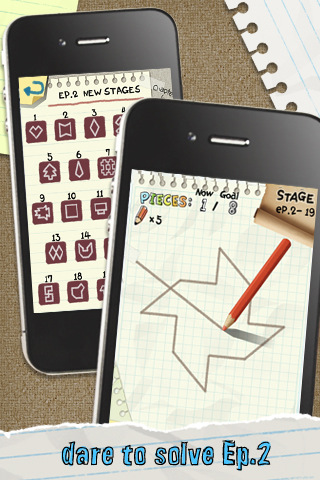
Slice it! , created by Com2uS, is a game that initially stirred up my attention by the iTunes App Store ratings. The current version has 106 ratings at 5 stars with 9045 ratings at 4.5 stars. Those are some pretty impressive stats aren't they?

I can't remember the last time I saw an app with ratings this high and would love some recommendations of other games with these kinds of ratings!

Anyways, Slice it! is a puzzle game that puts your Geometry skills to the test. I must admit, in High school I hated Geometry and barely did enough to get by, but don't worry! You won't be doing any Pi x Radius calculations but you will find yourself planning ahead and visualizing your strategy to achieve the most amount of stars possible...

Enable Photo Privacy with SwapCamRoll for iOS 4

Never mind the reasons why you want to hide some pictures, we're just telling you this jailbreak app makes it easier to do. SwapCamRoll is an app for iOS 4 that essentially gives you two camera rolls on your iPhone. Only one is active at a time while the inactive one hides on the "flip side", completely inaccessible on the phone until you activate SwapCamRoll. (You can navigate to either folder through SSH though).

So if you have some er, private pictures that you don't want others to see when they're scrolling through your photos, then you can create an entirely new camera roll that can be swapped out for the default. For some, it just might be the app you never knew you needed!

So how does it work? The app is pretty bare bones, but does have some options that may be confusing to new users. Read on for the breakdown:

Upgrade Your Air Hockey App Experience with Table Connect for iPhone

If you have ever tried to play a two-player multi-touch game on your iPhone, then you know how tricky it can be. While it's still fun, and debateably a better experience than the dollar-eating barroom games, you will soon have the opportunity to completely upgrade your multiplayer iPhone game experience.

Enter the coolest iPhone peripheral to date: Table.Connect for iPhone. While still in development, this brilliant idea proposes a beautifully designed table that connects directly to the iPhone via the dock connector. The mockups boast a 58" capacitive multitouch surface, sculpture and design to match the appearance of an iPhone, a power button, a Home button, and a built-in AC power supply...

Apple Looking into Nitride Coating for Scratch Proof iPhones and Other Devices

According to Appleinsider, this week the U.S. Patent Office published information on an application submitted by Apple entitled "Nitriding Stainless Steel for Consumer Electronic Products." It's a cost effective process for placing a nitride coating on top of stainless steel to create more scratch resistant products for consumers.

According to Apple's application, "In addition to providing a durable, hard surface that is both scratch and impact resistant, the nitride layer allows for the natural surface color and texture of the underlying stainless steel to remain visible to the user". The application reads: "It is this natural surface color and texture of the stainless steel that adds to the aesthetically pleasing appearance of the consumer electronic product, thereby enhancing the user's overall experience."

Is Square the Future of Mobile Payments?

Last week it was reported that Square, a mobile credit card reader, had opened its doors and was available for download in the app store. Square is the brainchild of Jack Dorsey, who is also co-founder of Twitter.

The app, when used in conjunction with a small card reader that plugs into the auxiliary port, allows anyone to process credit card payments. This takes "mobile payments" to a whole new level as now small businesses and vendors can process payments without the need for a wired or complex point-of-sale system.

All you need is a compatible device (iPhone, iPad, iPod touch, or one of select Android devices), the card reader, and a signal on your device.

So what does this mean for retailers and small businesses? Is it secure to use? And what about the cost? Will this be the new method businesses large and small use? Read more to find out...

Scrobble iPhone Tracks to Last.fm in Real Time

To scrobble is the act of sending information of a currently playing track, or song, to Last.fm. Last.fm is a free service that recommends and suggests music by discovering new music based on the music you play. In short, it's a social network that focuses on music and artists only.

Like other social networks, you find and add friends in order to share your musical tastes with other people and to discover the musical tastes of friends...

Can’t Run APT-GET from SSH/MobileTerminal? Try this

After jailbreaking for 4.1, many of you will notice you can no longer run apt-get commands from the command line, whether SSH or MobileTerminal. This is mind boggling, and none of the support sites or forums seem to have the right answer. The most common suggested solution is to delete some sources from Cydia and re-add them. This doesn't work.

After a few hours of troubleshooting, I gave up and assumed it was a limitation of greenpois0n. However, today I accidentally found the answer, and it's quite simple to make this work again.

Can’t Quit Apps with the Home Button? This Might Be Why.

Everything was pretty smooth for a while on my 4.1 jailbroken device, but then it happened. I tapped the Home button to quit an app and nothing happened. I double tapped it, and the switcher popped up. Another double tap and it retreated. Another single tap, but my open app stayed open.

If this happened to you, most likely the problem is with the latest version of Notified Pro.  I did some research, and uninstalled Notified Pro via Cydia. After a reboot, the problem was gone. Just in case, I re-installed it. Within half an hour, the problem was back, and I couldn't quit apps without using the SBSettings Close Button.

I removed Notified Pro again, and problem solved. If you can't live without Notified Pro, check this out. Hope this helps some of you out there.  Anyone else experience the same issue?

GV Extension Adds Native Google Voice SMS Functionality to the iPhone

Now that Google Voice is back on the iPhone (natively), many of us are using the app to send SMS messages. Still, since there is no real way to set an app as a default SMS handler, we found ourselves using both the SMS app and whichever GV app we found most useful.

No more! There's a new tweak in Cydia that merges the two. SMS GV Extension sets your Google Voice account as the default handler of text messages. Now when you send or receive text messages, it will be exclusively handled through the Google Voice API, and not your text messaging plan through your carrier.

For some of you, this is awesome.  But there is a huge limitation with this solution...

How Good the Mac App Store Could Be

Now that Apple has announced a desktop version of the App Store, there is much speculation on what we are actually getting. There are already quite a few OS X software marketplaces out there, though none are as polished as the iPhone's App Store.

If Apple is smart, they will likely add the Mac App Store as a way to run universal apps and release an iOS runtime platform for the desktop. Just think about it for a minute.

There isn't much unification between doing tasks on an iPhone and a Mac simultaneously, save for the apps that sync with their desktop counterparts. Here are some predictions I have about benefits of supporting universal apps on Macs.

App Review: Eat It!

Created by Dragon Team Interactive, Eat it! is an insanely simple game which features cute characters and equally matching charming music.

The concept is pretty straightforward and easy to pick up. You must feed lions or monkeys, the appropriate food they need. The lions will be eating meat and the monkeys will be eating fruit. That’s basically the game in a nutshell...