Anthony Bouchard

Anthony Bouchard joined the iDownloadBlog.com team in 2016 after originally covering Apple and iPhone jailbreak news at ModMyi.com. As an experienced editor, he brings more than 15 years’ worth of jailbreaking knowledge to our in-depth guides, opinion pieces, and news articles. His passion for device customization and user choice sparks his strong push to empower readers with the tools they need to explore and enjoy the freedom that comes with jailbreaking. Anthony blogs about not only jailbreaking, but also Apple software & accessories, drones & photography, and Nintendo gaming systems. Anthony honed his advanced technical knowledge over the years with hands-on projects ranging from gaming PC builds to engine repair mechanics. His never-ending hunger for knowledge is why you’ll always find him tinkering – tearing things apart and putting them back together to understand what makes them tick.

TwitterThemeToggler makes it much easier to toggle Night Mode in the Twitter app

Image showing a blue Twitter bird with a black shadow set against an all-white background

One of the saving graces of using Twitter at night is the built-in night mode theme that lets you cut down on all the white space by switching to it a darker background with light text.

Once you enable this dark mode, your eyes can finally take the load off and stop straining, but Twitter doesn’t exactly make toggling this feature on and off a cinch. That’s where a new free jailbreak tweak called TwitterThemeToggler comes into play.

Pokémon GO launches on Apple Watch with Activity and Workout integration

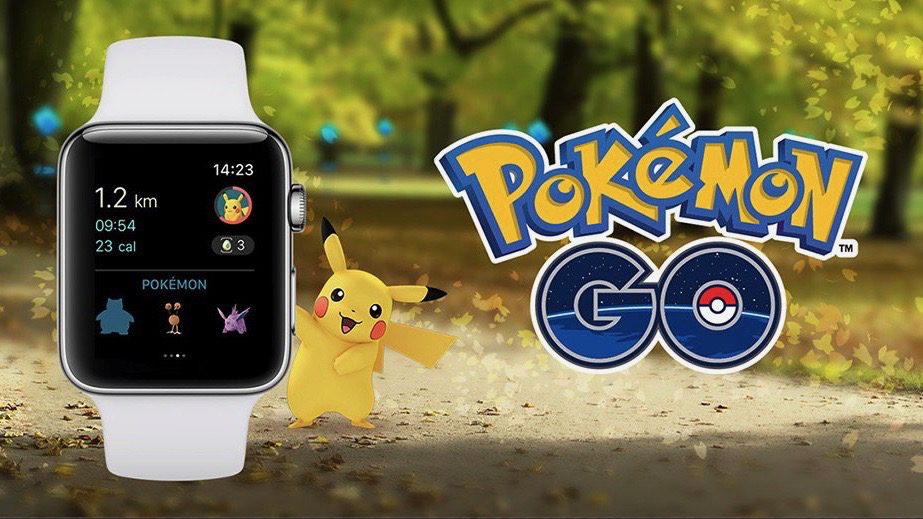
To all of those who have been waiting to play Pokémon GO on the Apple Watch since the game developers teased it at Apple’s September keynote event, you can finally stop holding your breath because it’s now available.

Pokémon GO for the Apple Watch comes in an update (version 1.21.2) to the existing iPhone app from the App Store, so after installing it, you’ll be able to add it to your Apple Watch just like you would with any watch app you’re already using.

How to log out of all active Facebook sessions from your iPhone

If you have a Facebook account, then chances are you access it on more than one device. You might forget from time to time to sign out of sessions on other machines you don't intend to use again, such as those in schools or at the workplace, potentially handing over access to your Facebook account to the next person(s) who uses the machine.

Facebook fortunately comes with a feature that lets you sign out of all active sessions on your account with just a few taps. We'll show you how you can do this in this tutorial.

SnapchatNoClickbait removes the clickbaity links from the Stories tab in Snapchat

Snapchat is one of the world’s most popular ways to send photos and short video clips to friends, but it also comes with additional clutter inside the app that many users feel they could really do without. Among said clutter are the clickbait-like links in the Stories Tab.

A new free jailbreak tweak called SnapchatNoClickbait will help clean up the Snapchat app of all that junk for anyone who’s tired of looking at uninteresting links and information.

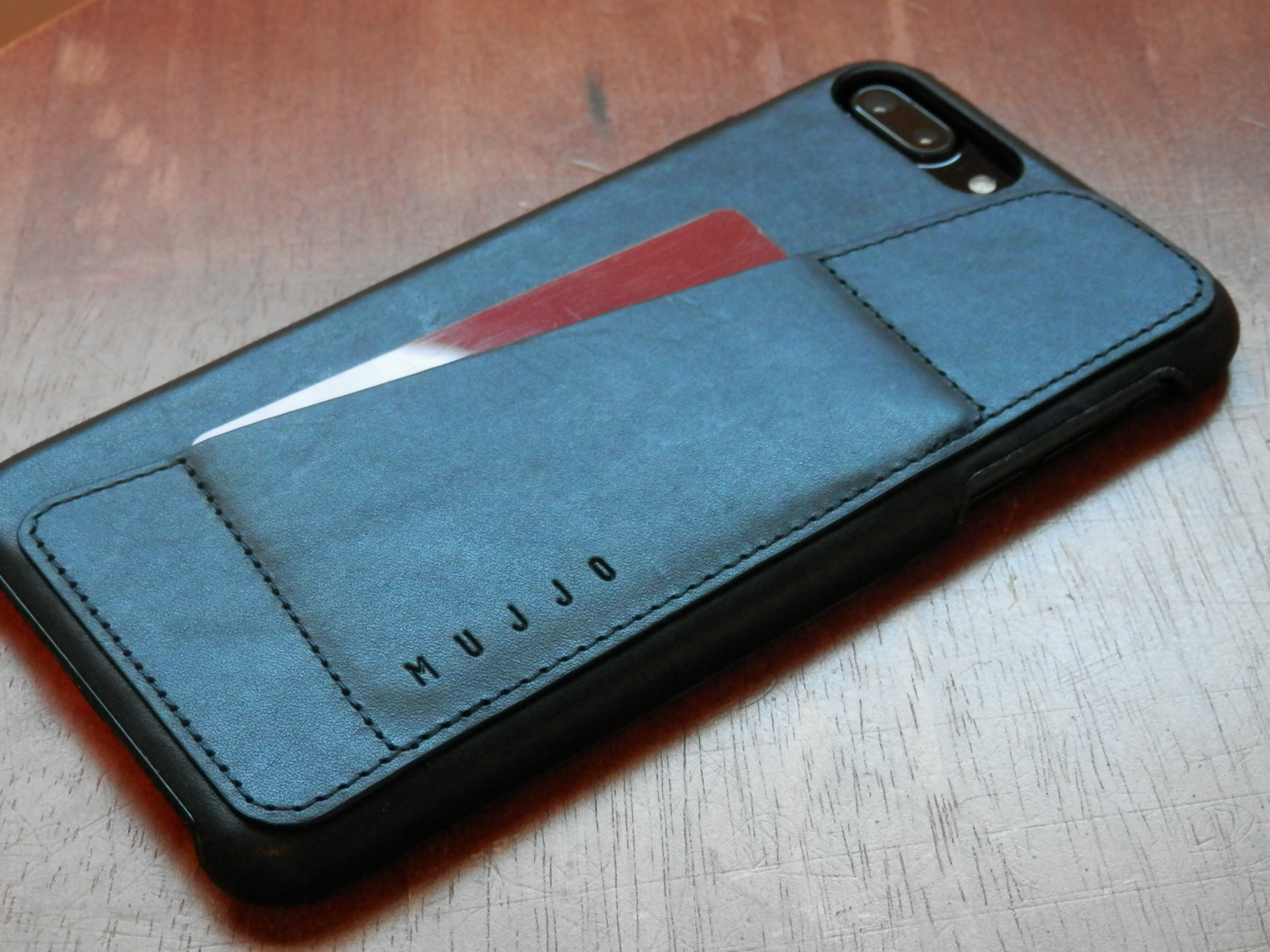
Mujjo is a high quality leather wallet case for iPhone at a great price

The phenomenon of wallet case popularity among iPhone owners hasn’t gone unnoticed by luxury case makers, and the Mujjo case is just one of those sexy options that leather lovers will have a hard time resisting.

Crafted out of vegetable-tanned leather and internally lined with a layer of suede to keep your iPhone cradled with the softest touch possible, the Mujjo is a luxurious travel case made for anyone who doesn’t want to lug their wallet around with them just to carry an ID and credit card on them at all times.

Error messages popping up from failed automatic iOS updates? Here’s the fix

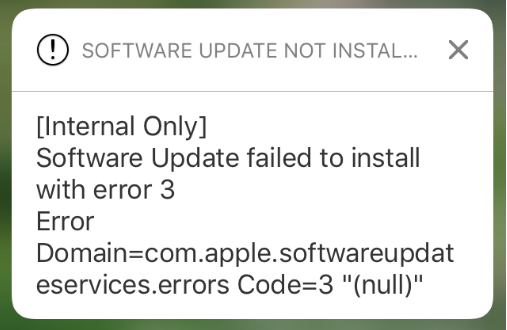
Your iPhone and/or iPad can perform over the air (OTA) software updates automatically during the night while you're sleeping, so long as it’s connected to a power source and you've given it permission first. While this feature is incredibly convenient for anyone who doesn’t have the time to wait for software updates during the day, it can sometimes be problematic.

There are all kinds of error messages that might pop up, but one of the more common messages you may come across, especially on iOS 10 devices, will look a lot like the one you see above. In this piece, we’ll talk about troubleshooting steps you can take to fix various types of similar error messages once and for all and get your device up to date.

Apple stops signing iOS 10.1.1

Apple has stopped signing iOS 10.1 and 10.1.1 on Tuesday in a move that's sure to choke the jailbreak community a little bit further. It's typical of Apple to follow this kind of behavior after a new firmware release, so it's not surprising this would happen as iOS 10.2 was released just over a week ago.

With the firmware no longer being signed, downgrades to iOS 10.1.1 are currently no longer possible, so if you've upgraded to iOS 10.2 recently or need to do a fresh restore of iOS 10.1.1 in iTunes, then you're out of luck.

How to delete your Super Mario Run game data without deleting the app

The popular new Super Mario Run game by Nintendo doesn’t have a whole lot of levels to play, but if you ever get to the point where you want to just delete all your in-game progress and start all over again, then you’ll be happy to know there’s a way to do that.

In this tutorial, we’ll show you how you can delete all your Super Mario Run game progress data without having to delete the game from your device and re-download it later on.

How to use the on-demand VPN feature on your iPhone or iPad

Depending on the VPN you’re using, your iPhone or iPad might be able to take advantage of a feature called VPN on demand (VPoD).

Essentially what this does is it connects you to your VPN automatically when it’s needed so you don’t have to toggle it on manually before accessing the internet from your device. As a result, you can have peace of mind because your information is protected once you begin using the internet.

Tips for saving cellular data while playing Super Mario Run

Super Mario Run is one of the biggest hit games to launch on the App Store this year, and although it’s getting a lot of attention from both Nintendo and Super Mario fans, it also comes with a big caveat: it requires an active internet connection.

For anyone who plays the game at home on Wi-Fi, this isn’t a big deal. Unfortunately, if you’re relying on a cellular data network to play, then you might end up using more data than you’ve bargained for.