Month: June 2011

iOS 5 1080p Export Confirms Camera Upgrade in Next-Gen iPhone

Earlier we reported that iOS 5 will give users the ability to playback video in full 1080p HD. The new feature is a welcome addition in iOS, which previously only allowed 720p media playback.

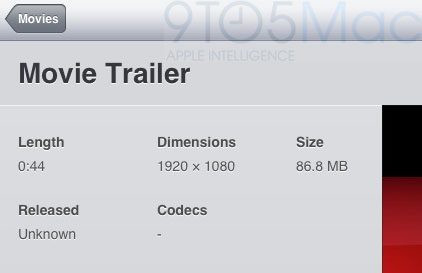
It now appears that iOS 5 will not only let you playback video in full HD, but also export it. 9to5Mac is reporting that a tipster sent them in code from the SDK showing a new 1080p video export option...

New in iOS 5: Print Maps Directly from Your iPhone

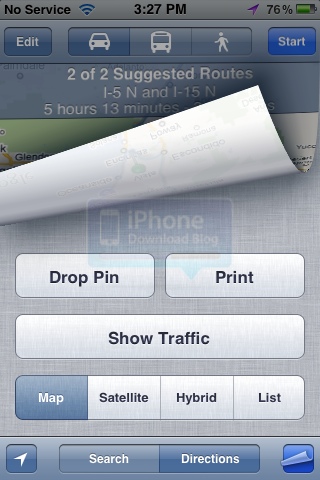
A new feature in iOS 5 allows you to print maps direction directly from your iPhone, assuming your have a Wi-Fi-friendly printer of course. I didn't pay much attention to this feature until I actually tried it.

In order to print directions, tap the little icon at the bottom right of the Maps app. You will then be given several options, the "Print" one included...

Gevey SIM Will Unlock iPhone 4 on iOS 5

Following the news that RedSn0w will jailbreak iOS 5, an unlock solution for the iPhone 4 on iOS 5 has also been uncovered. The Gevey SIM is a TurboSIM-like piggy back SIM card that will unlock iPhone 4 basebands.

On iOS 5, it appears that the Gevey SIM will still unlock the iPhone 4. Be warned: the Gevey SIM is technically illegal, so we do not recommend this method for unlocking the iPhone 4 on iOS 5.

New in iOS 5: Support for Social Media Services in Contacts

Here is a feature that had slipped under my radar but I just found out out about it on AllThingsD, even though I still had to dig around to figure out how to get it to work since the article didn't mention how to get there.

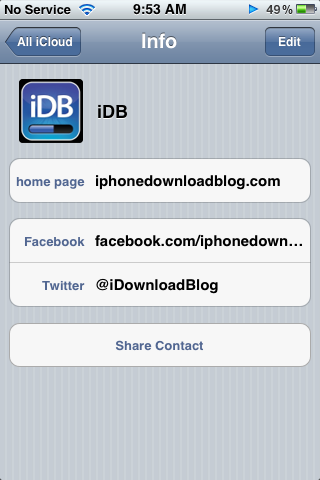
We already know from the WWDC keynote that iOS 5 is bringing deep Twitter integration. One of the many new features in iOS 5 is that you can add a Twitter handle to any contact. What Apple didn't mention is that you can also add Facebook, Flickr, LinkedIn, and Myspace info to any contact...

Wi-Fi Sync App Once Rejected by Apple is Now Part of iOS 5

When Apple announced its iOS software update at its WWDC keynote on Monday, one much-vaunted feature caught the eye of a university student in Birmingham, England. Greg Hughes apparently looked on in surprise as Apple announced iOS 5's PC-Free credentials including Wi-Fi iTunes syncing. Surprise came from the fact that Hughes had submitted an app to Apple's App Store that did the exact same thing, an app that was rejected by the Cupertino outfit.

Named 'Wi-Fi Sync', the app was originally rejected by Apple way back in May 2010 according to The Register, with Hughes even receiving a personal call from an Apple representative to commend him on his efforts.

Little did he know that Apple would later use the same name and even logo in iOS 5...

MathAlarm Jailbreak Tweak Makes Sure You’re Actually Awake in the Morning

We've all been there: You've had a late night, but you still have to get up early in the morning. You set your iPhone's alarm for the usual time to get up and go to work, and you're greeted by your alarm in the early hours of the morning. You've got the option to snooze the alarm or turn it off. Which option do you choose?

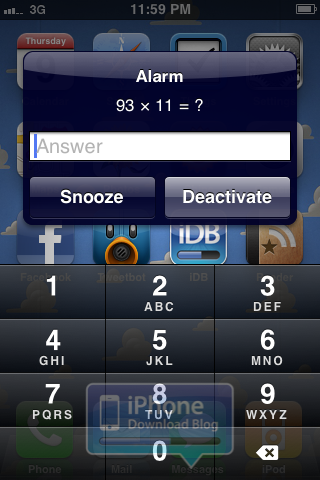
MathAlarm is a new jailbreak tweak, by Ryan Petrich, that makes sure you're actually awake in the morning. You have to solve a simple math equation before you can hit the Snooze or Deactivate button.

1080p Video Playback Finally Coming in iOS 5

An interesting tidbit has been uncovered in the iOS 5 beta relating to HD video playback. It appears that iDevices will finally be able to playback HD video at a full, 1080p resolution.

Specifically, the iPad 2 has been confirmed to have the ability to playback full, 1080p video in the Videos app. In the past, iTunes wouldn't even allow the syncing of 1080p video to an iDevice.

SliderBar Jailbreak Tweak Makes Scrolling on the iPhone Faster

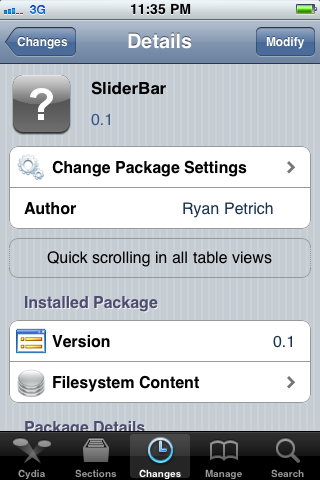
As part of the TweakWeek initiative, SliderBar is a free jailbreak tweak developed by Ryan Petrich. SliderBar makes vertical scrolling in iOS a breeze. Instead of scrolling by swiping up and down with your finger, SliderBar allows you to scroll through a vertical page in a more traditional way.

The tweak is very simple, and you may actually miss it in iOS if you don't know what it look for.

iOS 5 Beta 1 Tethered Jailbreak Now Available

RedSn0w, the popular jailbreak tool by the Dev Team, has been updated with support for a tethered jailbreak on the iOS 5 developer beta. It's been less than a week since Apple got iOS 5 Beta 1 into the hands of developers at WWDC and across the world, and a tethered jailbreak is already available.

The news was announced by Dev Team frontman, MuscleNerd, and version 0.9.8.b1 of RedSn0w is now available to download for those with access to the iOS 5 beta. To get the iOS 5 beta legally, you must have a registered developer account with Apple.

Apple Owes the Jailbreak Community an Apology

The relationship between Apple and the jailbreak community has always been an interesting one. Ever since the first, public iPhone jailbreak was displayed in 2007, Apple and jailbreakers have been fighting in a secret, underground war. Fast forward to 2011, and you can do a lot more with a jailbroken iPhone than just add custom ringtones.

On Monday, Apple unveiled iOS 5. Version 5 was called Apple's most "revolutionary" iOS release to date. Oddly enough, many features that have been in the jailbreak community for years are now present in iOS 5. In fact, Apple has borrowed (some would say stolen) ideas from jailbreak developers for years, and iOS 5 is the most current, blatant example.

Apple, you owe the jailbreak community an apology.

iPhone Now Available on 200 Carriers

The iPhone just won't quit. After five years of being on the market, Apple's smartphone is now available on 200 carriers worldwide. Sales are estimated to stay strong, and Apple should be on track to unveil a new iPhone this fall.

Since March of this year, Apple has gone from 186 carriers to 200 worldwide. The iPhone is available on the two largest carriers in the United States, AT&T and Verizon, as well. Apple is making aggressive moves to get the iPhone on as many carriers as possible across the globe.

New in iOS 5: Delete Songs from the Library

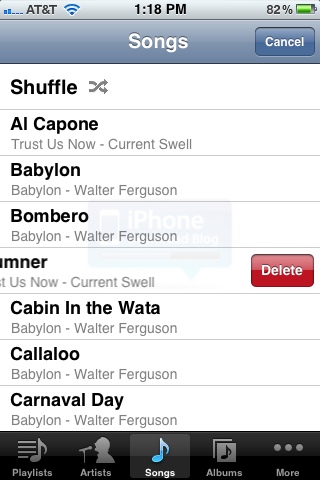
You'd think that by iOS 4.3.3, Apple would have figured out that deleting songs in your music library directly from the device was a much needed feature. Apparently it took Cupertino one more firmware version to reach that conlusion.

When in the Music app (previously know as the iPod app), simply swipe your finger across a song to have the option to delete. Hitting "Delete" will remove the song from the device. If your music is on iCloud, it will obviously still be in your download history for you to download again at any time for free...